
RAG From Scratch: Build a Document-Aware AI Assistant
No framework, no vector database, just chunking, embeddings, and cosine similarity written by hand, so you actually know what's happening when it breaks.
Every RAG tutorial that starts with pip install langchain and ends five lines later teaches you how to call a framework, not how retrieval-augmented generation actually works. When that five-line version returns a wrong or ungrounded answer in production, and it will, you're debugging a black box instead of a pipeline you understand. This builds the whole thing by hand instead: chunking, embeddings, a vector store implemented with nothing but NumPy, retrieval, and grounded generation, so every failure mode has a specific line of code you can point to.
The one sentence to remember
RAG isn't a single component, it's a pipeline, and almost everything that makes one reliable or unreliable in practice lives in the parts frameworks hide from you: how documents get chunked, what similarity threshold decides "relevant" versus "not relevant," and what the system does when nothing relevant was actually found.
By the end, you'll have a working assistant that answers questions against your own documents with citations back to the exact source, and you'll understand precisely why each stage exists.
The Two Pipelines We're Building
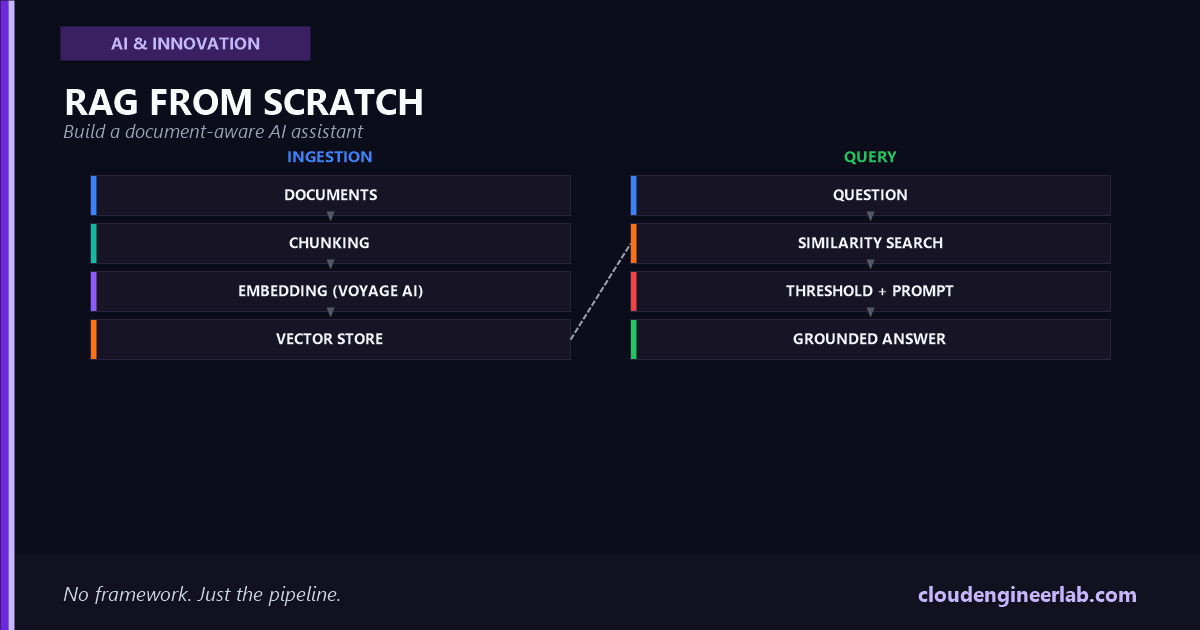
These are genuinely separate pipelines with separate failure modes. Ingestion runs once per document and can afford to be slow and thorough. Query runs on every question and has to be fast, which is exactly why the vector store exists, to make the query pipeline's search step fast without re-embedding every document on every question.
Step 1: Chunking
A whole document rarely fits, or belongs, in a single retrieval unit. Chunking splits it into pieces small enough to retrieve precisely and large enough to still make sense on their own:
def chunk_text(text: str, chunk_size: int = 500, overlap: int = 50) -> list[str]:
    """Split text into overlapping word-based chunks."""
    words = text.split()
    chunks = []
    start = 0
    while start < len(words):
        end = start + chunk_size
        chunks.append(" ".join(words[start:end]))
        start += chunk_size - overlap
    return chunks
Chunk size is a real trade-off, not a default to copy blindly
Chunks too large drag irrelevant surrounding text into every retrieval, diluting the similarity signal and wasting context window on padding. Chunks too small lose the surrounding sentence that gives a fact its meaning, a chunk containing just "45 minutes" is useless without the sentence establishing what took 45 minutes. The overlap parameter exists specifically to stop a sentence from being cut exactly in half at a chunk boundary, losing whichever half landed on the wrong side.
Step 2: Embedding
Anthropic doesn't ship its own embedding model, and for RAG specifically, that's an intentional separation, embedding and generation are different problems with different optimal tools. Anthropic's recommended pairing is Voyage AI, and voyage-3-large is currently their strongest general-purpose option, though it's worth checking Voyage's current model list before building on this, embedding models get replaced faster than this paragraph will stay accurate.
import voyageai

vo = voyageai.Client()  # reads VOYAGE_API_KEY from the environment

def embed_documents(chunks: list[str]) -> list[list[float]]:
    """Embed a batch of chunks for storage."""
    result = vo.embed(chunks, model="voyage-3-large", input_type="document")
    return result.embeddings

def embed_query(query: str) -> list[float]:
    """Embed a single query for retrieval."""
    result = vo.embed([query], model="voyage-3-large", input_type="query")
    return result.embeddings[0]
input_type is not a formality
Voyage's models apply a different internal transformation depending on whether text is being embedded as something to be searched (document) or something doing the searching (query), tuned specifically for retrieval rather than generic similarity. Embedding a query with input_type="document" still produces a vector, it just won't retrieve as well, which is a subtle enough bug that it's worth checking explicitly if retrieval quality looks worse than it should.
Step 3: The Vector Store, Built From Scratch
This is the part every framework hides, and it's worth seeing once with nothing hidden. A vector store's actual job, at small to medium scale, is nothing more exotic than holding a list of vectors and finding which ones are closest to a query vector:
import numpy as np

class SimpleVectorStore:
    def __init__(self):
        self.chunks: list[str] = []
        self.sources: list[str] = []
        self.vectors: np.ndarray | None = None

    def add(self, chunks: list[str], vectors: list[list[float]], source: str):
        self.chunks.extend(chunks)
        self.sources.extend([source] * len(chunks))
        new_vectors = np.array(vectors)
        self.vectors = new_vectors if self.vectors is None else np.vstack([self.vectors, new_vectors])

    def search(self, query_vector: list[float], top_k: int = 4) -> list[dict]:
        query = np.array(query_vector)
        # Cosine similarity against every stored vector, done directly.
        similarities = self.vectors @ query / (
            np.linalg.norm(self.vectors, axis=1) * np.linalg.norm(query)
        )
        top_indices = np.argsort(similarities)[::-1][:top_k]
        return [
            {"chunk": self.chunks[i], "source": self.sources[i], "score": float(similarities[i])}
            for i in top_indices
        ]
self.vectors @ query is a matrix-vector product, every stored vector's dot product with the query vector, computed in one call. Dividing by the norms turns that dot product into cosine similarity, a value from -1 to 1 measuring how closely two vectors point in the same direction, which is the entire mathematical basis "semantic search" rests on. There's no magic past this. A production vector database like pgvector, Pinecone, or Chroma does the same computation, just indexed for approximate search across millions of vectors instead of a linear scan across a few thousand.
Step 4: Retrieval, With an Honest Threshold
Top-k search always returns something, even when nothing in the store is actually relevant to the question. That's the gap where hallucination creeps in if it isn't closed explicitly:
def retrieve(store: SimpleVectorStore, query: str, top_k: int = 4, min_score: float = 0.3) -> list[dict]:
    query_vector = embed_query(query)
    results = store.search(query_vector, top_k=top_k)
    return [r for r in results if r["score"] >= min_score]
A missing threshold is a silent hallucination generator
Without min_score, a question about vacation policy asked against a store of network diagrams still returns the four nearest chunks, however weak the actual match, and hands them to the model as if they were relevant context. A capable model will often still produce a fluent-sounding answer from that weak context rather than recognizing it doesn't actually address the question, because nothing in the prompt told it that low similarity means "probably not relevant." The threshold is what turns "closest available chunks" into "chunks actually worth answering from."
The right value for min_score isn't universal, it depends on the embedding model and the domain, and it's worth tuning against a small labeled set of real questions rather than guessing, the same discipline covered generally in LLM Evaluation.
Step 5: Prompt Assembly and Grounded Generation
The retrieved chunks get assembled into a prompt that does two specific jobs: gives the model the actual source material, and constrains it to answer only from that material.
import anthropic

client = anthropic.Anthropic()

def build_prompt(query: str, retrieved: list[dict]) -> str:
    if not retrieved:
        context = "No relevant documents were found for this question."
    else:
        context = "\n\n".join(
            f"[Source: {r['source']}]\n{r['chunk']}" for r in retrieved
        )
    return (
        f"Answer the question using only the context below. "
        f"If the context doesn't contain enough information to answer, say so explicitly "
        f"rather than guessing. Cite the source for any claim you make.\n\n"
        f"Context:\n{context}\n\n"
        f"Question: {query}"
    )

def generate_answer(query: str, retrieved: list[dict]) -> str:
    prompt = build_prompt(query, retrieved)
    response = client.messages.create(
        model="claude-sonnet-5",
        max_tokens=1024,
        messages=[{"role": "user", "content": prompt}],
    )
    return response.content[0].text
The instruction to cite sources and admit uncertainty isn't decoration. It's what turns "here's some context, do your best" into a prompt that gives the model explicit permission to say it doesn't know, which matters because a model without that permission will often produce a confident-sounding guess instead.
Putting It Together: One Full Query
def ask(store: SimpleVectorStore, query: str) -> dict:
    retrieved = retrieve(store, query)
    answer = generate_answer(query, retrieved)
    return {
        "answer": answer,
        "sources": list({r["source"] for r in retrieved}),
        "chunks_used": len(retrieved),
    }
Tracing a real question through every stage, against a store built from three internal runbooks:
| Stage | What actually happens |
|---|---|
| Query | "What's the rollback procedure if a checkout deploy causes error spikes?" |
| Embedding | The question becomes a 1024-dimension vector via voyage-3-large |
| Search | Compared against every chunk vector in the store, four candidates returned |
| Threshold | Three score above 0.3, from the deployment runbook. One, from an unrelated HR document, scores 0.11 and is dropped |
| Prompt | The three relevant chunks are inserted with their source labels, the HR chunk never reaches the model |
| Generation | Claude answers using only those three chunks, citing the deployment runbook by name |
| Result | {"answer": "...", "sources": ["deployment-runbook.md"], "chunks_used": 3} |
That dropped fourth chunk is the threshold doing its job silently. Without it, the model would have received an irrelevant HR excerpt alongside the real answer and had to reason its way around it instead of never seeing it.
Where Retrieval Actually Fails
Semantic similarity isn't the same thing as relevance
Cosine similarity measures conceptual closeness, which is exactly wrong for questions that hinge on an exact string: an error code, a part number, a specific config key. "Error 0x8007000E" and "Error 0x8007002C" are semantically almost identical to an embedding model and completely different in reality. Pure vector search underperforms here, and the fix is hybrid search, combining vector similarity with a traditional keyword method like BM25 and merging the results, rather than trusting embeddings alone for content where exact terms carry the meaning.
The other common failure sits at the chunk boundary itself: a fact split across two chunks by the chunking step, with neither half individually similar enough to the query to clear the threshold. Overlap reduces this. It doesn't eliminate it, which is part of why retrieval quality deserves the same measurement discipline as any other part of the system, not an assumption that it's working because the demo looked good.
The Attack Surface Nobody Mentions in the Framework Docs
Every document in your store is untrusted input the moment someone else can edit it
If the documents being indexed include anything editable by people other than the system's own operators, a shared wiki, an intake form, a support ticket, a public documentation page, then anything crafted to look like an instruction and stored in one of those documents will ride straight through chunking and embedding, get retrieved because it's topically similar to a real query, and land directly inside the prompt sent to the model with no signal that it came from data rather than the person asking. This is exactly the mechanism covered in Prompt Injection and Agent Hijacking, applied specifically to the RAG context most tutorials never mention: retrieval doesn't just fetch facts, it fetches whatever text scored well, instructions included.
The mitigation is the same principle covered there, applied at ingestion: treat retrieved content as data to be reasoned about, not instructions to follow, explicitly in the prompt template, and restrict write access to whatever's actually being indexed to people you'd trust to send the model a direct message.
Evaluating Whether This Actually Works
A RAG system that "seems to work" on a handful of manual questions and a RAG system that's actually reliable are different claims, and only one of them is testable. Build a small set of real questions with known correct source documents, and measure two things separately: whether retrieval actually surfaced the right chunk (recall at k), and whether the generated answer was actually grounded in what was retrieved rather than drifting into the model's own training knowledge. These are genuinely different failure modes, a wrong answer from perfect retrieval is a generation problem, a wrong answer from a failed retrieval is a search problem, and conflating them makes both harder to fix. The full discipline for building this evaluation set is covered in LLM Evaluation.
Keeping the Index Current
Nothing about the pipeline above updates itself when a source document changes. A runbook edited on Tuesday is still answered from Monday's chunks until someone re-runs ingestion for that specific document, which is a real operational surface, not a one-time setup step. The practical pattern: track a hash or last-modified timestamp per source document, and re-chunk and re-embed only the documents that actually changed, rather than re-embedding an entire corpus on every update, which gets expensive and slow fast as the document set grows.
The Bottom Line
Nothing in this pipeline is conceptually hard, chunk text, embed it, measure similarity, filter what's actually relevant, and tell the model explicitly to answer only from what made the cut. What makes RAG unreliable in practice is almost never the concept, it's an untested chunk size, a missing similarity threshold, a document store nobody treats as untrusted input, or an evaluation set that never existed in the first place. Every one of those is a specific, fixable line of code once you can see the pipeline instead of a framework's default configuration.
The test worth running on your own RAG system
Ask it a question you know the answer isn't in your documents. If it says so honestly, the threshold and the prompt are doing their job. If it produces a confident, plausible-sounding answer anyway, that's not a model problem to prompt your way around, it's a missing gate in the pipeline, and now you know exactly which stage to fix.
This pipeline used cloud embeddings and a cloud model on purpose, to keep the mechanics visible. For the same pipeline rebuilt so every step, embedding included, runs locally and nothing leaves the machine, see Build a Private AI Assistant With Local Models + RAG.

Written by
Chetan Yamger
Cloud Engineer · AI Automation Architect · Modern Workplace Consultant
Cloud Engineer, AI Automation Architect, and Modern Workplace Consultant based in Amsterdam, Netherlands. Specializing in scalable, secure enterprise solutions with Microsoft Azure, Intune, PowerShell, and AI-driven automation using ChatGPT, Gemini, and modern LLM technologies.
Stay in the loop.
New articles, straight to you.
Deep-dive technical articles on Intune, PowerShell, and AI — no noise, no spam.
Discussion
Share your thoughts — your email stays private
Leave a comment