
What Happens When You Send a Prompt? The Journey from Browser to GPU
You press Enter and words start appearing. Here's the whole trip in plain language: routing, model servers, GPUs, streaming, and why it costs what it does.
You type a question into ChatGPT, Claude or Copilot and press Enter. Less than a second later, words start appearing on your screen, one after another, as if someone were typing them.
In that second, your question has travelled to a data centre, possibly hundreds of kilometres away, been checked, queued, cut into pieces, loaded onto some of the most expensive computer chips in the world, and started coming back to you one word at a time.
This post follows that journey, stop by stop, in plain language. Along the way, it explains three things people often wonder about:
- Why answers appear word by word instead of all at once.
- Why AI is sometimes instant and sometimes sluggish.
- Why AI services charge the way they do.
Part of a short series
From Text to Tokens to Answers explains what the AI model does with your words. Transformers Explained Visually explains how the model is designed. This post zooms out to everything around the model: the servers, the network and the GPUs that deliver its answer to you.
Where the numbers come from
The network timings in this post were measured from the test laptop to the real OpenAI and Anthropic API servers. The speed measurements come from running GPT-2, a small open AI model, on that laptop's processor. A data-centre GPU is many times faster, but the patterns, which is what matters here, are the same. Anything that's a typical range rather than a measurement is labelled as such.
The Journey at a Glance
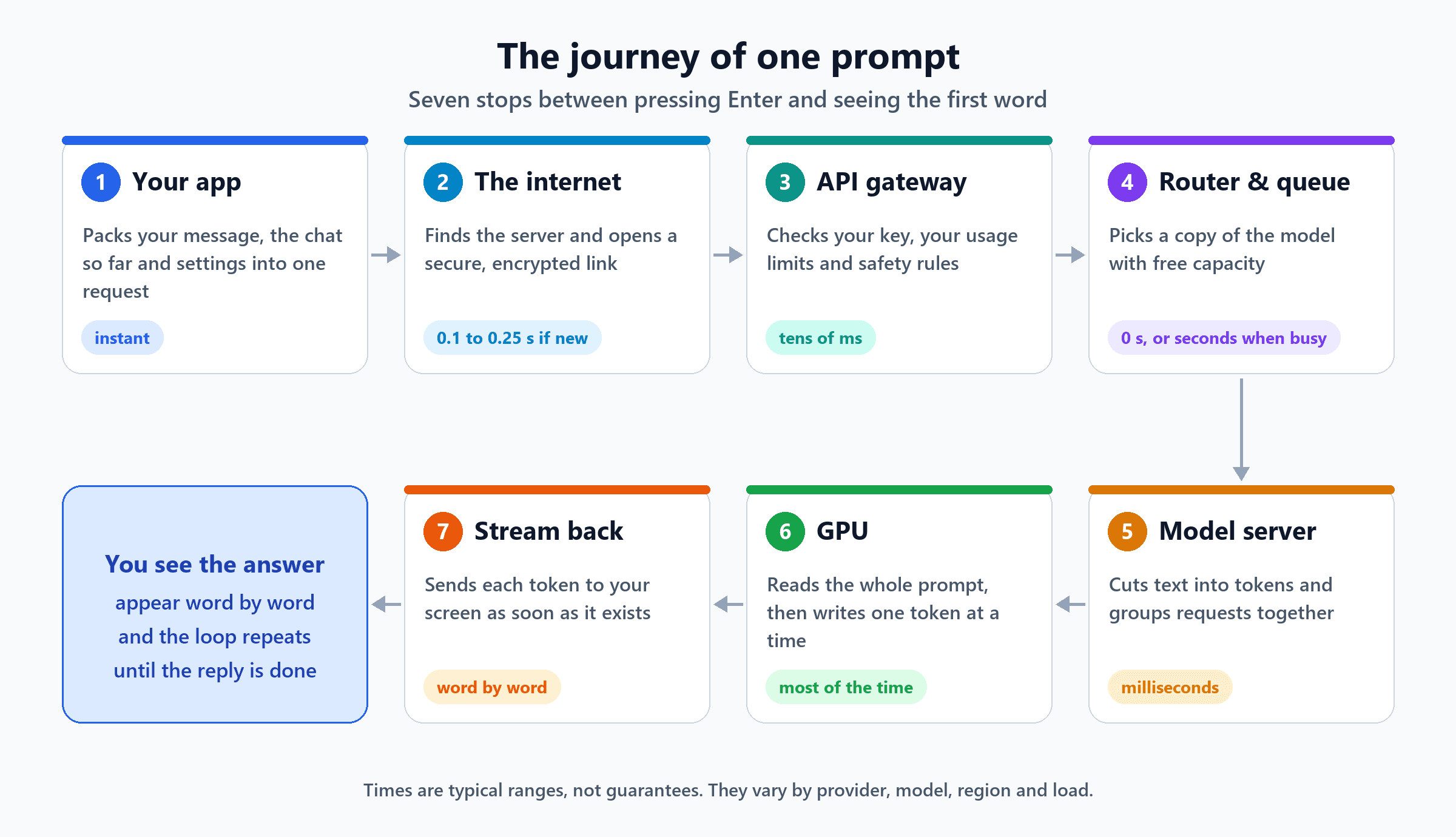
Let's take them one at a time.
Stop 1: Your App Packs the Request
When you press Enter, the app (a web page, a phone app, or a tool like Copilot) doesn't just send your sentence. It builds a small package containing:
- Your message.
- The conversation so far. The AI has no memory between messages, so the app re-sends the whole chat every time. That's why long conversations get slower and more expensive.
- Hidden instructions from the company that built the app, such as "You are a helpful assistant. Answer briefly."
- Settings, such as which model to use, the longest answer allowed, and whether to send the answer back bit by bit.
Optional: what the package looks like
Behind the scenes, it's a short piece of text in a format called JSON, something like this:
{
  "model": "example-model",
  "max_tokens": 500,
  "stream": true,
  "system": "You are a helpful assistant.",
  "messages": [
    { "role": "user", "content": "Why did my laptop restart overnight?" },
    { "role": "assistant", "content": "It was most likely a Windows update..." },
    { "role": "user", "content": "How do I stop that happening during work hours?" }
  ]
}
Notice the earlier question and answer travel along with the new question. "stream": true asks for the answer to be sent word by word.
Stop 2: Across the Internet
Next, the package has to reach the AI company's servers. Three quick things happen first:
- Find the address (DNS). Your device looks up where
api.openai.comorapi.anthropic.comactually lives, like looking up a phone number. - Open a connection. Your device and the server say hello.
- Agree on encryption (TLS). They set up a secure, private line, so nobody in between can read your question. This is the padlock in your browser's address bar.
We measured how long this takes from the test laptop:
| Step | First try | Later tries |
|---|---|---|
| Find the address (DNS) | about 0.02 s | about 0.005 s |
| Connection + encryption ready | about 0.18 to 0.25 s | about 0.07 to 0.10 s |
| Full reply from the server | about 0.33 to 0.42 s | about 0.22 to 0.29 s |
Those replies were "access denied" messages, because we didn't send a real account key. That's useful: it means about a quarter to half a second went by before any AI model was even involved. That's just the trip there and back, plus a quick security check.
Two small details stood out:
- The first stop often isn't the AI company at all. Both OpenAI's and Anthropic's APIs answered through Cloudflare, a company that runs servers in cities all over the world; the reply headers showed it came from Cloudflare's Amsterdam site. Your request first lands at a nearby "edge" server like this, which then passes it on to the AI company's own systems.
- Apps keep the line open. Setting up a connection is slow the first time and much faster after that, so well-built apps reuse the same connection for many messages.
Stop 3: The API Gateway, the Front Desk
The gateway is like a hotel reception desk. Before anything expensive happens, it checks:
- Who are you? Is your account key or login valid? If not, you get "access denied" (exactly what our test got).
- Are you within your limits? Every account has a cap on requests and tokens per minute. Go over it and you get an error, usually 429 "Too Many Requests", and are asked to wait and try again.
- Is the request allowed? Some providers run quick safety checks here.
- Start the meter. Usage is recorded for billing.
This normally takes only a few tens of milliseconds. Its job is to stop bad or excessive requests before they reach the GPUs, which are the costly part.
Stop 4: The Router and the Queue
A popular AI service doesn't run on one computer. The same model is copied onto hundreds or thousands of GPU servers, spread across several data centres. The router decides which copy should handle your request, based on:
- Which model you asked for. A small fast model and a large one live on different machines.
- Which servers have room right now.
- Where you are, or where your company's data is allowed to be processed.
- Whether a server already has your conversation in its memory. Some providers try to send your next message to the same server, so it doesn't have to re-read the whole chat from scratch.
If every suitable server is busy, your request waits in a queue. Usually that wait is near zero. At peak times, or right after a big product launch, it can be seconds, and this is the main reason the same AI can feel instant one day and slow the next.
Stop 5: The Model Server
Now your request reaches a server with GPUs attached, running special software built to serve AI models (well-known examples include vLLM, NVIDIA TensorRT-LLM and Hugging Face TGI). It does two important jobs.
First, it cuts your text into tokens. Tokens are the small pieces of text AI models work with, often a word or part of a word. This post explains tokens in detail.
Second, it groups requests together. This is called batching. A GPU is so powerful that working on just one person's request at a time wastes most of it. So the server handles many people's requests in the same step, like a bus carrying many passengers instead of a taxi carrying one. Modern servers do this continuously: as one person's answer finishes, a new person's request joins the next step straight away.
Stop 6: The GPU, Where the Answer Is Made
This is the heart of the journey. A GPU (graphics processing unit) is a chip originally designed for video games, which turned out to be perfect for AI because it can do thousands of calculations at the same time.
The AI model's knowledge is stored as billions of numbers called weights. A large model can have 70 billion of them or more, which takes around 140 GB of memory. That's more than one GPU can hold, so a big model is usually split across several GPUs working together as a team.
The GPU then works in two very different phases.
Phase 1: Reading your prompt
First, the model reads your whole prompt at once. Because all the words are already known, they can be processed side by side in one big parallel pass. This is called prefill. Its result is the very first word of the answer.
Phase 2: Writing the answer
Then the model writes the answer one token at a time. It predicts the next token, adds it to the text, and runs again to predict the one after that. This is called decode. It can't be done in parallel, because each new token depends on the one before it.
That difference is huge. Here's what we measured with GPT-2 on the test laptop:
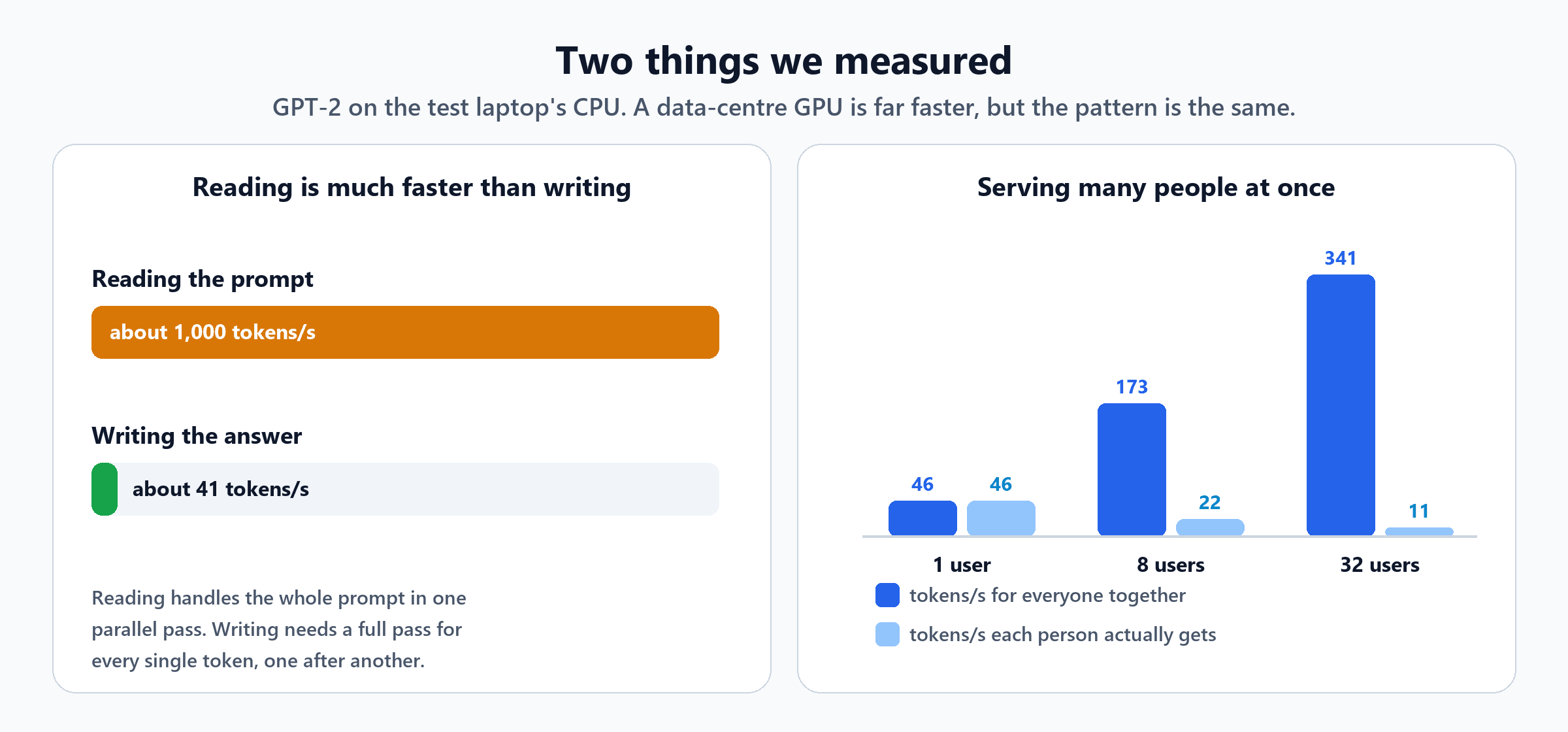
- Reading a prompt ran at about 1,000 tokens per second. A 1,000-token prompt took about 1 second; a 100-token prompt took 0.09 seconds.
- Writing ran at only about 41 tokens per second (34 per second after a long prompt).
So reading is roughly 25 times faster than writing. Keep that in mind; it explains the pricing later.
The memory trick that makes writing bearable
When the model writes token number 51, it needs to "remember" everything about the first 50. Recalculating all of that from scratch for every new token would be painfully slow. Instead, the model saves its working notes for every earlier token in a memory area called the KV cache, and only does fresh work for the newest token.
We tested it: writing 50 tokens took 6.0 seconds without the cache and 1.2 seconds with it, about five times faster. In a real service with long answers, the difference is far bigger.
The catch is that these notes take up GPU memory. For a large 70-billion-weight model, each token in the conversation needs roughly 320 KB of notes. A very long conversation of 128,000 tokens therefore needs around 42 GB of memory, just for one person's notes. That's a big reason why long conversations and huge documents are expensive to serve.
The busy-bus trade-off
Remember batching? We measured that too (the right-hand chart above). Serving 32 people at once produced 341 tokens per second in total, more than seven times the output of serving one person. But each of those 32 people only got 11 tokens per second, instead of 46.
That's the balancing act every AI provider performs all day: more people per GPU means lower cost, but slower answers for each person. Premium "fast" tiers often simply mean fewer passengers on your bus.
Optional: why writing is limited by memory, not maths
To write each new token, the GPU has to read every one of the model's weights from its memory. For a 70-billion-weight model stored at 2 bytes per weight, that's about 140 GB per token. A top data-centre GPU can move roughly 3.35 TB of data per second, so even with perfect efficiency, one GPU's worth of memory speed allows only around 24 passes per second (3.35 TB ÷ 140 GB). That's why providers spread a model across several GPUs, and why batching works so well: one read of the weights serves every request on the bus at the same time.
Stop 7: Streaming the Answer Back
If the model waited until the whole answer was finished, you might stare at a blank screen for ten seconds. Instead, as soon as each token is ready, the server sends it straight back down the open connection. This is called streaming, and it's why you see the answer appear word by word: you're watching the GPU write in real time.
Optional: what streaming looks like on the wire
Most AI APIs stream using a simple web standard called server-sent events. The server sends a series of small messages, each carrying a little piece of text. With Anthropic's API, one of those pieces looks like this:
event: content_block_delta
data: {"type":"content_block_delta","index":0,"delta":{"type":"text_delta","text":" was"}}
The app glues each piece onto the end of the answer on your screen. Other providers use the same idea with slightly different message shapes.
The answer stops when one of three things happens: the model produces a special "I'm done" token, the answer hits the maximum length set in Stop 1, or it writes a "stop" phrase the app asked for. If an answer ever ends mid-sentence, the length limit is usually why.
Latency: Why It's Sometimes Fast and Sometimes Slow
People talk about AI speed using two numbers:
- Time to first token: how long until the first word appears.
- Tokens per second: how fast the rest arrives once it starts.
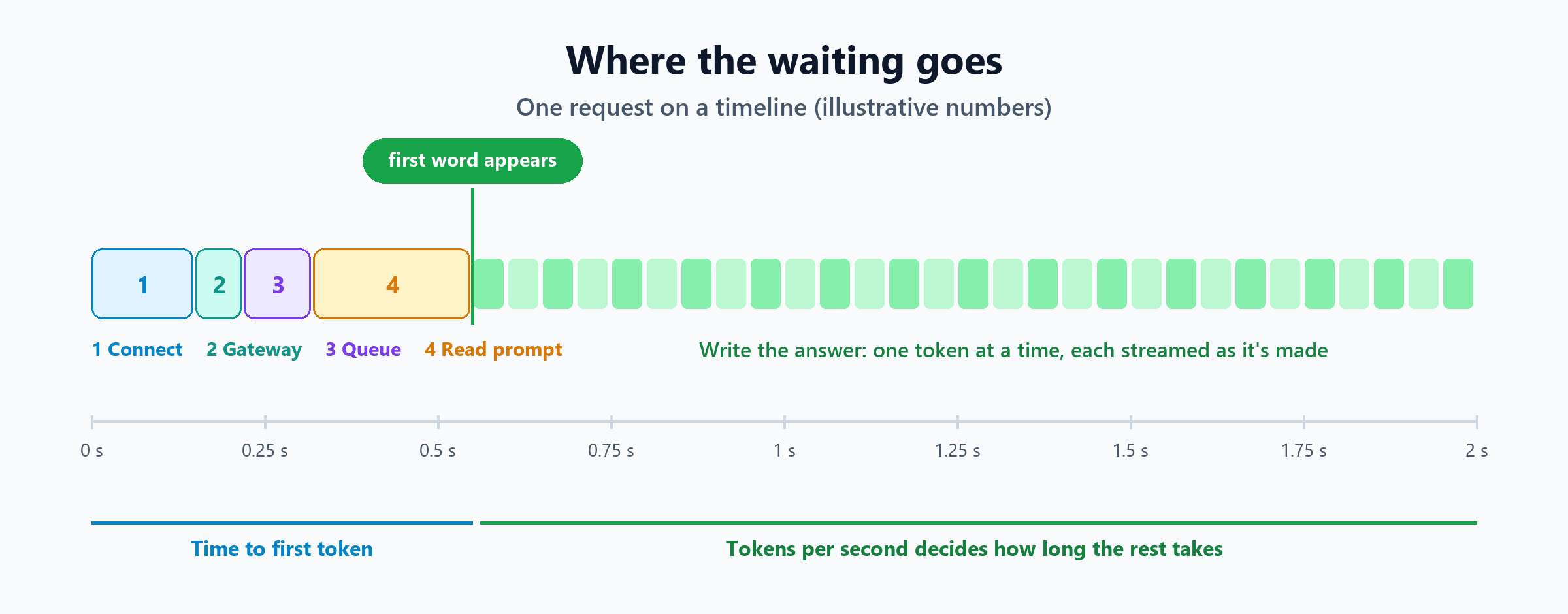
A simple way to estimate how long an answer takes:
Total time ≈ time to first token + (number of tokens in the answer ÷ tokens per second)
For example, with a 0.6-second wait for the first token and a speed of 50 tokens per second, a 500-token answer takes about 0.6 + 10 = 10.6 seconds in total. The answer's length matters far more than anything else.
| What makes it slower | Why |
|---|---|
| A long prompt or long chat history | More to read before the first word |
| A long answer | Every extra token is another full trip through the model |
| A bigger, smarter model | More weights to read for every token |
| Peak hours | Longer queues and more people on each bus |
| Distance to the data centre | Each round trip takes longer |
| "Thinking" or reasoning modes | The model writes many hidden tokens before the visible answer |
Cost: Why It's Priced Per Token
Now the pricing makes sense. AI services charge per token, usually quoted per million tokens, and almost always with two different prices:
- Input tokens (what you send): cheaper, because reading is fast and happens in parallel.
- Output tokens (what the AI writes): often several times more expensive, because writing is slow, sequential, and keeps a GPU busy for every single token.
Here's a worked example using made-up but realistic prices of $3 per million input tokens and $15 per million output tokens. Real prices vary a lot by provider and model, so check the current price list.
| Tokens | Cost | |
|---|---|---|
| Your prompt plus chat history | 2,000 input | $0.006 |
| The AI's answer | 500 output | $0.0075 |
| One message | about $0.014 |
That looks tiny, but two things make it add up:
- The whole chat is re-sent every time. By the twentieth message in a long conversation, you might be paying to re-read 20,000 tokens of history on every turn.
- Automation multiplies everything. A script that calls the AI 50,000 times a month turns 1.4 cents into about $700.
Providers offer a few ways to bring that down:
- Prompt caching. If the start of your prompt is the same every time (the hidden instructions, a long document), the provider can keep its notes for it, and charge you much less for re-reading it.
- Batch processing. If you don't need answers immediately, several providers offer a discount, often around half price, for requests that can be processed within hours instead of seconds.
- Smaller models for simpler jobs. They're cheaper per token and faster too.
How to save AI tokens and manage your licence spend goes deeper into the practical side.
What You Can Do With This
Whether you're a user, an IT admin or building something yourself:
- Start a new chat for a new topic. Long chats get slower and more expensive, and the AI can lose track of the early parts.
- Ask for the length you need. "Answer in three bullet points" is faster and cheaper than an essay.
- Pick the right size of model. Use the small, fast one for simple tasks, and the large one for hard ones. Many companies now route between several models for exactly this reason.
- If you build apps: keep connections open, always stream, set a sensible maximum answer length, retry politely when you get a 429 error, and keep repeated instructions at the start of the prompt so caching can help. Designing a reliable AI workflow covers the retry side.
- If privacy or cost is the main concern, remember the whole journey can run on your own hardware instead, as shown in build a private AI assistant with local models.
The Short Version
| Stop | What happens | Typical time |
|---|---|---|
| 1. Your app | Packs your message, the chat so far and settings | Instant |
| 2. The internet | Finds the server, opens an encrypted link | 0.1 to 0.25 s for a new link (measured) |
| 3. API gateway | Checks your key, limits and safety; starts billing | Tens of milliseconds |
| 4. Router & queue | Picks a free copy of the model | Zero, or seconds when busy |
| 5. Model server | Cuts text into tokens, groups requests together | Milliseconds |
| 6. GPU | Reads the prompt in one go, then writes one token at a time | Most of the total time |
| 7. Stream back | Sends each token to your screen as soon as it exists | Word by word |
The next time words start trickling onto your screen, you'll know what you're watching: a GPU in a data centre writing one token at a time, sharing its attention with dozens of other people, and sending each piece to you the instant it's ready. Reading your question was the quick part. Writing the answer is where the time, and the money, goes.
To see this engine scaled up to a whole industry, read the AI inference revolution. To see how models are shrunk to run faster and on cheaper hardware, read AI model quantization explained.
For the Curious: Try It Yourself
You can measure Stop 2 yourself from any computer with curl installed (Windows 10 and 11 include it). No account is needed; the server will reply "access denied", which is fine, because we only want the timings:
curl -s -o /dev/null -w "dns=%{time_namelookup}s connect=%{time_connect}s tls=%{time_appconnect}s reply=%{time_starttransfer}s code=%{http_code}\n" https://api.anthropic.com/v1/modelsdns=0.020798s connect=0.063578s tls=0.184346s reply=0.329250s code=401Each number is a running total from the moment you pressed Enter. Run it twice and you'll usually see the second run is faster, because the address lookup has been remembered. On Windows PowerShell, type curl.exe instead of curl.

Written by
Chetan Yamger
Cloud Engineer · AI Automation Architect · Modern Workplace Consultant
Cloud Engineer, AI Automation Architect, and Modern Workplace Consultant based in Amsterdam, Netherlands. Specializing in scalable, secure enterprise solutions with Microsoft Azure, Intune, PowerShell, and AI-driven automation using ChatGPT, Gemini, and modern LLM technologies.
Stay in the loop.
New articles, straight to you.
Deep-dive technical articles on Intune, PowerShell, and AI — no noise, no spam.
Discussion
Share your thoughts — your email stays private
Leave a comment