
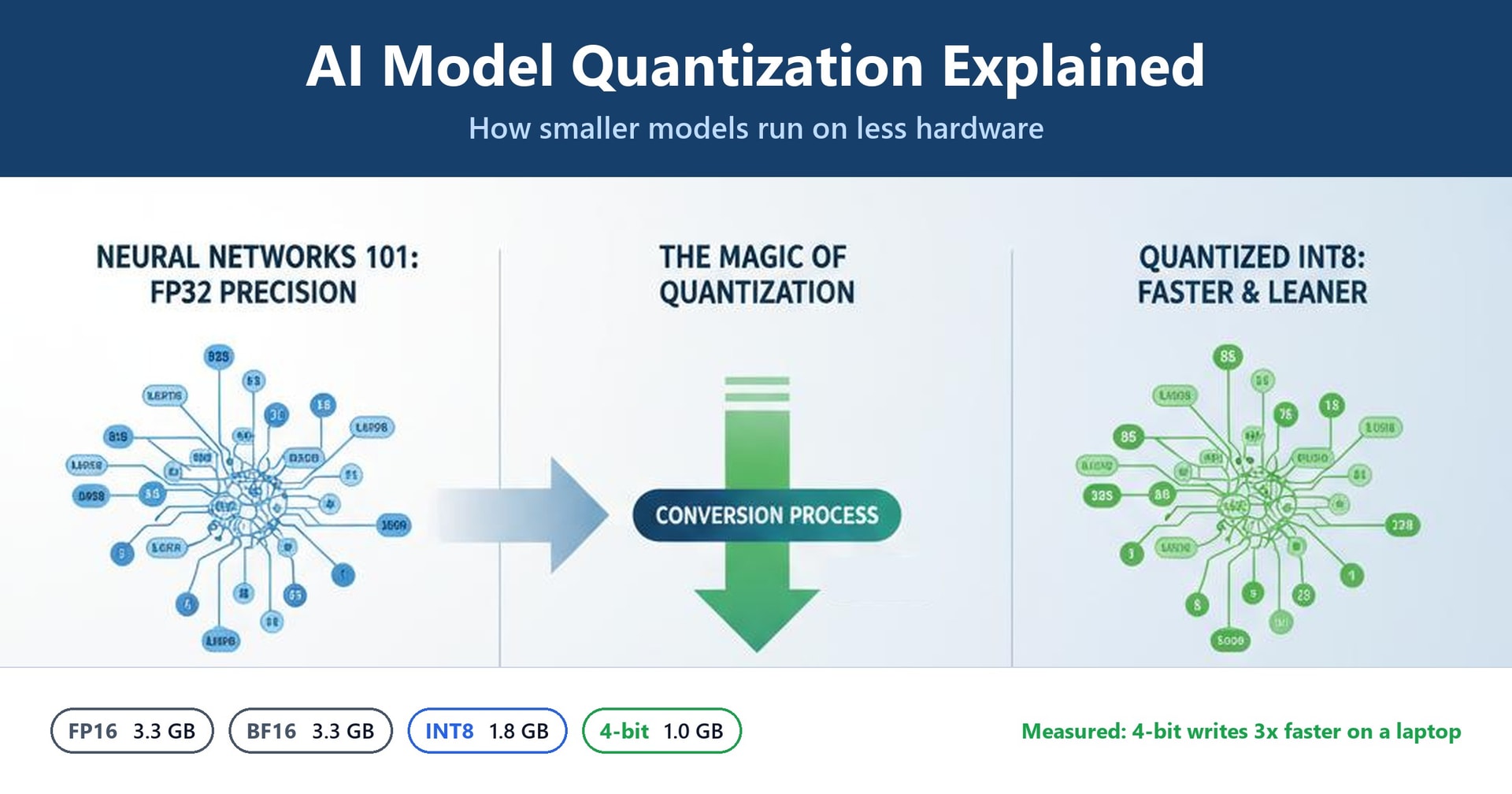
AI Model Quantization Explained: How Smaller Models Run on Less Hardware
FP16, BF16, INT8 and 4-bit compared with a real laptop experiment: how much memory each format saves, how much faster it runs, and what it does to answers.
An AI model is, at heart, a very long list of numbers called weights. A small chat model has about one and a half billion of them; large ones have hundreds of billions. Where you can run a model (a phone, a laptop, a single GPU, or only a data centre) comes down mostly to one question: how much memory do all those numbers take up?
Quantization is the trick of storing each number with fewer bits, the way you might round €19.87 to "about twenty euros". The model gets much smaller and usually faster. The price is a little accuracy, and sometimes more than a little.
This post explains the main formats in plain language, then puts them to a real test. We took one model, converted it into eight formats, and measured memory, speed and the quality of its answers on an ordinary laptop.
The experiment in one paragraph
Model: Qwen2.5-1.5B-Instruct, a small open chat model. Tool: llama.cpp (build b11577), the open-source engine behind popular local-AI apps such as Ollama and LM Studio. Hardware: a laptop with an Intel Core i7-11800H processor, 16 GB of RAM and no GPU, using 8 threads. We downloaded the model once in FP16 and made every other format from that same file, so the comparison is fair. Every number in this post was measured; nothing is estimated unless it says so.
Why Model Size Matters
Every weight has to sit in memory while the model runs. And every time the model writes a single token (a word or part of a word), it has to read all of those weights from memory. That gives two simple rules:
- Memory needed ≈ number of weights × bytes per weight.
- Writing speed is mostly limited by how fast memory can be read. Fewer bytes to read means more tokens per second.
Our post on what happens when you send a prompt explains why writing is limited by memory. Quantization attacks both rules at once, because it shrinks the bytes per weight.
Here's what that means for some common model sizes (rounded rule-of-thumb figures for the weights alone):
| Model size | FP16 / BF16 (2 bytes) | 8-bit (about 1 byte) | 4-bit (about 0.5 to 0.6 bytes) |
|---|---|---|---|
| 1.5 billion weights | about 3 GB | about 1.6 GB | about 1 GB |
| 7 billion weights | about 14 GB | about 7.5 GB | about 4 to 4.5 GB |
| 70 billion weights | about 140 GB | about 75 GB | about 40 GB |
That last column is the whole story of the local-AI boom. A 7-billion-weight model goes from "needs an expensive GPU" to "fits on a normal laptop", and a 70-billion-weight model goes from "several data-centre GPUs" to "one large GPU or a high-memory workstation".
The Formats, in Plain Language
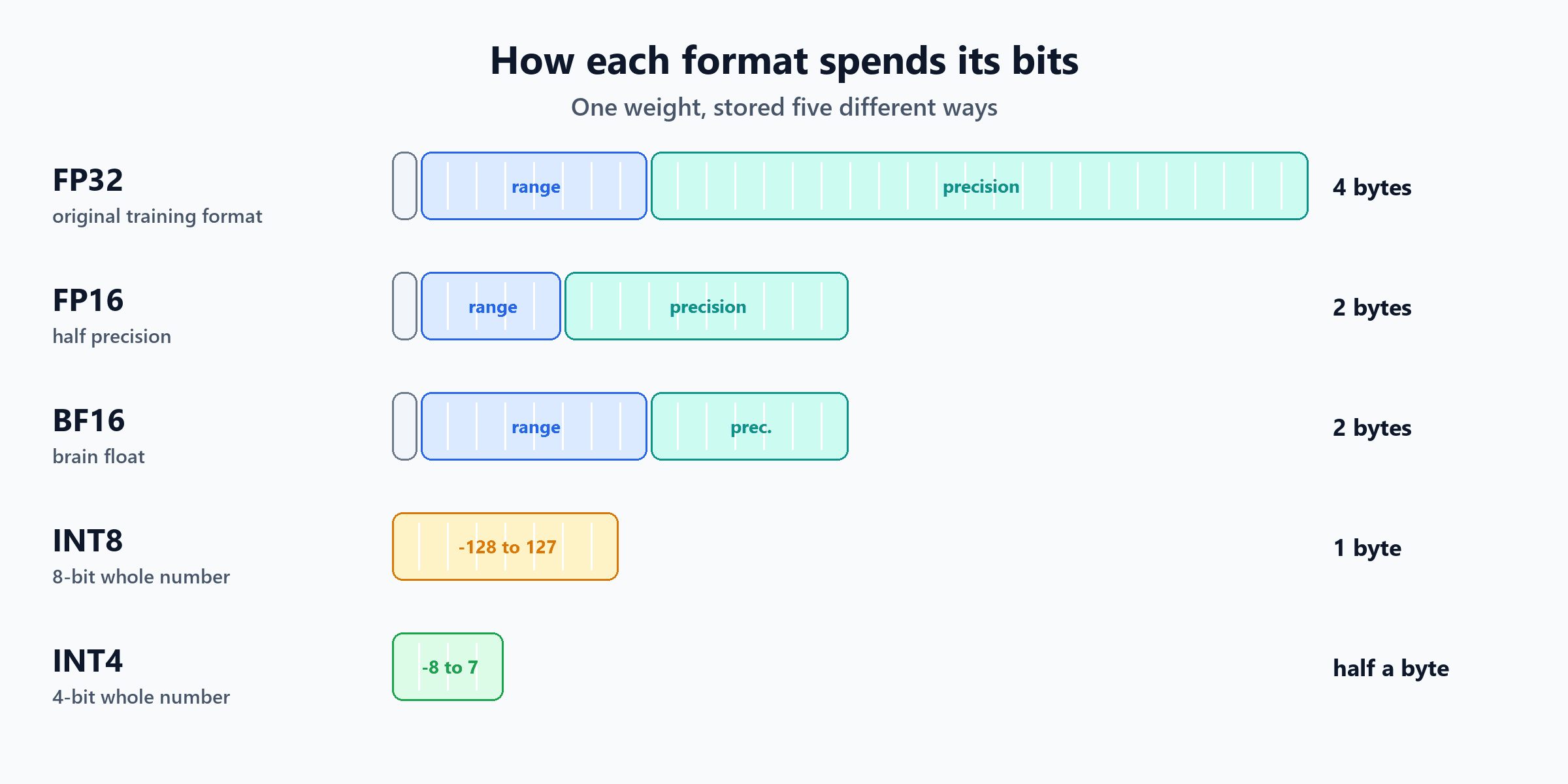
FP32: the original
Models are traditionally trained in FP32 (32-bit floating point), which uses 4 bytes per weight. It's very precise, and far more precise than a model needs just to answer questions.
FP16: half the size
FP16 uses 2 bytes, so the model is half the size of FP32. It keeps a decent amount of precision, but it has a small range: the biggest number it can hold is 65,504. Anything bigger becomes "infinity", and very small numbers collapse to zero.
BF16: same size, different trade-off
BF16 ("brain float", invented at Google) also uses 2 bytes, but it splits them differently. It keeps FP32's huge range and gives up some precision instead. That makes it much safer for training, where a single overflowing number can ruin a run, which is why most modern models are trained in BF16.
Here's the difference on real numbers, converted with PyTorch:
| Value | FP16 stores it as | BF16 stores it as |
|---|---|---|
| 0.1234567 | 0.123474 (closer) | 0.123535 |
| 70,000 | infinity (too big) | 70,144 |
| 0.00000001 | 0 (too small) | 0.0000000100 |
For simply running a finished model, the two behave almost identically. In our test, BF16 picked the same next word as FP16 99.5% of the time.
INT8 and 4-bit: whole numbers plus a scale
The quantized formats stop storing decimals entirely. Instead:
- Take a small group of weights (often 32 at a time).
- Find the biggest one and work out a scale so that it maps to the top of the whole-number range.
- Divide every weight by the scale and round to a whole number: -127 to 127 for 8-bit, or -7 to 7 for 4-bit.
- Store the small whole numbers plus one scale per group.
To use the weights, the model multiplies them back by the scale. The rounding is where accuracy is lost.
Here are eight real weights taken from the model's first layer, quantized by hand:
| Weights (rounded for display) | Average error | |
|---|---|---|
| Original | 0.0006, 0.0113, -0.0186, 0.0084, 0.0247, -0.0067, -0.0102, 0.0049 | |
| As 8-bit whole numbers | 3, 58, -96, 43, 127, -34, -53, 25 | |
| Back from 8-bit | 0.0006, 0.0113, -0.0187, 0.0084, 0.0247, -0.0066, -0.0103, 0.0049 | 0.00004 |
| As 4-bit whole numbers | 0, 3, -5, 2, 7, -2, -3, 1 | |
| Back from 4-bit | 0.0000, 0.0106, -0.0176, 0.0071, 0.0247, -0.0071, -0.0106, 0.0035 | 0.00071 |
8-bit gives back almost exactly the original numbers. 4-bit is about 18 times less precise, and the smallest weight (0.0006) has rounded to zero. Spread across a billion weights, those small errors add up, which is exactly what the quality tests below measure.
Why '4-bit' files are bigger than 4 bits per weight
The scales take up space too. llama.cpp's 8-bit format (Q8_0) stores one 2-byte scale for every 32 weights, so it actually averages 8.5 bits per weight. Its popular 4-bit format, Q4_K_M, averages 5.0 bits, because it also keeps a few sensitive layers at 6-bit. The letters describe the scheme: K formats use smarter nested scales, and _M means "medium" (a balanced mix). Simpler formats like Q4_0 use one plain scale per group.
The Experiment: One Model, Eight Formats
We measured four things for every format:
- Memory: the peak RAM the program actually used while answering a question.
- Speed: tokens per second when writing an answer, and when reading a 512-token prompt (llama.cpp's own benchmark tool, three runs each).
- Closeness to the original: on 40 passages of Wikipedia text, about 20,000 tokens (the standard WikiText-2 test set), how often each format picked the same next word as the FP16 model, and its perplexity. Perplexity is a measure of how "surprised" the model is by real text; lower is better.
- Real answers: six everyday questions, asked with randomness switched off, so any difference comes from the format alone.
Memory and speed
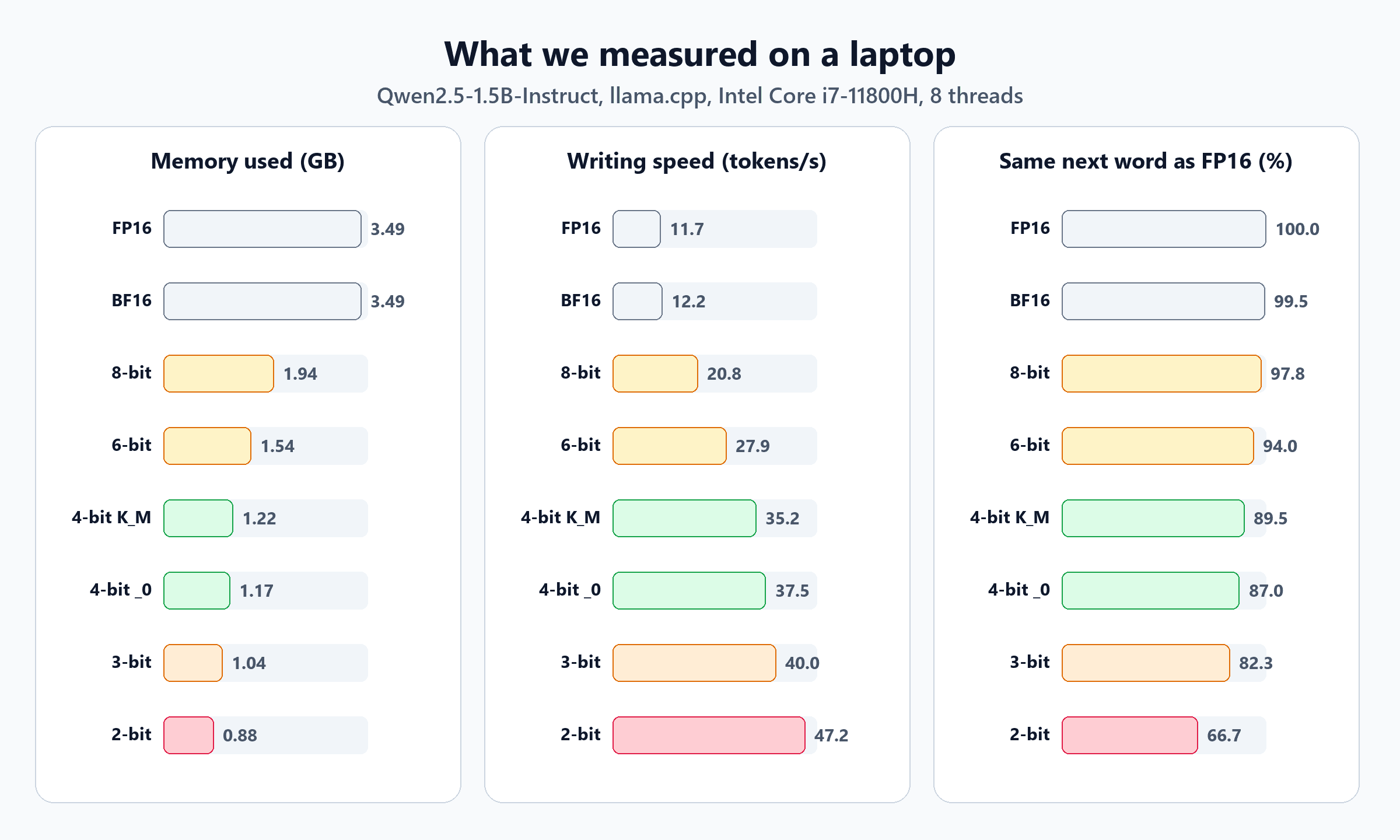
| Format | Bits per weight | Memory used | Writing speed | Reading speed |
|---|---|---|---|---|
| FP16 | 16.0 | 3.49 GB | 11.7 tokens/s | 142 tokens/s |
| BF16 | 16.0 | 3.49 GB | 12.2 tokens/s | 153 tokens/s |
| 8-bit (Q8_0) | 8.5 | 1.94 GB | 20.8 tokens/s | 131 tokens/s |
| 6-bit (Q6_K) | 6.6 | 1.54 GB | 27.9 tokens/s | 388 tokens/s |
| 4-bit (Q4_K_M) | 5.0 | 1.22 GB | 35.2 tokens/s | 340 tokens/s |
| 4-bit (Q4_0) | 4.8 | 1.17 GB | 37.5 tokens/s | 268 tokens/s |
| 3-bit (Q3_K_M) | 4.1 | 1.04 GB | 40.0 tokens/s | 382 tokens/s |
| 2-bit (Q2_K) | 3.4 | 0.88 GB | 47.2 tokens/s | 349 tokens/s |
Memory includes the program itself and room for a 4,096-token conversation, so it's a little more than the file size. 1 GB here means 1,024 MB.
Two clear findings:
- Writing speed follows size almost perfectly. The 4-bit Q4_K_M model uses about a third of the memory of FP16 and writes three times faster (35.2 vs 11.7 tokens per second). On a laptop, that's the difference between watching words crawl out and reading at a normal pace.
- Reading speed doesn't follow size. 8-bit was actually the slowest at reading a prompt, while 6-bit was the fastest. Reading is limited by raw calculation rather than memory, so it depends on how well the processor's maths instructions suit each format. Don't assume "smaller = faster" for everything; measure on your own hardware.
How close to the original?
| Format | Same next word as FP16 | Perplexity (lower is better) | Change |
|---|---|---|---|
| FP16 | 100% (the reference) | 9.16 | |
| BF16 | 99.5% | 9.17 | +0.2% |
| 8-bit (Q8_0) | 97.8% | 9.18 | +0.3% |
| 6-bit (Q6_K) | 94.0% | 9.24 | +0.9% |
| 4-bit (Q4_K_M) | 89.5% | 9.59 | +4.7% |
| 4-bit (Q4_0) | 87.0% | 9.67 | +5.6% |
| 3-bit (Q3_K_M) | 82.3% | 10.36 | +13% |
| 2-bit (Q2_K) | 66.7% | 15.30 | +67% |
The pattern is a gentle slope followed by a cliff:
- Down to 8-bit, the loss is almost nothing.
- At 4-bit, it's noticeable but modest. The model picks a different next word about one time in ten, usually a reasonable alternative. Notice that the smarter Q4_K_M beats the simpler Q4_0, for only 5% more memory.
- At 3-bit, and especially 2-bit, quality falls off a cliff. At 2-bit, the model disagrees with the original on a third of all words.
The answer test
Statistics are one thing. Here's what the formats actually said. ✅ is correct, ⚠️ is partly right, ❌ is wrong.
| Question | FP16, BF16, 8-bit | 6-bit | 4-bit and 3-bit | 2-bit |
|---|---|---|---|---|
| Capital of Australia? | ✅ Canberra | ✅ | ✅ | ✅ |
| €1,200 laptop, 15% off? | ✅ €1,020 | ✅ | ❌ €960 | ❌ €1,080 |
| PowerShell: list stopped services | ✅ | ❌ invalid command | ✅ | ❌ nonsense |
| BitLocker in one sentence | ✅ | ✅ | ✅ | ❌ called it "digital rights management" |
| Translate a sentence to French | ⚠️ | ⚠️ | ⚠️ | ❌ |
| Kilogram of feathers or steel? | ❌ "feathers" | ❌ | ❌ | ❌ "steel" |
Some of these deserve a closer look, because they're more interesting than a simple score:
- The discount question. Full precision, 8-bit and 6-bit all got €1,020. Every 4-bit and 3-bit version said €960, which is a 20% discount instead of 15%. A small rounding of the weights was enough to change a calculation. Arithmetic and exact facts are usually the first things to slip.
- The PowerShell command. Full precision gave a correct command (
Get-Service | Where-Object { $_.Status -eq 'Stopped' }), which on our test machine listed 168 stopped services. The 6-bit model offeredGet-Service -Status Stopped, which looks plausible but fails with "A parameter cannot be found that matches parameter name 'Status'". Yet the 4-bit models got it right. Errors aren't neatly ordered by bit count, which is why you should always test a quantized model on your own tasks. - The French translation. Every version down to 3-bit produced the same slightly clumsy sentence ("La réunion a été transférée au après-midi de jeudi"). The 2-bit model invented a committee and a misspelled Wednesday.
- The feathers trick question. A kilogram is a kilogram. Every format got it wrong, including full precision. That's an important lesson: quantization can only lose ability, never add it. A small 1.5-billion-weight model simply isn't strong at trick questions, at any precision.
Be careful with these results
This is one small model, one laptop and six questions. Bigger models generally tolerate quantization better than small ones, because they have more weights to spread the rounding errors across. We also used plain conversions; llama.cpp can produce better low-bit files using an "importance matrix" built from sample text, which improves 2-bit and 3-bit quality noticeably. Treat these numbers as an illustration of the trade-off, not a verdict on every model.
So Which Format Should You Use?
| Format | Use it when | Avoid it when |
|---|---|---|
| BF16 / FP16 | Training or fine-tuning; you have plenty of memory; you need the reference quality | Memory or speed is tight |
| 8-bit | You want near-original quality at half the size | You need the smallest possible model |
| 6-bit | A safe middle ground when 4-bit isn't quite good enough | Memory is very tight |
| 4-bit (Q4_K_M) | Running models locally on laptops and desktops; the most popular default | Precise maths or facts matter most and you have memory for 8-bit |
| 3-bit and below | Squeezing a bigger model onto too-small hardware, as a last resort | Anything where correctness matters |
A useful rule of thumb from the local-AI community, consistent with what we saw: a bigger model at 4-bit usually beats a smaller model at full precision, for the same memory. A 7-billion-weight model at 4-bit (about 4.5 GB) will generally give better answers than a 1.5-billion-weight model in FP16 (about 3.5 GB).
You're probably already using 4-bit
If you run models with Ollama or LM Studio, the default download is usually a 4-bit file, typically Q4_K_M. The model name or tag tells you which format you have; look for labels such as q4_K_M, q8_0 or fp16.
What About GPUs and the Cloud?
Our experiment used llama.cpp's GGUF files on a laptop processor, but the same ideas apply everywhere:
- On GPUs, popular 4-bit methods include GPTQ, AWQ and bitsandbytes. They use the same "small whole numbers plus scales" idea, with different ways of choosing the scales.
- Newer data-centre GPUs add hardware support for low-precision floating-point formats such as FP8, and on the latest generations even 4-bit floating point. That lets cloud providers serve big models faster and cheaper.
- The memory saved can be spent elsewhere. A smaller model leaves more GPU memory for the KV cache, which means longer conversations or more users served at once. The AI inference revolution covers that side.
There are also two broad ways to quantize. Post-training quantization (what we did) converts a finished model in minutes. Quantization-aware training teaches the model during training to cope with rounding, which gives better results at very low bit counts but costs much more to do.
The Short Version
| Question | Answer from our test |
|---|---|
| How much smaller is 4-bit? | 3.49 GB → 1.22 GB in memory, about a third |
| How much faster? | 11.7 → 35.2 tokens per second when writing, about 3 times |
| How much quality is lost? | Same next word 89.5% of the time; perplexity up 4.7% |
| Is 8-bit worth it? | Nearly identical to FP16 (97.8%) at about half the size |
| BF16 or FP16 for running a model? | Practically the same (99.5% agreement) |
| Where does it break? | 3-bit is shaky; 2-bit got 5 of 6 questions wrong |
| What fails first? | Exact arithmetic and precise facts |
Quantization is why you can run a capable AI model on an ordinary laptop, with no cloud and no data leaving your machine. It isn't free: you trade a little accuracy for a lot of memory and speed. For most everyday local use, 4-bit is the sweet spot, 8-bit is the safe choice, and anything below 4-bit needs careful testing.
Ready to put a quantized model to work? Build a private AI assistant with local models and RAG, or start with how to build your own offline AI application. To see a 4-bit model doing real work, follow build a local AI coding assistant.
For the Curious: Repeat the Experiment
These are the exact commands we ran, using the Windows CPU build of llama.cpp (llama-b11577-bin-win-cpu-x64.zip from the project's GitHub releases) and qwen2.5-1.5b-instruct-fp16.gguf from the Qwen2.5-1.5B-Instruct-GGUF repository on Hugging Face.
Make a quantized copy (any of BF16, Q8_0, Q6_K, Q4_K_M, Q4_0, Q3_K_M, Q2_K), using 8 threads:
.\llama-quantize.exe qwen2.5-1.5b-instruct-fp16.gguf q-Q4_K_M.gguf Q4_K_M 8Measure reading and writing speed for several files at once:
.\llama-bench.exe -m qwen2.5-1.5b-instruct-fp16.gguf -m q-Q8_0.gguf -m q-Q4_K_M.gguf -p 512 -n 128 -t 8 -r 3Measure closeness to the original. First save the FP16 model's predictions, then compare each quantized file against them:
.\llama-perplexity.exe -m qwen2.5-1.5b-instruct-fp16.gguf -f wiki.test.raw -c 512 --chunks 40 -t 8 --kl-divergence-base base.kld
.\llama-perplexity.exe -m q-Q4_K_M.gguf -c 512 --chunks 40 -t 8 --kl-divergence-base base.kld --kl-divergence
The second command prints the "Same top p" line (how often the top word matches) and the perplexity of both models. Ask a question with randomness switched off:
.\llama-completion.exe -m q-Q4_K_M.gguf -sys "You are a helpful assistant. Answer concisely." -p "What is the capital of Australia? Answer in one word." -st --temp 0 -n 120
Written by
Chetan Yamger
Cloud Engineer · AI Automation Architect · Modern Workplace Consultant
Cloud Engineer, AI Automation Architect, and Modern Workplace Consultant based in Amsterdam, Netherlands. Specializing in scalable, secure enterprise solutions with Microsoft Azure, Intune, PowerShell, and AI-driven automation using ChatGPT, Gemini, and modern LLM technologies.
Stay in the loop.
New articles, straight to you.
Deep-dive technical articles on Intune, PowerShell, and AI — no noise, no spam.
Discussion
Share your thoughts — your email stays private
Leave a comment