
AI at the Edge: What Changes When Models Run on Your Device?
Offline operation, latency, privacy, hardware acceleration, updates and fleet deployment, measured on a laptop: first tokens in 0.1 to 0.2 s, no outside connections, and a model update that refuses a 1-byte corruption.
Most AI today runs in someone else's data centre. You send a request across the internet, a GPU somewhere answers, and the result comes back. Edge AI moves the model onto the device itself: a laptop, a phone, a factory PC, a kiosk. The AI is the same kind of thing; almost everything around it changes.
Earlier posts covered the basics: offline vs online AI explains the choice, building an offline AI app shows a first app, and small vs large language models measured which model size a task needs. This post is about what changes in practice when you run models on devices: offline operation, latency, privacy, hardware acceleration, updates, and deploying to a fleet. We measured each one on a real laptop.
How we tested
- The device: a laptop with an Intel Core i7-11800H and 16 GB of RAM. It's a Windows virtual machine with no GPU or NPU exposed to it, so everything ran on the CPU (llama.cpp reported its backends as
CPUand found no GPU). - The models: Qwen2.5-Instruct at 0.5B, 1.5B and 7B parameters, 4-bit (Q4_K_M), all Apache-2.0 licensed, with hashes checked against the publisher's.
- The runtime: llama.cpp build b11577 (
llama-serverandllama-bench). - The deployment test: a model package and install scripts written the way an Intune Win32 app would run them, tested against a folder standing in for a device.
What we couldn't measure: battery use (a virtual machine on mains power) and NPU or GPU acceleration (none available). We say so where it matters.
What Changes, at a Glance
| Cloud AI | Edge AI | |
|---|---|---|
| Where the model runs | A provider's servers | The device itself |
| Needs the internet | Every request | Only to install or update |
| First response | Network round trip plus queue plus model | Model only |
| Where your data goes | To the provider | Nowhere |
| Model size | Anything the provider runs | Whatever fits in the device's memory |
| Speed depends on | The provider's hardware and load | The device's memory speed and accelerators |
| Updates | The provider changes the model whenever it chooses | You ship new model files to every device |
| Cost | Per request, forever | Hardware you already own, plus distribution |
1. Offline Operation
Once the model file and runtime are on the device, nothing else is needed. We started the 1.5B model and sent it five different helpdesk questions. It answered all of them with no internet involvement at all: the model is a file on disk, and the runtime reads it into memory.
What "works offline" really means in practice:
- Inference works offline. Answers, summaries and classification all run locally.
- Installation and updates still need connectivity, to deliver the files in the first place (see section 5).
- The model only knows what it was trained on. It can't look anything up. Anything current, such as your knowledge base or today's ticket queue, has to come from local data. That's what local RAG is for (build a private AI assistant).
- Offline is a design choice you must test, not an assumption. Some "local" AI apps still phone home for licensing, telemetry or features.
2. Privacy: Prove It, Don't Assume It
"It runs locally" is a claim. We checked it. While the model was generating answers, we listed every network connection the model process held:
TCP connections held by the model process while generating:
   Established 127.0.0.1:8091 -> 127.0.0.1:64027
   Established 127.0.0.1:8091 -> 127.0.0.1:64029
   Established 127.0.0.1:8091 -> 127.0.0.1:64031
   Listen 127.0.0.1:8091 -> 0.0.0.0:0
UDP endpoints: ['0']
Every connection was on 127.0.0.1, the machine talking to itself: the model listening, and our test client asking questions. There were no outside addresses, and no UDP at all. The question text never left the laptop.
Three things make this privacy real, not just likely:
- Bind the model server to
127.0.0.1, not to all network interfaces, so other machines can't reach it. - Check the process's connections the way we did here, and repeat the check after every runtime update.
- Block outbound traffic for the runtime with a host firewall rule if the data is sensitive. Then even a future update that tried to send data couldn't.
Edge AI isn't automatically private, though. The model files, any local logs, and any cached prompts sit on the device, so they need the same protection as the documents the user asks about: disk encryption, access control and a plan for lost devices. What happens when a laptop is lost covers that side.
3. Latency: No Network Round Trip
With the 1.5B model already loaded, we measured time to first token, how long before the answer starts appearing, for five different questions:
| Request | First token after | Full answer |
|---|---|---|
| 1 (VPN disconnects) | 0.193 s | 48 tokens in 1.67 s |
| 2 (Outlook not receiving) | 0.107 s | 14 tokens in 0.49 s |
| 3 (slow laptop) | 0.097 s | 41 tokens in 1.31 s |
| 4 (Teams freezing) | 0.096 s | 35 tokens in 1.11 s |
| 5 (printer prints nothing) | 0.096 s | 35 tokens in 1.18 s |
| Repeat of request 1 | 0.029 s | 40 tokens in 1.18 s |
For comparison, what happens when you send a prompt measured a single round trip to cloud AI APIs from the same laptop at 0.22 to 0.42 seconds, and that was before any model did any work. The local model often had its first word ready sooner than the cloud could even acknowledge the request.
Two more latency effects show up only on the device:
- Repeated prompts are faster. Asking the same question again started in 0.029 s, because llama.cpp reuses work it has already done on an identical prompt. Long, fixed system prompts benefit the most.
- Cold starts are real. Loading the model before the first request took 1.4 seconds (2.7 s on the very first run) for the 1.5B model here (faster once Windows had the file cached in memory). The model-size comparison measured 1.1 s for 0.5B, 9.3 s for 7B and 45 s for 14B. On a device, you decide whether the model stays loaded (using memory all day) or starts on demand (making the first user wait).
4. Hardware Acceleration: Memory Speed Is the Limit
We ran the same three models at 1, 2, 4 and 8 CPU threads, measuring two different jobs: reading a 256-token prompt, and generating 64 tokens.
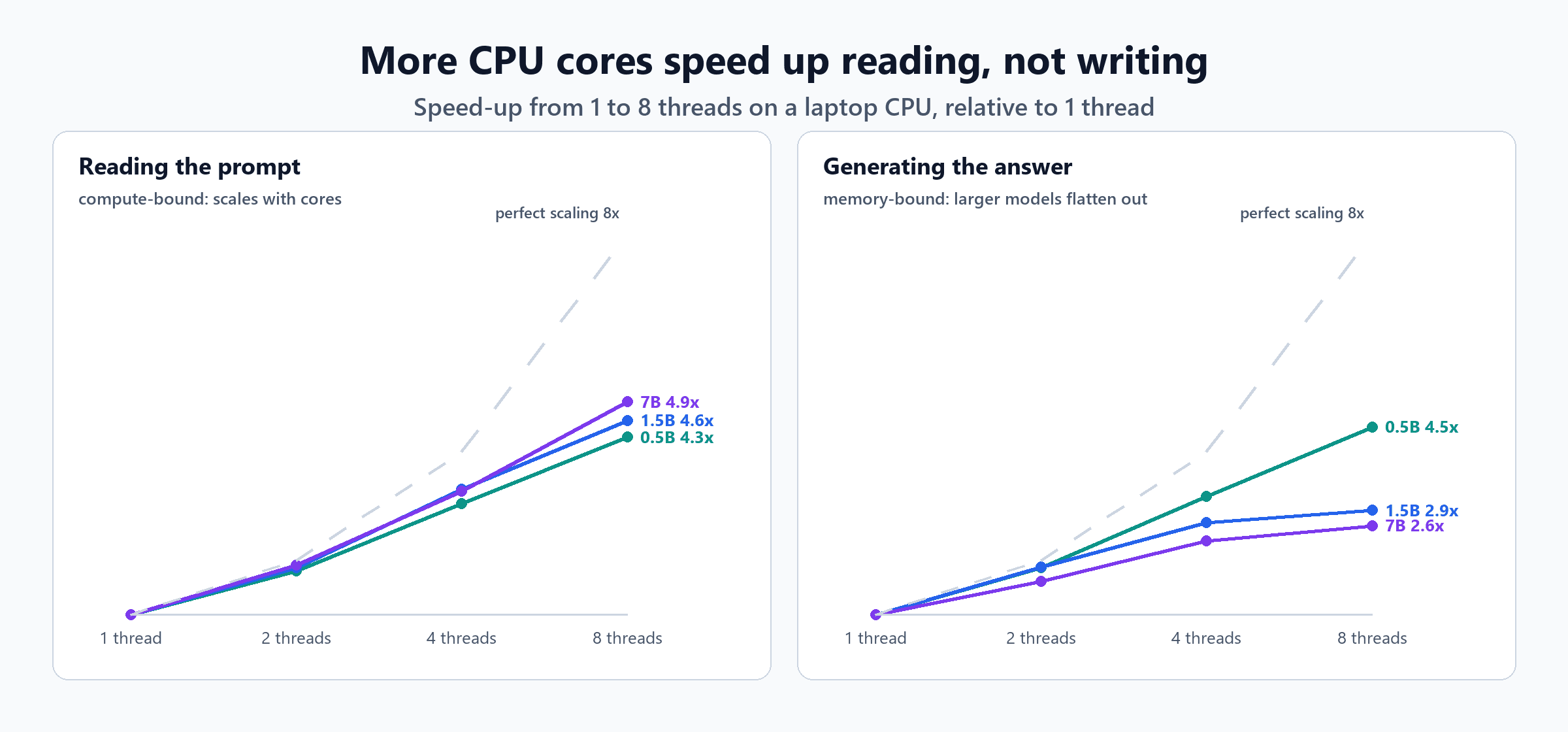
| Model | Reading, 1 → 8 threads (tokens/s) | Generating, 1 → 8 threads (tokens/s) | Generating, 4 → 8 threads |
|---|---|---|---|
| 0.5B | 108 → 463 | 16 → 72 | +40% |
| 1.5B | 78 → 359 | 13 → 38 | +8% |
| 7B | 16 → 80 | 3.3 → 8.7 | +12% |
Reading is arithmetic on many tokens at once, so more cores help. Generating produces one token at a time, and every token requires reading the entire model from memory. Multiply each model's size by its top generation speed and you get roughly how much data it's reading per second:
- 0.5B: 0.49 GB × 72 per second ≈ 35 GB/s
- 1.5B: 1.12 GB × 38 per second ≈ 43 GB/s
- 7B: 4.68 GB × 8.7 per second ≈ 41 GB/s
The two larger models both level off at about 41 to 43 GB/s, which is roughly what this laptop's memory can deliver. Extra cores can't help once memory is the bottleneck. The 0.5B model is small enough that it hadn't reached that limit yet, which is why it kept scaling.
That's the real reason edge devices are getting NPUs (neural processing units) and GPUs with fast memory: they add both arithmetic and memory bandwidth for exactly this workload. What it means for choosing hardware:
- Memory bandwidth and memory size matter more than core count for generating text.
- NPUs are built for efficient on-device inference. Microsoft's Copilot+ PC specification, for example, requires an NPU rated at 40+ TOPS. Using one needs a runtime and a model format that support it, so check that your chosen model and runtime actually run on the NPU, not just that the device has one. CPU, GPU, NPU and QPU explains each processor and includes a script to inventory what your devices have.
- Battery is the cost we couldn't measure here. On a laptop on battery, sustained CPU inference drains it fast; NPUs exist largely to do the same work for much less power.
5. Updates and Deployment: You Ship the Model
In the cloud, the provider changes the model whenever it likes. At the edge, you deliver every model to every device, and every update is your change to manage. Three facts shape how:
- Model files are big and don't update in pieces. The 1.5B model is 1.12 GB. A new version means a new file; there's no small patch.
- A corrupted or tampered model file can be silent. It may still load and simply give worse answers.
- Devices differ. A model that runs well on 16 GB can fail, or freeze the machine, on 8 GB.
So we built a deployment package the way an Intune Win32 app would install it. The package holds the model file and a manifest: name, version, the publisher's SHA-256, file size, minimum RAM and disk space, runtime version and licence. The install script:
- Skips if that version is already active.
- Checks the device: enough RAM, enough free disk.
- Copies the model into its own version folder, then verifies the hash of the copy, not the source.
- Switches to the new version in one step, by writing a small pointer file and moving it into place. A failed install never touches the version in use.
- Keeps the previous version for rollback, and removes anything older.
The heart of it:
# 3. copy into a new version folder, then verify the copy (not the source)
$target = Join-Path $Root "$($m.name)\$($m.version)"
New-Item -ItemType Directory -Force -Path $target | Out-Null
Copy-Item (Join-Path $Package $m.file) $target -Force
Copy-Item (Join-Path $Package 'manifest.json') $target -Force
$hash = (Get-FileHash (Join-Path $target $m.file) -Algorithm SHA256).Hash.ToLower()
if ($hash -ne $m.sha256) {
    Remove-Item $target -Recurse -Force
    Log "hash mismatch: expected $($m.sha256.Substring(0,12)), got $($hash.Substring(0,12)); nothing changed"; exit 30
}

# 4. switch in one step: write the new pointer to a temp file, then move it over the old one
$previous = if (Test-Path $currentFile) { (Get-Content -Raw $currentFile | ConvertFrom-Json).version } else { $null }
$tmp = "$currentFile.tmp"
[pscustomobject]@{ name = $m.name; version = $m.version; path = (Join-Path $target $m.file); sha256 = $m.sha256;
                   previous = $previous; installed = (Get-Date -Format s) } | ConvertTo-Json | Set-Content $tmp -Encoding UTF8
Move-Item $tmp $currentFile -Force
A matching detection script reports which version is active, the way Intune checks whether a Win32 app is installed, and a rollback switch points back to the previous version. We tested six scenarios:
S1 fresh install v1 (0.5B)         exit 0      1.2 s  installed (previous: )
detect 1.0.0                       exit 0   Detected helpdesk-triage 1.0.0
S1b same version again             exit 10     0.3 s  already installed
S2 upgrade to v2 (1.5B)            exit 0      2.7 s  installed (previous: 1.0.0)
detect 2.0.0                       exit 0   Detected helpdesk-triage 2.0.0
S3 corrupted package (1 byte)      exit 30     2.5 s  hash mismatch: expected 6a1a2eb6d156, got c6318dd50299; nothing changed
detect 2.0.0                       exit 0   Detected helpdesk-triage 2.0.0
S4 device below requirements       exit 20     0.3 s  not enough RAM: 16 GB, needs 64 GB
detect 2.0.0                       exit 0   Detected helpdesk-triage 2.0.0
S5 rollback                        exit 0   rolled back from 2.0.0 to 1.0.0
detect 1.0.0 exit 0 Detected helpdesk-triage 1.0.0- A single changed byte in a 1.12 GB file was refused, and the working version stayed active.
- A device that didn't meet the requirements was refused before anything was copied.
- Rollback was instant, because the previous version was still on disk.
One gap we'd fix before production: rollbacks weren't written to the install log, only installs. Every version change, in either direction, belongs in the log.
At fleet scale
The arithmetic changes once you multiply by devices:
- Bandwidth: one 1.12 GB model to 2,000 laptops is about 2.2 TB of downloads per update. Peer-to-peer caching, such as Windows Delivery Optimization, and download scheduling stop that from flooding your network.
- Disk: keeping the previous version for rollback doubles the space. Our two versions used about 1.6 GB.
- Rings: roll out new models in stages, to a pilot ring first and then broad deployment, exactly like Windows updates (Intune and Windows Autopatch covers ring design). A new model can change answers in ways your users notice before your monitoring does.
- Keep the model separate from everything else. Prompts, settings and rules are small text files. Ship them separately from the model, so most changes don't require a new gigabyte download.
- Test before release. Run your evaluation set on each new model before it goes to any ring; the model supply chain post covers verifying files, licences and provenance first.
When the Edge Makes Sense
Put AI on the device when:
- The data shouldn't leave it: personal data, regulated information, sensitive documents.
- It must work without connectivity: field work, travel, factory floors, unreliable networks.
- Latency matters more than raw capability: autocomplete, classification, real-time assistance.
- The volume is high and the task narrow, so per-request cloud costs would add up.
Keep it in the cloud when:
- The task needs a model too big for your devices.
- Devices vary too much to guarantee a good experience everywhere.
- You need the newest models as soon as they're released, with no distribution work.
Many organisations end up with both: a small local model for the routine and private work, and a cloud model for the hard questions.
Checklist
- The model and runtime are licensed for your use, and their hashes are verified (supply chain checks).
- The runtime listens only on
127.0.0.1, and its connections are checked; outbound traffic is blocked if the data is sensitive. - Device requirements (RAM, disk, accelerator) are checked before installing, not after.
- Models install into versioned folders, switch in one step, and keep the previous version for rollback.
- The installed copy's hash is verified, so corruption or tampering is refused.
- Detection reports the active version; every install and rollback is logged.
- Updates roll out in rings, with an evaluation run before each release.
- Model files, logs and caches on the device are protected like the data they process.
The Short Version
| What changes | What we measured on the laptop |
|---|---|
| Offline operation | Five different questions answered with no internet involvement |
| Privacy | Every connection the model held was on 127.0.0.1; no outside addresses, no UDP |
| Latency | First token after 0.1 to 0.2 s for new questions; a cloud API round trip alone measured 0.22 to 0.42 s |
| Cold start | 1.4 to 2.7 s to load the 1.5B model; 45 s for a 14B model |
| Hardware | Reading scales with cores (up to 4.9x on 8 threads); generating hits a memory-speed limit near 41 to 43 GB/s for larger models |
| Updates | Versioned install with hash check, requirement check and instant rollback; a 1-byte corruption and an under-spec device were both refused |
Running AI at the edge trades the cloud's convenience for control: over your data, your latency and your costs. In return, you take on the work the provider used to do: choosing hardware, shipping gigabyte files, verifying them, and rolling them back when something goes wrong. Treat models like any other software you deploy to devices, and that work becomes routine.

Written by
Chetan Yamger
Cloud Engineer · AI Automation Architect · Modern Workplace Consultant
Cloud Engineer, AI Automation Architect, and Modern Workplace Consultant based in Amsterdam, Netherlands. Specializing in scalable, secure enterprise solutions with Microsoft Azure, Intune, PowerShell, and AI-driven automation using ChatGPT, Gemini, and modern LLM technologies.
Stay in the loop.
New articles, straight to you.
Deep-dive technical articles on Intune, PowerShell, and AI — no noise, no spam.
Discussion
Share your thoughts — your email stays private
Leave a comment