
The Future of Computing: CPU + GPU + NPU + QPU
Not quantum vs classical: how CPUs, GPUs, NPUs and QPUs each do what they're best at, and how quantum-centric, hybrid computing will actually run.
For years, the quantum computing story has been told as a contest: quantum versus classical. Which will win? When will quantum computers replace today's machines? It makes a good headline, and it's the wrong question.
Look inside any modern computer and you'll see why. A laptop bought today often contains three different kinds of processor: a CPU for general work, a GPU for graphics and parallel maths, and an NPU for running AI models efficiently. A data centre adds racks of GPUs and custom AI chips. Nothing replaced anything. Each new processor joined the team because it was dramatically better at one kind of work.
The QPU is the next member of that team. The interesting question isn't quantum or classical; it's which processor does which part of the job, and how do they work together? IBM calls its answer quantum-centric supercomputing: systems that combine classical and quantum processors so that each contributes where it is strongest. This post explains what that means, from the inside of each processor to the engineering that connects them.
Stage 11 of the learning path
This is the second post in stage 11, Future of Quantum Computing, of the Quantum Computing & Technology learning path. It builds on Classical Computer vs Quantum Computer, which introduced the CPU, GPU and QPU, and on From Noisy Qubits to Fault-Tolerant Quantum Computers. This post adds the NPU, the data-movement problem, and how hybrid systems are actually built and run.
The Map: Modern Computing
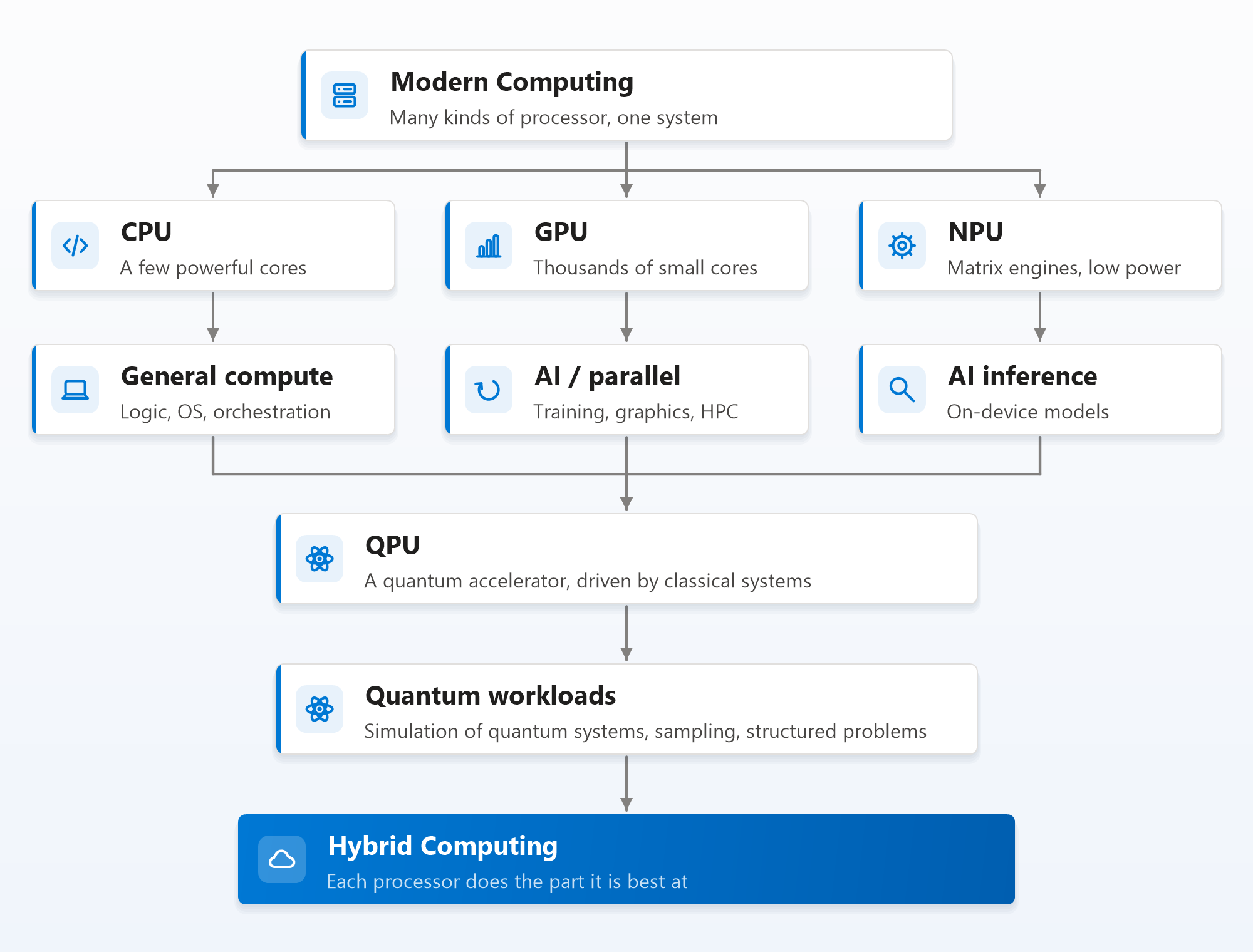
Two things about this map matter. First, the three classical processors merge into the QPU: a quantum processor never works alone. It's always driven, fed and interpreted by classical machines. Second, the arrow ends at hybrid computing, not at the QPU. The destination isn't a quantum computer; it's a system where each kind of processor handles the part of a workload it does best.
Why One Processor Is No Longer Enough
For about thirty years, the CPU got faster almost for free. Transistors shrank, clock speeds rose, and every program sped up without anyone rewriting it. Around 2005, that stopped. Making transistors smaller no longer made them proportionally more power-efficient (the end of what engineers call Dennard scaling), so raising clock speeds made chips too hot to cool.
The industry's answer was specialisation: if you can't make one general processor much faster, build different processors that are each extremely efficient at one kind of work. History shows the pattern clearly:
| Era | Specialised processor | What it took over | What happened next |
|---|---|---|---|
| 1980s | Maths coprocessor (such as the Intel 8087) | Floating-point arithmetic | Absorbed into the CPU itself |
| Late 1990s | GPU | 3D graphics | Became programmable (CUDA, 2007) |
| 2010s | GPU for AI | Training neural networks | Became the centre of the AI boom |
| 2015 onwards | AI accelerators (Google's TPU, cloud inference chips) | Data centre AI | Spread across the cloud providers |
| 2017 onwards | NPU in phones and PCs | Running AI on the device | Now a standard part of laptops |
| Now | QPU | Simulating quantum systems and other narrow problems | Being connected to supercomputers |
Each new processor followed the same path: a narrow job, a dramatic efficiency gain on that job, and then integration into a larger system. The QPU is following that path too, just much earlier in it.
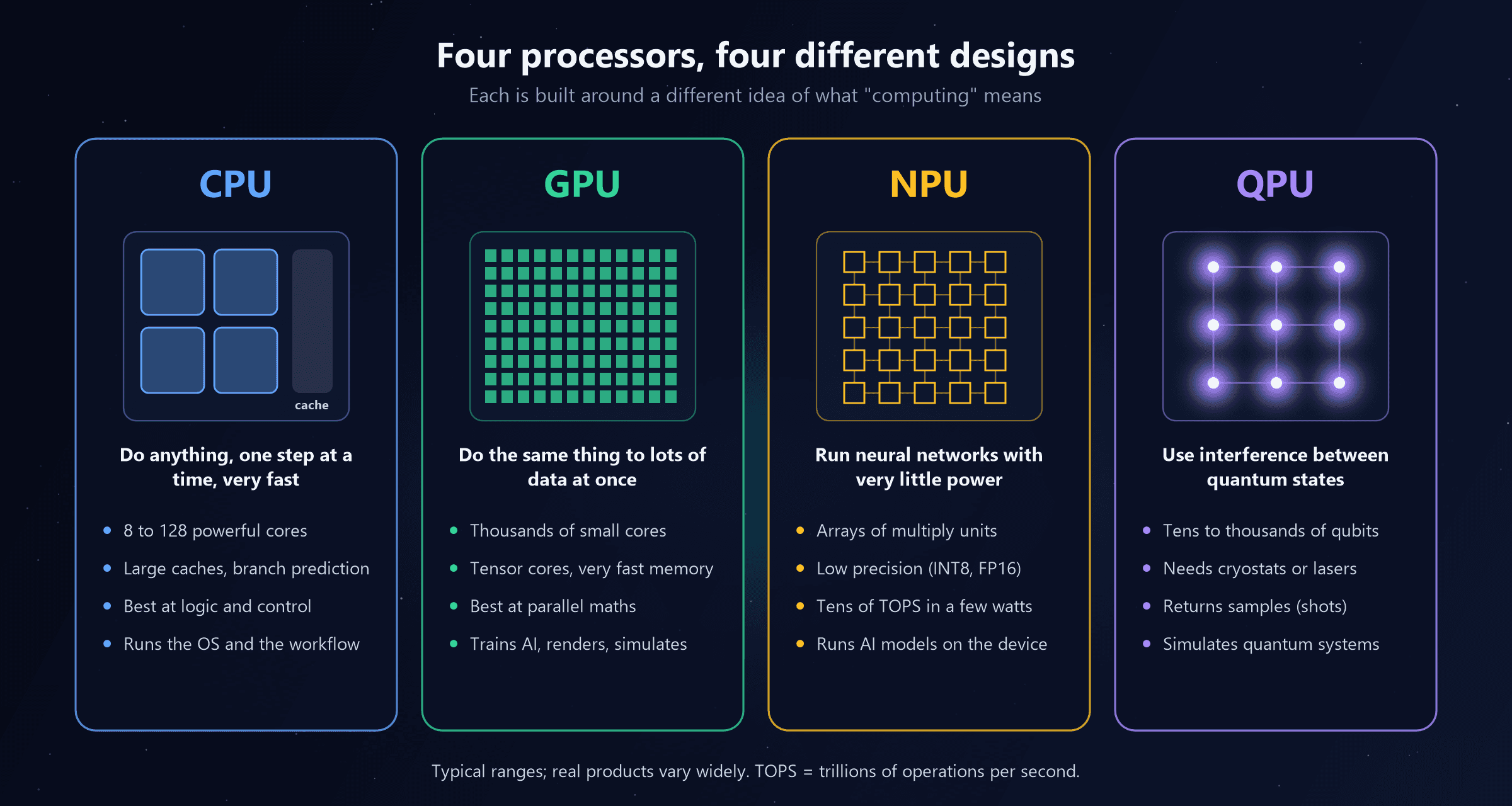
Four Processors, Four Ideas
CPU: the generalist and the conductor
A CPU has a small number of very powerful cores, from a handful in a laptop to over a hundred in a server. Each core is designed to run any program quickly, one instruction stream at a time: it predicts which way branches will go, runs instructions out of order to avoid waiting, and keeps frequently used data in large, fast caches.
That makes the CPU the best processor for logic, decisions and control: operating systems, databases, web servers, business logic, and, crucially, orchestrating everything else. In a heterogeneous system, the CPU decides what runs where, prepares the data, launches work on the accelerators and collects the results.
Weak at: doing the same simple operation on billions of numbers. It can, but a GPU or NPU does it far faster per watt.
GPU: the parallel workhorse
A GPU trades a few clever cores for thousands of simple ones, all running the same instruction on different pieces of data at once. Modern data centre GPUs add tensor cores, units built specifically for the matrix multiplications at the heart of AI, and very fast stacked memory (HBM) that feeds them at terabytes per second.
That makes the GPU the best processor for massively parallel arithmetic: training and running large AI models, graphics, scientific simulation and, increasingly, simulating quantum circuits and decoding quantum error correction (see Quantum Computing + AI).
Weak at: branching, unpredictable logic, and small jobs, where the cost of sending work to the GPU outweighs the speed-up.
NPU: AI with a power budget
A neural processing unit is built for one thing: running neural networks efficiently. Its core is a grid of multiply-accumulate units through which data flows in a regular pattern (a "systolic array", the same idea Google uses in its TPUs), using low-precision numbers such as 8-bit integers. Trained neural networks tolerate that lower precision well, and it saves enormous amounts of energy and memory.
NPUs are measured in TOPS, trillions of operations per second. Microsoft's Copilot+ PC specification, for example, requires an NPU of 40 TOPS or more. The point isn't raw speed; a data centre GPU is far faster. It's doing AI work in a few watts, so a laptop can blur your video background, transcribe a meeting or run a small language model all day without draining the battery or spinning up the fan.
Weak at: anything that isn't neural-network maths, and training large models. NPUs are mostly for inference, running models that were trained elsewhere.
QPU: the quantum specialist
A QPU is the most different of the four. It doesn't process numbers at all in the usual sense. It prepares qubits, applies gates that create superposition, entanglement and interference, and measures them, returning a handful of random bits per run. Repeating the run thousands of times (shots) gives a probability distribution, which is the answer.
That makes a QPU the right tool for a narrow set of problems with quantum structure: simulating molecules and materials, certain sampling problems, and algorithms such as Shor's (see Where Can Quantum Computers Actually Be Useful?). It needs extreme conditions (millikelvin refrigerators or ultra-high vacuum and lasers) and an entire classical control system to drive it, as covered in How Does a Quantum Computer Actually Work?.
Weak at: almost everything else, including storing data, loading large datasets, and the matrix arithmetic AI depends on.
Side by side
| CPU | GPU | NPU | QPU | |
|---|---|---|---|---|
| Core idea | Fast, flexible, sequential | Massively parallel | Efficient neural-network maths | Quantum interference |
| Units | Few powerful cores | Thousands of small cores | Arrays of multiply-accumulate units | Tens to thousands of qubits |
| Typical precision | 64-bit | 32, 16, 8-bit and lower | 16, 8, 4-bit | Probabilities from repeated shots |
| Programming model | Any language | CUDA, ROCm, AI frameworks | AI runtimes (ONNX Runtime, Core ML, Windows ML) | Circuits (Qiskit, CUDA-Q, Q#) |
| Where you meet it | Everywhere | Gaming PCs, workstations, data centres | Phones, Copilot+ PCs, Macs | Cloud services and research centres |
| Best for | Logic, control, orchestration | Training AI, graphics, simulation | On-device AI inference | Quantum simulation, structured problems |
| Worst for | Bulk parallel maths | Branch-heavy logic, tiny jobs | General code, training | Almost everything else |
Try It: What Processors Does Your Machine Have?
Heterogeneous computing starts with a simple question that software must answer at run time: which processors are actually available? This PowerShell lists the CPU and looks for a real GPU and an NPU on Windows:
$devices = Get-PnpDevice -PresentOnly -ErrorAction SilentlyContinue
$npu = $devices | Where-Object { $_.Class -eq 'ComputeAccelerator' -or $_.FriendlyName -match '\bNPU\b|Neural|AI Boost' }
$gpu = Get-CimInstance Win32_VideoController | Where-Object { $_.Name -notmatch 'Hyper-V|Remote Display|Basic Display' }

"CPU:   " + (Get-CimInstance Win32_Processor).Name
"GPU:   " + $(if ($gpu) { $gpu.Name -join ', ' } else { 'none found' })
"NPU:   " + $(if ($npu) { $npu.FriendlyName -join ', ' } else { 'none found' })
"Model: " + (Get-CimInstance Win32_ComputerSystem).Model
On the machine used to write this post, it returned:
CPU:   11th Gen Intel(R) Core(TM) i7-11800H @ 2.30GHz
GPU:   none found
NPU:   none found
Model: Virtual Machine
That's an instructive result. The test machine is a virtual machine: the physical laptop has a GPU, but the hypervisor exposes only five CPU cores and a virtual display adapter. Software running inside it can't use accelerators it can't see. The same is true in the cloud, where the processors your workload can use depend entirely on the instance type you choose. Heterogeneous computing is as much about provisioning and discovery as about hardware.
A small lesson from writing this script
The first version matched NPU anywhere in a device name, and reported "Microsoft Hyper-V Input" as an NPU, because "Input" contains those three letters. The \b word boundaries in '\bNPU\b' fix it. If you build hardware inventory reports through Intune or Microsoft Graph, test your filters against real device names before trusting the counts.
On a Copilot+ PC, the NPU appears as a compute accelerator device, and Windows exposes it to applications through Windows ML and ONNX Runtime. That matters for endpoint teams: NPU capability is now a hardware attribute worth inventorying across a managed fleet, just like TPM version or memory size.
The Real Bottleneck: Moving Data
If each processor is so good at its job, why not send every task to the best one? Because moving data costs more than computing on it. Fetching a number from main memory takes far more energy and time than doing arithmetic on it, by a factor of hundreds in many designs. Sending work to an accelerator across a bus or a network costs even more.
So heterogeneous computing has one golden rule: offload work only when the computation is large compared with the data you have to move. That's why:
- GPUs are fed in large batches, and modern designs put CPU and GPU memory closer together (Apple's unified memory, NVIDIA's Grace Hopper and similar designs, NVLink and CXL interconnects).
- NPUs sit on the same chip as the CPU in laptops, sharing memory, so short AI tasks are worth offloading.
- QPUs are the extreme case. Loading classical data into a quantum state is slow, and reading results out requires many repeated shots. That's why quantum computers suit problems with small inputs and small outputs but enormously hard computation in between, as explained in Quantum Computing + AI.
The same rule decides where the QPU must physically sit, which brings us to quantum-centric supercomputing.
Quantum-Centric Supercomputing
The idea
IBM describes quantum-centric supercomputing as an architecture in which quantum processors and classical processors (CPUs and GPUs) work together as one system, each running the parts of a workload it handles best, linked by fast networks and common software. NVIDIA, national supercomputing centres and other quantum companies describe essentially the same picture under different names: the QPU becomes another accelerator in the supercomputer, next to GPUs.
A hybrid loop you can run
Almost every useful near-term quantum algorithm is a loop between the two worlds: a classical optimiser chooses settings, the QPU evaluates a circuit with those settings, the result goes back to the optimiser, and so on. Here's a complete example with Qiskit, finding the lowest energy of a small magnetic model. The simulator stands in for a real QPU:
import time
import numpy as np
from scipy.optimize import minimize
from qiskit.circuit.library import n_local
from qiskit.quantum_info import SparsePauliOp
from qiskit.primitives import StatevectorEstimator

# The problem: the lowest energy of a small magnetic model
hamiltonian = SparsePauliOp.from_list([("ZZ", 1.0), ("XI", 0.5), ("IX", 0.5)])

# The quantum part: a parameterised circuit the QPU runs
ansatz = n_local(2, "ry", "cx", reps=2)
estimator = StatevectorEstimator()      # stands in for a real QPU here

qpu_time, calls = 0.0, 0
def energy(params):
    global qpu_time, calls
    start = time.perf_counter()
    result = estimator.run([(ansatz, hamiltonian, params)]).result()
    qpu_time += time.perf_counter() - start
    calls += 1
    return float(result[0].data.evs)

# The classical part: the CPU's optimiser chooses the next parameters
start = time.perf_counter()
best = minimize(energy, np.full(ansatz.num_parameters, 0.1), method="COBYLA", options={"maxiter": 200})
total = time.perf_counter() - start

print(f"Quantum evaluations:   {calls}")
print(f"Hybrid result:         {best.fun:.6f}")
print(f"Exact answer:          {np.linalg.eigvalsh(hamiltonian.to_matrix()).min():.6f}")
print(f"Time in quantum calls: {qpu_time / total:.0%} of {total:.2f} s")
Run on the test machine (Qiskit 2.5.2):
Quantum evaluations:   200
Hybrid result:         -1.414213
Exact answer:          -1.414214
Time in quantum calls: 56% of 0.43 s
The hybrid loop found the right answer (minus the square root of 2), but notice the shape of the work: 200 separate round trips between the classical optimiser and the quantum evaluation. On a laptop simulator each round trip takes about a millisecond. On a real QPU, the round trip is the problem.
Why the QPU has to sit next to the classical computer
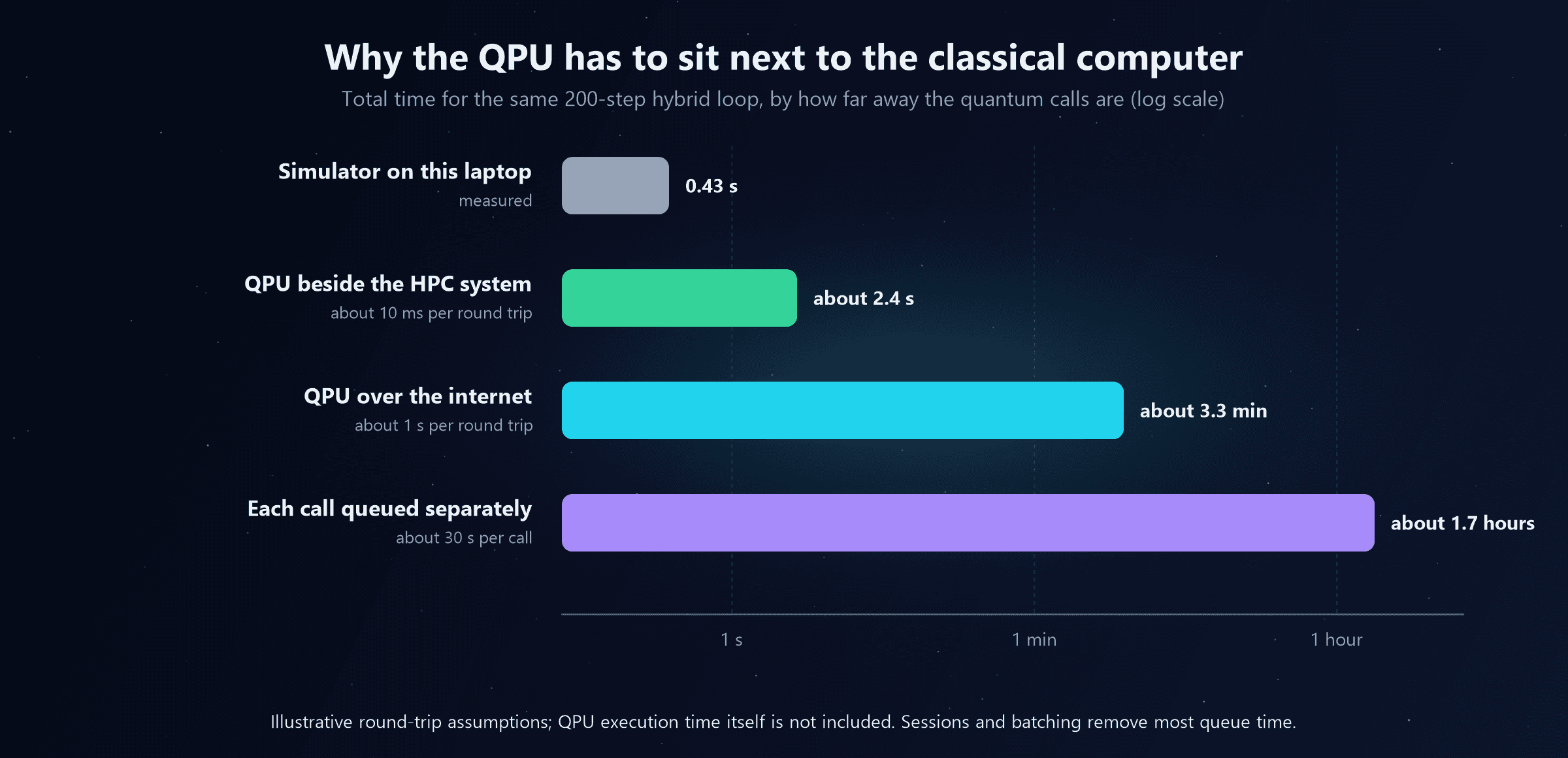
With illustrative round-trip times, the identical loop takes about 2.4 seconds when the QPU sits beside the classical system, about 3 minutes over the internet, and well over an hour if every call waits in a public queue. Real algorithms need thousands of such iterations. That's why cloud quantum services offer sessions and batch modes that keep a job's place on the machine, and why the long-term direction is co-location: QPUs installed inside the same facilities as supercomputers, on fast local networks.
Three time-scales
Not every interaction between classical and quantum processors happens at the same speed, and each speed needs a different kind of connection:
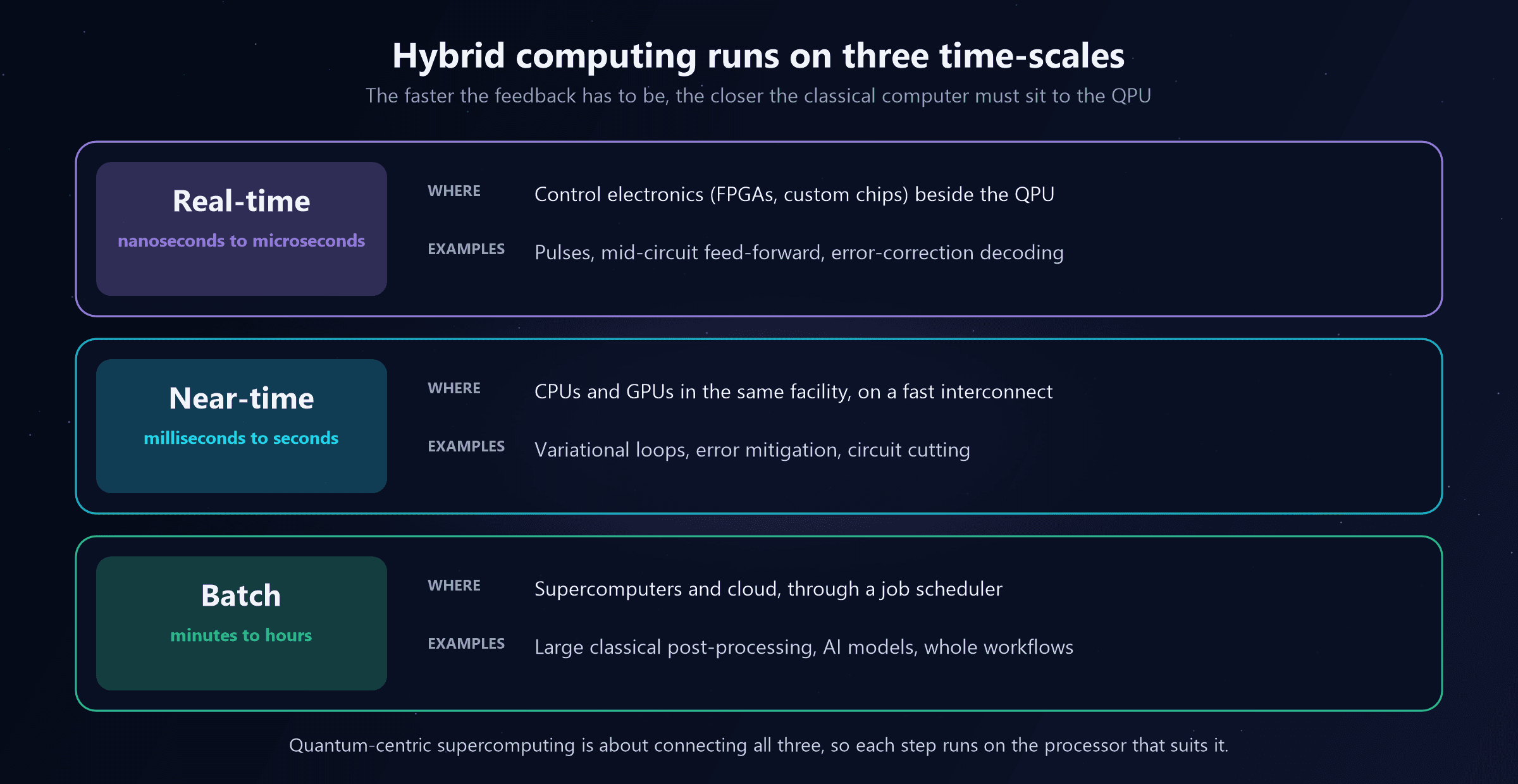
- Real-time (nanoseconds to microseconds). Generating pulses, reacting to a mid-circuit measurement, and decoding error correction must happen while the qubits are still coherent. This runs on control electronics right beside the QPU, and at fault-tolerant scale, decoding is one of the hardest real-time computing problems there is (see From Noisy Qubits to Fault-Tolerant Quantum Computers).
- Near-time (milliseconds to seconds). Variational loops like the example above, error mitigation, and techniques that split big circuits into smaller pieces ("circuit cutting") and stitch the results together. This needs CPUs and GPUs close to the QPU on a fast network. NVIDIA's NVQLink and CUDA-Q platform are aimed exactly at this layer, linking QPUs to GPU supercomputers.
- Batch (minutes to hours). Large classical processing of quantum results, running alongside ordinary HPC jobs and AI models, managed by the same job schedulers supercomputing centres already use.
What it looks like in practice
Several real projects show the pattern:
- IBM and RIKEN installed an IBM quantum system at RIKEN in Kobe, Japan, alongside the Fugaku supercomputer, and have run chemistry calculations that split the work: the QPU samples candidate electron configurations, and thousands of Fugaku's CPU nodes do the heavy classical processing on them (a method called sample-based quantum diagonalisation).
- National supercomputing centres in Europe, the US and elsewhere are hosting quantum computers next to their classical machines, often funded through programmes such as the EuroHPC quantum initiative and US national laboratory access programmes.
- GPU makers are building software and interconnects that treat QPUs as accelerators: CUDA-Q lets one program target GPUs (for simulation) or real QPUs, and NVQLink connects QPUs to GPU systems with low latency.
The common thread: nobody is building a quantum computer to replace a supercomputer. They're building supercomputers that include quantum processors.
One Workload, Four Processors
What does a hybrid workload look like end to end? Take a future materials-discovery pipeline, the kind described in Where Can Quantum Computers Actually Be Useful?:
1. CPU: plan and orchestrate
2. GPU: screen millions of candidates
3. QPU: solve the hardest cases
4. CPU and GPU: post-process and learn
5. NPU: use the result
Every processor contributes, and none could do the whole job alone. That's what hybrid computing means.
The Software That Holds It Together
Heterogeneous hardware is only useful if software can target it without being rewritten for every chip. The trend is the same at every level: write the workload once, and let a runtime decide where each part runs.
| Layer | Examples | What it does |
|---|---|---|
| Schedulers and orchestrators | Slurm, Kubernetes, cloud batch services | Decide which machine and which processors run each job |
| Workflow tools | Python workflow engines, Qiskit Functions, HPC workflow managers | Chain classical and quantum steps into one pipeline |
| AI runtimes | ONNX Runtime, Windows ML, Core ML, PyTorch | Run the same model on CPU, GPU or NPU, whichever is available |
| Parallel computing | CUDA, ROCm, SYCL, OpenMP | Program CPUs and GPUs |
| Quantum SDKs | Qiskit, CUDA-Q, Q#, and the QIR intermediate representation | Write circuits once, run them on simulators (often GPUs) or real QPUs |
For IT and cloud engineers, this is familiar territory. It's the same layering as containers and orchestration: the hardware underneath gets more varied, and the job of the platform team is to make it look uniform to the people writing workloads.
Myths About the Future of Computing
| Myth | Reality |
|---|---|
| Quantum computers will replace classical computers | QPUs are accelerators that depend on classical systems for everything else |
| Quantum computers will replace GPUs for AI | GPUs and AI accelerators will keep doing AI; a QPU isn't a drop-in replacement |
| NPUs make GPUs unnecessary | NPUs run small models efficiently on devices; GPUs train and serve large models |
| More processor types make computing harder to use | The software trend is towards runtimes that pick the right processor automatically |
| Hybrid computing is a future idea | It's how every phone, laptop and supercomputer already works; the QPU is just the newest member |
What This Means for IT and Cloud Engineers
- Think in workloads, not chips. The useful question for any project is which parts are logic (CPU), bulk parallel maths (GPU), on-device AI (NPU) or quantum simulation (QPU).
- Inventory accelerators. NPU capability across your laptop fleet now affects which AI features users get; GPU and accelerator capacity drives cloud cost. Both are worth reporting on, for example alongside existing Intune hardware inventory.
- Expect quantum as a service inside HPC. If your organisation runs HPC or AI infrastructure, quantum access will most likely arrive through the same schedulers, cloud accounts and supercomputing partners, not as a box in your data centre.
- Mind the latency. Hybrid quantum workloads are sensitive to round-trip time; sessions, batching and co-located services matter as much as raw QPU performance.
- Keep security separate. Whatever the hardware future holds, the action item for today is post-quantum cryptography.
Quick Recap
- The future isn't quantum versus classical; it's CPU + GPU + NPU + QPU, each doing what it's best at.
- Specialisation won after clock speeds stalled; every accelerator, from the maths coprocessor to the GPU, joined the system rather than replacing it.
- CPU: logic, control and orchestration. GPU: massively parallel maths and AI training. NPU: efficient AI inference on the device. QPU: problems with quantum structure.
- Moving data is the real cost, and QPUs are the extreme case: small input, small output, hard computation in between.
- Quantum-centric supercomputing puts QPUs inside supercomputers so that the hybrid loop is fast: the same 200-step loop takes seconds when co-located and hours through a public queue.
- Hybrid computing works on three time-scales: real-time control and decoding, near-time loops, and batch processing.
- Software is converging on runtimes and SDKs that let one workload target many kinds of processor.
What's Next on the Learning Path
The remaining stage 11 posts look at the next ten years in more detail: which technologies are racing towards fault tolerance, how industries are preparing, and which skills are worth building now. Stage 10, Quantum Networking, covers the links that will connect quantum processors to each other. The full 11-stage path is listed at the end of the beginner's guide.

Written by
Chetan Yamger
Cloud Engineer · AI Automation Architect · Modern Workplace Consultant
Cloud Engineer, AI Automation Architect, and Modern Workplace Consultant based in Amsterdam, Netherlands. Specializing in scalable, secure enterprise solutions with Microsoft Azure, Intune, PowerShell, and AI-driven automation using ChatGPT, Gemini, and modern LLM technologies.
Stay in the loop.
New articles, straight to you.
Deep-dive technical articles on Intune, PowerShell, and AI — no noise, no spam.
Discussion
Share your thoughts — your email stays private
Leave a comment