
Intune + Windows Autopatch: Designing a Modern Windows Update Strategy
September 2026 gives Autopatch real control over quality updates, .NET Framework updates, and machine recovery. Here's how to design a ring strategy around it.
For most of Windows Update's history, "strategy" meant picking a few deferral numbers in an update ring policy and hoping for the best. Microsoft started rolling out a real change to that on September 1, 2026: Windows Autopatch gets granular, per-update-type control over quality updates, .NET Framework updates, and a new machine recovery capability, reaching every tenant by October 15, 2026.
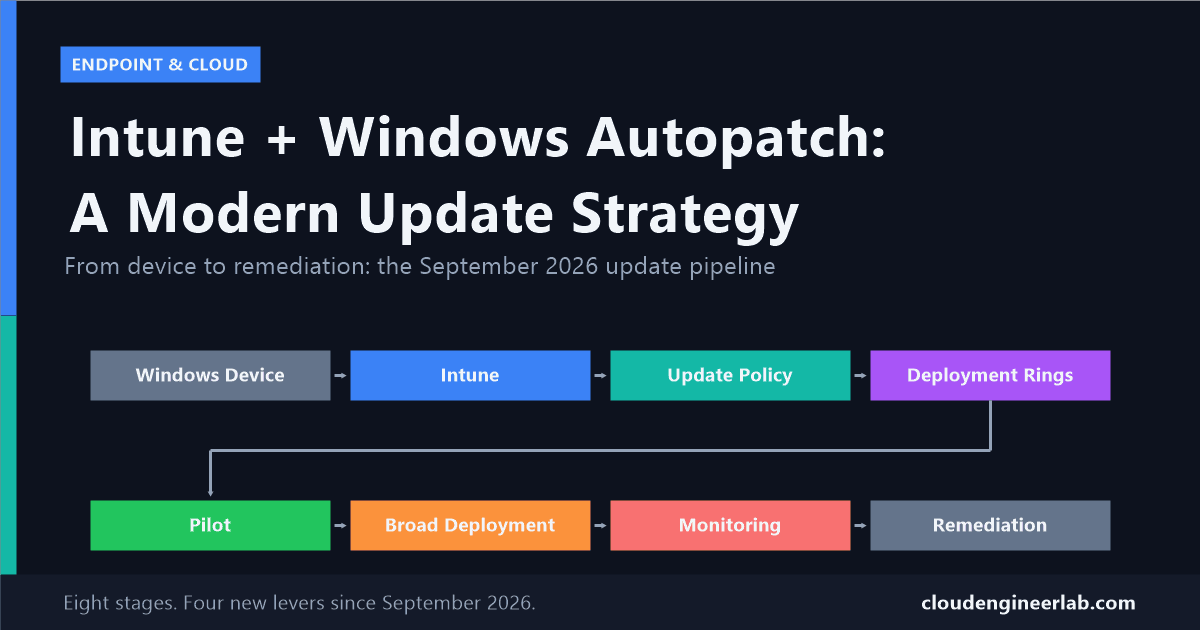
That is not a small settings tweak. It changes what "designing an update strategy" actually means, because for the first time you have separate levers for security patches, preview updates, out-of-band fixes, and boot-failure recovery, instead of one blunt deferral number covering everything. This post walks through building that strategy stage by stage, using the pipeline every Autopatch deployment actually follows.
The Pipeline at a Glance
Each stage below is a real decision point, not just a step that happens automatically once you flip a switch.
Stage 1: The Windows Device
Before any policy or ring matters, a device has to actually be eligible. It needs to be Entra-joined (or hybrid joined), enrolled in Intune, licensed for Windows Autopatch, and registered into an Autopatch group. Skip registration and none of the ring logic below applies to that device at all, it just sits outside the managed pipeline entirely, patched or not, with no visibility.
Registration is not enrollment
A device can be fully Intune-enrolled and still not be registered with Windows Autopatch. If a device isn't showing up in your Autopatch reporting, check its Autopatch group membership before assuming there's a policy problem.
Stage 2: Intune's Role
Intune is where update policy actually gets assigned, and its role got more central this year: since June 2026, Intune became the exclusive tool for Windows Update for Business policy. If any part of your update management still lives in Group Policy or WSUS, that path is no longer the supported one going forward.
Under the hood, when you create or edit an Autopatch group, Windows Autopatch uses Microsoft Graph to create the Entra ID groups and policy assignments behind the scenes, Intune then assigns the resulting software update policies to those groups, and Autopatch takes over from there: delivering the policies and reporting device-level status back. You are not managing Intune and Autopatch as two separate systems doing similar things. Autopatch groups are built on top of Intune's assignment model, not a replacement for it.
Stage 3: Update Policy, Where September 2026 Actually Changes Things
This is the stage that got rebuilt. Before this rollout, a quality update policy was mostly one setting: how many days to defer. Now it splits into four separate approval categories, each configurable independently:
| Update type | What it covers | A reasonable default |
|---|---|---|
| Monthly security updates | The standard Patch Tuesday security release | Automatic approval, short or no deferral |
| Monthly non-security preview updates | Optional preview fixes ahead of next month's rollup | Manual approval, most orgs can skip these entirely |
| Out-of-band security updates | Emergency fixes for actively exploited vulnerabilities | Automatic approval, minimal deferral |
| Out-of-band non-security updates | Emergency fixes for non-security bugs | Manual approval, evaluate case by case |
Deferrals in each category go up to 30 days, giving you room to let a pilot ring absorb a release before it reaches everyone else. And now there are two more things living in this same policy surface that used to have no formal controls at all:
.NET Framework updates follow the exact same approval categories as Windows OS quality updates. There is no separate .NET policy to maintain, your monthly security approval setting governs both at once.
Quick Machine Recovery (QMR) updates also get approval and deferral settings inside this same policy. QMR is a genuinely new capability: if a device fails to boot twice in a row, Windows can automatically detect, diagnose, and apply a Microsoft-provided fix through the Windows Recovery Environment, without anyone physically touching the machine. You choose whether QMR fixes deploy automatically or wait for manual review, the same approval pattern as everything else in this policy.
Pausing an update does not roll it back
If you pause a release because it's causing problems, Autopatch stops sending it to devices that haven't installed it yet. It will not uninstall or roll back the update on devices that already got it. Pause is a stop-the-bleeding control, not an undo button, plan your pilot ring size accordingly so a bad release affects as few devices as possible before you catch it.
Even hotpatch has exceptions, and September 2026 proved it
Hotpatch updates are supposed to apply security fixes without a reboot. The September 2026 security release broke that promise on purpose: Microsoft shipped it as a standard update instead of a hotpatch because the fix touches components that cannot be updated without a restart. Devices stayed enrolled in hotpatch with no configuration change needed, and hotpatching resumed normally with the next cycle. The lesson for your strategy: never assume "hotpatch-enabled" means "will never need a reboot notice to users." Build a communication step into your process for the months it doesn't hold.
Stage 4: Deployment Rings
Rings are organised through Autopatch groups, a logical container that bundles Entra device groups together with the update policies above. Every Autopatch group comes with two rings you cannot remove or rename: Test and Last. If you add nothing else, Test is your pilot ring and Last is everyone else. You can add up to 15 rings per group and run up to 300 groups per tenant, so the two defaults are a floor, not a ceiling.
Devices land in a ring one of two ways:
- Assigned distribution: one specific Entra device group maps to one ring. Predictable, manual, good for small or well-organised fleets.
- Dynamic distribution: a pool of devices splits across several rings by percentage you set, letting Autopatch handle the actual sorting.
Test: IT team plus 5 to 10 volunteers across your main hardware models. Gets every release first.
Last: everyone else. Receives the release once Test has run it for a few days without incident.
Why this works here: a small, uniform fleet doesn't need multiple gradual steps, one pilot checkpoint before broad deployment is enough signal.
Stage 5: Pilot
The Test ring only does its job if it actually represents your fleet's risk surface, not just whoever is easiest to add. A pilot made entirely of IT laptops will miss the driver conflict that only shows up on the finance department's specific docking stations.
Cover your hardware diversity
Include at least one device from every major OEM and model your organisation actually runs, not just the newest ones.
Include your risky software combinations
VPN clients, endpoint security agents, and any driver-heavy line-of-business hardware (barcode scanners, specialised peripherals) belong in the pilot, because that's where quality updates most often cause conflicts.
Keep it small enough to watch closely
A pilot ring you can personally check on every device is more useful than a large one you only glance at in a dashboard.
Give it real time before promoting
A few days minimum before a release moves toward broad deployment. Boot-failure issues in particular don't always surface on day one.
Stage 6: Broad Deployment
The Last ring (or your final custom ring) is where deferral timing matters most, because this is the ring absorbing whatever risk your pilot didn't catch. Stack your deferrals so each ring gets meaningfully more runway than the one before it, if Test deploys near-immediately and Last also deploys near-immediately, you have not actually built a gradual rollout, just two rings with the same outcome on different days.
Stage 7: Monitoring
September 2026 also added the reporting that makes the new policy controls worth having. Two reports matter most:
| Report | What it shows |
|---|---|
| Quality Update Status Report | Per-device target compliance, which updates actually installed, which policy is assigned, device readiness, and hotpatch status |
| Quick Machine Recovery Update Status Report | Which devices were affected by a boot-critical issue, their remediation status, the applicable fix version, release date, and OS version |
These sit alongside the Update Readiness dashboards and Update Readiness Checker introduced earlier in 2026, which give tenant-wide visibility and flag devices likely to have trouble before a rollout reaches them. Together, this is real device-level accountability: you can now answer "which specific machines are behind, and why" instead of just a tenant-wide compliance percentage.
Watch the QMR report even if you never expect to need it
Quick Machine Recovery only matters on the day a device actually fails to boot. That is exactly the kind of report people forget exists until they need it urgently. Add it to a recurring check, not just a break-glass lookup.
Stage 8: Remediation
Remediation now has two very different shapes, depending on whether a human or the system catches the problem first.
Human-triggered remediation is the pause control from Stage 3: you notice a release causing trouble, you pause it, new installs stop, existing installs stay as they are. This closes the loop back to Update Policy, a paused release is a signal to revisit your approval settings for that update type before you unpause it.
System-triggered remediation is Quick Machine Recovery: no human decision required in the moment. A device fails to boot twice, Windows detects it, diagnoses it, and applies a Microsoft-provided fix through WinRE. Your only real decision was made earlier, back in Stage 3, when you chose automatic or manual approval for QMR fixes.
Putting Together a 2026 Starting Policy
If you are designing this from scratch today, here is a reasonable starting point to adjust from:
Update Policy approvals
Automatic approval with minimal deferral for monthly security and out-of-band security updates. Manual approval for both non-security categories, most organisations can leave preview updates unapproved entirely.
.NET Framework
No separate decision needed, it inherits whatever you set above.
Quick Machine Recovery
Start with automatic approval. A boot-critical fix that waits on manual review defeats the point of a capability designed to restore productivity without anyone touching the device.
Deployment rings
Two rings (Test, Last) if your fleet is small and uniform. Four rings (Test, First, Fast, Last) once your fleet is large or diverse enough that a bad release would be expensive to discover late.
Deferral stacking
Roughly 0 to 3 days on Test, 3 to 7 on First, 7 to 14 on Fast, 14 to 21 on Last, adjusted for how aggressively your organisation wants to stay current versus how much runway you want for catching problems.
Monitoring cadence
Check the Quality Update Status Report weekly. Check the Quick Machine Recovery report on the same cadence, even during weeks nothing seems to be happening.
None of this requires a new licence beyond what most Intune-managed fleets already have. It requires actually opening the new policy surface and setting these four approval categories deliberately, instead of leaving whatever the previous single-deferral setting happened to be.
If you've already rolled this out in your own tenant, I'd like to hear how your ring percentages and deferral windows shook out in practice. Drop a comment below, especially if Quick Machine Recovery has already caught something in the wild for you.

Written by
Chetan Yamger
Cloud Engineer · AI Automation Architect · Modern Workplace Consultant
Cloud Engineer, AI Automation Architect, and Modern Workplace Consultant based in Amsterdam, Netherlands. Specializing in scalable, secure enterprise solutions with Microsoft Azure, Intune, PowerShell, and AI-driven automation using ChatGPT, Gemini, and modern LLM technologies.
Stay in the loop.
New articles, straight to you.
Deep-dive technical articles on Intune, PowerShell, and AI — no noise, no spam.
Discussion
Share your thoughts — your email stays private
Leave a comment