
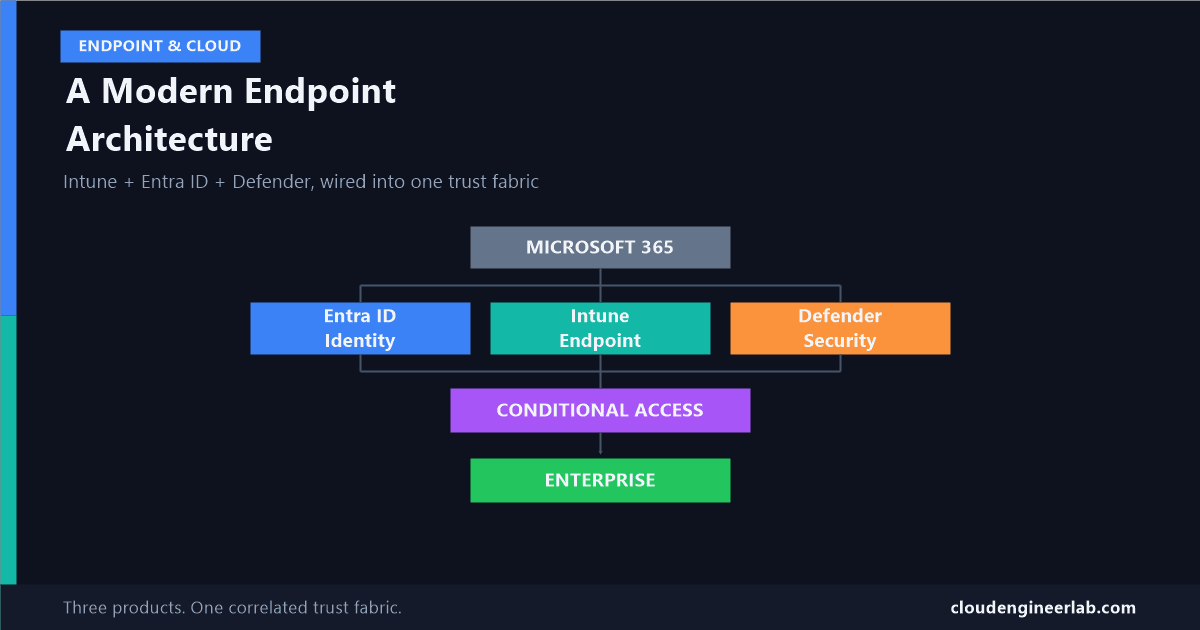
Building a Modern Endpoint Architecture with Intune + Entra ID + Defender
These three products aren't separate tools bolted together, they're one correlated trust fabric. Most tenants deploy all three and never actually wire them into it.
Most enterprise tenants have all three of these products deployed. Entra ID handles sign-in. Intune manages devices. Defender watches for threats. And in most of those tenants, the three run as three separate tools that happen to share a licence bundle, not as the single correlated architecture they were actually designed to form.
That gap, deployed versus wired together, is what this post is about. Here's the shape of the whole thing first, then each layer in depth, then the part almost nobody configures that makes the other two actually talk to each other.
                    Microsoft 365
                         |
        ┌────────────────┼────────────────┐
        ↓                ↓                ↓
     Entra ID          Intune          Defender
        ↓                ↓                ↓
   Identity          Endpoint         Security
        └────────────────┼────────────────┘
                         ↓
                 Conditional Access
                         ↓
                    Enterprise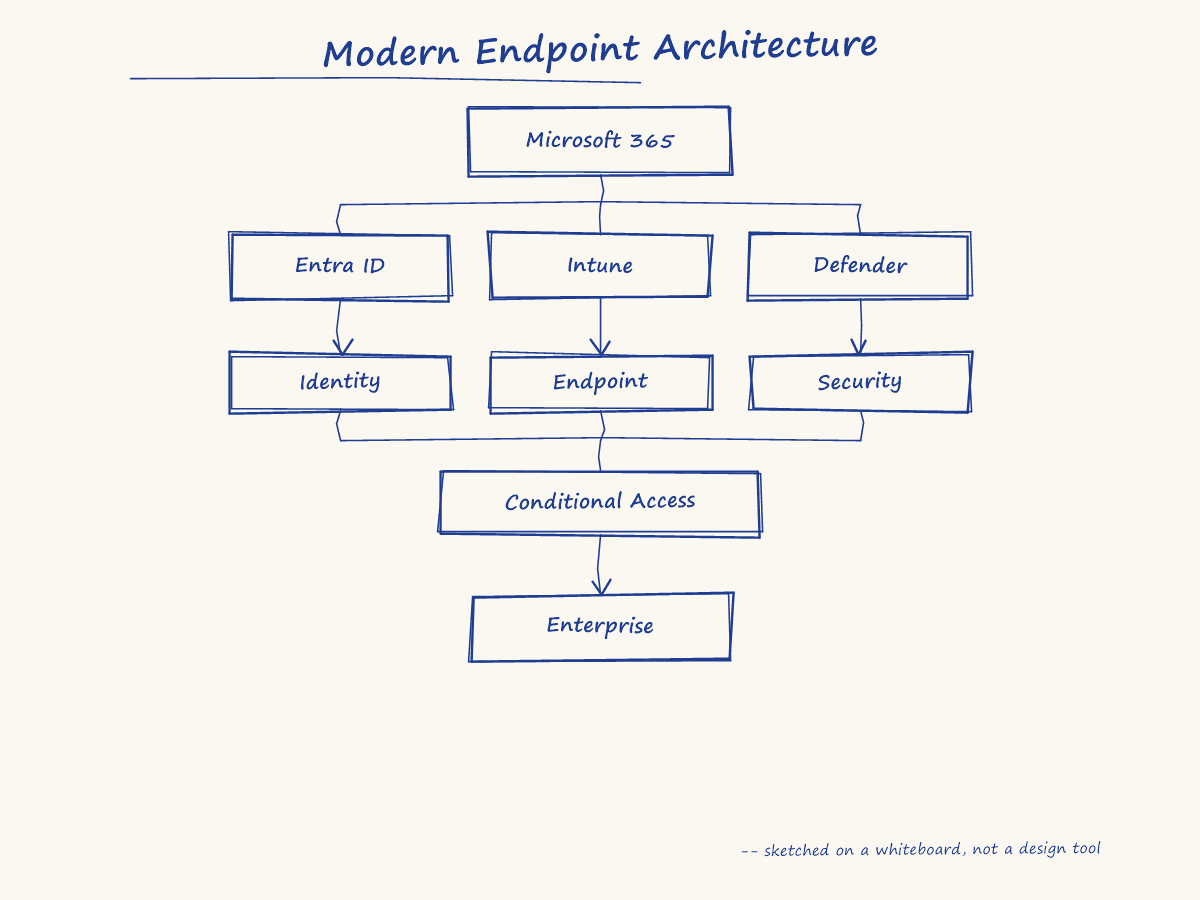
This maps directly onto three of the six pillars in Microsoft's own Zero Trust framework: Identity, Endpoints, and (partially) the signal correlation that feeds Applications. It doesn't cover Data or Network, and I'll say plainly where this diagram's scope ends later on. What it does cover, it covers deep.
The Foundation: Identity Comes Before Everything Else
Here's the sequencing almost every simplified architecture diagram glosses over: a device has to establish an identity in Entra ID before Intune can manage it at all. Registration and enrollment are not the same step, and conflating them is where a lot of "why won't this device enroll" tickets actually start.
Registration: the device gets an identity
The device authenticates and creates a device identity object in Entra ID, backed by a TPM-generated key pair. This key pair can't be exported or spoofed onto another device, it's a hardware root of trust, not a password or certificate that could theoretically be copied.
Enrollment: management gets attached to that identity
Only after that identity exists can Intune enroll the device and start enforcing configuration, encryption requirements, password complexity, and everything else that makes a device "managed" rather than merely "known."
Registered is not the same as managed
A device can be Entra registered, with a fully trusted identity, and still have zero Intune management applied. Registration alone gets you a trusted identity Conditional Access can reference. It does not get you compliance policy, app deployment, or any of the configuration enforcement covered elsewhere on this site. Confirm which one you actually have before troubleshooting the other.
This is also where Entra ID's Identity Protection lives: user risk and sign-in risk, MFA, and Privileged Identity Management for just-in-time admin access. Everything above this layer, endpoint management, security telemetry, Conditional Access itself, is being evaluated in the context of an identity this layer already vouched for.
The Endpoint Layer: Intune Defines "Healthy"
Once a device is enrolled, Intune's job is to define, enforce, and continuously verify what a healthy device actually looks like: encryption, OS version, password policy, and every application on it, wrapped, detected, and deployed correctly. I've written extensively about the mechanics underneath this layer, what actually happens after you upload a .intunewin file, why detection rules report the wrong answer, when dependencies and supersedence apply, and how Autopatch now controls the update side of that health definition. All of that operational depth exists to answer one architectural question reliably: is this specific device, right now, in the state we've decided counts as trustworthy.
That answer becomes the compliance signal, and it's a narrower answer than people assume, a device passing every one of Intune's checks is telling you it's configured correctly, not that it's currently safe. That distinction is the entire subject of compliance versus security, worth reading in full if you haven't; this post assumes it and builds on top of it.
The Security Layer: Defender, and What's Actually Underneath It
The diagram shows one "Defender" box. What's actually running underneath it is Microsoft Defender XDR, a correlation engine sitting across Defender for Endpoint, Defender for Identity, Defender for Cloud Apps, and Defender for Office 365, fusing their signals together rather than reporting them separately.
Here's a concrete example of why that fusion matters. Defender for Identity detects an on-premises Kerberos attack against a hybrid-joined account, a completely different product and completely different signal type than anything Defender for Endpoint or Entra ID would see on their own. That detection doesn't stay siloed:
This is what 'unified risk' actually means
Entra ID Protection's own native risk detection is genuinely useful on its own. What makes it materially stronger in 2026 is that the risk score Conditional Access reads is no longer just Entra's isolated view, it's a compounded score fused from every connected Defender product, correlated by user and time. A device-level detection and an identity-level detection about the same person, in the same window, produce one stronger signal instead of two separate, weaker ones.
This is also where Defender for Endpoint's device-level risk score feeds back down into the Intune layer, covered in detail in the compliance post linked above: a device Defender flags as high-risk can be made to fail Intune compliance automatically, but only if that specific integration setting is actually configured. The fusion described here happens on the identity side regardless; the device-to-compliance link is something you have to deliberately wire in.
Where the Three Actually Meet: Conditional Access
Conditional Access doesn't generate any signal of its own. It's the decision engine that reads what the three layers above produced, device compliance from Intune, the fused risk score from Defender XDR flowing through Entra ID Protection, plus location, client app, and required authentication strength, and turns all of it into one access decision: grant, block, or require more.
That's the architectural reason "require compliant device" alone is an incomplete Conditional Access strategy. It's reading exactly one of the signals this whole stack was built to produce.
Enterprise: What the Decision Actually Protects
The bottom of the diagram, "Enterprise," is deliberately abstract, because what it represents varies: SharePoint, an internal LOB app, a financial system, email. What's consistent is what Zero Trust actually means at this final step: access isn't a single decision made once at sign-in. It's continuously re-evaluated as the signals above it change. A user who was compliant and low-risk an hour ago and is now flagged by Defender XDR doesn't keep their access because they already got in once, the next policy evaluation sees the new state and acts on it.
What this diagram deliberately doesn't cover
Microsoft's Zero Trust framework has six pillars: Identity, Endpoints, Applications, Data, Infrastructure, and Network. This architecture, and this post, covers Identity and Endpoints deeply, and touches Applications through Defender XDR's correlation. Data protection (Purview, sensitivity labels, DLP), Infrastructure, and Network segmentation are real, necessary parts of a complete Zero Trust deployment that simply sit outside what this specific three-product diagram represents. Don't mistake covering this diagram well for covering Zero Trust completely.
A Maturity Checklist
Deploying all three products gets you the diagram's shape. These specific configurations are what actually wire it together:
Confirm device registration is happening cleanly before enrollment
A device stuck as Entra registered but never truly enrolled has an identity but none of Intune's actual enforcement.
Configure the Defender-to-Intune compliance link explicitly
"Require the device to be at or under the machine risk score" doesn't turn on by itself just because both products are licensed.
Separate your risk-based Conditional Access policies
User risk and sign-in risk call for different remediation, keep them in separate policies rather than one combined rule.
Treat compliance as one input, not the whole policy
A Conditional Access strategy built entirely on "require compliant device" is reading one signal out of an architecture built to correlate several.
Verify detection rules and app health, not just the compliance dashboard
A device can be compliant and still running a broken deployment underneath, the difference this whole site's application-packaging series exists to catch.
Five checks, and most tenants that have deployed all three products for years still fail at least one of them. That gap between "we have the licences" and "we built the architecture" is exactly what turns three separate consoles into the single trust fabric this diagram is actually describing.
Which of these five is still open in your own tenant? For most environments I've reviewed, it's the separated risk policies, user risk and sign-in risk sitting in one combined rule instead of two. Drop a comment below with what you found in yours.

Written by
Chetan Yamger
Cloud Engineer · AI Automation Architect · Modern Workplace Consultant
Cloud Engineer, AI Automation Architect, and Modern Workplace Consultant based in Amsterdam, Netherlands. Specializing in scalable, secure enterprise solutions with Microsoft Azure, Intune, PowerShell, and AI-driven automation using ChatGPT, Gemini, and modern LLM technologies.
Stay in the loop.
New articles, straight to you.
Deep-dive technical articles on Intune, PowerShell, and AI — no noise, no spam.
Discussion
Share your thoughts — your email stays private
Leave a comment