
Intune Compliance Is Not Security: Understanding the Difference
A fully patched, encrypted, PIN-locked device can still be actively compromised. Here's why compliance is a checklist, not a security guarantee, and what actually is.
"Our devices are compliant, so we're secure" is one of the most common false equivalences in enterprise IT, and it's dangerous precisely because it's half true. A compliant device really is meaningfully safer than a non-compliant one. But compliance is a report card against a fixed set of rules you wrote, checked periodically. It has no opinion on whether malware is running right now, whether a user's credentials were phished this morning, or whether the sign-in attempt using them came from somewhere it shouldn't have.
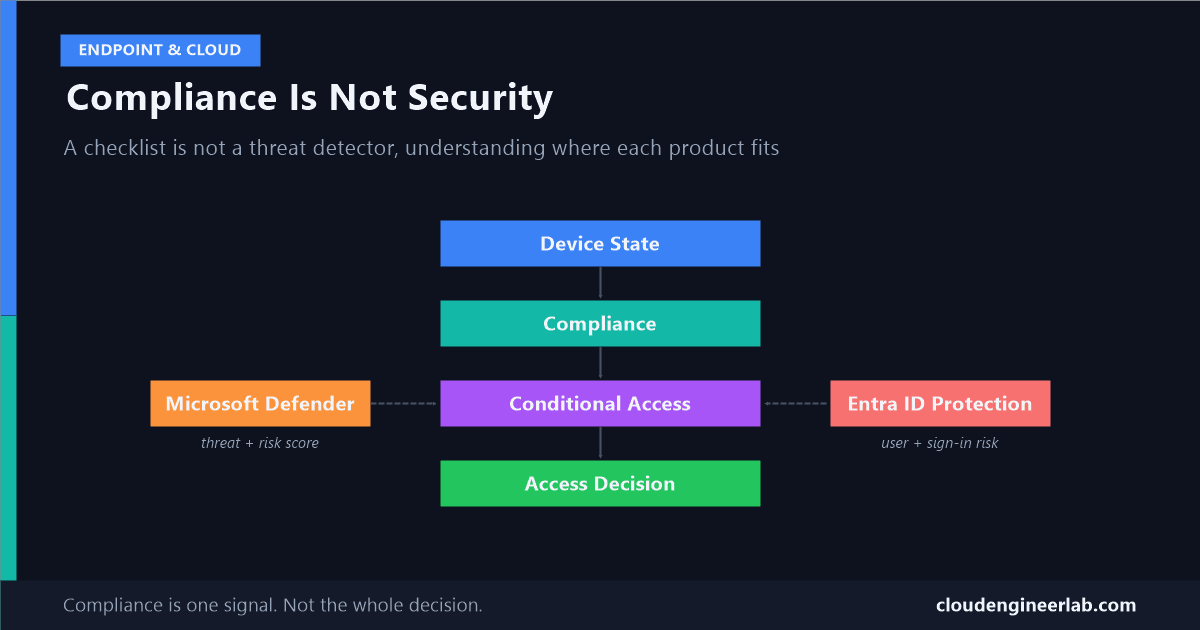
Here's the actual pipeline, and where each Microsoft product genuinely fits into it. If you want the underlying sync mechanism itself, how a compliance result actually travels from a device into an access decision, that's covered separately here.
Device State
     ↓
Compliance
     ↓
Conditional Access
     ↓
Access Decision
Device State: The Raw Facts
This is just what's true on the device, with no judgment attached. Is BitLocker on. What OS build is installed. Is a PIN configured. Is the firewall enabled. These are facts, collected the way I've described in how a device reports back to Intune, not opinions about whether that state is good enough for anything.
Compliance: A Checklist, Evaluated Periodically
Intune's job at this stage is narrow and specific: take the device state above, compare it against rules an admin wrote in advance, and output a binary-ish result, compliant or not. That's genuinely useful. It's also fundamentally limited in a way that matters:
Compliance rules are static. Threats are not.
A device with BitLocker on, a PIN set, the latest OS build, and a healthy firewall passes every one of those checks while actively running malware, if nothing in your compliance policy is actually looking for malware. By default, most compliance policies check configuration, not active threat state. A perfectly configured device and a perfectly configured, currently-compromised device look identical to a compliance policy that was never told to check for the difference.
I've written before about how even the compliance signal itself can be stale or wrong mechanically, a device that stopped checking in still shows its last known compliant status. Combine that mechanical lag with compliance's narrow scope, and "Compliant" in the portal is genuinely two layers removed from "currently secure."
Conditional Access: The Decision Engine
This is the layer that actually enforces anything, and the important architectural fact is that device compliance is just one input among several, not the whole picture. A Conditional Access policy can evaluate device compliance, user identity, sign-in risk, user risk, location, client application, and required authentication strength, together, in the same decision.
Treating "require compliant device" as your entire Conditional Access strategy uses exactly one of these signals and ignores the rest.
Where Microsoft Defender Fits
Microsoft Defender for Endpoint owns actual threat detection. Real-time behavioural analysis, active malware, EDR telemetry, the things a static compliance checklist was never designed to catch. It produces a machine risk score per device based on what it's actually observing.
That risk score doesn't reach Conditional Access on its own. It reaches Intune first, through a specific compliance policy setting: "Require the device to be at or under the machine risk score." Only once that setting is configured does a Defender-detected compromise actually flip a device to non-compliant, which is what Conditional Access can then act on.
Without this setting, Defender and compliance never talk to each other
This integration is not automatic just because both products are deployed in your tenant. If this specific compliance policy setting isn't configured, a device Defender has already identified as high-risk can remain "Compliant" in Intune indefinitely, because nothing ever told the compliance engine to care about Defender's opinion.
Where Entra ID Fits
Entra ID Protection owns identity risk, and it's a completely separate axis from anything about the device. Two specific signals matter here:
| Signal | What it actually measures | Typical remediation |
|---|---|---|
| User risk | The likelihood this identity or account is compromised (leaked credentials, unusual behaviour patterns over time) | Secure password reset |
| Sign-in risk | The likelihood this specific authentication attempt isn't the real account owner (anomalous location, impossible travel, known-bad IP) | Requiring MFA |
Keep these as separate Conditional Access policies
Because the right remediation differs, forcing a password reset doesn't help a legitimate user hit by an anomalous sign-in, and requiring MFA doesn't help if the account itself is already compromised, these two risk conditions belong in separate policies, not bundled into one. Entra ID Protection reports both signals to Conditional Access at the moment of sign-in, entirely independent of whatever Intune has to say about the device.
Where Intune Fits
Intune owns the device side of this pipeline: collecting device state, evaluating it against compliance policy, and managing the configuration and applications that produce that state in the first place. It's the source of the device compliance signal Conditional Access consumes, and, when wired up correctly, the bridge that lets Defender's threat detection become an enforceable condition. It is not, on its own, a threat detection product.
Putting the Whole Picture Together
| Product | What it actually owns | What it does NOT do on its own |
|---|---|---|
| Intune | Device state collection, compliance evaluation, configuration and app management | Detect active threats or judge identity risk |
| Microsoft Defender for Endpoint | Real-time threat detection, EDR, machine risk scoring | Enforce access decisions, or affect compliance unless explicitly wired in |
| Entra ID Protection | Identity risk: user risk and sign-in risk | Anything about the device itself |
| Conditional Access | Combining every signal above into one access decision | Generate any signal itself, it's an orchestrator, not a sensor |
A Worked Example
A device shows "Compliant": BitLocker on, latest OS build, PIN configured, firewall enabled. It also has live malware Defender detected an hour ago.
Without the Defender-to-compliance integration configured
Compliance stays green. Conditional Access sees a compliant device and grants access normally. The malware has no effect on the access decision at all, because nothing in this pipeline was told to look for it.
With 'Require device at or under machine risk score' configured
Defender's risk score crosses the threshold, Intune flips the device to non-compliant within its next evaluation cycle, and Conditional Access, still just reading the compliance signal it always reads, now blocks or restricts access automatically.
Separately, if the malware also led to credential theft
Entra ID Protection's user risk signal would independently flag the identity, triggering its own Conditional Access policy, a secure password reset, regardless of what the device-side story looks like.
Same incident, two completely independent detection and enforcement paths, neither of which is "compliance" by itself. Compliance was the delivery mechanism in the second step, not the thing that noticed anything.
The Actual Takeaway
Compliance is necessary hygiene: it keeps the baseline configuration honest and gives Conditional Access something concrete to require. It was never designed to be a security control on its own, and treating it like one leaves the exact gap Defender and Entra ID Protection exist to close. Real security in this stack comes from wiring all three signal sources together, device state, threat detection, and identity risk, into the Conditional Access policies that actually make the decision. Compliance alone is a report card. Security is what happens when that report card is one input among several the decision actually listens to.
Do you have the Defender-to-Intune compliance integration configured in your own tenant, or is device compliance still your only signal? I'd like to hear what pushed you to add the others. Drop a comment below.

Written by
Chetan Yamger
Cloud Engineer · AI Automation Architect · Modern Workplace Consultant
Cloud Engineer, AI Automation Architect, and Modern Workplace Consultant based in Amsterdam, Netherlands. Specializing in scalable, secure enterprise solutions with Microsoft Azure, Intune, PowerShell, and AI-driven automation using ChatGPT, Gemini, and modern LLM technologies.
Stay in the loop.
New articles, straight to you.
Deep-dive technical articles on Intune, PowerShell, and AI — no noise, no spam.
Discussion
Share your thoughts — your email stays private
Leave a comment