
Designing a Complete Microsoft Endpoint Security Architecture
Every product covered on this site, placed on one map, showing exactly what branches in parallel and what has to converge before the next layer can trust it.
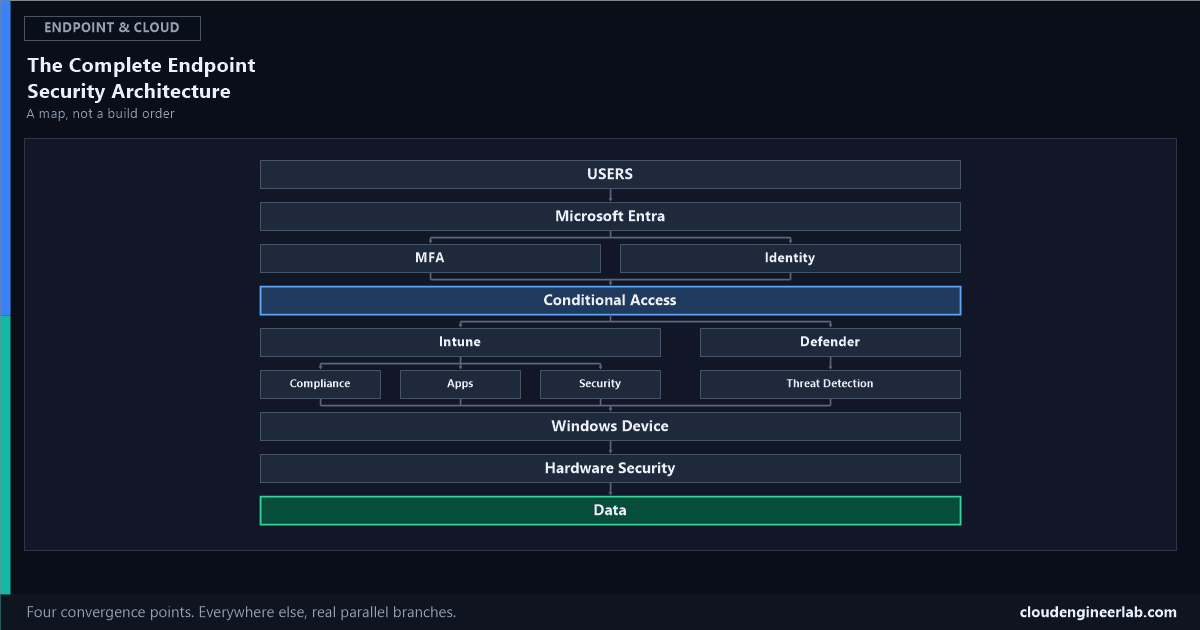
The complete practical lab answered what order to build these controls in. This post answers a different question: how do they actually relate to each other structurally, once they're all in place. Not a build sequence, a map, with real branching and real convergence points, the places where independent signals have to merge before anything downstream can trust the result. How an entire organisation actually rolls this out, phase by phase, over months is the third companion piece.
Why This Is a Tree, Not a Line
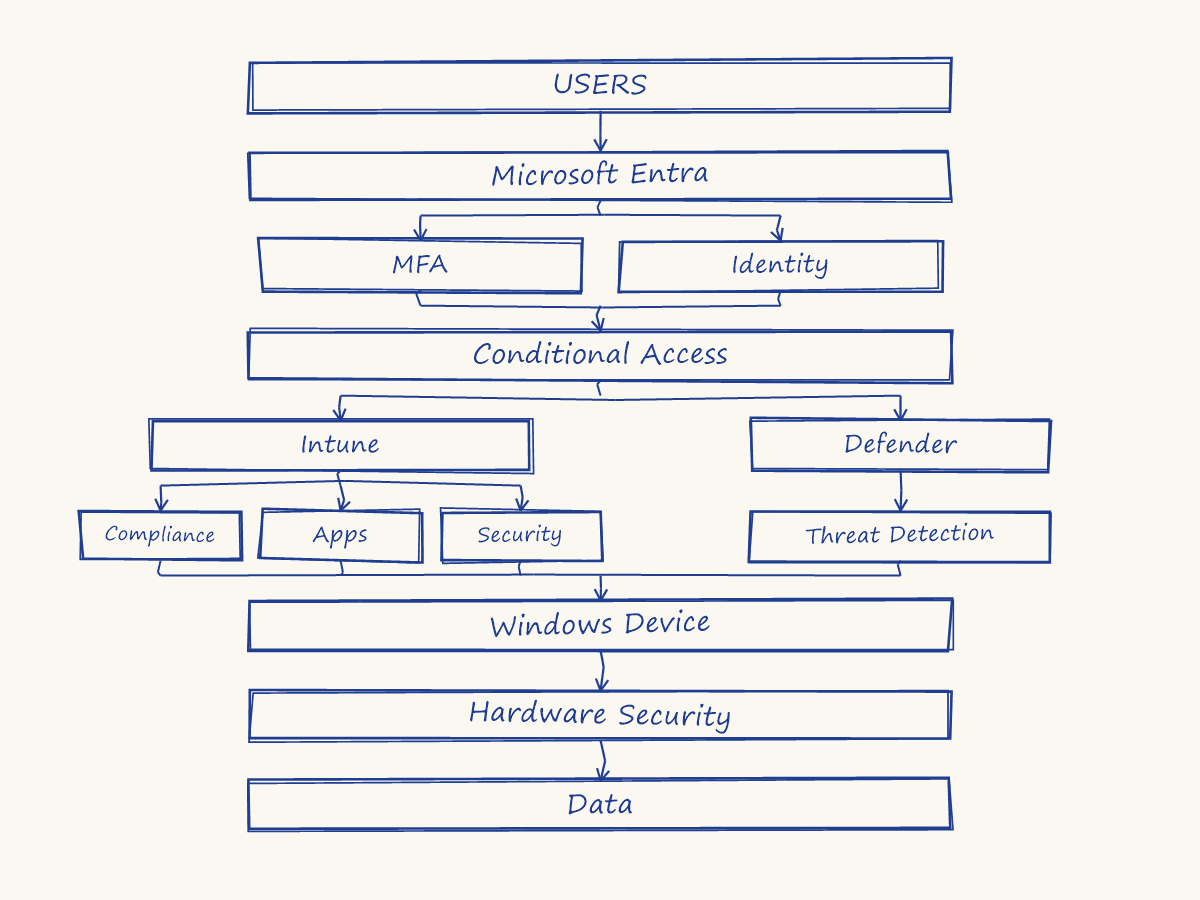
A straight pipeline implies each stage waits for the one before it and produces exactly one thing for the next stage to consume. Real endpoint security architecture doesn't work that way. Several things happen in parallel, evaluated independently, and specific points in this diagram are genuine convergence points, where the architecture requires multiple independent signals to combine before anything can proceed. Getting that distinction right is what separates a real architecture from a list of products that happen to be deployed in the same tenant.
Users → Microsoft Entra: Everything Starts With Identity
Every request in this diagram begins as a real person. Microsoft Entra ID is the first thing anything downstream has to trust, the layer every other layer depends on existing first.
The First Branch: MFA and Identity, Evaluated in Parallel
Entra doesn't ask "did they pass MFA, and only then check who they are." Both happen as independent, simultaneous evaluations:
The full ladder from password alone to phishing-resistant MFA lives here, and the deeper WebAuthn mechanics behind the strongest rung are here. A user can pass a strong MFA challenge while Identity Protection simultaneously flags their account as compromised from an unrelated leaked-credential signal, two genuinely separate findings that both have to feed into the next stage.
The First Merge: Conditional Access
MFA and Identity converge here, along with device and risk signals still to come. The two real combination rules underneath this convergence are covered in full here: any matching Block policy wins outright, and every required grant control from every matching policy has to be satisfied together, not any single signal deciding alone.
The Second Branch: Intune and Defender, Two Different Jobs Running in Parallel
Management and detection are not the same function
Intune manages configuration: what a device is supposed to look like. Defender detects behaviour: what a device is actually doing right now. The full role breakdown between these two, plus Entra ID, is covered here. They run as parallel tracks, not a sequence, which is exactly why a device can be perfectly managed by Intune while Defender is independently watching for something Intune's configuration checks were never designed to see.
Intune's Own Branch: Compliance, Apps, and Security
Intune itself isn't one function, it fans out into three parallel management domains:
| Branch | What it governs | Deep dive |
|---|---|---|
| Compliance | The device health rules that feed Conditional Access's compliant-device check | The full mechanism |
| Apps | What software is deployed, allowed, or blocked from running at all | Application deployment and application control allowlisting |
| Security | The Endpoint Security blade itself: baselines, Firewall, BitLocker, Credential Guard, ASR, device control | The full nine-control baseline |
Defender's Own Branch: Threat Detection
Unlike Intune, Defender's branch doesn't fan out into multiple parallel management domains, it has one job here: live threat detection, feeding a machine risk score that can flow back into Intune Compliance under a specific, deliberately configured integration, not automatically just because both products are deployed.
The Second Merge: Windows Device
Four independent branches, Compliance, Apps, Security, and Threat Detection, converge here. This is the actual physical and logical endpoint, the point where every management decision and every detection signal from everything above it has to actually land on real hardware running real software.
Why this convergence point matters architecturally
A device can satisfy Compliance while its Application Control policy is misconfigured, or pass every Security baseline setting while Threat Detection is actively watching a live compromise. None of the four branches above individually represents "is this device actually safe." Only their convergence at this single point does, and a gap in any one of the four is a gap the other three won't automatically cover for it.
Windows Device → Hardware Security → Data
The final leg is a straight line again, deliberately, because the hardware chain of trust is itself sequential: UEFI has to hold before Secure Boot means anything, Secure Boot has to hold before the TPM's measurements mean anything, and the TPM has to hold before BitLocker's key sealing actually protects the data at the very bottom of this diagram. Everything above this point was in service of this exact hand-off working correctly.
Reading the Diagram When Something Goes Wrong
Start at Data and work upward, not downward
If data was exposed, the question isn't "which single product failed," it's which convergence point above it received a signal that should have stopped it, and why that signal either wasn't generated or wasn't acted on.
Check both branches at each fork, not just one
A device passing Compliance tells you nothing about whether Application Control or Threat Detection also held. Each fork in this diagram is a place a single-signal investigation gets the wrong answer.
Remember which links are genuinely sequential
The UEFI-to-Data chain at the bottom has no parallel branches left, a failure there is a single-cause investigation. The branches above it almost never are.
Summary
The one distinction worth keeping
This diagram has exactly four convergence points, Conditional Access, Windows Device, and the two smaller merges feeding each of them, and everywhere else, signals run in genuine parallel. Treating a parallel branch as if it were sequential (assuming Compliance alone means "safe") or treating a convergence point as if it only needed one signal (assuming MFA alone means "verified") are the two most common architectural misreadings of a stack that looks, from a product list, like it should just be one straight line.
Which fork in this diagram does your own environment treat as a single signal when it's actually two? Compliance standing in for the full Intune branch, or MFA standing in for the full Entra branch, are the two I see most often. Drop a comment with what you've found.

Written by
Chetan Yamger
Cloud Engineer · AI Automation Architect · Modern Workplace Consultant
Cloud Engineer, AI Automation Architect, and Modern Workplace Consultant based in Amsterdam, Netherlands. Specializing in scalable, secure enterprise solutions with Microsoft Azure, Intune, PowerShell, and AI-driven automation using ChatGPT, Gemini, and modern LLM technologies.
Stay in the loop.
New articles, straight to you.
Deep-dive technical articles on Intune, PowerShell, and AI — no noise, no spam.
Discussion
Share your thoughts — your email stays private
Leave a comment