
MFA Explained: Why Passwords Alone Are No Longer Enough
Not all MFA is equal. A real attack technique already defeats the most common kind, and Microsoft is retiring the weakest kind entirely this year.
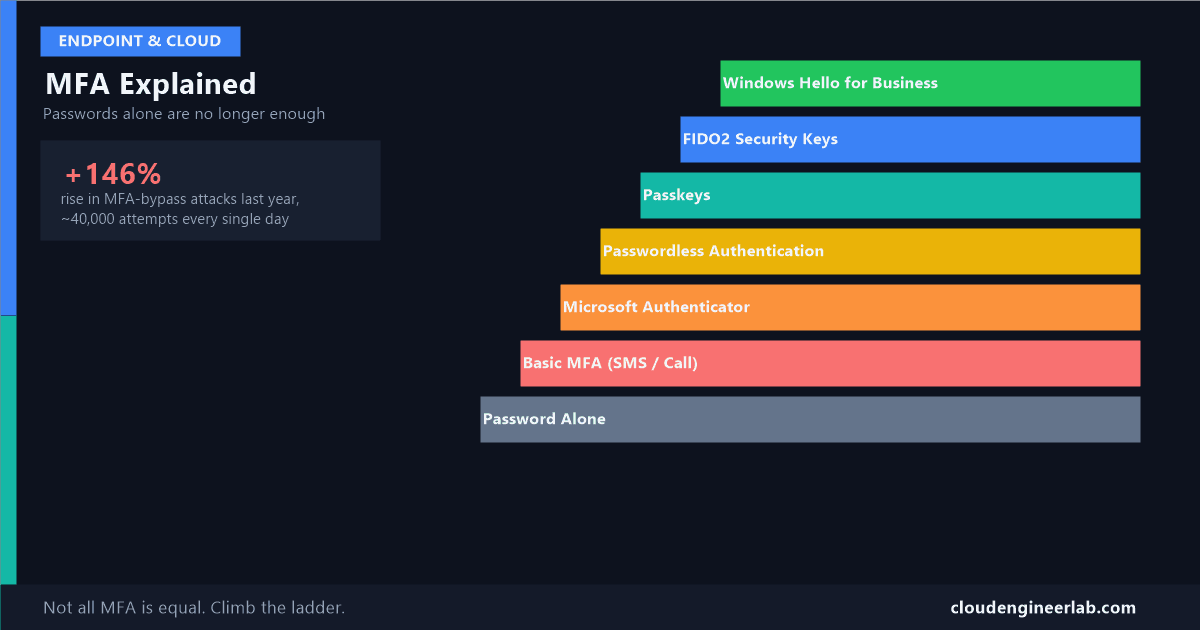
Attacks that specifically defeat MFA rose 146% in the past year, with close to 40,000 attempts happening every single day. If your reaction to that is "but we have MFA turned on," that's exactly the assumption this post exists to correct. Not all MFA is equal. Some of it stops a real, common attack cold. Some of it, the kind most companies still use, doesn't slow the attacker down at all.
This is the identity layer, the first of the four layers in endpoint security, explained as an actual ladder you climb, not a single feature you either have or don't.
The Ladder
Rung 0: Password Alone
One thing you know, and nothing else. If that one thing leaks, in a data breach, a phishing email, or just a weak password someone guessed, there's nothing else standing in the way. This isn't MFA at all, it's the starting point everything else improves on.
Rung 1: Basic MFA (password + SMS or phone call code)
A password plus a code texted or called to your phone. Better than nothing, but this is also the exact method Microsoft has announced it's retiring starting September 2026, specifically because it's the weakest form of MFA still in common use, vulnerable to SIM-swapping and, as covered below, real-time interception.
Rung 2: Microsoft Authenticator (push notifications)
Instead of a code, your phone gets a push notification asking "was this you?" Modern versions require number matching, typing a number shown on your screen into the app, specifically to stop people from reflexively tapping "Approve" without looking. This closed one real gap, but a determined attacker can still defeat it, covered in the attack walkthrough below.
Rung 3: Passwordless Authentication
No password in the flow at all. You sign in with just your phone, using Microsoft Authenticator's passwordless phone sign-in, and a match on your device (face, fingerprint, or PIN) replaces typing anything. There's no password left for a phishing page to steal in the first place.
Rung 4: Passkeys
A passkey is a cryptographic key pair replacing a password entirely, and it comes in two forms worth knowing apart. A device-bound passkey (like one stored in a FIDO2 key or in Authenticator) never leaves that specific device. A synced passkey is encrypted and synced across your other devices through a provider like your phone's built-in password manager, more convenient, slightly less strict than device-bound.
Rung 5: FIDO2 Security Keys
A physical hardware key, a small USB or NFC device, that proves your identity by proving you physically have that specific object. This is device-bound by definition and is one of the methods that qualifies as genuinely phishing-resistant, for reasons explained in the next section.
Rung 6: Windows Hello for Business and Certificate-Based Authentication
The enterprise-grade top of the ladder: biometric or PIN sign-in tied to a hardware-backed key on a specific Windows device, or a certificate issued directly to that person. Alongside FIDO2 keys, this sits in Microsoft's strongest official tier, covered next.
Watch a Real Attack Defeat Rungs 1 and 2
This is the part that makes the ladder concrete instead of theoretical. Here's exactly how an adversary-in-the-middle (AiTM) attack works, and why it doesn't care whether you're using a text code or an app-based push.
Step 1: The fake page
You get a convincing phishing email and click through to a page that looks exactly like your real sign-in page. It isn't. It's a proxy sitting silently between you and the real Microsoft sign-in page.
Step 2: Your password gets relayed, live
You type your password into the fake page. The proxy immediately forwards it to the real site, in real time, as if it were you typing it there directly.
Step 3: The real MFA prompt appears, and it's genuine
The real Microsoft site, thinking it's really you, sends back a real MFA challenge. The proxy relays that challenge straight to your phone. The push notification or text code you receive is completely real, because it genuinely came from Microsoft, just relayed through an attacker sitting in the middle.
Step 4: You approve it, because it looks correct
You tap "Approve," or type the real code, because everything about the request looks legitimate. It is legitimate, it's just being relayed by someone who shouldn't be there.
Step 5: The attacker now has a live, authenticated session
The proxy captures the session the real site just granted, and the attacker uses it directly, no password needed again, often within hours, to move on to further attacks like business email compromise.
This defeats push notifications, SMS, and app-based codes equally
None of it depends on cracking anything or guessing a code. The attacker just relays a completely genuine authentication exchange through themselves. Rungs 1 and 2 on the ladder above have no defence against this, because from the real Microsoft service's point of view, nothing about the request looks wrong.
Why FIDO2 keys and passkeys don't fall for this: these methods cryptographically bind the sign-in to the actual website's real address. When you register a security key with login.microsoftonline.com, the key will only ever respond to a request that's genuinely coming from that exact domain. A proxy sitting on a look-alike domain can relay your password and your push notification tap all day, but it can't make your security key believe it's talking to the real site when it isn't. The check happens in the cryptography itself, not in whether the page looked convincing to you.
Entra's Authentication Strengths: The Ladder, Officially Named
Microsoft Entra ID turns this exact ladder into something you can actually enforce, through Conditional Access, using three built-in authentication strengths:
| Authentication strength | What it actually accepts | Where it sits on the ladder |
|---|---|---|
| MFA | Any valid combination of two factors, including the weaker rungs | Rungs 1 through 6, the baseline |
| Passwordless MFA | Microsoft Authenticator passwordless sign-in, passkeys, Windows Hello for Business | Rungs 3 and up |
| Phishing-resistant MFA | FIDO2 security keys, Windows Hello for Business, or Microsoft Entra certificate-based authentication only | Rungs 5 and 6 only |
Phishing-resistant is deliberately the most restrictive, not the most convenient
That tier exists specifically to exclude everything an AiTM proxy can relay. A Conditional Access policy set to require phishing-resistant MFA for, say, Global Administrators, means exactly that: a push notification or a text code simply will not satisfy it, on purpose.
What to Actually Do About It
Get off SMS and voice codes now, not in September
Microsoft is retiring these methods starting September 2026. If your organisation still leans on text-message codes as the primary MFA method, that removal is a forcing function, better to move deliberately now than scramble when it's gone.
Turn on number matching in Microsoft Authenticator if you haven't already
It's a small, real improvement against the laziest version of push-approval fatigue, even though it doesn't stop a genuine AiTM proxy.
Require the Phishing-resistant MFA authentication strength for admin roles first
Your highest-privilege accounts are the ones worth protecting with the tier that actually stops the attack described above, before rolling anything out more broadly.
Move general staff toward Passwordless MFA as the realistic near-term target
Full phishing-resistant hardware keys for every employee is a real cost and logistics project. Passwordless sign-in through Microsoft Authenticator is a meaningfully stronger, more achievable step for most of the organisation in the meantime.
Understanding where a method sits on this ladder is also the missing piece in a bigger picture: identity is only one of the four layers, and even a perfect authentication strength here doesn't protect an unencrypted device or a mismanaged application, covered in the rest of the endpoint security series.
Where does your own organisation actually sit on this ladder today, and is it further up than you assumed before reading this? For a lot of teams, the honest answer is still Rung 1 or 2. Drop a comment below with where you're starting from.

Written by
Chetan Yamger
Cloud Engineer · AI Automation Architect · Modern Workplace Consultant
Cloud Engineer, AI Automation Architect, and Modern Workplace Consultant based in Amsterdam, Netherlands. Specializing in scalable, secure enterprise solutions with Microsoft Azure, Intune, PowerShell, and AI-driven automation using ChatGPT, Gemini, and modern LLM technologies.
Stay in the loop.
New articles, straight to you.
Deep-dive technical articles on Intune, PowerShell, and AI — no noise, no spam.
Discussion
Share your thoughts — your email stays private
Leave a comment