
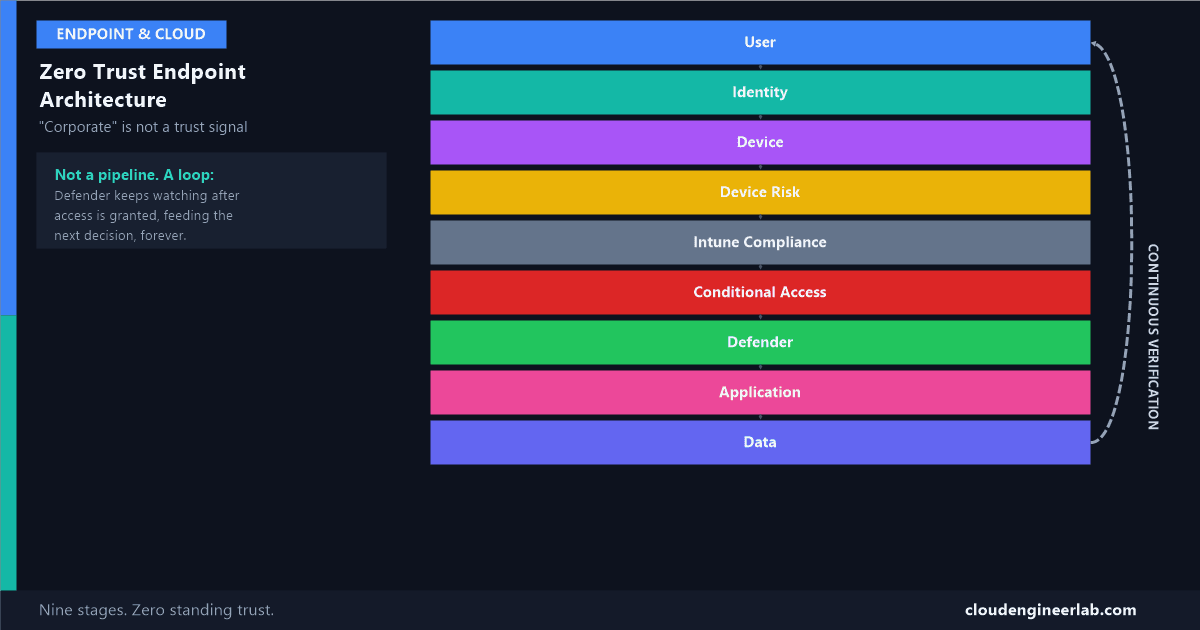
Zero Trust Endpoint Architecture: Never Trust a Device Just Because It Is Corporate
A domain-joined, company-issued laptop is not automatically trustworthy. Nine layers, one continuous loop, and why 'corporate' was never the actual trust signal.
"It's a corporate device" is the single most common unexamined trust assumption in enterprise IT, and it's wrong often enough to matter. A corporate laptop can be stolen, infected, jailbroken, or simply left signed in and unattended. Ownership was never the actual security property worth trusting. Zero Trust architecture exists specifically to stop treating "corporate" as a synonym for "safe."
User
  ↓
Identity
  ↓
Device
  ↓
Device Risk
  ↓
Intune Compliance
  ↓
Conditional Access
  ↓
Defender
  ↓
Application
  ↓
Data
This is a loop, not a one-way pipeline. Every request runs down through all nine stages, and the results feed back into the next request, continuously, for the life of the session and every session after it.
The Nine Stages
User: Where Every Request Actually Starts
Nothing below this layer is the point. It all exists to make one person's request to check email or open a file safe to grant, without them needing to understand any of the eight layers underneath it.
Identity: Verified Independently of the Device
Entra ID answers exactly one question at this stage: is this person who they claim to be. The full authentication ladder from password alone to phishing-resistant MFA is covered here. Critically, this layer says nothing about the device being used yet, identity and device are evaluated as two genuinely separate trust objects, which is the architectural decision that makes the rest of this post possible.
Device: A Separate Trust Object, Not Inherited From the User
A verified person on an untrusted device is still a real risk, which is why the device gets its own identity in Entra ID, established through a TPM-backed key pair, the hardware chain of trust covered in full here, rather than borrowing trust from whoever happens to be signed in.
This is exactly where 'it's corporate' stops meaning anything
A device being enrolled and domain-joined proves it was once provisioned correctly. It proves nothing about its state right now. A corporate laptop reported stolen an hour ago is still, technically, "a corporate device," and treating that label as an ongoing trust guarantee is precisely the assumption Zero Trust architecture is built to remove.
Device Risk: A Continuous Signal, Not a One-Time Check
This is the stage that separates a genuinely Zero Trust architecture from one that just checks a box at enrollment and stops looking. Device risk pulls together live signals, Microsoft Defender's machine risk score based on actual observed behaviour, whether the device's boot state still matches what was recorded at Stage 3 of the hardware chain of trust, and whether anything about this specific sign-in attempt looks anomalous.
Device Risk and Intune Compliance are not the same check
It's tempting to treat "compliant" and "low risk" as interchangeable. They aren't. Compliance is a checklist evaluated against rules you wrote in advance, a device can pass every configured rule while actively running malware nothing in that checklist was told to look for. Device Risk is the layer that's actually watching for the thing Compliance structurally can't see.
Intune Compliance: Configuration, Checked on a Schedule
The actual mechanism carrying a compliance result into an access decision is covered in full here: a scheduled evaluation, roughly every 8 hours by default, comparing the device's real configuration against policy, then syncing that result to the device's object in Entra ID.
Why this sits below Device Risk in this architecture, not above it
Compliance answers "is this device configured the way we require." Device Risk answers "does anything about this device or sign-in look actively dangerous right now." A device can be perfectly compliant and still carry elevated risk, or genuinely non-compliant (a delayed update, for instance) while posing no real threat. Evaluating risk as its own distinct signal, rather than folding it entirely into the compliance checkbox, is what lets Conditional Access make a more nuanced call than a flat compliant/non-compliant gate would allow.
Conditional Access: Every Signal Above, Combined Into One Decision
This is the actual decision point, and the two real combination rules underneath it are covered in full here: any matching policy that says Block always wins, and every required grant control from every matching policy has to be satisfied together. Identity, Device, Device Risk, and Compliance all feed into this single evaluation, none of them individually makes the call.
Defender: Watching What Happens After Access Was Already Granted
This is the stage that makes the diagram a loop, not a line
Everything above this point happens before access is granted. Defender's job starts after, watching the live session for the behaviour a one-time gate could never catch: a file that starts encrypting other files, a process reaching out to a known-bad address, credential-dumping tooling running in memory. Whatever Defender observes here feeds directly back into Device Risk at the top of the next evaluation, which is exactly why a device that looked fine at sign-in can be blocked an hour later without anyone touching a policy. The specific behaviours ASR rules and Defender are watching for are covered in full here.
Application: The Specific Resource Actually Being Reached
Not every application deserves identical trust. Restricting access to genuinely sensitive applications, payroll, HR, finance, as their own distinct policy target is covered as its own pattern here, separate from the general-population policy protecting everything else.
Data: The Thing Every Layer Above Exists to Protect
The layer everything above was actually in service of. What happens to data specifically when the device holding it is lost, and why encryption is the layer that still holds even after every access control above it becomes irrelevant, is covered in full here.
A Worked Scenario: The Laptop That Still Looks Corporate
A company laptop is stolen from a parked car
Fully enrolled, domain-joined, BitLocker encrypted, every box checked at provisioning time. By every static definition, it's still "a corporate device."
The thief attempts to sign in
Identity fails immediately without valid credentials, the first and most basic gate already holding.
Suppose credentials were also compromised in the same theft, saved in a browser
Identity now passes. This is exactly the scenario the rest of the architecture exists for, a verified identity is no longer sufficient by itself.
Device Risk picks up the anomaly
A sign-in from a device that hasn't checked in from its usual location, combined with the employee having already reported the device stolen and their account access revoked, flags this session as high risk well before any application is reached.
Conditional Access blocks based on the combined signal
Even if one individual signal looked borderline, the combination, revoked access plus elevated device risk, is enough for a matching Block policy to win outright.
If it had gotten further, Defender would have been the next line
Any attempt to access sensitive files or run unusual tooling on the device would be exactly the live-behaviour pattern Defender watches for, independent of whether the device was ever technically "corporate."
At no point in this story did "the laptop belongs to the company" do any actual security work. Every stage that mattered was evaluating something else entirely.
Summary
The nine stages, restated as one loop
A user's request (1) is verified as a real identity (2), on a device evaluated as its own separate trust object (3), whose live risk state is continuously watched (4) alongside its configured compliance (5), all combined into one Conditional Access decision (6). Defender keeps watching after that decision is made (7), feeding back into the next evaluation, while the specific application (8) and the data behind it (9) are the actual things every layer above was protecting. "Corporate" never appears anywhere in that list, because ownership was never the property any of these nine stages actually checks.
Where in your own environment does "it's a corporate device" still quietly substitute for an actual trust decision? Device Risk is the stage I see skipped most often, treated as a nice-to-have rather than the thing that catches what Compliance structurally can't. Drop a comment with what you've found.

Written by
Chetan Yamger
Cloud Engineer · AI Automation Architect · Modern Workplace Consultant
Cloud Engineer, AI Automation Architect, and Modern Workplace Consultant based in Amsterdam, Netherlands. Specializing in scalable, secure enterprise solutions with Microsoft Azure, Intune, PowerShell, and AI-driven automation using ChatGPT, Gemini, and modern LLM technologies.
Stay in the loop.
New articles, straight to you.
Deep-dive technical articles on Intune, PowerShell, and AI — no noise, no spam.
Discussion
Share your thoughts — your email stays private
Leave a comment