
Attack Surface Reduction: How to Stop Common Attack Techniques with Intune
ASR rules don't detect malware, they block the specific techniques malware needs to work. Here's what each major rule actually stops, and how it fits into Intune's wider hardening toolkit.
Most people who've heard of Attack Surface Reduction know it as "a list of toggles under Endpoint Security." What actually makes it powerful is that it isn't looking for known-bad files the way an antivirus signature does. It's looking for behaviour, specific technique patterns that legitimate software almost never needs and that a huge share of real-world attacks depend on completely. The Windows hardening baseline post covers ASR as one of nine controls. This one goes deep on ASR specifically, plus the three capabilities Intune groups alongside it: application control, device control, and exploit protection.
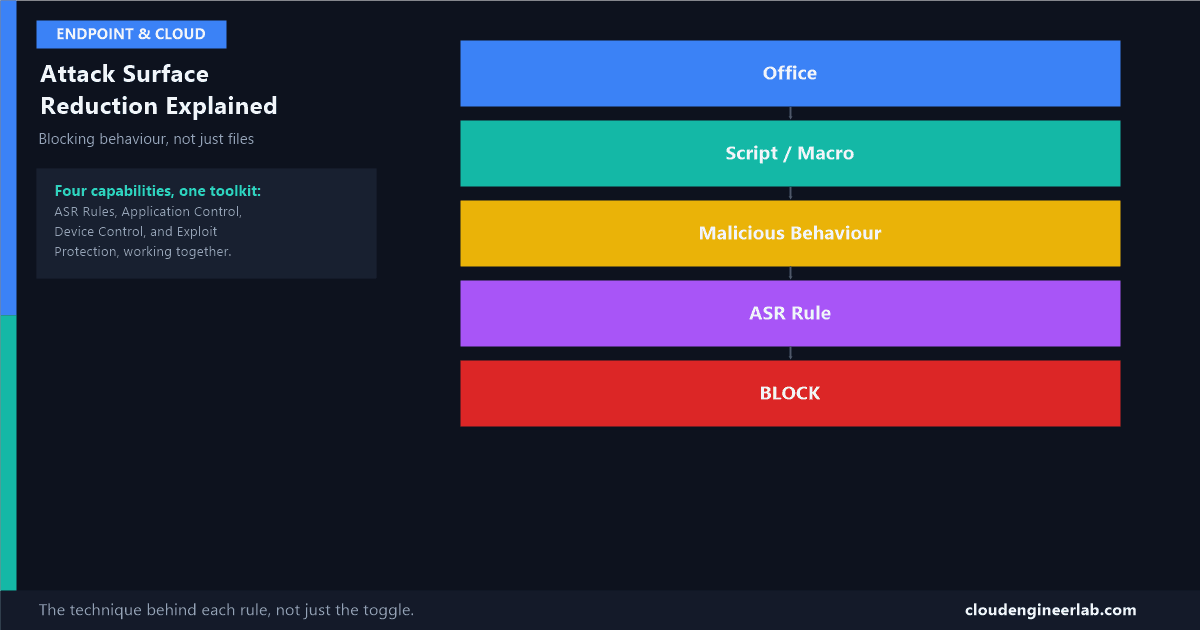
Office
  ↓
Script / Macro
  ↓
Malicious Behaviour
  ↓
ASR Rule
  ↓
BLOCK
That's the pattern behind an enormous share of real attacks: a Word or Excel document arrives by email, a macro inside it runs, and that macro tries to do something no ordinary spreadsheet formula would ever need to do, launch a script, spawn a shell, reach out to the internet for a second payload. ASR rules exist specifically to break that chain at the "malicious behaviour" step, regardless of whether the specific file has ever been seen before.
The Four Capabilities, Not Just ASR Rules
Microsoft groups four distinct hardening capabilities under Intune's Endpoint Security → Attack surface reduction area, and it's worth understanding all four as one toolkit rather than treating "ASR" as a single feature:
ASR Rules, Explained Individually
Each rule targets one specific technique. Understanding the technique is what makes the rule make sense, rather than it just being a name on a checklist.
Block all Office applications from creating child processes
The technique: A macro inside Word, Excel, or PowerPoint calls out to cmd.exe, powershell.exe, or another executable as a child process of the Office app itself. This is one of the single most common malware delivery patterns because it needs nothing exotic, just a user opening a document and enabling macros.
How the rule stops it: Office applications are allowed to do everything a document legitimately needs, calculations, formatting, embedded objects, but they're blocked at the OS level from spawning any child process at all. A macro can still run its own logic; it just can't hand off to a shell to do the actual damage.
Block Office applications from creating executable content
The technique: Instead of launching a process directly, a malicious macro writes a new .exe or .dll file to disk, intending to execute it in a second stage, or have another mechanism launch it later.
How the rule stops it: Office is blocked from writing files with executable extensions to disk in the first place, closing off the "drop now, run later" variant of the same underlying attack.
Block Office applications from injecting code into other processes
The technique: Rather than spawning a new visible process (which might draw attention), a macro injects malicious code directly into the memory space of an already-running, trusted process, letting the malicious code execute under that trusted process's identity.
How the rule stops it: Blocks the specific process-injection APIs Office applications have no legitimate reason to call, cutting off a technique specifically chosen by attackers to blend in.
Block Office communication applications from creating child processes
The technique: The same child-process spawning pattern as the first rule, but targeting Outlook specifically, since a malicious email attachment or an embedded object opened directly from the mail client is a common entry point that doesn't always go through a "download and open" step a user might pause on.
Block Win32 API calls from Office macros
The technique: VBA macros can call the Win32 API directly, low-level Windows functions that go far beyond anything a spreadsheet or document should need, including functions used for process manipulation and memory allocation, the building blocks of more sophisticated malware.
How the rule stops it: Blocks macros from reaching the Win32 API at all, restricting them to the much narrower set of operations Office's own object model exposes.
Block execution of potentially obfuscated scripts
The technique: Attackers heavily obfuscate PowerShell and JScript, random variable names, string concatenation tricks, base64-encoded payloads, specifically to evade both human review and simple pattern-matching detection.
How the rule stops it: Uses heuristics to recognise the structure of obfuscation itself, not a specific known-bad script, catching a huge range of otherwise-unseen malicious scripts because heavy obfuscation is itself a strong signal, legitimate scripts are rarely written this way.
Block JavaScript or VBScript from launching downloaded executable content
The technique: A script running in the context of a downloaded file (from an email attachment or a browser download) tries to launch another executable it just fetched, chaining a script-based first stage into a binary second stage.
How the rule stops it: Specifically blocks scripts marked as coming from an untrusted, downloaded source from being able to launch executable content, breaking the handoff between stages.
Block credential stealing from the Windows local security authority subsystem (lsass.exe)
The technique: Tools like Mimikatz read the memory of lsass.exe, the process that holds authentication secrets, cached password hashes and Kerberos tickets, to extract credentials for reuse elsewhere on the network. This is the same underlying risk Credential Guard defends against through hardware isolation; this ASR rule defends against it by directly blocking the memory-read attempt itself.
How the rule stops it: Blocks non-authorised processes from opening a handle to lsass.exe with the specific access rights needed to dump its memory, regardless of what tool is attempting it.
Block process creations originating from PSExec and WMI commands
The technique: Once attackers have a foothold on one machine, PsExec and WMI are two of the most common built-in tools used for lateral movement, remotely executing commands on other machines using already-compromised credentials, all using legitimate, signed Windows components that a signature-based AV has no reason to flag.
How the rule stops it: Blocks the specific process-creation pattern these tools produce when used for remote execution, without blocking their legitimate administrative uses entirely.
Use advanced protection against ransomware
The technique: Ransomware's defining behaviour, rapidly reading, encrypting, and rewriting large numbers of files in a short window, is distinct enough from normal application behaviour to detect directly, independent of whether the specific ransomware family has ever been seen before.
How the rule stops it: Uses cloud-based machine learning models specifically trained on this behavioural pattern, giving it a real chance at catching a brand-new ransomware variant on day zero, when signature-based detection has nothing to match against yet.
Rolling Out ASR Rules Without Breaking Line-of-Business Tools
Deploy every rule in Audit mode first, always
No exceptions, even for a rule that sounds obviously safe. Audit mode logs exactly what the rule would have blocked without blocking anything.
Query the audit hits directly, don't rely on the summary dashboard alone
In the Microsoft Defender portal's Advanced Hunting, a query like this surfaces exactly what's triggering each rule and from where:
DeviceEvents
| where ActionType startswith "Asr"
| summarize Hits = count() by ActionType, InitiatingProcessFileName, DeviceName
| order by Hits desc
Investigate every distinct InitiatingProcessFileName, not just the count
A rule firing 400 times from one legacy Excel macro-driven reporting tool is one exclusion to write. The same 400 hits spread across dozens of different unrecognised processes is worth investigating properly before assuming it's all noise.
Scope exclusions to the specific file or folder, never the whole rule
Excluding a specific known process path preserves the rule's protection for everything else. Turning the rule off tenant-wide because of one legacy tool throws away the protection for every other device that never had the conflict.
Move to Block in stages, starting with the highest-confidence rules
The LSASS credential-theft rule and the Office child-process rules are typically safe to enforce earliest, legitimate software essentially never needs that exact behaviour. Save the rules with the most historical false positives in your specific environment for last.
Application Control: Deciding What's Allowed to Run, in Advance
ASR rules block specific bad behaviours from applications that are otherwise allowed to run. Application control, built on Windows Defender Application Control (WDAC), works the opposite way: nothing runs unless it's explicitly on the allowed list, based on publisher certificate, file hash, or trusted path.
Why this catches what ASR can't
A completely novel piece of malware, one that doesn't spawn child processes, doesn't touch LSASS, doesn't do anything ASR's specific rules are watching for, still has to actually execute to do anything. Application control doesn't need to recognise the technique at all; it just never lets an unrecognised binary run in the first place. The tradeoff is real: this requires genuinely knowing and maintaining what software your fleet needs to run, which is a heavier operational lift than any ASR rule.
Deploy WDAC policies through Intune in Audit mode first, exactly the same discipline as ASR rules, review what would have been blocked, then move to Enforce once the allowed-application list genuinely reflects what the fleet needs.
Device Control: What's Allowed to Physically Connect
Device control governs removable storage and peripherals, USB drives, external hard disks, sometimes Bluetooth and other removable media classes, and it exists because a fully hardened software stack doesn't help if anyone can plug in a USB drive and copy every file off the device, or plug in a compromised USB device designed to impersonate a keyboard and inject commands (a "BadUSB" style attack).
| Control | What it does |
|---|---|
| Block all removable storage | The strictest option: no removable media reads or writes at all |
| Allow read, block write | Lets users use USB drives to bring files in, prevents data leaving the device this way |
| Require encryption for removable media | Data written to an approved USB drive must be BitLocker To Go encrypted |
| Allow-list specific approved hardware IDs | Only company-issued, specifically approved USB devices are recognised at all |
Configure this under Endpoint Security → Attack surface reduction → Device control, and consider it alongside the local admin controls covered in the hardening baseline, both are about limiting what a device, or the person holding it, can do once they already have physical access.
Exploit Protection: Mitigating Vulnerabilities You Haven't Patched Yet
Exploit protection, the direct successor to the older standalone EMET toolkit, applies memory-safety mitigations at the process level, independent of whether the specific vulnerability being exploited has been patched yet.
| Mitigation | What it stops |
|---|---|
| Data Execution Prevention (DEP) | Marks memory regions as non-executable, stopping a classic buffer-overflow technique of injecting and then running shellcode from data memory |
| Address Space Layout Randomisation (ASLR) | Randomises where key structures load in memory each run, making it much harder for an exploit to reliably jump to a known memory address |
| Control Flow Guard (CFG) | Validates that indirect function calls actually go to a legitimate, expected function, not an address an attacker redirected execution to |
| Structured Exception Handling Overwrite Protection (SEHOP) | Blocks a specific technique of overwriting Windows' own exception-handling chain to hijack execution |
Why this still matters even with everything above enabled
ASR rules and application control both assume the attacker is trying to run something, a script, a macro, an unapproved binary. Exploit protection defends against a different category entirely: a vulnerability in software you're already running and already trust, a PDF reader, a browser plugin, being used to hijack that legitimate, already-approved process's own execution. It's the layer that still matters on the day a zero-day drops for an app you can't patch immediately.
Configure per-application exceptions under Endpoint Security → Attack surface reduction → Exploit protection, since some older or specialised software genuinely breaks under specific mitigations and needs a scoped exception rather than disabling protection system-wide.
Summary
| Capability | Defends against | Deployment discipline |
|---|---|---|
| ASR Rules | Known malicious behaviours, regardless of the specific file | Audit, review Advanced Hunting data, enforce in stages |
| Application Control | Anything not explicitly approved, including completely novel malware | Audit, build a genuine allow-list, enforce |
| Device Control | Data leaving, or threats entering, through physical/removable media | Start with read-allow, write-block as the safe middle ground |
| Exploit Protection | Memory-corruption exploitation of vulnerabilities you haven't patched yet | Test per-application, exception-scope anything that breaks |
Four different capabilities, four different threat models, and the same underlying discipline running through all of them: know what "normal" looks like in your specific environment before you start blocking what looks abnormal, because the rule that stops a real attacker and the rule that breaks your finance team's macro-driven spreadsheet are sometimes closer together than they look.
Which ASR rule has caused you the most false positives in a real environment? The Office child-process rules and the obfuscated-script rule are the two I hear about most, usually from exactly the kind of legacy macro tooling this whole toolkit exists to eventually replace. Drop a comment with what you've hit.

Written by
Chetan Yamger
Cloud Engineer · AI Automation Architect · Modern Workplace Consultant
Cloud Engineer, AI Automation Architect, and Modern Workplace Consultant based in Amsterdam, Netherlands. Specializing in scalable, secure enterprise solutions with Microsoft Azure, Intune, PowerShell, and AI-driven automation using ChatGPT, Gemini, and modern LLM technologies.
Stay in the loop.
New articles, straight to you.
Deep-dive technical articles on Intune, PowerShell, and AI — no noise, no spam.
Discussion
Share your thoughts — your email stays private
Leave a comment