
Microsoft Intune in 2026: What Changed and What Endpoint Engineers Should Know
A function-by-function breakdown of what actually changed in Intune this year, and the specific checks every endpoint engineer should run in their own tenant.
Microsoft ships Intune changes every month, and by the time you read the release notes for one service release, the next one is already rolling out. I already covered that cadence month by month in Microsoft Intune in 2026: 6 Months of Major Changes and What's Coming Next. This post is different on purpose.
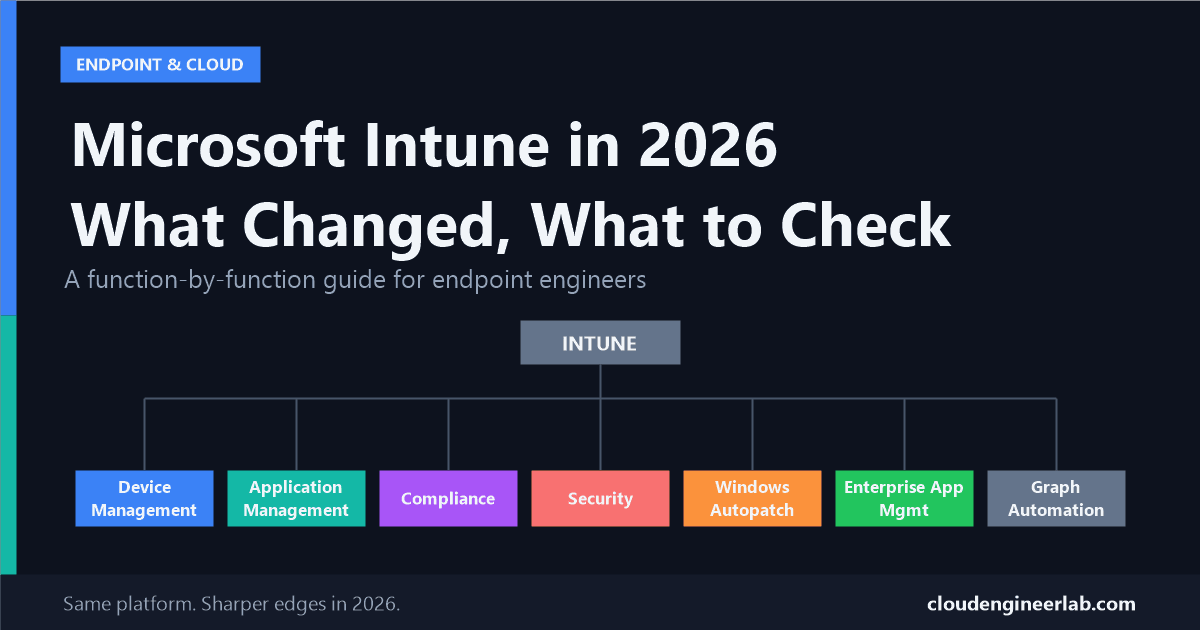
Instead of a timeline, this is organised the way an endpoint engineering team is actually organised: by function. Device management, application management, compliance, security, Autopatch, Enterprise App Management, and Graph automation. For each one, I am skipping the changes that do not change how you work and focusing on the ones that do, plus exactly what to check in your own tenant.
Intune
 ├── Device Management        → Autopilot Device Preparation matures
 ├── Application Management   → enforcement gets teeth, not just warnings
 ├── Compliance                → one tenant toggle can take down access
 ├── Security                  → Copilot agents move from chat to action
 ├── Windows Autopatch          → hotpatch by default, Intune-only WUfB
 ├── Enterprise App Management  → auto-update GA, catalog at ~600 apps
 └── Graph Automation           → more of your fleet now runs through it
The Throughline Before the Details
Read across all seven areas and three patterns repeat.
What's actually driving 2026's changes
Consolidation. Windows Update for Business policy now has to go through Intune. Enterprise App Management has folded into Microsoft 365 E5. Fewer standalone tools, more of the fleet routed through one console and one API surface.
Agents doing real work. Security Copilot inside Intune is no longer a chat sidebar that explains a setting to you. It drafts policies, prioritises vulnerabilities, and reviews changes, actions that used to require a human to open the settings catalog.
Soft warnings becoming hard blocks. Minimum app and client versions that used to log a warning now stop the app from launching. If your fleet has stale Company Portal clients or old MAM SDK versions, 2026 is the year that stopped being a cosmetic problem.
Keep those three forces in mind as you read the rest of this. Almost every change below is an instance of one of them.
Device Management: Autopilot Device Preparation Grows Up
For years, "Autopilot" meant one thing: the classic user-driven flow with the Enrollment Status Page (ESP) gating access to the desktop until policies and apps finished installing. In 2026, that stopped being the only real option. Windows Autopilot device preparation (the "v2" model) matured enough that choosing between it and classic Autopilot is now a deliberate architecture decision, not a preview you can ignore.
v2 is not an upgrade to v1
Device preparation is not a newer version of classic Autopilot that replaces it outright. It is a different architecture built for a narrower scenario. Treat the choice as "which tool fits this device population," not "which one is newer."
The biggest structural difference: device preparation does not use the Enrollment Status Page at all. It has its own setup progress experience and completion page. If your troubleshooting runbooks, scripts, or monitoring are built around ESP phase names and timeouts, none of that carries over to a device provisioned through device preparation.
Which one to use
| Use classic Autopilot (v1) when | Use device preparation (v2) when |
|---|---|
| You need Hybrid Entra Join | Fleet is Windows 11 only |
| You use self-deploying mode (kiosks, shared devices) | Devices are Entra-joined only, no on-prem dependency |
| You rely on pre-provisioning (white glove) | You can keep the out-of-box app payload to 25 or fewer apps and 10 or fewer scripts |
| You need device naming templates | You are cloud-first and comfortable with a leaner OOBE |
| You have a large app payload to push during ESP | You want the newer, simpler setup experience |
| You still support Windows 10 devices |
The second change worth building into your baseline: Managed Installer policy now extends to the Autopilot device preparation process. Apps deployed through Intune are trusted earlier, before the user ever reaches the desktop, instead of only after enrollment completes. If you run application control (WDAC or similar) alongside device preparation, revisit your Managed Installer scope now that the trust boundary starts earlier in the flow.
What to check this quarter: Audit your current OOBE app and script count on any device population you are considering moving to device preparation. If you are already past 25 apps or 10 scripts in that phase, v2 will not fit without trimming the payload first, not because of a licensing limit, but because that is the ceiling the experience is designed around.
Application Management: Enforcement Finally Has Teeth
For a couple of years, running an outdated Company Portal or an old Intune MAM SDK version got you a warning banner nobody read. In 2026, that changed from advisory to enforced, and it happened for both platforms.
iOS: SDK version warnings
Since late June 2026, users opening iOS apps built with an Intune MAM SDK earlier than version 20.8.0 see a warning recommending an update. It is currently non-blocking, users can dismiss it, but it is the visible first step before Microsoft starts enforcing a minimum SDK version the way it already does on Android.
Android: Company Portal becomes a single point of failure
Android devices need Intune Company Portal 5.0.6726.0 or later. If the Company Portal falls behind that version, managed work apps, including Outlook, Teams, and OneDrive, can refuse to launch entirely. One outdated system app can take down every managed app on the device at once.
Conditional Access: a grant control stopped being enforced
After June 30, 2026, Microsoft stopped enforcing the "Require Approved Client App" grant control in Conditional Access. Any policy still built on that grant is no longer doing what its name says. The replacement is the "Require app protection policy" grant control, which is the direction Microsoft has been pushing MAM enforcement toward for a while.
Check this before you read further
If you have not already audited your Conditional Access policies for "Require Approved Client App," do it now rather than at your next quarterly review. That control has been silently non-functional since July 1, 2026. A policy that looks like it is enforcing app protection may currently be enforcing nothing.
What to check this quarter:
- Grep your Conditional Access policies (Entra admin center, or via Graph,
GET /identity/conditionalAccess/policies) for the deprecated grant control and migrate every hit to "Require app protection policy." - Pull a Company Portal version report across your Android fleet. Anything below 5.0.6726.0 is a live outage risk for Outlook, Teams, and OneDrive, not a future one.
- If you maintain any custom or line-of-business apps wrapped with the Intune MAM SDK, check the SDK version in the build pipeline, not just in the app store listing. 20.8.0 is the floor you want to already be past.
Compliance: The Toggle That Can Take Down Access Overnight
Two changes here matter more than any individual policy setting update.
First, compliance state and compliance reporting are not the same thing, and 2026's clarified guidance makes that distinction sharper. Compliance state is evaluated from device configuration, OS version, security posture, policy assignment, and sign-in activity. Compliance reporting, what you actually see in the console, refreshes on the device's check-in and policy refresh cycle. If a device looks non-compliant in a report right after a policy change, that can be a stale check-in, not a real failure. Do not chase a report number without confirming the device has actually checked in since the change you are investigating.
Second, and more dangerous: the tenant-wide toggle "Mark devices with no compliance policy assigned as Not compliant."
This is the single most operationally risky setting in Intune compliance
If you enable that toggle while any Conditional Access policy requires a compliant device, every device that falls outside all of your compliance policy assignments becomes non-compliant immediately, and loses access as soon as Conditional Access re-evaluates. This is not a gradual rollout. It is instant, tenant-wide, and it will hit any device your assignment groups do not actually cover: new joiner devices in an unassigned group, service accounts, kiosks, anything you forgot.
Before you touch that toggle in either direction, run an assignment coverage report: every dynamic and static group your compliance policies target, cross-referenced against every enrolled device. Anything not covered is a device you are about to flip to non-compliant the moment you flip that switch.
Two smaller but real changes worth tracking:
- Android device administrator management is deprecated for devices with access to Google Mobile Services. If any part of your Android fleet is still on that legacy management mode, plan the migration to Android Enterprise now rather than waiting for it to be forced.
- BYOD has continued its shift away from full MDM enrollment. For personal iOS and Android devices, App Protection Policies (MAM without enrollment) are now the primary data protection layer in most enterprise designs, not a fallback for users who refuse enrollment.
What to check this quarter: Run the compliance assignment coverage audit above before your next change to that toggle, and confirm no part of your Android estate is still on device administrator mode.
Security: Copilot Agents Move From Chat to Action
The Security Copilot surface inside Intune stopped being a question-answering assistant and started doing configuration work. As of 2026 there are four purpose-built agents, though one of them is already gone.
| Agent | What it actually does | Status |
|---|---|---|
| Policy Configuration Agent | Reads a plain-language requirement or an uploaded document, maps it to settings catalog items, and drafts a policy for review | Active |
| Vulnerability Remediation Agent | Pulls CVE data from Microsoft Defender Vulnerability Management for managed devices and apps, prioritises by CVSS score and exposure, and gives step-by-step remediation guidance | Public preview since June 2026 |
| Change Review Agent | Reviews configuration changes before or after they go out | Active |
| Device Offboarding Agent | Automated offboarding workflows | Retired: new setup ended April 30, 2026; removed from the admin center June 1, 2026 |
The Policy Configuration Agent is worth understanding in detail because it changes what the job of "writing an Intune policy" actually looks like:
You describe the requirement in plain language
For example: "All laptops must have BitLocker enabled with AES-256 encryption." Or you upload a document, a security standard, a client requirement, an audit finding.
The agent maps it to settings catalog items
It parses the text and finds the specific settings catalog entries that implement the requirement, along with recommended values.
You review, not the agent
You see the proposed settings, remove anything you do not want, and adjust values that do not fit your environment.
The agent creates the policy
Only after your review. The agent drafts, it does not deploy unreviewed changes on its own.
Treat every agent output as a draft, not a decision
The genuine skill shift here is not "learn to prompt the agent." It is learning to review AI-drafted policy critically, the same way you would review a colleague's pull request, before it touches a production device group. An agent that maps "AES-256 encryption" to the wrong BitLocker cipher suite setting is a bigger problem when it happens silently than when you had to configure it by hand and would have caught the mismatch yourself.
Alongside the agents, 2026 also brought STIG security baselines for regulated fleets and local AI agent blocking policies, Intune managing on-device AI agents (shadow AI) as their own endpoint risk category rather than treating them as regular software.
What to check this quarter: If your team has started using the Policy Configuration Agent, confirm you have a real review step in the workflow, not just a rubber-stamp approval. If you had anything built around the Device Offboarding Agent, it is already gone; confirm that workflow has a replacement.
Windows Autopatch: From Deferral Rings to a Mandatory Superhighway
Three changes here, and the third one is the one that actually forces action.
Hotpatch updates are on by default. Starting May 2026, Windows Autopatch enables hotpatch security updates by default on eligible devices: security fixes install without a reboot, which meaningfully shortens the gap between patch release and patch compliance. An opt-out has been available since April 2026 for teams that need to keep their current reboot-based patching cadence for compatibility reasons.
Update Readiness got a real dashboard. Tenant-wide visibility, per-device update detail, centralized alerts with remediation guidance, and an Update Readiness Checker that flags devices likely to have trouble before a rollout reaches them, replacing a lot of manual report-pulling.
Intune is now the exclusive tool for Windows Update for Business policy, as of June 2026. If any part of your update management still runs through Group Policy or WSUS for WUfB-scoped settings, that path is no longer supported going forward. This is the one change on this list with a hard deadline that has already passed: if you have not migrated, you are either already broken or running on borrowed time with policy that Microsoft is no longer maintaining through the old channel.
What to check this quarter: Confirm your organisation's hotpatch stance was a deliberate decision, not a default you never revisited. Then confirm, explicitly, that zero WUfB policy in your environment still originates from GPO or WSUS. If you inherited this environment and have not verified that yourself, verify it now.
Enterprise App Management: The Catalog Grew Up
Enterprise App Management (EAM) went from a nice-to-have curated app list to something worth rebuilding part of your packaging pipeline around.
The catalog is now roughly 600 apps, up from the 90 to 100 it launched with. Auto-update reached general availability with service release 2606 (June 2026): assign an EAM app with a Required assignment, and Intune detects and applies newer catalog versions automatically, incremental or major, with no supersedence relationship to configure per update. EAM is also now generally available in GCC High and DoD environments, closing a gap that kept some regulated tenants from adopting it earlier. And as of July 1, 2026, EAM is included in eligible Microsoft 365 E5 subscriptions, with entitlement rollout to existing customers completed by August 1, 2026.
The real action item here is subtractive, not additive
If your team is still manually packaging, versioning, and patching a third-party app that now lives in the 600-app EAM catalog with auto-update, you are maintaining a parallel pipeline for work Microsoft now does for you. The win in 2026 is not "start using EAM." Most teams already did. It is auditing your existing Win32 app packages against the current catalog and retiring the ones that duplicate it.
What to check this quarter: Pull your list of manually packaged Win32 apps and cross-reference it against the current EAM catalog. Every match is a maintenance burden you can hand off.
Graph Automation: Building Scripts That Survive Throttling
This section exists because of everything above it. Windows Update for Business is now Intune-only. The EAM catalog is six times bigger. Security Copilot agents create and modify policy programmatically. All of that means more of your fleet's day-to-day operation flows through the Graph API surface than it did a year ago, and scripts written for a smaller, calmer surface do not automatically hold up.
The throttling behaviour engineers get bitten by most: Intune and device-related Graph endpoints implement low thresholds and frequently omit the Retry-After header on a 429 response, unlike better-behaved parts of Graph. Report export endpoints specifically cap at 100 requests per tenant per minute, with additional per-user and per-app sub-limits layered on top. A script that assumes every throttled response tells you how long to wait will stall or fail against these endpoints.
# Custom backoff for Intune/Devices endpoints that omit Retry-After
function Invoke-GraphWithBackoff {
    param(
        [scriptblock]$Request,
        [int]$MaxRetries = 5,
        [int]$BaseDelaySeconds = 5
    )

    for ($attempt = 0; $attempt -lt $MaxRetries; $attempt++) {
        try {
            return & $Request
        }
        catch {
            $statusCode = $_.Exception.Response.StatusCode.value__
            if ($statusCode -ne 429 -and $statusCode -ne 503) {
                throw
            }

            # Intune endpoints often omit Retry-After, so fall back to exponential backoff
            $retryAfter = $_.Exception.Response.Headers['Retry-After']
            $delay = if ($retryAfter) { [int]$retryAfter } else { $BaseDelaySeconds * [math]::Pow(2, $attempt) }

            Write-Warning "Throttled (attempt $($attempt + 1)/$MaxRetries). Waiting $delay seconds."
            Start-Sleep -Seconds $delay
        }
    }

    throw "Request failed after $MaxRetries retries."
}
The Microsoft Graph PowerShell SDK's built-in retry handler (Set-MgRequestContext -MaxRetry -RetryDelay) covers the common case, but its defaults (3 retries, 3-second delay) are tuned for Graph in general, not for the endpoints that throttle hardest. For scheduled jobs hitting device or report endpoints specifically, a custom wrapper like the one above, with real exponential backoff, is worth the extra code.
On authentication: for anything unattended (scheduled tasks, Azure Automation runbooks, CI pipelines), use app-only authentication with admin-consented application permissions, not a delegated flow tied to a signed-in account. Delegated auth belongs in interactive, ad hoc scripts an engineer runs at their own keyboard.
What to check this quarter: If you have automation written before this year that polls Intune device or report endpoints on a schedule, check whether it has any retry logic at all. Given how much more of the platform now runs through the API, a script that silently fails on throttling is a bigger blind spot today than it was twelve months ago.
What to Actually Do This Quarter
If you only take seven things away from this post, one per area:
Device Management
Stop treating Autopilot device preparation as "the new default." Check your OOBE app and script count before choosing it over classic Autopilot for a given device population.
Application Management
Find and replace every Conditional Access policy still using "Require Approved Client App." It has not been enforcing anything since July 1, 2026.
Compliance
Run an assignment coverage report before you ever touch the "no compliance policy assigned" toggle.
Security
Put a real human review gate on Policy Configuration Agent output before it reaches a production device group.
Windows Autopatch
Confirm, explicitly, that no Windows Update for Business policy in your tenant still originates from GPO or WSUS.
Enterprise App Management
Cross-reference your manually packaged Win32 apps against the current EAM catalog and retire the duplicates.
Graph Automation
Add real exponential backoff to any scheduled script hitting Intune device or report endpoints, don't rely on Retry-After being present.
None of these require a new licence, a new tool, or a new project charter. They are audits you can run this week with access you already have, and each one closes a gap that 2026 actually opened, not one a release note merely mentioned.
If you have run into any of these changes differently in your own tenant, especially the compliance toggle or the WUfB migration, drop a comment below. I am tracking real-world impact on this as the year closes out.

Written by
Chetan Yamger
Cloud Engineer · AI Automation Architect · Modern Workplace Consultant
Cloud Engineer, AI Automation Architect, and Modern Workplace Consultant based in Amsterdam, Netherlands. Specializing in scalable, secure enterprise solutions with Microsoft Azure, Intune, PowerShell, and AI-driven automation using ChatGPT, Gemini, and modern LLM technologies.
Stay in the loop.
New articles, straight to you.
Deep-dive technical articles on Intune, PowerShell, and AI — no noise, no spam.
Discussion
Share your thoughts — your email stays private
Leave a comment