
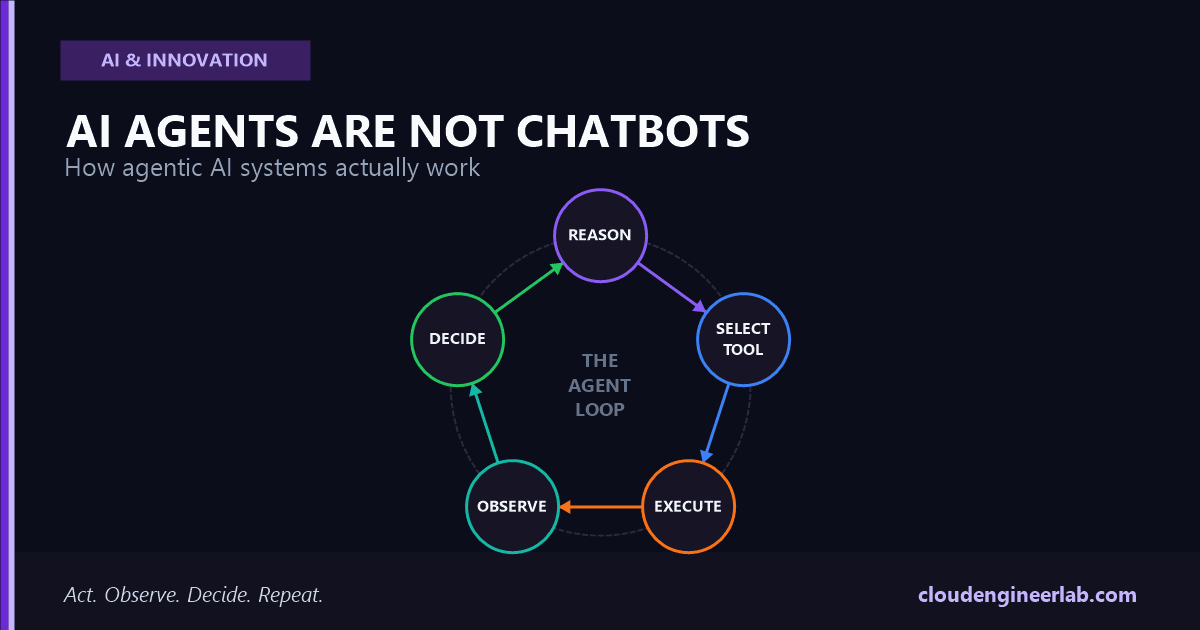
AI Agents Are Not Chatbots: How Agentic AI Systems Actually Work
A chatbot answers. An agent acts, checks, and tries again. Here's the real architecture behind agent loops, tool calling, memory, and long-running tasks.
Ask a chatbot to reschedule your 3 PM meeting, and it will tell you how to do it. Ask an agent, and it checks your calendar, finds a conflict-free slot, sends the update, and confirms it's done. Both of those interactions might start with the exact same sentence typed into the exact same chat box. What happens after that sentence is a completely different piece of software.
That difference is not a matter of degree. A chatbot is a single request and a single response. An agent is a loop: decide, act, observe, decide again, until the task is actually finished, not just described. Confusing the two is why so many "AI agent" products quietly disappoint. They generate a very convincing plan and then stop, because nothing in the system was ever built to carry that plan into the real world.
The one sentence to remember
A chatbot generates the next message. An agent decides what to do next, does it, checks whether it worked, and keeps going until the task is done, not until the reply looks finished.
This is a full architectural walkthrough: the actual pipeline a request moves through, then the eleven pieces that make an agent behave like one, agent loop, tool calling, planning, memory, state, context, human approval, long-running tasks, sub-agents, sandboxing, and failure recovery. Modern agent platforms are converging on the same shape for a reason: tool use, real code execution, file inspection, and tasks that run for minutes or hours, not text generation alone.
The Architecture, Step by Step
This diagram is a loop, not a pipeline
Drawn top to bottom, it looks like a straight line from request to result. It isn't. "Next Action" routes back to Tool Selection far more often than it routes forward to Final Result. A real agent might cycle through Reasoning, Tool Selection, Execution, and Observation a dozen times before anything gets returned to the user. The loop, not any single stage, is the actual architecture, and it's the very first thing worth understanding properly.
If a system you're evaluating only ever draws you the straight-line version of this diagram, ask what happens when step six fails. That answer is where the real engineering lives.
The Agent Loop
Strip everything else away and an agent is one mechanism repeated: the model looks at the goal and everything that's happened so far, decides on one action, that action actually executes, the real result comes back, and the model looks again. It stops when the model itself decides the goal is met, not when a fixed number of steps runs out.
The model never touches the outside world directly
At every turn, the model is still just predicting text. The difference is that some of that text is structured as an action request, a specific format the surrounding code recognizes and knows how to execute. The model proposes; the harness disposes.
Every action's real result re-enters the conversation
The output of an action, a database row, an API error, a file's contents, gets appended back into what the model sees next, as genuine new information, not as something the model already knew.
The loop ends on a decision, not a timer
A well-built loop terminates when the model concludes the goal is satisfied and produces a final answer with no further action requested. Everything else, budgets, step limits, timeouts, exists as a safety net around that, not as the primary stopping condition.
Why this is harder than it sounds
A model that's slightly overconfident about whether a step succeeded will happily move on to the next one anyway, compounding the mistake. The loop's reliability depends entirely on the observation step actually reporting the truth, not a plausible-sounding summary of it. Real results, not assumptions, are what make the loop trustworthy.
Tool Calling
A tool call is the model emitting a structured request, a name and a set of arguments matching a defined schema, instead of prose. It looks almost identical to a function signature because that's essentially what it is.
| What the model does | What the model does not do |
|---|---|
Emits {"tool": "check_inventory", "sku": "A1029"} as structured output | Query the actual inventory database itself |
| Reads back whatever result the harness returns | Guess at what the result probably would have been |
| Decides the next action based on that real result | Continue as if the action had already happened |
The schema is what makes this reliable at scale. A tool definition specifies exactly what arguments are valid, and the surrounding code validates the model's request against that schema before ever executing it, rejecting anything malformed rather than trying to execute a guess.
Parallel tool calls are a real efficiency gain, not a gimmick
A single turn can request several independent tool calls at once, checking three different systems in parallel instead of three sequential round trips. The harness executes them concurrently and returns every result together, which is often the single biggest latency win in a well-tuned agent loop.
For a deeper look at one specific, standardized way tool calls reach external systems, including how a server describes its own available tools to a client at connection time, see MCP Explained: The New USB-C of AI Agents.
Planning
Planning is the reasoning that happens before a tool gets picked, and agent systems genuinely differ in how much of it happens up front versus one step at a time.
| Approach | How it works | Best for |
|---|---|---|
| Reactive | Decide one action at a time based only on the current state | Tasks where conditions can change mid-execution and an early plan would go stale |
| Upfront planning | Produce a full multi-step plan before executing any of it | Tasks with a knowable, stable shape where seeing the whole plan helps catch a flawed approach early |
| Hybrid | Sketch a rough plan, then re-plan after each significant observation | Most real production agents, since it gets the benefit of foresight without betting everything on the first guess |
Modern models increasingly do this planning work as an explicit reasoning step before committing to an action, visibly working through the problem rather than jumping straight to a tool call. That reasoning step is what separates an agent that picks a sensible next action from one that pattern-matches to the first plausible-looking tool.
Memory
"My agent doesn't remember things" almost always means one of two very different problems, and they need different fixes.
| Type | What it actually is | Fails when |
|---|---|---|
| Working memory | Everything accumulated in the current conversation's context so far | The conversation ends. Nothing here survives to the next session unless something explicitly saves it |
| Persistent memory | Information deliberately written to storage outside the conversation, retrievable in a future, unrelated session | It was never actually written anywhere durable, so there's nothing to retrieve later |
An agent that seems to "forget" a user's preference between sessions usually isn't broken. It simply has no persistent memory mechanism at all, everything it knew lived only in a context window that no longer exists. Giving an agent real memory means giving it an explicit tool to write notes to durable storage and read them back later, not hoping a longer context window will somehow cover it.
State
State and memory get conflated constantly, but they answer different questions. Memory answers "what happened." State answers "what's true right now."
Don't let the model be the source of truth for state
An agent's belief about whether a step completed, based on its own transcript, is not the same thing as that step actually having completed. For anything beyond a toy example, state needs to live somewhere checkable and external: a database row, a ticket's status field, a file that either exists or doesn't. A production agent re-reads that external state to confirm reality rather than trusting its own memory of what it thinks it did.
This is also what makes an agent loop resumable after a crash or a restart. If state lives only in an in-memory transcript, losing that process loses all knowledge of progress. If state lives in an external system, a fresh agent instance can pick up exactly where the last one left off by simply reading it.
Context
Context is the finite window of tokens the model actually sees on any single call: the system prompt, the tool definitions, the conversation so far, every tool result accumulated along the way. Everything the agent "knows" at a decision point has to fit inside it.
Long-running loops have a specific failure mode here: old tool results pile up, most of them no longer relevant to the current step, quietly consuming budget and diluting the model's attention on what actually matters right now. Two concrete mitigations show up in real production systems:
Context editing
Deliberately clear specific old content, typically stale tool results or reasoning that's no longer relevant, once it's served its purpose, rather than letting every byte accumulate forever.
Compaction
Rather than deleting old context outright, summarize it server-side into a condensed form once the conversation approaches a size threshold, preserving what matters while freeing up room for what's next.
Without one of these, a long-running agent's context fills with its own history until either the cost per turn becomes impractical or the window runs out entirely, mid-task.
Human Approval
The model doesn't ask permission. It can't, on its own, tell the difference between a routine action and an irreversible one unless the surrounding system draws that line for it. Approval gates are implemented in the harness, not the model.
| Pattern | How it works |
|---|---|
| Blanket gate on specific tools | Any call to a named tool (delete_record, send_payment, merge_pull_request) always pauses for a human decision, regardless of context |
| Risk-based gating | Low-impact actions execute automatically; anything crossing a defined risk threshold pauses for confirmation |
Where this actually matters
Any action that deletes data, moves money, sends a communication on someone's behalf, or changes a production system deserves a real approval gate, not a prompt instruction asking the model to "be careful." A prompt is a suggestion the model can misjudge under the wrong conditions. A gate that structurally intercepts the tool call before execution cannot be talked out of stopping.
Long-Running Tasks
Chat UX assumes an answer comes back in seconds. Agentic tasks routinely don't: a multi-step research task, a large codebase refactor, a data migration that runs for hours. That difference forces real architectural choices, not just a longer loading spinner.
Pause and resume, not one long-held connection
A task that might run for an hour can't reasonably hold a single open HTTP connection the whole time. Long-running agent architectures support suspending a task and resuming it later, sometimes across a completely different process.
Progress has to survive an interruption
If the process running the loop restarts partway through, a well-built system picks up from tracked progress rather than starting the entire task over from nothing.
A budget keeps the agent pacing itself
Giving the model a sense of how much runway remains, a token ceiling or a time limit, lets it wrap up gracefully and prioritize what matters most, instead of being cut off mid-thought with no warning.
This is also why some agent platforms support explicitly pausing a turn mid-task and resuming it later, rather than forcing every long task to either finish inside one continuous call or fail.
Sub-Agents
A single agent doing everything itself eventually chokes on its own context. A research task that reads forty documents doesn't need one agent holding all forty documents in its head at once, it needs one agent that delegates each document to a disposable sub-agent and receives back a short, useful summary.
What delegation actually buys you
The parent agent's context stays focused on orchestration, the actual goal and what's been learned so far, instead of filling up with raw material it only needed once. Sub-agents can also run in parallel on independent pieces of a task, and different sub-agents can use different models entirely, a fast, cheap model for a simple lookup, a more capable one only where the task genuinely needs it.
This is the same underlying idea whether it shows up as a coding assistant spinning up a subagent to investigate one part of a codebase, or a multi-agent session where an orchestrating agent delegates a defined piece of work to another named agent instance and waits for its result.
Sandboxing
The moment an agent can execute code or touch a filesystem, it needs to do that somewhere contained, not directly on the host system running the loop. A single wrong command, whether from a genuine bug or a manipulated input, shouldn't be able to reach anything beyond what the task actually needs.
Isolated execution, not the host machine
Code runs inside a dedicated container or sandboxed process with its own filesystem, separate from wherever the orchestrating agent itself lives.
Network access is restricted, not open by default
A sandbox that can reach any external endpoint the model happens to request is one prompt injection away from exfiltrating data. Real deployments allow-list what a sandbox can actually reach.
The environment doesn't persist state it shouldn't
A sandbox reset between tasks, or scoped tightly to one session, prevents one task's leftover state from quietly leaking into the next one.
Sandboxing is what actually makes it safe to let an agent run bash commands or execute arbitrary code, instead of only ever suggesting a command for a human to review and run themselves. For the hands-on build of exactly this, container isolation, resource limits, and default-deny network, with real Docker flags and a worked escape-attempt trace, see Build an AI Agent Sandbox.
Failure Recovery
Tool calls fail constantly in the real world: a timeout, a file that doesn't exist, an API returning an error instead of data. A well-built agent loop treats that as information to reason about, not a crash to bubble up and kill the whole task.
| Failure type | What it looks like | Right response |
|---|---|---|
| Retryable | A transient network blip, a rate limit, a momentary timeout | Retry, often with backoff, since the same call may simply succeed the second time |
| Non-retryable | A permissions error, a malformed request, a resource that genuinely doesn't exist | Don't retry blindly. The model needs a different approach, or a human, not five identical failed attempts |
Cap the retries
An agent that keeps retrying the same failing action without a ceiling doesn't fail loudly, it just quietly burns time and money while making no progress. The error result returned to the model needs to be marked clearly as a failure, and the loop needs an explicit limit on how many times the same action gets retried before escalating to a human or giving up on that path entirely.
The result of a failed tool call is still a real observation. Feeding it back into the loop, honestly labeled as an error, is what lets the model actually reason about what went wrong instead of confidently building on top of a result that never happened.
The Bottom Line
None of these eleven pieces are optional extras bolted onto a chatbot to make it sound more impressive. They're what the word "agent" actually means, architecturally: a loop that acts on the real world, observes what actually happened, and keeps going until the goal is genuinely met, with memory, state, and context handled deliberately enough to survive more than a few steps, and enough sandboxing and approval gates that letting it act autonomously is a reasonable decision rather than a leap of faith.
The question that actually tells you what you're looking at
Next time a product calls itself an "AI agent," ask what happens when its second tool call fails. A chatbot wearing an agent's marketing won't have an answer. A real one will, because failure recovery was part of the architecture from the start, not an afterthought.
A chatbot was always going to tell you what to do next. The interesting engineering, the part actually worth building well, is everything that happens after it decides to do that thing itself.

Written by
Chetan Yamger
Cloud Engineer · AI Automation Architect · Modern Workplace Consultant
Cloud Engineer, AI Automation Architect, and Modern Workplace Consultant based in Amsterdam, Netherlands. Specializing in scalable, secure enterprise solutions with Microsoft Azure, Intune, PowerShell, and AI-driven automation using ChatGPT, Gemini, and modern LLM technologies.
Stay in the loop.
New articles, straight to you.
Deep-dive technical articles on Intune, PowerShell, and AI — no noise, no spam.
Discussion
Share your thoughts — your email stays private
Leave a comment