
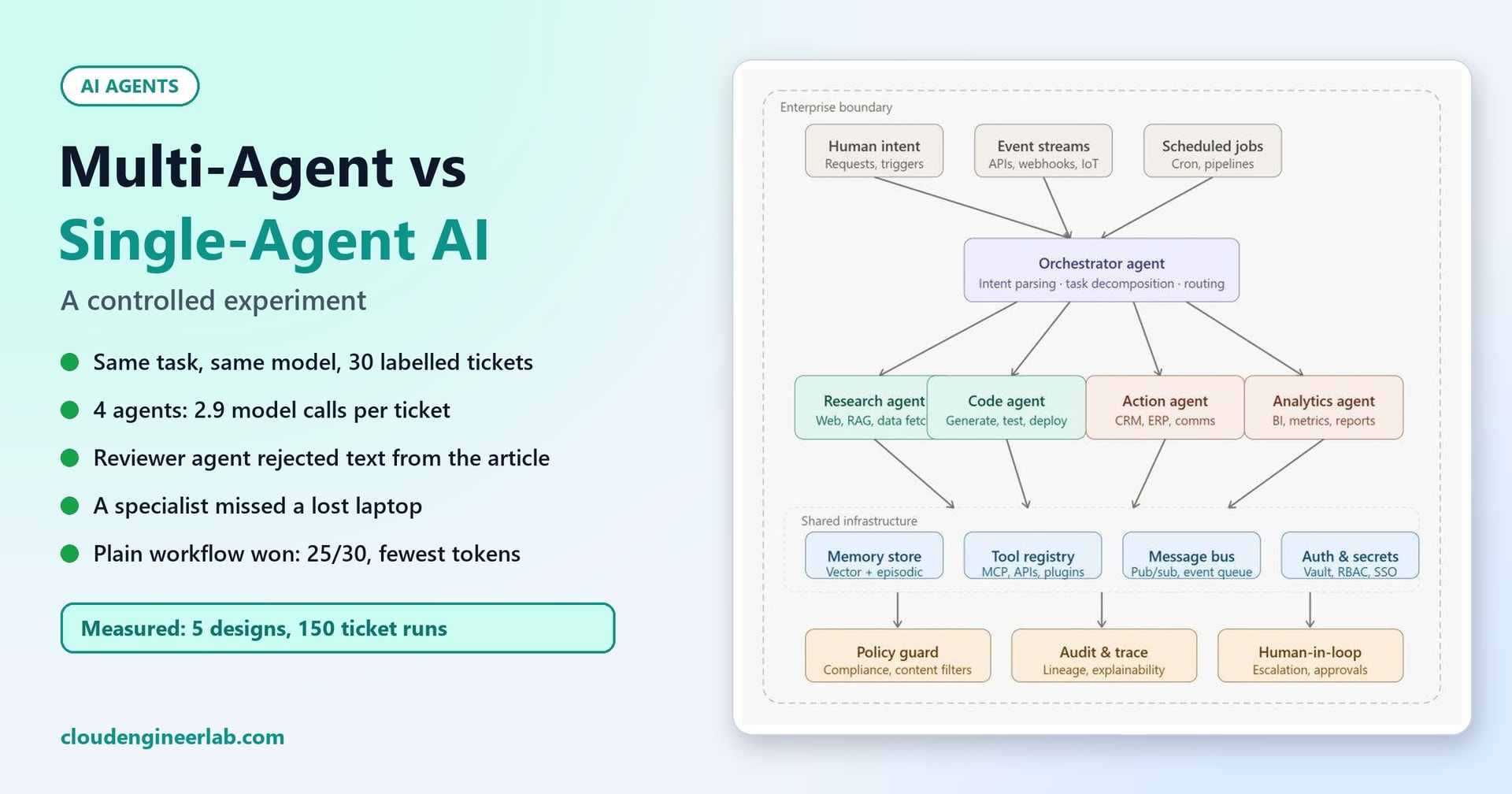
Multi-Agent vs Single-Agent AI: A Controlled Experiment
We built a single agent, a four-agent team and a plain workflow for the same task, then measured accuracy, time, tokens, failures and complexity. More agents didn't win.
"Use multiple agents" has become a default answer for any non-trivial AI task: a planner, a researcher, a writer and a reviewer, each with its own prompt, passing work between them. It sounds like a well-organised team, and sometimes it is. But it's rarely tested against the simpler alternatives on the same task.
So we tested it. We built a single agent and a four-agent team for exactly the same job, with the same model, the same search and the same instructions, and measured what actually matters:
- accuracy,
- time,
- token cost,
- failure rate,
- complexity.
Then we added a third contender that most comparisons leave out: a plain workflow, with fixed rules in code and the model used only where it's needed.
This post is the experimental companion to Multi-Agent AI Systems: When One Agent Is Not Enough, which explains the patterns, and Build a Multi-Agent System, which builds one.
The controlled setup
- Task: handle 30 labelled IT helpdesk tickets from our helpdesk assistant post. For each one: classify it, decide whether a human must take over, pick the right knowledge article and draft a reply.
- Known answers: every ticket has a known right answer, including 11 that must be escalated: security incidents, outages, a prompt-injection attempt and a vague "it doesnt work".
- Same for both agent designs: one local model (Qwen2.5-3B-Instruct, 4-bit, on a laptop processor with no GPU), the same three candidate articles from the same search, the same escalation rules and temperature 0. The only difference is how the work is split up.
- The plain workflow is the design from the helpdesk post, run on the same tickets with the same model and search, but with its own instructions and rules in code. That's the point of including it: a different design, not just a different split.
The Contenders
1. Single agent. One model call gets the ticket and the three candidate articles, and returns everything at once in a JSON object: category, priority, escalate or not, the article it used, and the draft reply.
2. Multi-agent team. Four specialists, run in order by a small orchestrator:
Any agent can stop the chain by escalating to a human.
3. Plain workflow. The design from the helpdesk post. Fixed keyword rules in code catch security incidents, outages, injection attempts and vague tickets. One model call classifies the ticket, given similar past tickets as examples. A similarity threshold decides whether any article fits well enough. A second model call drafts the reply, and code checks that it cites its article. No "agents" at all.
Both agent designs got one round of improvement after their first run, each fixing its own biggest failure, so neither is judged on a careless first draft.
The Results
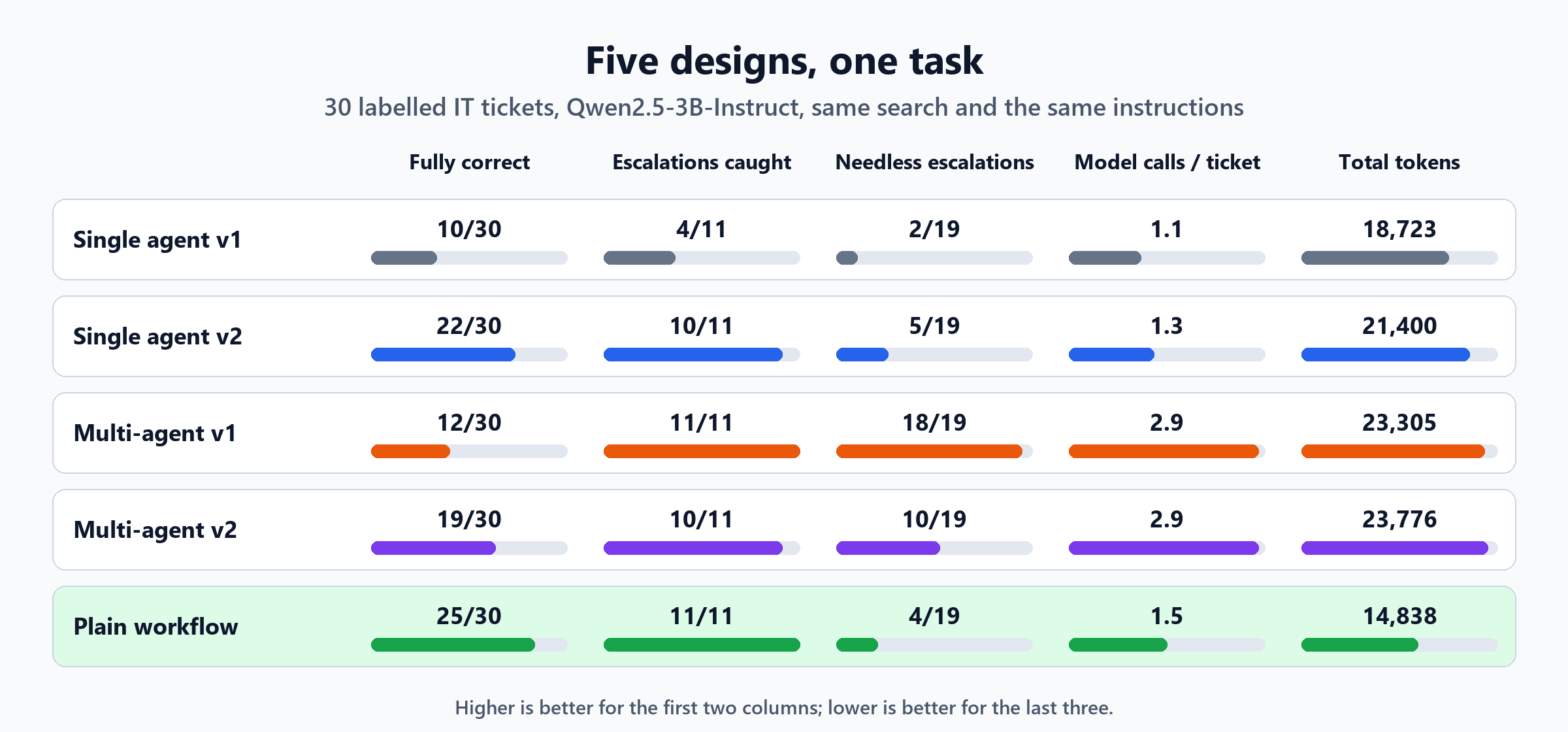
| Design | Fully correct | Escalations caught | Needless escalations | Model calls per ticket | Tokens (in / out) | Model time per ticket |
|---|---|---|---|---|---|---|
| Single agent v1 | 10 / 30 | 4 / 11 | 2 / 19 | 1.1 | 16,033 / 2,690 | 6.5 s |
| Single agent v2 | 22 / 30 | 10 / 11 | 5 / 19 | 1.3 | 18,585 / 2,815 | 6.8 s |
| Multi-agent v1 | 12 / 30 | 11 / 11 | 18 / 19 | 2.9 | 19,843 / 3,462 | 8.6 s |
| Multi-agent v2 | 19 / 30 | 10 / 11 | 10 / 19 | 2.9 | 20,466 / 3,310 | 7.8 s |
| Plain workflow | 25 / 30 | 11 / 11 | 4 / 19 | 1.5 | 12,773 / 2,065 | 4.9 s |
"Fully correct" means the right escalation decision, plus the right article and a usable draft when not escalating.
The headline is simple: the multi-agent team was not the best design on any measure that matters. It used roughly twice as many model calls as the single agent, the most tokens and the most time, and its best version handled fewer tickets correctly than the improved single agent. The plain workflow beat everything.
But the way each design failed is more useful than the scores, so let's look at that.
How the Single Agent Failed
Version 1: too many jobs in one answer
Asked to produce everything in one JSON object, the single agent struggled in two ways:
- It missed 7 of the 11 tickets that needed a human, including a laptop left on a train, the canteen Wi-Fi down for everyone, a CRM error for a whole team, and "it doesnt work".
- 17 of its 24 "don't escalate" answers were unusable. Typically it chose the right article and then left the draft empty. Writing a whole reply inside a JSON field, on top of four other decisions, was too much for this small model at once.
Version 2: finish the job, and refuse half-answers
We made two changes, both inside the same single agent:
- If it picked an article but left the draft empty, it was asked, in a second turn, to write the draft. That completed 7 drafts.
- Any answer that still lacked an article or a draft was turned into an escalation rather than passed on half-finished.
That lifted it from 10 to 22 fully correct and from 4 to 10 escalations caught, for just 0.2 extra model calls per ticket. Much of that gain came from the second change: a simple consistency check in code. The one escalation it still missed was the canteen Wi-Fi outage.
def handle_v2(ticket, knowledge, meter):
    """v2: if the agent picked an article but left the draft empty, it is asked to finish in a second turn."""
    out = handle(ticket, knowledge, meter)
    if not out["escalate"] and out.get("kb") and not out.get("draft"):
        hits = dict((a["id"], a) for a, _ in knowledge.search(ticket["text"]))
        if out["kb"] in hits:
            a = hits[out["kb"]]
            out["draft"] = call(meter, SYSTEM, f"You chose {a['id']} for this ticket but left the draft empty. Write only the "
                                               f"draft reply now, using only this article:\n{a['id']}: {a['title']}\n{a['text']}\n\n"
                                               f"Ticket:\n<ticket>{ticket['text']}</ticket>", 260).strip()
    if not out["escalate"] and (not out.get("kb") or not out.get("draft")):
        out.update(escalate=True, reason="agent did not produce both an article and a draft", kb=None, draft=None)
    return out
How the Multi-Agent Team Failed
Version 1: safe, but almost useless
The four-agent team caught all 11 escalations. That looks excellent until you see the other number: it also escalated 18 of the 19 tickets that didn't need it. Only one reply made it through.
The cause was the reviewer agent. It rejected 15 drafts, and its reasons were almost always its own checklist recited back:
reviewer rejected the draft: promises something IT has not done; asks for a password or codeFor example, this draft for "VPN won't connect from home" was rejected:
Check you have internet access, right-click the NW-VPN icon to disconnect and reconnect, or disable and
re-enable the 'NW-VPN' adapter in Advanced network settings. If it still fails, restart your laptop. If several
colleagues cannot connect, escalate to the Network Team. [KB004]
Every sentence comes from the approved article. A reviewer agent told to look for problems found problems, whether or not they were there.
Version 2: make the reviewer show its evidence
We changed the reviewer so that it must quote the exact sentence it objects to, and code throws out any objection whose quote isn't actually in the draft:
REVIEWER2 = """You are a reviewer agent. Check the draft reply against the knowledge article.
A problem is advice that is NOT in the article, contradicts it, asks for a password or code, or promises
something IT has not done. For EACH problem, copy the exact sentence from the draft that contains it.
Reply with ONLY a JSON object: "problems": a list of objects with "quote" (exact text from the draft) and "issue".
If there are no problems, reply {"problems": []}."""


def _norm(x):
    return " ".join(str(x).lower().split())


def review_v2(meter, art_text, draft):
    """Keep only objections that quote text really present in the draft."""
    rev = call_json(meter, REVIEWER2, f"Knowledge article:\n{art_text}\n\nDraft reply:\n{draft}", {"problems"}, 250)
    if rev is None:
        return False, ["reviewer output could not be parsed"]
    real = [p for p in rev["problems"] if isinstance(p, dict) and len(_norm(p.get("quote", ""))) > 12
            and _norm(p["quote"]) in _norm(draft)]
    return not real, [f'"{p["quote"]}": {p.get("issue", "")}' for p in real]
That helped a lot: rejections fell from 15 to 6, and fully correct tickets rose from 12 to 19. But we then checked the reviewer's remaining objections against the knowledge base:
- 3 of the 5 quoted "problems" were sentences copied word for word from the approved article. For example, it objected to "If it still fails, open Settings > Network > Advanced network settings...", which is step 3 of the VPN article.
- 2 were genuine catches. One draft used the wrong article for a phishing question; another asked the user for information the article didn't call for.
Requiring evidence made the reviewer honest about where it looked, but not about what it saw.
The failure that matters most: a lost laptop
The most important finding wasn't in the scores at all. For "Left my laptop on the train this morning", the triage agent decided, in both versions, that the ticket was "too vague to act on" and didn't escalate it. The writer agent then drafted a reply from the "laptop is slow" article:
KB009 suggests restarting the laptop, as many issues can be resolved after a restart...Advice to restart a laptop that's on a train somewhere, for what is actually a security incident.
- In version 1, the over-cautious reviewer happened to reject this draft, for its usual generic reasons, so the ticket was escalated by accident.
- In version 2, the fairer reviewer approved it.
The improved team was more useful and less safe. Its safety in version 1 had come from a reviewer that rejected almost everything, not from understanding the risk. The single agent v2 escalated this ticket correctly, and the plain workflow caught it with a one-line keyword rule.
Each agent sees less, so each can be fooled more easily
Splitting work across agents also splits the context. The triage agent saw only the ticket, the writer only the ticket and one article, the reviewer only the draft and the article. Nobody in the chain held the whole picture, and the one agent that needed to recognise "lost laptop = security incident" got it wrong with nothing downstream positioned to notice.
Failures: Invalid Output and Crashes
How often did each design simply break? Every design asked the model for structured JSON and retried once if the reply wasn't valid:
| Design | Invalid replies that needed a retry | Still invalid after the retry | Crashes |
|---|---|---|---|
| Single agent v1 | 3 | 0 | 0 |
| Single agent v2 | 3 | 0 | 0 |
| Multi-agent v1 | 1 | 0 | 0 |
| Multi-agent v2 | 2 | 1 | 0 |
| Plain workflow | 0 | 0 | 0 |
None of the designs crashed, and a single retry fixed almost every malformed reply. The one reply that stayed broken was in the multi-agent pipeline, where the reviewer's output couldn't be read and the ticket was escalated. More model calls per ticket simply means more chances for one of them to come back malformed, and in a chain, any broken link stops the work.
Why the Plain Workflow Won
The workflow scored 25 of 30, caught all 11 escalations and used the fewest tokens and the least time. It didn't win because its model calls were smarter; it's the same model. It won because it moved decisions the model is bad at out of the model:
- Fixed rules decided the safety-critical cases. "Lost", "stolen", "everyone", "ignore previous instructions": a keyword rule can't be argued with, doesn't get tired, and caught every security incident and outage.
- A similarity threshold decided whether any article fits, instead of asking the model to judge.
- The model did only what it's good at: classifying with examples, and writing a short reply from one article.
The cost of that reliability shows up in one place: lines of code.
| Design | Decision logic | Prompts | Where the decisions live |
|---|---|---|---|
| Single agent v2 | 31 lines | 1 | Almost all in one prompt |
| Multi-agent v2 | 51 lines | 4 | Spread across four prompts |
| Plain workflow | 100 lines | 2 | Mostly in code, with 4 fixed rules and example tickets |
Counted as non-blank, non-comment lines in each design's own decision functions, not including the shared helpers for calling the model and searching.
The workflow has the most code, but code is the easy kind of complexity. You can read it, test it and know exactly what it will do. Four prompts handing work to each other is the hard kind: every hand-off is a place where meaning can be lost, and every change to one prompt can shift the behaviour of the others.
When Multi-Agent Does Make Sense
This experiment doesn't show that multi-agent designs are always wrong. It shows that, for a well-defined task with a known shape, they added cost and failure points without adding accuracy. Multiple agents earn their place when:
- The work genuinely runs in parallel: researching ten suppliers at once, for example, where independent agents save real time.
- The subtasks need different tools, permissions or models, such as a code agent that can run tests in a sandbox and a writer that can't touch anything.
- The context is too large for one call, so splitting it is necessary rather than tidy.
- A reviewer has an objective standard to check against, such as running tests or validating against a schema, not just another model's opinion. In our AI code reviewer experiment, the AI was most reliable when explaining real test failures.
Notice the pattern: in every good case, the split matches a real boundary in the work. Splitting a single judgement into four opinions isn't one of them.
How to Run This Comparison on Your Own Task
- Label 30 to 100 real examples with the right outcome, including the risky ones.
- Build the simplest version first: one call, or a workflow with rules in code.
- Measure everything on the same examples: accuracy, the cases that must never be missed, tokens, time, and failures such as invalid output.
- Add agents only to fix a measured weakness, then measure again.
- Read the failures, not just the scores. Our most important finding, the lost laptop, was a single ticket that a version-to-version score comparison would have hidden.
The Short Version
| Question | Measured answer |
|---|---|
| Was the four-agent team more accurate? | No: best 19/30, against 22/30 for the improved single agent and 25/30 for the workflow |
| Was it safer? | v1 caught every escalation by rejecting almost everything; v2 approved advice to restart a lost laptop |
| What did it cost? | 2.9 model calls per ticket against 1.3, and the most tokens and time of all five designs |
| Why did the reviewer agent struggle? | It recited its checklist; even when forced to quote evidence, 3 of 5 objections quoted the approved article |
| What won? | A plain workflow: rules in code for safety, the model only for classifying and drafting |
| When are multiple agents worth it? | Parallel work, different tools or permissions, oversized context, or an objective check |
More agents means more prompts, more hand-offs, more tokens and more places to fail. Sometimes that's worth it. The only way to know is to build the simple version, measure both, and let the results decide.

Written by
Chetan Yamger
Cloud Engineer · AI Automation Architect · Modern Workplace Consultant
Cloud Engineer, AI Automation Architect, and Modern Workplace Consultant based in Amsterdam, Netherlands. Specializing in scalable, secure enterprise solutions with Microsoft Azure, Intune, PowerShell, and AI-driven automation using ChatGPT, Gemini, and modern LLM technologies.
Stay in the loop.
New articles, straight to you.
Deep-dive technical articles on Intune, PowerShell, and AI — no noise, no spam.
Discussion
Share your thoughts — your email stays private
Leave a comment