
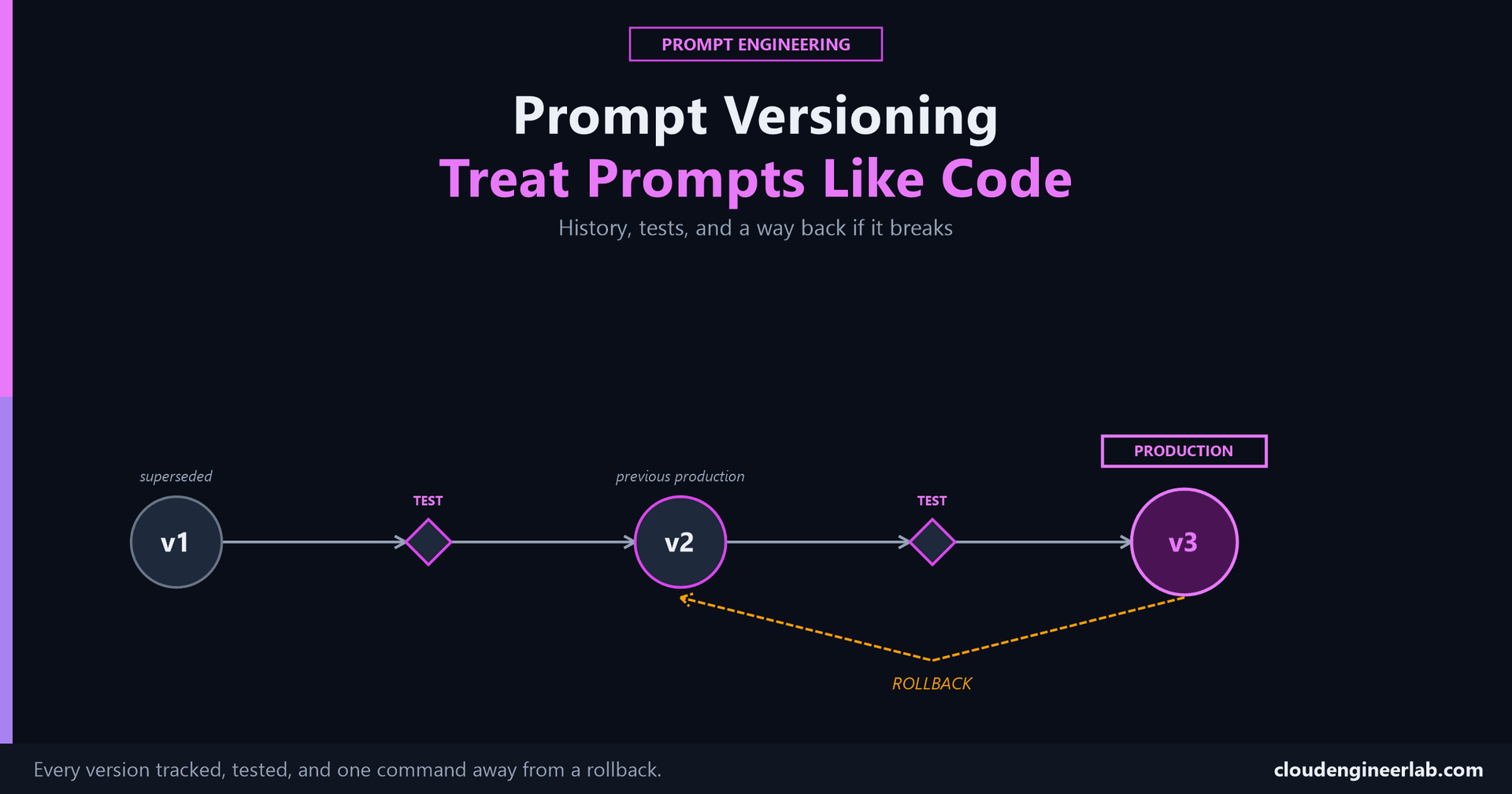
Prompt Versioning: Treat Prompts Like Code
A prompt edited live in a vendor dashboard has no history, no diff, and no way back. Git, change history, and rollback fix all three.
Someone edits the production prompt directly in a vendor dashboard to fix an urgent issue. It works. Three weeks later, a different, unrelated problem shows up, and nobody can say what the prompt actually said last month, who changed it, or why. That's not a testing gap, the previous post covers testing. It's a version control gap, and it's the same gap application code solved decades ago.
The one sentence to remember
A prompt that can change production behavior deserves the same lifecycle as code that can change production behavior: a history of every version, a test gate before promotion, and a way back when a version turns out to be wrong.
The Pipeline
Notice what never happens in this pipeline
No version reaches Production without going through Test first, and no version skips straight from an idea to live traffic. That's the entire discipline. Everything else in this post is what makes that one rule actually enforceable instead of aspirational.
Prompts Are Code, Not Config
A prompt determines what a system does, the same way a function's logic does. It can introduce a bug (a dropped edge case), a regression (a format that used to be consistent and isn't anymore), or a behavior change nobody signed off on. Treating it as a string someone can edit inline, in a dashboard, in a spreadsheet, in a Slack message a teammate pastes into the code, removes every one of the safeguards that already exist for code specifically because code has the same risk profile.
Git for Prompts
Store each prompt as its own file, in the repository, not as a string literal buried inside application code and not as a value living only in a third-party UI.
prompts/
├── bitlocker-compliance/
│   ├── v1.txt
│   ├── v2.txt
│   ├── v3.txt
│   └── CHANGELOG.md
Every change is a commit with a real message
git add prompts/bitlocker-compliance/v2.txt
git commit -m "Add anatomy structure: role, constraints, example format

v1 dropped devices with a null BitLocker status and drifted in output
format between runs. v2 adds explicit constraints and an example
output line, per the eval results in prompt-evaluation-results.md."
A commit message that explains why, not just what changed, is what turns a change history into something a teammate (or you, in three months) can actually use.
Diffs show exactly what changed
git diff v1..v2 -- prompts/bitlocker-compliance/A line-by-line diff of the actual prompt text answers "what's different" in seconds. Reconstructing that from memory, or from a screenshot someone happened to take, doesn't.
Tags mark the versions that actually matter
git tag bitlocker-compliance-v2
git tag bitlocker-compliance-v3
A tag on the exact commit that passed evaluation and got promoted is a stable reference point, independent of whatever the branch's history looks like six months later.
Change History as a Debugging Tool
When output quality shifts and nobody changed "the code," the first question is exactly the one a change history answers directly: what prompt version is live right now, and when did it become live?
git log --oneline -- prompts/bitlocker-compliance/
a4f21c9 Add explicit null-status handling (v3)
7b90e13 Add anatomy structure: role, constraints, example format (v2)
2e88a01 Initial version (v1)
Cross-referencing that log against when a regression started is the same move as bisecting a code regression, except without a real history, there's nothing to bisect against. The change is invisible until someone happens to remember making it.
Test Cases Gate Every Promotion, Not Just the First Version
The Test step in the pipeline above isn't a separate concept from this post, it's the exact framework from the previous post run again, every time: the same fixed dataset, the same metrics, scored against the new version before it's allowed to replace what's currently live.
A version that hasn't been tested against the fixed dataset isn't a candidate yet
It's a draft. The distinction matters because "I tweaked the wording and it reads better" describes a draft. "It passed the same test suite version 2 passed, plus the new edge case that broke version 2" describes a candidate actually ready for the next step.
Rollback
Because every version is a discrete, tagged artifact, reverting production to the last known-good version is one action, not a reconstruction effort.
git checkout bitlocker-compliance-v2 -- prompts/bitlocker-compliance/Compare that to the alternative
Without version control, "roll back" means someone trying to remember, or guess, what the prompt used to say before the change that's now suspected of causing a problem. That's not a rollback, it's a reconstruction under pressure, during an incident, which is the worst possible time to be doing it for the first time.
A rollback should be exactly as fast and exactly as boring as reverting a bad code deploy. If it isn't, the prompt isn't actually versioned yet, no matter how carefully individual changes are being made.
Production Prompts: What "Live" Actually Means
"Live" should be an explicit, checkable pointer, a tag, a version field in a config table, an environment variable, not an implicit fact about whatever text currently happens to be pasted somewhere.
{
  "prompt": "bitlocker-compliance",
  "production_version": "v3",
  "promoted_at": "2026-09-24T09:00:00Z",
  "promoted_by": "eval-gate",
  "eval_pass_rate": "5/5"
}
A record like this answers, at any moment, without asking anyone: what's actually running right now, since when, and what evidence justified promoting it. None of that is answerable when "live" just means "whatever's in the box."
Prompt Ownership
Code has owners, a person or team accountable for a module, who reviews changes to it before they merge. Prompts that drive real behavior need the same thing, and most teams that skip this don't notice until a prompt has drifted for months with nobody specifically responsible for catching it.
# prompts/OWNERS.md
bitlocker-compliance/   @security-team
incident-summary/       @sre-team
customer-reply-draft/   @support-lead
An unowned prompt is the same risk as unowned production code
Anyone with API access editing a shared prompt whenever it seems convenient is how a change with real behavioral consequences ships with nobody having actually looked at it first. Naming an owner per prompt, and requiring their review before a version promotes, closes exactly the gap that "well, someone probably checked it" leaves open.
A Worked Version History
Continuing the same example
This picks up the BitLocker prompt from the Anatomy post, tested with the framework from the previous post, now tracked through three real versions.
| Version | Change | Why | Eval result | Status |
|---|---|---|---|---|
| v1 | One-sentence prompt, no structure | First working draft | 3/5 accuracy, drops both edge cases | Superseded |
| v2 | Full anatomy structure: role, context, constraints, example output format | v1's format drifted between runs and silently dropped a null-status device | 5/5 accuracy, both original edge cases handled | Promoted, then superseded |
| v3 | Added an explicit "flag for investigation, never skip" instruction for missing fields | A new case in production, a device with no check-in date at all, was silently dropped the same way v1 dropped its null-status case | 5/5 on the full dataset including the new case | Current production version |
Reading this table answers "is v3 actually safe to promote" with evidence. Reading three prompt files side by side and guessing which one "seems more careful" does not, no matter how experienced the person guessing is.
Where This Leads
Versioning the prompt is one layer
Once a versioned, tested, owned prompt is running inside a larger system, an agent calling it, a workflow retrying it, a pipeline chaining it with others, that system needs its own production discipline on top: safe retries, idempotency, and checkpointing for the workflow the prompt lives inside. That layer is covered here, and it assumes the prompt itself is already this stable, an assumption this post is what actually earns.
The Bottom Line
A prompt with no version history, no test gate, and no rollback path isn't simpler than a versioned one, it's just carrying the same risk without any of the tools that make that risk manageable. Git for the files, a fixed test suite for the gate, an explicit pointer for what's actually live, and a named owner for every prompt that matters, together, are what turn "someone changed the prompt" from an incident into a normal, reviewable, reversible Tuesday.
The audit worth running before this handles anything real
Pick your most important production prompt right now. Can you show its last three versions, what changed between them, and why? Can you revert to the one before this one in under a minute? If either answer is no, that's not a process gap to schedule for later, it's the actual reason the next bad prompt change will be a multi-hour incident instead of a one-line revert.
Is your most important prompt living in a file with real history, or in a dashboard that only shows what it currently says? That gap is usually invisible until the day a rollback is the only thing that would have helped. Drop a comment with how your team currently tracks prompt changes, or whether it does at all.

Written by
Chetan Yamger
Cloud Engineer · AI Automation Architect · Modern Workplace Consultant
Cloud Engineer, AI Automation Architect, and Modern Workplace Consultant based in Amsterdam, Netherlands. Specializing in scalable, secure enterprise solutions with Microsoft Azure, Intune, PowerShell, and AI-driven automation using ChatGPT, Gemini, and modern LLM technologies.
Stay in the loop.
New articles, straight to you.
Deep-dive technical articles on Intune, PowerShell, and AI — no noise, no spam.
Discussion
Share your thoughts — your email stays private
Leave a comment