
AI Agent Permissions: Build Least-Privilege Access for Tools and APIs
A working permission layer for an AI agent: scoped per-call credentials, per-tool permissions, a policy decision point, approvals bound to exact parameters, and a tamper-evident audit log.
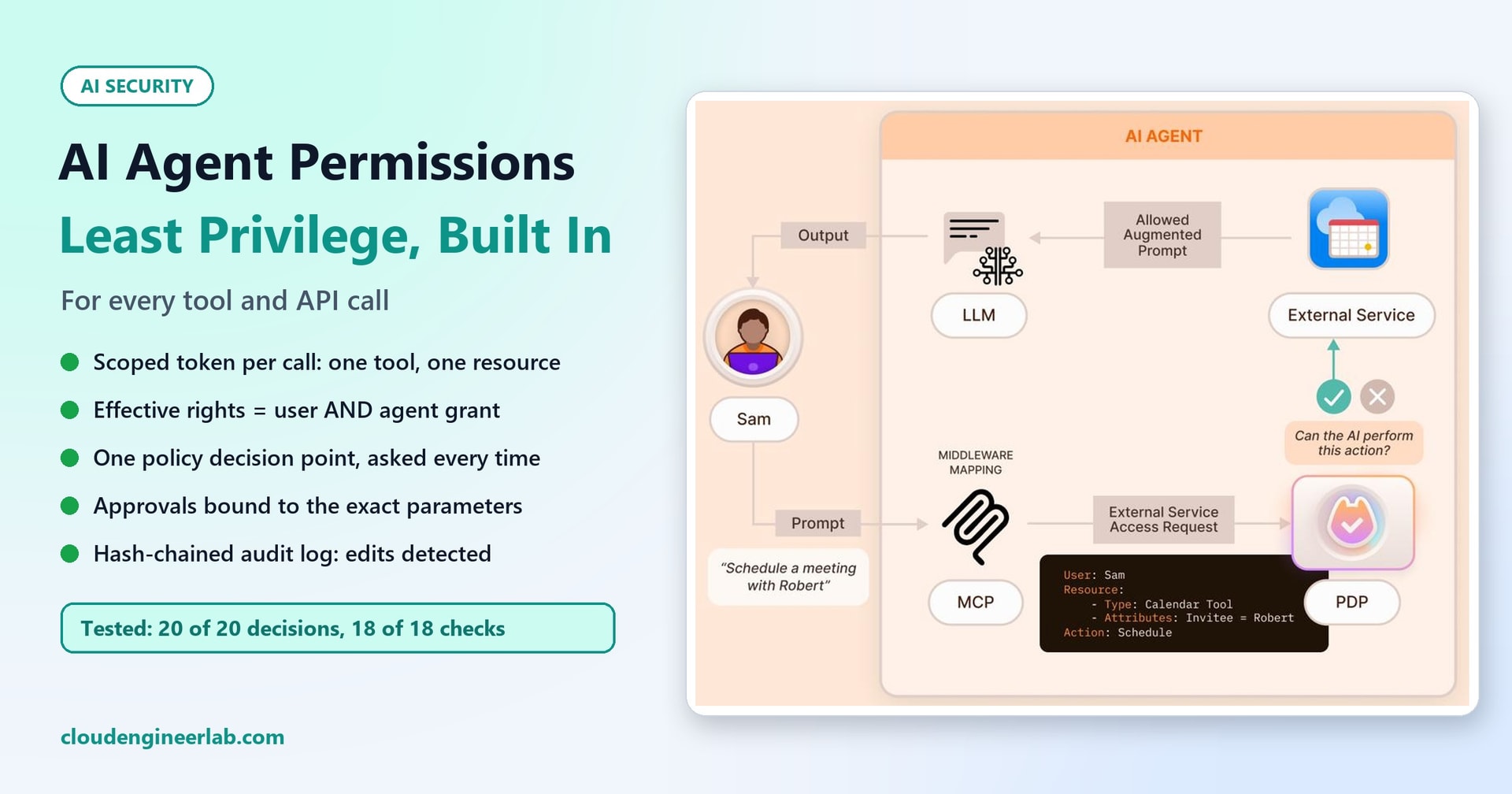
The diagram on this post's cover shows the question every agent tool call should answer before anything happens: "Can the AI perform this action?" Sam asks the agent to schedule a meeting with Robert. The request goes through MCP, but before it reaches the calendar, a policy decision point (PDP) checks who is asking, which tool, which resource, and what action. Only then does the call go through.
This post builds that layer for a real agent and tests it. It has five parts:
- Scoped credentials: a token that allows exactly one call, on one resource, for two minutes.
- Per-tool permissions: the agent can do only what both the user and the agent are allowed to do.
- Authorization checks: one PDP, asked before every call, never skipped.
- Approval workflows: human approval bound to the exact parameters approved, single-use and expiring.
- Audit logs: an append-only record where any edit is detected.
How to give AI agents API access without too much power covers the principles: one tool per capability, tiers by blast radius, and rate limits. AI agent identity covers delegated identity. This post is the hands-on build that puts them together.
What we built and tested
- The code: a permission layer for the IT helpdesk agent used in earlier posts, in plain Python (about 170 lines, standard library only).
- The tests: 20 authorization test cases with expected decisions, and 18 checks of the credential, approval and audit mechanisms.
- The results: the policy matched all 20 expected decisions, and all 18 checks passed on Python 3.14. A PDP decision took about 1 to 2 microseconds; minting and checking a token took about 15 to 22.
It's built to show the mechanics clearly, not as a drop-in product. The section near the end maps each part to what you'd use in production.
The Shortcut This Replaces
Most agents start the same way. The agent gets one service account with every permission its tools might ever need, and anything the agent decides to do, it can do.
The problem is in whose permissions are used. Our test users are:
- Sam: an ordinary employee.
- Priya: on the helpdesk team.
- Omar: the helpdesk lead.
If the agent's own identity decides, Sam can ask the agent to restart a colleague's laptop, edit any ticket, or put someone in a group, because the agent is allowed to. The agent becomes a way for anyone to borrow its access.
We measured it. Of our 20 test cases, 15 should not simply be allowed: they should be denied or need approval. "The agent's identity decides" would have allowed 13 of those 15. The only two it stopped were calls to a tool the agent was never given.
Part 1: Per-Tool Permissions, Calculated Per Request
The fix is to calculate permissions for this request: what this user is allowed to do, intersected with what this agent is allowed to do.
User rights come from roles. "own" means the user's own devices and tickets, while "any" means anyone's:
ROLE_ACTIONS = {
    "employee":      {"get_ticket:own", "get_device:own", "restart_service:own", "clear_temp_files:own"},
    "helpdesk":      {"get_ticket:any", "get_device:any", "restart_service:any", "clear_temp_files:any",
                      "update_ticket:any", "add_to_group:any", "reset_password:any"},
    "helpdesk_lead": {"approve:any"},
}
AGENT_GRANTS = {    # what each agent identity is allowed to use, whoever is asking
    "helpdesk-agent": {"get_ticket", "get_device", "restart_service", "clear_temp_files", "update_ticket",
                       "add_to_group", "reset_password"},
}
Notice what isn't in the agent's grant: disable_account. Offboarding happens in the HR workflow, so this agent never gets that tool, whoever asks. Removing a tool is still the strongest permission, as the threat model for this agent showed.
Part 2: The Policy Decision Point
All the rules live in one function. The tools never decide for themselves whether they're allowed to run:
def decide(user, agent, action, resource, context=None):
    """Return (decision, reason). decision is 'allow', 'deny' or 'approval_required'."""
    context = context or {}
    if action not in AGENT_GRANTS.get(agent, set()):
        return "deny", f"agent '{agent}' has no grant for {action}"
    rights = set().union(*(ROLE_ACTIONS[r] for r in USERS.get(user, {}).get("roles", [])))
    owns = OWNERS.get(resource.get("id")) == user
    if f"{action}:any" not in rights and not (owns and f"{action}:own" in rights):
        return "deny", f"user '{user}' may not {action} on {resource.get('id')}"
    if action == "add_to_group" and resource.get("group") in PROTECTED_GROUPS:
        return "deny", f"'{resource['group']}' is a protected group; use a change request"
    if action == "reset_password" and not context.get("identity_verified"):
        return "deny", "no recorded identity verification for this reset"
    if action in NEEDS_APPROVAL:
        return "approval_required", f"{action} needs a second person"
    return "allow", "within the user's rights and the agent's grant"
Three things make this a real PDP rather than a few if statements inside each tool:
- It's the only place rules exist. To answer "who can reset passwords?", you read one function, not thirteen tools.
- It looks at the resource, not just the action. Sam may restart
PC-0142(his laptop) but notPC-0377(Priya's). A role check alone can't express that. - It explains itself. Every decision comes with a reason, which goes into the audit log and back to the user.
Some of the 20 test cases, with the decision the PDP gave for each:
| Case | Request | Decision |
|---|---|---|
| C01 | Sam restarts the spooler on his own laptop | Allow |
| C02 | Sam restarts the spooler on Priya's laptop | Deny: not his device |
| C05 | Sam updates his own ticket | Deny: employees can't edit tickets |
| C09 | Priya (helpdesk) restarts Sam's laptop | Allow |
| C11 | Priya adds Tom to Project Atlas | Approval required |
| C12 | Priya adds Tom to Domain Admins | Deny: protected group |
| C15 | Priya resets Lee's password, no verification on record | Deny |
| C16 | Priya disables Lee's account | Deny: the agent has no grant for it |
| C18 | Omar (the lead) adds himself to Domain Admins | Deny: protected group, even for the lead |
| C19 | An unknown user reads a ticket | Deny |
The PDP gave the expected decision in all 20 cases.
Part 3: Scoped Credentials for Every Call
The agent never holds a credential that works for everything. After the PDP allows a call, the gateway mints a token for exactly that call: this user, this agent, this action with these parameters, for two minutes, once. The tool checks the token itself before acting.
def scope(action, resource):
    """The exact call a token allows: the action plus every parameter, not just the resource id."""
    return action + ":" + json.dumps(resource, sort_keys=True)


def mint_token(user, agent, action, resource, ttl=120):
    claims = {"sub": user, "act": agent, "scope": scope(action, resource), "exp": time.time() + ttl,
              "jti": secrets.token_hex(8)}
    body = json.dumps(claims, sort_keys=True).encode()
return body.hex() + "." + hmac.new(KEY, body, hashlib.sha256).hexdigest()def verify_token(token, action, resource):
"""The tool's own check: signed by the gateway, unexpired, unused, and for exactly this call."""
try:
body_hex, sig = token.split(".")
body = bytes.fromhex(body_hex)
except ValueError:
return False, "malformed token"
if not hmac.compare_digest(sig, hmac.new(KEY, body, hashlib.sha256).hexdigest()):
return False, "bad signature"
c = json.loads(body)
if c["exp"] < time.time():
return False, "expired"
if c["jti"] in USED_TOKENS:
return False, "already used"
if c["scope"] != scope(action, resource):
return False, f"token is for {c['scope']}, not {scope(action, resource)}"
USED_TOKENS.add(c["jti"])
return True, "ok"The token records two identities: sub (the user the action is for) and act (the agent acting). The audit trail can then answer "who did this?" honestly: the agent did, on Sam's behalf.
Why check the token in the tool as well as at the gateway? Because the tools are where the damage happens. If any code path ever reaches a tool without going through the gateway, the tool refuses: our test called a tool directly, and it answered "malformed token".
Our first version had a gap here, and a test found it
The first mint_token scoped the token to the action and the resource id only, for example add_to_group:tom. A token issued for "add Tom to Project Atlas" would then also have worked for "add Tom to Domain Admins", since both have the id tom. The gateway's approval check would still have stopped it, but the tool's own check wouldn't. We now bind the token to every parameter, and test this exact case:
token is for add_to_group:{"group": "Project Atlas", "id": "tom"}, not add_to_group:{"group": "Domain Admins", "id": "tom"}
Scope tokens to the whole call, not to the most obvious field.
Part 4: Approvals Bound to Exact Parameters
For privileged actions, the PDP returns approval_required. The gateway parks the call and creates an approval request. Four rules make the approval mean something:
- The requester can't approve their own request.
- Only approvers can approve: here, the helpdesk lead.
- The approval is for exactly these parameters. It stores a fingerprint of the action and every parameter; a call with anything different is refused.
- It's single-use and it expires (15 minutes here).
    def consume(self, rid, action, resource):
        g = self.granted.pop(rid, None)          # single use: removed whether or not it matches
        if not g:
            return False, "not approved (or already used)"
        if g["exp"] < time.time():
            return False, "approval expired"
        if g["fp"] != fingerprint(action, resource):
            return False, "parameters differ from what was approved"
        return True, g["approver"]
The fingerprint check is what stops the classic swap: getting a harmless change approved, then running a different one with the approval ID. The single-use rule matters too. In our test, an attempt with the wrong parameters used up the approval, so a second attempt with the right parameters needed a fresh approval instead of quietly succeeding.
There's one more detail in the gateway below: when an approved call finally runs, the PDP is asked again. If Priya lost her helpdesk role between asking and approval, the call is denied. Permissions are checked when the action happens, not only when it was requested. Human-in-the-Loop AI covers what a good approval request should show the approver.
Part 5: An Audit Log You Can Trust
Every decision is logged: allowed, denied and pending, with the reason and the approver. Each entry includes the hash of the previous one, so changing or deleting any entry breaks the chain:
    def write(self, **event):
        event = {"ts": round(time.time(), 3), **event, "prev": self.last}
        self.last = hashlib.sha256(json.dumps(event, sort_keys=True).encode()).hexdigest()
        self.entries.append({**event, "hash": self.last})
A real entry from the test run, for Sam's denied request:
{'ts': 1792499601.441, 'user': 'sam', 'agent': 'helpdesk-agent', 'action': 'restart_service', 'resource': {'id': 'PC-0377'}, 'decision': 'deny', 'reason': "user 'sam' may not restart_service on PC-0377", 'hash': '75d539b5909f9f643f0a635b7c9a3bb8ef67918780598a8f37afea65759ea562'}When the test changed one old entry (an approval request marked "pending") to read "deny", verification reported entry 3 was changed or removed.
A hash chain detects edits; it doesn't prevent them
Someone who can rewrite the whole log can recompute every hash. In production, write the log to storage the agent's runtime can only append to, such as immutable blob storage or a separate logging workspace. Periodically copy the latest hash somewhere else, so a rewritten history no longer matches.
Putting It Together: the Gateway
The gateway is the only path from the agent to a tool. It asks the PDP, handles approvals, mints the scoped token, calls the tool and logs the result:
    def call(self, user, agent, action, resource, context=None, approval_id=None):
        decision, reason = decide(user, agent, action, resource, context)
        approver = None
        if decision == "approval_required":
            if not approval_id:
                rid = self.approvals.request(user, action, resource)
                self.log.write(user=user, agent=agent, action=action, resource=resource, decision="pending", reason=rid)
                return {"status": "pending_approval", "approval_id": rid}
            ok, approver = self.approvals.consume(approval_id, action, resource)
            if not ok:
                decision, reason = "deny", approver
        if decision == "deny":
            self.log.write(user=user, agent=agent, action=action, resource=resource, decision="deny", reason=reason)
            return {"status": "denied", "reason": reason}
        token = mint_token(user, agent, action, resource)
        result = self.tools[action](token, resource)
        self.log.write(user=user, agent=agent, action=action, resource=resource, decision="allow",
                       approver=approver, result=result.get("status"))
        return result
In an MCP setup, this is the layer between the MCP server and the real APIs, exactly where the PDP sits on the cover diagram. The model sees tool names and results. It never sees a credential, and it can't skip the check.
The Test Results
All 18 mechanism checks passed:
PASS  token works for its own call
PASS  same token refused a second time  already used
PASS  token refused for another device  token is for restart_service:{"id": "PC-0142"}, not restart_service:{"id": "PC-0377"}
PASS  token for one group refused for another  token is for add_to_group:{"group": "Project Atlas", "id": "tom"}, not add_to_group:{"group": "Domain Admins", "id": "tom"}
PASS  expired token refused
PASS  altered token refused  bad signature
PASS  tool refuses a call that skips the gateway  malformed token
PASS  privileged call parked for approval
PASS  requester can't approve own request  requester cannot approve their own request
PASS  non-approver can't approve
PASS  lead approves
PASS  approval refused for different parameters  parameters differ from what was approved
PASS  approval is single-use (consumed by the mismatch)  not approved (or already used)
PASS  approved call runs once
PASS  expired approval refused  approval expired
PASS  gateway denies Sam on Priya's laptop
PASS  audit log intact  8 entries intact
PASS edited entry detected entry 3 was changed or removed| What we measured | Result |
|---|---|
| Policy decisions matching the expected result | 20 / 20 |
| Non-allowed cases the "agent identity decides" shortcut would have allowed | 13 / 15 |
| Credential, approval and audit checks passed | 18 / 18 |
| Time for one PDP decision | About 1 to 2 microseconds |
| Time to mint and verify one scoped token | About 15 to 22 microseconds |
The cost of checking every call is negligible next to a single model call, which takes seconds. Performance is no reason to skip authorization.
Keep these tests in the agent's test suite and run them on every change to roles, grants or tools. A permission bug looks exactly like a working feature until someone tests the case that should fail.
From This Example to Production
Every part maps to something you'd use in a real Microsoft or cloud environment. The names below are examples; pick what fits your platform.
| Part | In this post | In production, for example |
|---|---|---|
| Scoped credentials | HMAC token per call, 2 minutes, single use | OAuth on-behalf-of or token exchange: a short-lived token for the user, with the agent recorded as the actor; narrow scopes, such as resource-specific permissions instead of tenant-wide ones |
| Per-tool permissions | Roles intersected with the agent's grant | App roles and groups for users; a separate, minimal permission set per agent identity |
| PDP | One decide() function | A policy engine such as Open Policy Agent or Cedar, with policies versioned and reviewed like code |
| Approvals | Fingerprinted, single-use, expiring | An approval workflow (Teams, ITSM or a privileged-access tool) showing the exact parameters |
| Audit log | Hash-chained list | Append-only storage plus your SIEM, with the user, agent, decision and approver on every event |
| Secrets | A key only the gateway holds | A key vault and managed identity; nothing secret in prompts or model context |
Secrets vs certificates vs tokens covers how the gateway itself should authenticate.
Checklist
- The agent's identity has a minimal grant; tools the job doesn't need don't exist.
- Every request is checked against the user's rights and the agent's grant, never the agent's alone.
- One PDP holds the rules; tools don't decide for themselves.
- Rules look at the resource (own vs anyone's, protected groups), not just the action.
- Tools receive a per-call token bound to every parameter, short-lived and single-use, and they verify it themselves.
- Privileged actions need approval from someone other than the requester, bound to the exact parameters, single-use and expiring.
- Permissions are re-checked when the action runs, not just when it was requested.
- Every decision, including denials, is logged with the user, agent, reason and approver, in append-only storage.
- Authorization tests, especially the cases that should fail, run on every change.
The Short Version
| Part | What it does | What our tests showed |
|---|---|---|
| Per-tool permissions | Effective rights = the user's rights AND the agent's grant | The agent-identity shortcut would have allowed 13 of 15 non-allowed cases |
| PDP | One place answers "can the AI perform this action?" | 20 of 20 expected decisions; about 1 to 2 microseconds each |
| Scoped credentials | A token for one call, bound to every parameter | Reuse, another device, another group, expiry and tampering were all refused |
| Approvals | A second person, for exactly these parameters, once | Self-approval, changed parameters, reuse and expired approvals were all refused |
| Audit log | Every decision, hash-chained | An edited entry was detected |
Least privilege for an agent isn't one setting. It's a narrow grant, a decision made fresh for every call, a credential that can't be reused, and a record you can trust afterwards. Together that's about 170 lines, and it costs microseconds per call.

Written by
Chetan Yamger
Cloud Engineer · AI Automation Architect · Modern Workplace Consultant
Cloud Engineer, AI Automation Architect, and Modern Workplace Consultant based in Amsterdam, Netherlands. Specializing in scalable, secure enterprise solutions with Microsoft Azure, Intune, PowerShell, and AI-driven automation using ChatGPT, Gemini, and modern LLM technologies.
Stay in the loop.
New articles, straight to you.
Deep-dive technical articles on Intune, PowerShell, and AI — no noise, no spam.
Discussion
Share your thoughts — your email stays private
Leave a comment