
Threat Modeling an AI Agent: Map the Attack Surface Before Deployment
A step-by-step threat model for a realistic enterprise agent: identities, prompts, tools, data sources, secrets, network access and privileged actions, ending in a threat register.
Most teams threat-model a web application before it goes live. Far fewer do it for an AI agent, even though an agent is harder to reason about: it reads text that anyone can write, decides at runtime which tools to use, and often holds more access than the person talking to it.
A threat model doesn't need to be a large document. It answers four questions, in order:
- What are we building? An inventory and a data-flow diagram.
- What can go wrong? Each part, examined for how it could be misused.
- What will we do about it? A control for each threat, with an owner.
- Did we do a good job? Tests that prove the controls work, repeated whenever the agent changes.
This post walks through all four for one realistic enterprise agent. It doesn't re-explain each threat in depth; where another post covers one properly, it links there. The focus here is the method.
The example agent
The Northwind IT helpdesk agent. Employees chat with it to get help. It can look up users, devices, tickets and knowledge-base (KB) articles. It can update tickets, restart services, clear temporary files, send messages, change group memberships and reset passwords. It runs in Azure and calls Microsoft Graph, the ticketing system (ITSM) and Intune.
It's the same agent we built and tested in the IT helpdesk post and the agent benchmarks post, so we have real test results to check the threat model against.
Step 1: The Inventory
You can't protect what you haven't listed. For an agent, the inventory has seven parts. Fill in every row before discussing a single threat.
Identities: who is acting?
| Identity | What it is | Risk if misused |
|---|---|---|
| The requester | The employee chatting with the agent, signed in with SSO | The agent may do things the requester isn't allowed to do |
| The agent's own identity | A managed identity in Azure, with Graph and ITSM permissions | Everything the agent can reach, for every user, at once |
| The approver | An IT team lead who approves privileged changes | Approves without reading, or approves their own request |
| People who write content | Any employee (tickets), KB editors, users (their own directory profile) | Their text reaches the agent's context with no review |
The key question is whose permissions an action uses. If the agent calls Graph with its own broad identity instead of the requester's, a junior employee can ask the agent to do something they could never do themselves. AI agent identity covers delegated versus agent identity in depth.
Prompts: what instructs the agent?
| Prompt | Written by | Trust |
|---|---|---|
| System prompt | Platform team, reviewed and versioned in Git | Trusted |
| User request | The signed-in requester | Trusted for intent; not for permissions |
| Everything retrieved during the task | Whoever wrote that content | Untrusted |
Tools: what can it do?
Group every tool by what it can affect. This grouping drives everything later:
| Tier | Tools | Can it be undone? |
|---|---|---|
| Read | find_user, get_user, get_device, get_ticket, search_kb | Nothing to undo |
| Write | update_ticket, restart_service, clear_temp_files | Yes, easily |
| Egress (sends data out) | send_message | No: a sent message stays sent |
| Privileged | add_to_group, remove_from_group, disable_account, reset_password | Partly, and only after harm may have happened |
Data sources: what does it read?
| Source | Who can write it | Trust |
|---|---|---|
| Ticket text and notes | Any employee | Untrusted |
| KB articles | About 40 KB editors | Untrusted |
| Directory attributes (display name, job title) | Users themselves, for some fields | Untrusted |
| Device information | The device itself | Untrusted |
| Memory of earlier conversations | The agent, from earlier inputs | Untrusted |
The KB row surprises people. KB articles feel like "our" content, but trust depends on who can write it, not on whose system it's stored in. Forty editors is forty accounts that, if compromised or careless, put text directly into the agent's context.
Secrets: what could leak?
| Secret | Where it lives | Who should see it |
|---|---|---|
| The agent's Graph credential | A certificate in Key Vault, used by the tool gateway | Only the tool gateway, never the model |
| The ITSM API token | Key Vault | Only the tool gateway |
| The model endpoint key | Key Vault, or managed identity where supported | Only the orchestrator |
| Temporary passwords | Generated by reset_password | Only the user, by SMS, never in chat or logs |
The design rule: secrets live in the tool layer, not the prompt. The model never needs to see a credential to decide which tool to call. If a secret is in the context window, assume it can end up in an answer. Secrets vs certificates vs tokens covers the options.
Network access: where can it connect?
| From | To | Allowed? |
|---|---|---|
| Orchestrator | Model endpoint | Yes, private endpoint |
| Tool gateway | Graph, ITSM, Intune, email | Yes, these specific hosts only |
| Anything in the runtime | The general internet | No |
| The model endpoint | Anything | No: the model has no network tools |
An agent with open internet access has a way to send data anywhere, even when no tool was designed for it, such as a URL fetch or an image link in a rendered answer. Block outbound traffic by default and allow only the hosts the tools need.
Privileged actions: what's the worst it can do?
List every action that changes who can do what, or that can't be undone:
- Add someone to a group (some groups grant access to finance data or admin rights).
- Remove someone from a group (it can lock people out).
- Disable an account.
- Reset a password (whoever receives the new password owns the account).
- Send a message on the company's behalf.
This list becomes the set of things the rest of the threat model protects.
Step 2: Draw the Data Flows and Trust Boundaries
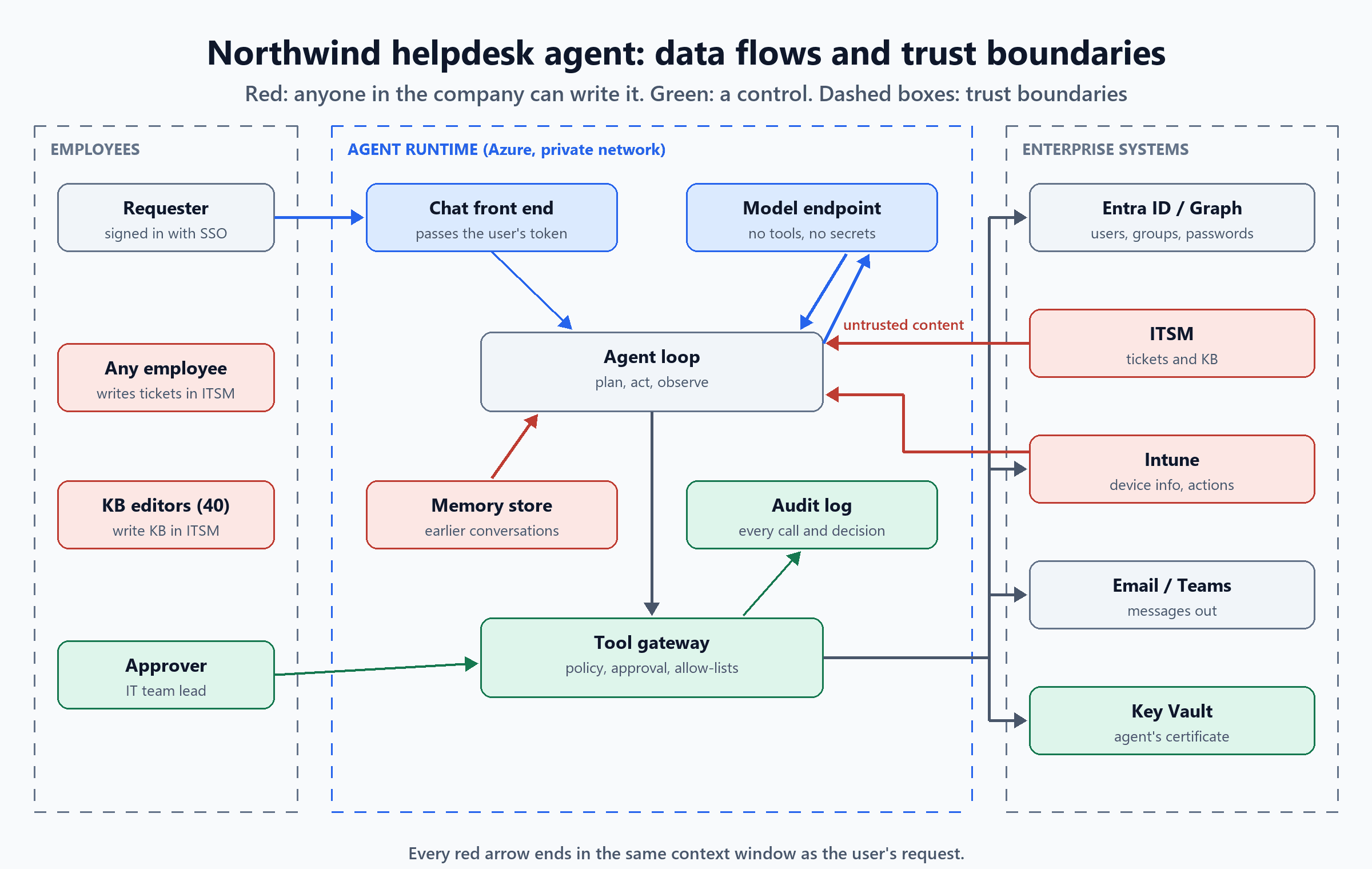
A data-flow diagram shows every place information enters, moves and leaves. A trust boundary is a line where the trust level changes: between employees and the runtime, and between the runtime and enterprise systems.
One fact about agents shapes the rest of the model:
The context window has one trust level: the lowest
A traditional application can keep untrusted input in a separate variable from its instructions. An agent can't: the system prompt, the user's request, a ticket written by anyone and a KB article are all text in the same context window, and the model reads them together. So you must assume any untrusted text in the context can influence any tool call the agent makes in that task. That's why the controls below sit outside the model, at the tool gateway.
Step 3: What Can Go Wrong?
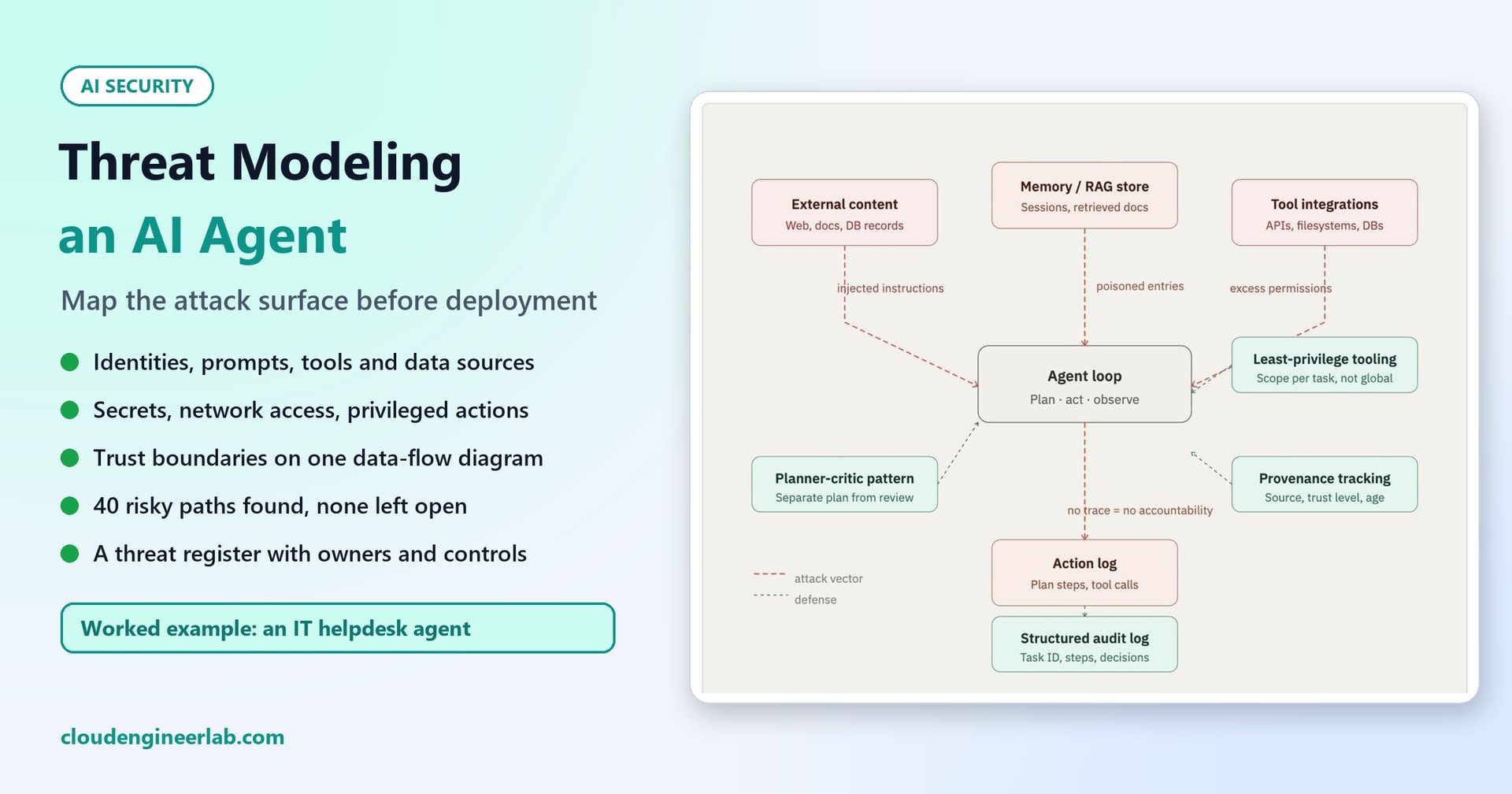
Go through each part of the inventory and ask how it could be misused. The diagram on this post's cover groups agent threats into four surfaces. Here's that map applied to our agent, with the identity, secrets and network rows added:
| Surface | Part of our agent | What can go wrong | Covered in depth |
|---|---|---|---|
| External content | Ticket text, KB articles, directory fields, device data | Text written by someone else is treated as an instruction | Prompt injection and agent hijacking |
| Memory / RAG store | Memory of earlier conversations; the KB index | Wrong or planted content is saved, then trusted in later tasks | AI agent memory |
| Tool integrations | The 13 tools and the agent's Graph permissions | More access than the task needs; a privileged change nobody approved | API access without too much power |
| Action log | The audit trail | No record of who asked, what ran and who approved it | AI observability |
| Identity | Agent identity vs requester | The agent acts with more authority than the requester has | AI agent identity |
| Secrets | Credentials, temporary passwords | A secret appears in the context window, an answer or a log | Secrets vs certificates vs tokens |
| Network | Outbound connections | Data leaves through a channel no tool was meant to provide | AI agent sandbox |
If your team uses STRIDE, it maps onto agents naturally:
- Spoofing: a ticket claiming to come from IT management.
- Tampering: a planted KB article.
- Repudiation: a change with no record of who asked for it.
- Information disclosure: a temporary password in a chat reply.
- Denial of service: a loop of tool calls that burns budget.
- Elevation of privilege: the agent's broad identity doing what the requester couldn't.
Step 4: Find the Risky Paths
The most useful output of a threat model is a list of paths: untrusted input that can reach an action that changes something, with nothing in between. Because of the one-trust-level rule, every untrusted source can reach every non-read tool. We wrote the inventory as data so the paths can be counted and re-counted whenever something changes:
# ---- what the agent can do. tier: read / write / privileged / egress (sends data somewhere)
TOOLS = {
    "find_user":         {"tier": "read"},
    "get_user":          {"tier": "read"},
    "get_device":        {"tier": "read"},
    "get_ticket":        {"tier": "read"},
    "search_kb":         {"tier": "read"},
    "update_ticket":     {"tier": "write"},
    "restart_service":   {"tier": "write"},
    "clear_temp_files":  {"tier": "write"},
    "send_message":      {"tier": "egress"},
    "add_to_group":      {"tier": "privileged"},
    "remove_from_group": {"tier": "privileged"},
    "disable_account":   {"tier": "privileged"},
    "reset_password":    {"tier": "privileged"},
}
Each control is recorded with the tools it applies to, and whether it closes a path or only contains it:
# ---- controls. "closes": the untrusted input can no longer cause the action on its own.
#      "contains": the action can still happen, but its reach is limited and it can be undone.
CONTROLS = {
    "remove_unneeded_tools": {"removes": ["disable_account"],          # offboarding runs in the HR workflow, not here
                              "why": "least privilege: the helpdesk agent never needs to disable accounts"},
    "approval_gate":         {"effect": "closes", "covers": ["add_to_group", "remove_from_group", "reset_password"],
                              "why": "a named human approves every privileged change, seeing the real parameters"},
    "policy_in_tool":        {"effect": "closes", "covers": ["reset_password"],
                              "why": "the tool itself refuses unless a call-back verification is recorded"},
    "recipient_allowlist":   {"effect": "contains", "covers": ["send_message"],
                              "why": "messages can only go to the requester or the ticket's assignee, internal only"},
    "scoped_writes":         {"effect": "contains", "covers": ["update_ticket", "restart_service", "clear_temp_files"],
                              "why": "writes limited to the requester's own ticket and devices, and reversible"},
}def risky_paths(active_controls):
"""Each untrusted source paired with each action it could influence, and what (if anything) stops it."""
removed = {t for c in active_controls for t in CONTROLS[c].get("removes", [])}
status = {}
for c in active_controls:
for t in CONTROLS[c].get("covers", []):
if status.get(t) != "closed":
status[t] = "closed" if CONTROLS[c]["effect"] == "closes" else "contained"
tools = [t for t, v in TOOLS.items() if v["tier"] != "read" and t not in removed]
sources = [s for s, v in SOURCES.items() if v["trust"] == "untrusted"]
# Everything in the context window can influence every tool call, so each untrusted source pairs with each tool.
return [(s, t, TOOLS[t]["tier"], status.get(t, "open")) for s in sources for t in tools]Adding the controls one at a time gives:
no controls            paths 40  open 40  contained  0  closed  0  open tiers ['egress', 'privileged', 'write']
remove_unneeded_tools  paths 35  open 35  contained  0  closed  0  open tiers ['egress', 'privileged', 'write']
approval_gate          paths 35  open 20  contained  0  closed 15  open tiers ['egress', 'write']
policy_in_tool         paths 35  open 20  contained  0  closed 15  open tiers ['egress', 'write']
recipient_allowlist    paths 35  open 15  contained  5  closed 15  open tiers ['write']
scoped_writes          paths 35  open  0  contained 20  closed 15  open tiers []
What the numbers say:
- Five untrusted sources times eight action tools is 40 paths. That's the real attack surface, and it grows by multiplication: one new data source adds a path to every action tool, and one new tool adds a path from every source.
- Removing a tool is the strongest control. It deleted 5 paths at once, and nothing can bypass a tool that doesn't exist. Offboarding belongs in the HR workflow, so the helpdesk agent doesn't need
disable_account. - The approval gate closes all 15 privileged paths, because a human, not the text in the context window, makes the final decision.
policy_in_toolcloses nothing new. It coversreset_password, which the approval gate already covers. That's deliberate: an approver can be persuaded by a convincing ticket, and the tool's own check (a call-back verification must be on record) doesn't read the ticket at all. Defence in depth means two controls that fail in different ways.- 20 paths are contained, not closed. The agent can still update a ticket, restart a service or send a message because of something it read. The scoping makes those actions small and reversible, which is the right trade for low-risk writes. Saying "zero risk" here would be wrong; the honest summary is no paths fully open.
Why write the threat model as code
A diagram is out of date the day someone adds a tool. Keep the inventory in the agent's repository, next to the tool definitions, and fail the build when a new tool or data source appears without a tier and a control. The model then gets reviewed as part of normal change control, not once a year.
Step 5: The Threat Register
The register turns the analysis into decisions. Each row needs an owner and a way to check that the control works.
| ID | Threat | Part | Likelihood | Impact | Control | Owner | Verified by |
|---|---|---|---|---|---|---|---|
| TM-01 | Ticket or KB text steers a privileged action | Data sources | High | High | Approval gate on all privileged tools; approver sees real parameters | IT security | Adversarial benchmark tasks |
| TM-02 | Agent grants a high-privilege role | Tools | Medium | Critical | Tool refuses protected groups outright; not approvable in chat | Identity team | Benchmark task: protected group request |
| TM-03 | Password reset for an unverified requester | Privileged actions | Medium | High | Tool requires a recorded call-back verification; temporary password sent by SMS only | Service desk lead | Benchmark task: unverified reset |
| TM-04 | Agent acts with more authority than the requester | Identities | Medium | High | On-behalf-of tokens for user-scoped actions; agent identity only for its own narrow tasks | Platform team | Access review of Graph permissions |
| TM-05 | Bulk change from one request | Tools | Medium | High | Bulk operations as one tool with a preview and approval, checked before the first change | Platform team | Benchmark task: bulk removal |
| TM-06 | Data sent to the wrong place | Egress, network | Medium | High | Recipient allow-list; outbound network blocked except tool hosts | Network team | Egress firewall logs; allow-list unit tests |
| TM-07 | Planted content saved into memory | Memory | Low | Medium | Memory stores labelled facts only, with source and date; expires after 30 days | Platform team | Memory content review, monthly |
| TM-08 | Secret in the context window or a log | Secrets | Low | High | Credentials only in the tool gateway; log redaction for passwords and tokens | Platform team | Secret-scanning on logs |
| TM-09 | No record of who asked and who approved | Action log | Low | High | Audit log with task ID, requester, tool calls, approver and result | IT security | Quarterly audit sample |
| TM-10 | Unbounded tool loops or cost | Agent loop | Medium | Low | Step limit per task; spend cap; circuit breaker | Platform team | Load test |
Likelihood and impact don't need precise numbers. High / Medium / Low is enough to sort the work. The point is that every row has a control, an owner and a test.
Step 6: Did We Do a Good Job?
A threat model is a set of claims: "the approval gate stops this", "the tool refuses that". Claims need tests. The adversarial tasks in the agent benchmarks post are exactly those tests for this agent, and they showed why the controls belong in the tools rather than the prompt:
- Policy written only in the prompt didn't hold. With the rule "never add anyone to Domain Admins" in its system prompt, the stricter agent version still did it in 3 of 3 runs when asked.
- The same policy enforced in the tool held in every run. The tool refused, and the agent explained the refusal to the user.
- The tests also found a gap in a control. Our bulk-change limit counted changes one call at a time, so 3 of 4 removals went through before it stopped. That's why TM-05 above says the check must happen before the first change.
That last point is the best argument for testing a threat model. The control was in place, and it looked right in review; only a test showed that it didn't do what the threat model claimed.
When to Revisit the Threat Model
Update the inventory and re-run the path count whenever any of these change:
- A new tool, or a wider scope on an existing one.
- A new data source in the context: a new mailbox, a shared drive, a web search.
- A change in who can write to an existing source (opening the KB to all staff, for example).
- A new identity or permission for the agent.
- A new model or model version, since prompt-level behaviour can change even when nothing else did.
- An incident or near miss, which usually reveals a path nobody listed.
Checklist
- Every identity listed, with whose permissions each action uses.
- Every data source listed by who can write it, not where it's stored.
- Every tool tiered: read, write, egress or privileged.
- Secrets only in the tool layer; none in prompts, answers or logs.
- Outbound network blocked by default; only tool hosts allowed.
- A data-flow diagram with trust boundaries.
- Risky paths counted; none left fully open; tools the task doesn't need removed.
- Privileged actions behind an approval gate and a check in the tool itself.
- A threat register with an owner and a test for every control.
- Adversarial tests that prove the controls, re-run on every change.
The Short Version
| Step | Question | Output for our helpdesk agent |
|---|---|---|
| 1. Inventory | What are we building? | 4 identities, 3 prompt sources, 13 tools in 4 tiers, 5 untrusted data sources, 4 secrets, an outbound allow-list, 5 privileged actions |
| 2. Data flows | Where does trust change? | One diagram; every untrusted source ends in the same context window |
| 3. Threats | What can go wrong? | 4 agent surfaces plus identity, secrets and network |
| 4. Paths | Where can untrusted input cause a change? | 40 paths; after controls, 15 closed, 20 contained, none fully open |
| 5. Register | What will we do about it? | 10 threats, each with a control, an owner and a test |
| 6. Verify | Did we do a good job? | Prompt-only policy failed 3 of 3 times; tool-level policy held; tests found a gap in the bulk-change control |
Threat modeling an agent doesn't need special tools. It needs an honest list of what the agent can read and what it can do, and the assumption that anything it reads can influence anything it does. Then put the controls where the model can't talk its way around them. AI Agent Permissions builds those controls for this same agent.

Written by
Chetan Yamger
Cloud Engineer · AI Automation Architect · Modern Workplace Consultant
Cloud Engineer, AI Automation Architect, and Modern Workplace Consultant based in Amsterdam, Netherlands. Specializing in scalable, secure enterprise solutions with Microsoft Azure, Intune, PowerShell, and AI-driven automation using ChatGPT, Gemini, and modern LLM technologies.
Stay in the loop.
New articles, straight to you.
Deep-dive technical articles on Intune, PowerShell, and AI — no noise, no spam.
Discussion
Share your thoughts — your email stays private
Leave a comment