
Secrets vs Certificates vs Tokens: Which One Should Your Application Use?
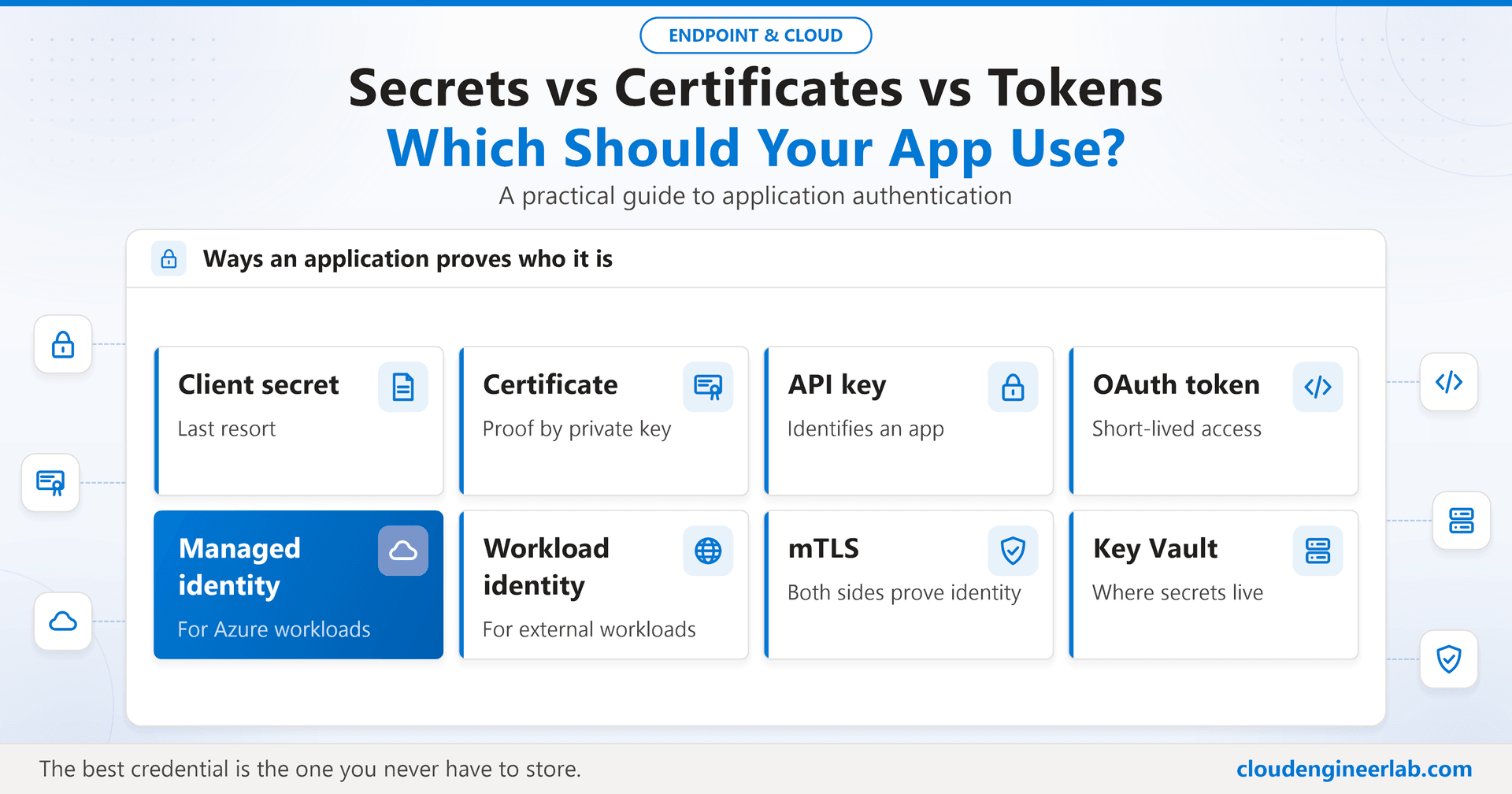
Client secret, certificate, API key, OAuth token, managed identity, workload identity or mTLS? A practical guide to how applications should prove who they are.
Users have MFA, Conditional Access and passwordless sign-in. Applications usually have a string in a configuration file. That imbalance is why leaked application credentials keep showing up in breach reports: a client secret pushed to a public repository, an API key embedded in a mobile app, a storage key copied into a script and forgotten.
Every application that calls another service has to answer the same question: how do I prove who I am? There are more options than most teams realise, and choosing the right one removes whole classes of incidents. This post compares them and gives a straightforward way to choose.
Three Families, One Important Distinction
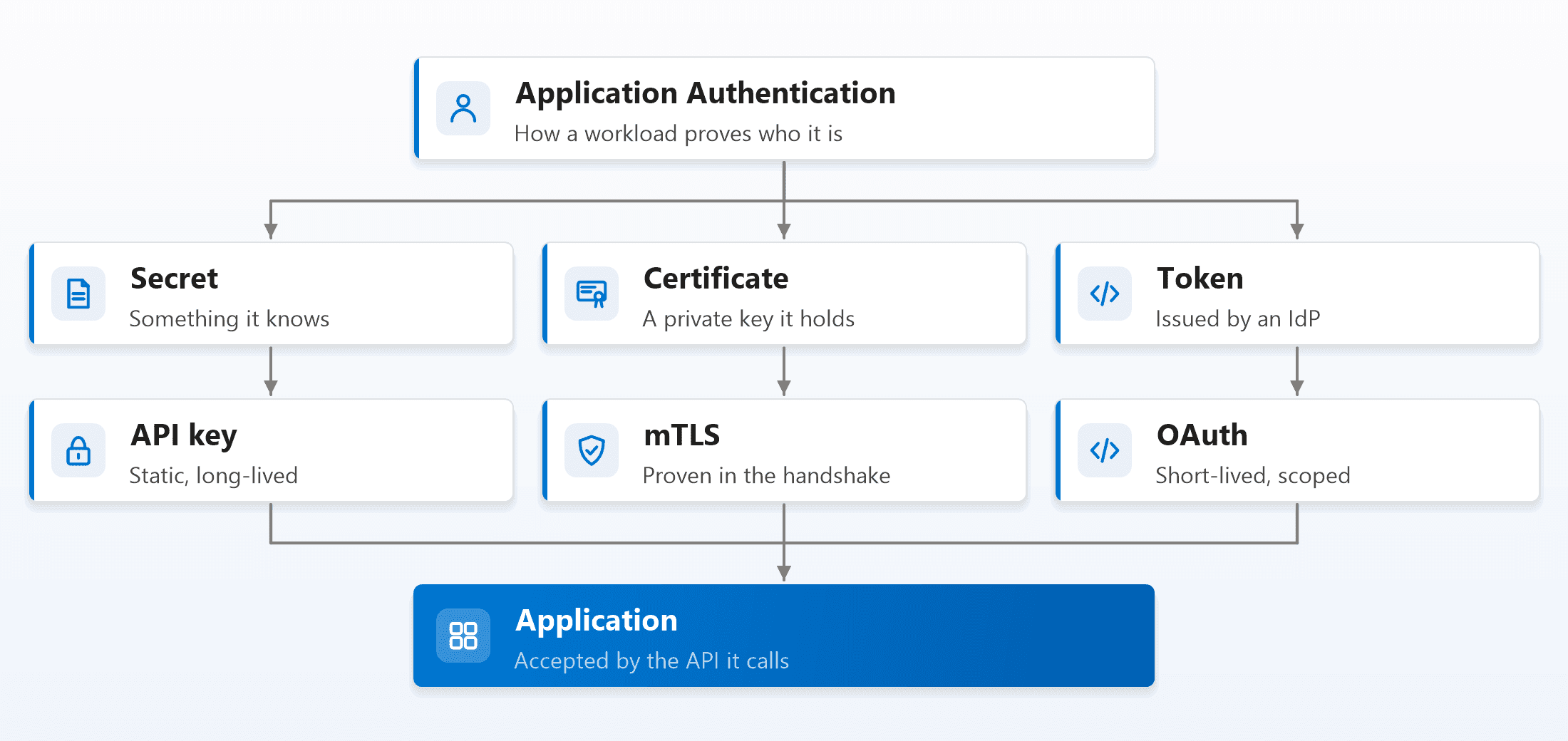
Every option below belongs to one of three families:
- Secrets: something the application knows, a string it sends to prove its identity. Client secrets and API keys. Whoever has a copy of the string is the application.
- Certificates: a private key the application holds. It proves its identity by signing something, and the key itself never travels. A copy of the certificate alone is useless without the private key.
- Tokens: short-lived proof issued by an identity provider after the application authenticated some other way. OAuth access tokens are the common example.
The distinction that clears up most of the confusion: a token isn't an alternative to a secret or a certificate. It's the result. An application uses a secret, a certificate or a platform identity to authenticate to the identity provider, and gets a token back. The token is what it then sends to the API.
So the real design question has two parts: how does the application get its token, and what does the API accept?
Client Secret
A client secret is a password for an application registration in Microsoft Entra ID (or any OAuth identity provider). The application sends it, along with its client ID, to get an access token.
Use it when: nothing better is available, typically a third-party product that only supports a client ID and secret, and only for a short time while you move to something better.
Why it's the last resort:
- It's a shared string. Anyone who copies it from a config file, a log, a pipeline variable or a screenshot can become the application.
- It expires (in Entra ID, after at most two years, and many organisations cap it lower), and an expired secret in production is a classic outage.
- Rotation means updating every place the secret was copied to, which nobody has a complete list of.
If you must use one: store it in a vault, give it the shortest practical lifetime, monitor its expiry, and scope the application's permissions as tightly as possible.
Certificate
Instead of a shared string, the application registration trusts a certificate. The application proves its identity by signing a short assertion with the certificate's private key, and the identity provider verifies the signature.
Use it when: the application runs outside Azure, can't use workload identity federation, and can store a private key securely: on a server with the key in a vault or HSM, or on a Windows machine with the key marked non-exportable.
Why it beats a secret: the private key never leaves the application. Logs, network captures and copied configuration files can't leak it, because it's never sent anywhere. With the key in an HSM or the TPM, even an administrator on the machine can't export it.
The trade-off is lifecycle: certificates expire and need renewal, exactly like the device certificates in the certificate lifecycle post. Automate renewal, and monitor expiry.
Managed Identity
A managed identity is an identity Azure gives to an Azure resource itself: an App Service, a Function, a virtual machine, a Logic App, an Automation account. The application asks the Azure platform for a token, and Azure handles everything else. There is no credential for you to store, rotate or leak.
- System-assigned: tied to one resource, created and deleted with it.
- User-assigned: a standalone identity you can attach to several resources and that outlives any one of them.
Use it when: your code runs in Azure (or on an Azure Arc-enabled server) and calls anything that accepts Entra ID tokens: Key Vault, Storage, SQL, Microsoft Graph, your own APIs. This should be the default for every Azure workload.
from azure.identity import DefaultAzureCredential
from azure.keyvault.secrets import SecretClient

# Uses the managed identity in Azure, and your own sign-in when running locally
credential = DefaultAzureCredential()
client = SecretClient(vault_url="https://kv-app-prod.vault.azure.net", credential=credential)
partner_key = client.get_secret("partner-api-key").value
Managed identity also solves the "secret zero" problem: if your secrets live in a vault, something still needs a credential to open the vault. With a managed identity, that first credential doesn't exist. The Intune automation framework post uses exactly this for unattended automation.
Workload Identity Federation
Workload identity federation brings the managed identity idea to workloads that don't run in Azure: GitHub Actions pipelines, Kubernetes clusters, workloads in AWS or Google Cloud, and anything else whose platform can issue an OpenID Connect token.
Instead of storing a secret, you tell Entra ID to trust tokens from that external platform for one specific workload (for example, "this repository, on the main branch"). The workload presents its platform-issued token and exchanges it for an Entra ID access token. Nothing is stored anywhere.
permissions:
  id-token: write   # lets the job request a GitHub-issued OIDC token
  contents: read

steps:
  - uses: azure/login@v2
    with:
      client-id: ${{ secrets.AZURE_CLIENT_ID }}
      tenant-id: ${{ secrets.AZURE_TENANT_ID }}
      subscription-id: ${{ secrets.AZURE_SUBSCRIPTION_ID }}
Those three values are identifiers, not secrets; there's no password anywhere in this pipeline.
Use it when: a CI/CD pipeline, a Kubernetes workload or a workload in another cloud needs to call Azure or Microsoft Graph. It replaces the pipeline secret that is otherwise one of the most commonly leaked credentials in any organisation. The AI agent identity post applies the same pattern to AI agents.
API Key
An API key is a static string that identifies the calling application to an API. It's simple, and that's both its appeal and its problem.
Use it when: a third-party service only offers API keys, which many SaaS APIs still do.
What it can't do: it identifies an application, not a user; it usually can't carry fine-grained permissions; and it's typically long-lived. Anything shipped inside a browser app or a mobile app is public, so an API key there is just an identifier, never a secret.
If you have to use one:
- Keep it in a vault, read at runtime, not in code or configuration.
- Use one key per application and environment, so a leak is contained and traceable.
- Restrict it where the provider allows: by IP range, by referrer, by allowed operations.
- Rotate it on a schedule, and immediately if it might have been exposed.
For your own Azure resources, prefer Entra ID authentication over keys at all: many services, such as Storage, let you disable key-based access entirely once your applications use managed identities.
OAuth Token
An OAuth access token is what an API should really receive: a short-lived, signed token issued by an identity provider, stating which application (and possibly which user) is calling and what it may do (its scopes or roles).
Use it when: your application calls an API that accepts Entra ID or OAuth tokens. That's most Microsoft and modern SaaS APIs, and should be all of your own.
- Client credentials flow: the application acts as itself, getting its token with a certificate, managed identity or federated credential (or, as a last resort, a secret).
- Delegated flows: the application acts on behalf of a signed-in user, with the user's permissions, as covered in OAuth vs OpenID Connect vs SAML.
Tokens expire in about an hour, so a leaked token has a short useful life, which is exactly why it's better than a long-lived key. How APIs should validate them is covered in what happens between browser and API.
mTLS
Mutual TLS goes one step further than normal TLS: the client also presents a certificate during the TLS handshake, so both sides prove their identity before any application data is exchanged.
Use it when:
- Services talk to each other inside a platform, often handled automatically by a service mesh.
- Devices or partners connect to a high-assurance API, such as IoT fleets or financial APIs.
- You want tokens that can't be replayed from another machine. With certificate-bound access tokens, the token only works over the TLS connection that presents the matching certificate.
The trade-off is the same as any certificate: issuing, renewing and revoking certificates for every client, which is where a PKI or a service mesh earns its keep. The device certificate posts show the same model for Wi-Fi and VPN.
Side by Side
| Credential | What is stored | Typical lifetime | If it leaks | Best for |
|---|---|---|---|---|
| Client secret | A shared string | Months to two years | Attacker is the app until rotated | Last resort, temporary |
| API key | A shared string | Often unlimited | Attacker is the app until rotated | Third-party APIs that offer nothing else |
| Certificate | A private key (ideally non-exportable) | One to two years | Very hard to leak if non-exportable | Apps outside Azure that can protect a key |
| Managed identity | Nothing | Platform-managed | Nothing to leak | Anything running in Azure |
| Workload identity | Nothing | Per-run tokens | Nothing to leak | Pipelines, Kubernetes, other clouds |
| OAuth access token | Held in memory only | About an hour | Short window of misuse | What APIs should receive |
| mTLS | A private key per client | Months to years | Very hard to leak if non-exportable | Service-to-service, devices, partners |
How to Choose: Ask in This Order
1. Does it run in Azure?
Use a managed identity. Stop here.
2. Does it run on a platform that issues OIDC tokens?
GitHub Actions, Kubernetes, AWS, Google Cloud and others: use workload identity federation. Stop here.
3. Can it protect a private key?
Use a certificate, with the key in a vault, HSM or the TPM, and automated renewal.
4. Does the service it calls only support API keys?
Use an API key, stored in a vault, restricted, one per app and environment, rotated.
5. Nothing else is possible?
Use a client secret, with the shortest lifetime you can manage, monitored expiry, and a plan to replace it.
Whatever the application uses to authenticate, what it sends to your APIs should be an OAuth access token. And for service-to-service traffic that needs the strongest guarantee, add mTLS underneath.
Run a credential inventory
Microsoft Entra ID lists every application registration and every secret and certificate on it, with expiry dates. Start there: find the secrets, find which ones could become managed identities or federated credentials, and remove them one by one. Every secret you delete is one less thing that can leak.
Summary
Secrets, certificates and tokens aren't three competing answers; they're three layers of the same system. Secrets and certificates are ways an application proves itself to an identity provider. Managed identities and workload identity federation are ways to do that with nothing stored at all. Tokens are what the application gets back, and what APIs should accept. API keys and client secrets still exist, but they should be the exceptions you're steadily removing, not the default you start with.
The best credential is the one you never have to store.

Written by
Chetan Yamger
Cloud Engineer · AI Automation Architect · Modern Workplace Consultant
Cloud Engineer, AI Automation Architect, and Modern Workplace Consultant based in Amsterdam, Netherlands. Specializing in scalable, secure enterprise solutions with Microsoft Azure, Intune, PowerShell, and AI-driven automation using ChatGPT, Gemini, and modern LLM technologies.
Stay in the loop.
New articles, straight to you.
Deep-dive technical articles on Intune, PowerShell, and AI — no noise, no spam.
Discussion
Share your thoughts — your email stays private
Leave a comment