
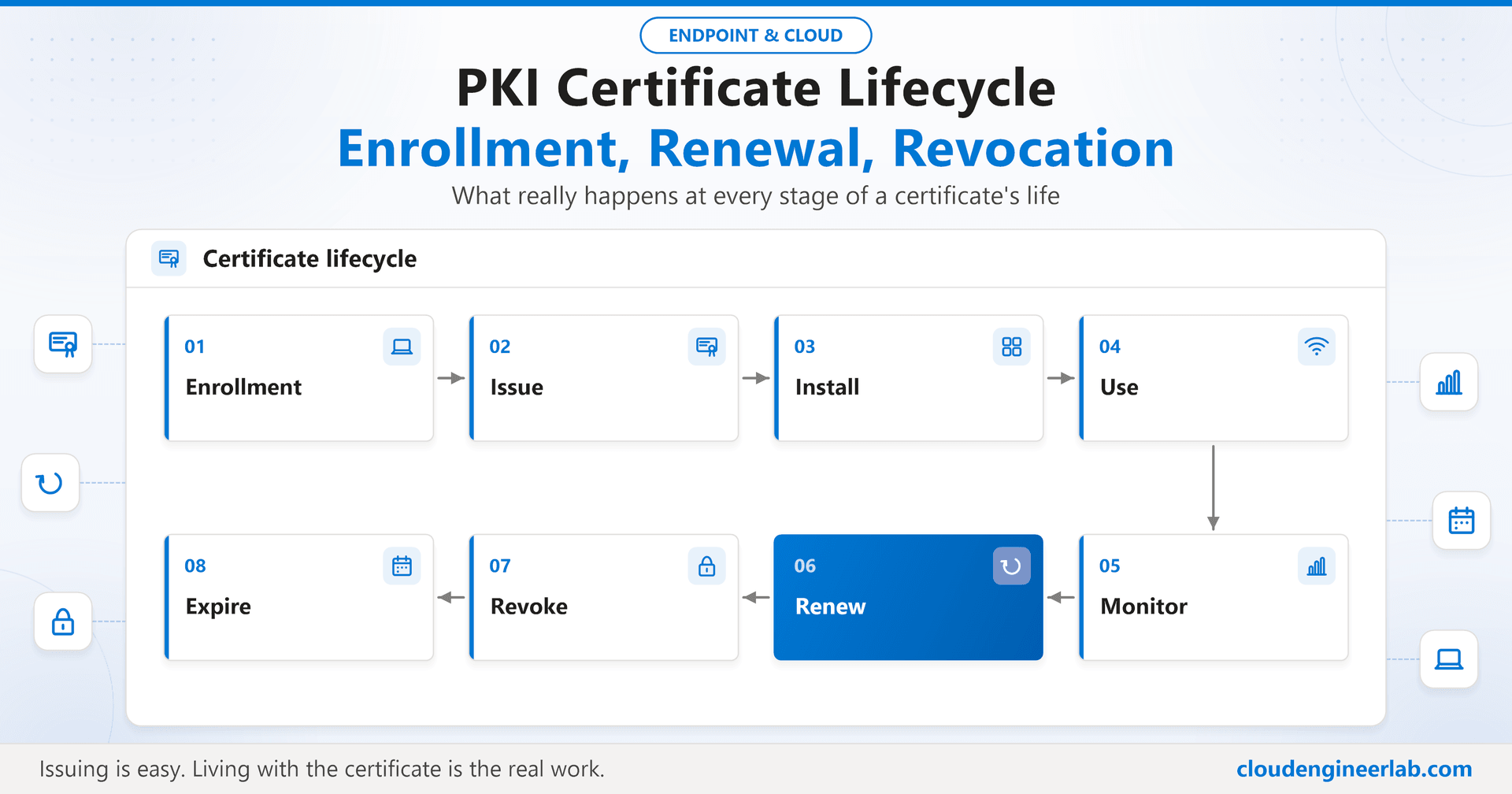
PKI Certificate Lifecycle: Enrollment, Renewal and Revocation
What happens when a certificate expires, a device is deleted or a user leaves: renewal thresholds, failed renewals, revocation timing, CRL vs OCSP.
Most PKI writing stops at the moment a certificate is issued. That is the easy part. The hard part is everything after: a certificate has to be renewed before it expires, revoked when it should no longer be trusted, and watched the whole time, across thousands of devices that go offline, get wiped, change hands, and belong to people who eventually leave.
This post skips the "what is a PKI" material (the Intune PKI deep dive covers that) and follows one certificate through its whole life instead, then investigates the situations where the lifecycle goes wrong.
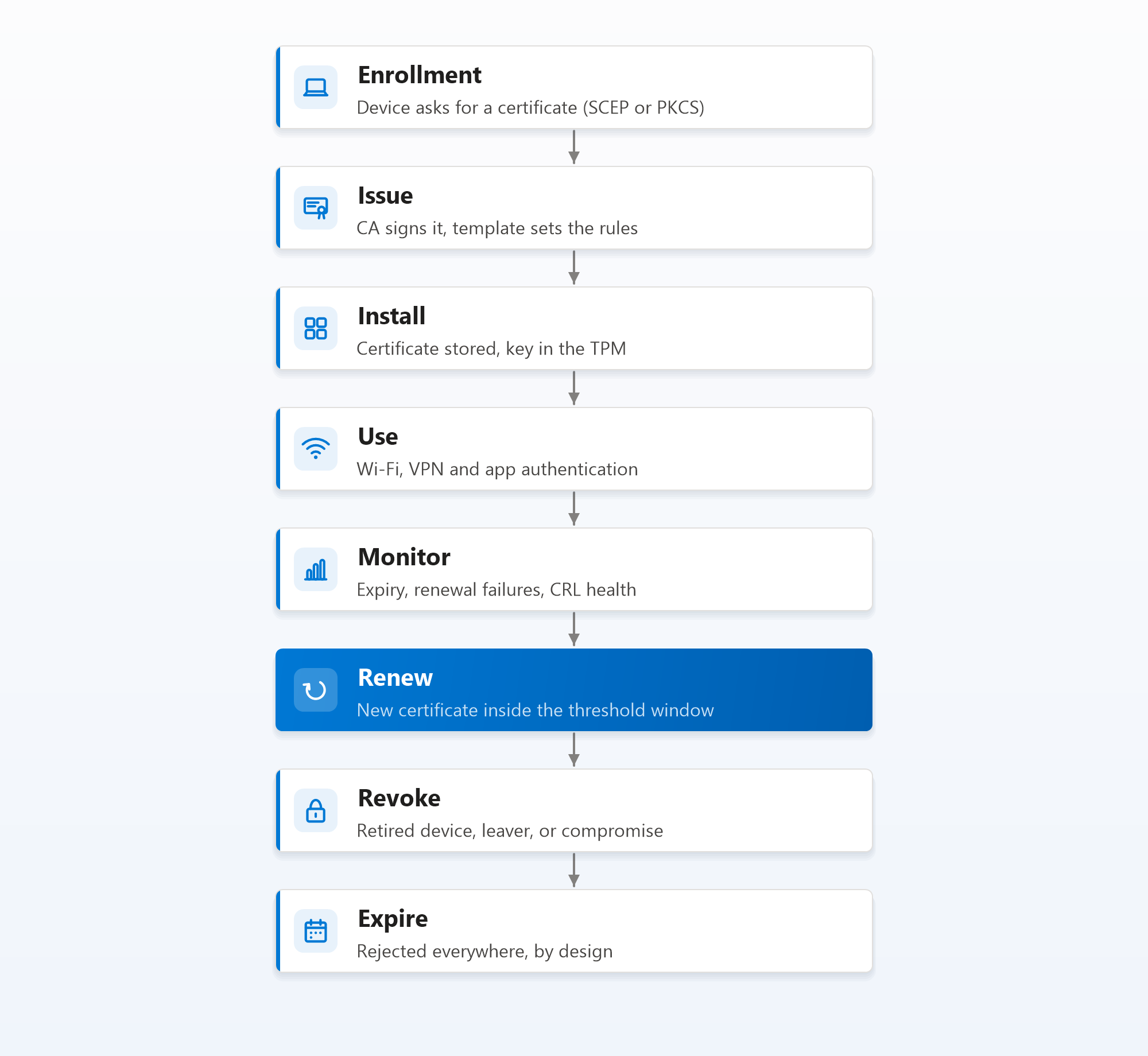
The Eight Stages
Enrollment. The device asks for a certificate, through a SCEP or PKCS profile in Intune. Nothing is trusted yet; this is just a request.
Issue. The CA checks the request against the certificate template and signs it. The template decides the maximum validity period and what the certificate may be used for.
Install. The certificate lands in the device's certificate store, with its private key ideally held by the TPM. From here on, the certificate's expiry date is fixed.
Use. The device presents the certificate to Wi-Fi, VPN or apps, and every one of those relying parties checks it independently: chain, purpose, validity and revocation.
Monitor. Someone (or something) watches for certificates nearing expiry, renewals that failed, and the health of the CRLs that relying parties depend on. This is the stage most organisations skip.
Renew. Before the certificate expires, the device gets a new one. In Intune this is driven by the renewal threshold, covered in detail below.
Revoke. If a certificate must stop being trusted before it expires (a retired device, a leaver, a compromise), the CA revokes it and publishes that fact.
Expire. Every certificate eventually reaches its end date and is rejected everywhere. That is by design. The goal is for expiry to happen only to certificates nobody needs any more.
Renewal Thresholds
Intune doesn't renew certificates on a schedule. Each SCEP and PKCS profile has a renewal threshold, a percentage of the certificate's lifetime. When the remaining lifetime falls below that percentage, the device requests a fresh certificate the next time it processes the profile.
| Certificate validity | Threshold | Renewal starts |
|---|---|---|
| 1 year | 20% | About 73 days before expiry |
| 1 year | 10% | About 36 days before expiry |
| 2 years | 20% | About 146 days before expiry |
| 90 days | 20% | 18 days before expiry |
The threshold is a trade-off:
- Too low and a device that is offline for a few weeks (long leave, a laptop in a drawer, a device in for repair) misses the whole window and expires.
- Too high and devices renew far more often than they need to, which multiplies CA load, CA database growth and the number of valid certificates per device in circulation.
Size the window to your longest normal absence
Pick a threshold that gives at least twice the longest period a device is normally offline. For most organisations, a one-year certificate with a 20% threshold (roughly ten weeks of renewal window) covers holidays, parental leave and repairs comfortably.
One detail that catches people out: the template has the final say on validity. If the Intune profile asks for two years but the template's validity period is one year, the certificate is issued for one year, and the threshold is calculated against that.
Failed Renewal Scenarios
Renewal is just a new enrollment, so anything that breaks enrollment also breaks renewal. The difference is timing: an enrollment failure is noticed immediately, a renewal failure is noticed weeks later when the old certificate expires.
| Scenario | What happens | Prevention |
|---|---|---|
| Device offline through the whole renewal window | Certificate expires before the device ever asks for a new one | A renewal window longer than normal absences; monitor devices that haven't checked in |
| NDES or the Certificate Connector is down | Renewal requests fail quietly across the estate | Two connectors and two NDES servers; alert on connector status |
| Template permissions changed | The CA rejects every renewal for that template | Change control on templates; watch the CA's Failed Requests |
| The CRL has expired | New certificates are issued, but relying parties reject every certificate | Monitor CRL Next Update dates; own the Root CRL renewal |
| The TPM was cleared or reset | The private key is gone, so the existing certificate is useless even before expiry | Treat a TPM reset as a re-enrollment; the device needs a new certificate |
| Device clock is wrong | The new certificate looks not yet valid, or the old one looks expired | Keep time sync healthy; it matters for every certificate check |
| The issuing CA itself is near expiry | The CA can't issue a certificate that outlives its own certificate, so new certificates get shorter and shorter | Renew CA certificates well before the halfway point of their lifetime |
The renewal that can't fix itself
If a device reaches Intune through the corporate Wi-Fi, and the certificate that Wi-Fi depends on expires, the device can no longer get the network it needs to fetch a new certificate. It stays broken until someone connects it another way: a cable, a guest network or a phone hotspot. This is the strongest argument for a generous renewal window, and for making sure devices can reach Intune over the internet, not only over the corporate network.
What Happens When a Certificate Expires?
At the exact moment of expiry, nothing happens on the device. The certificate is still in the store. What changes is that every relying party now rejects it:
- Wi-Fi: the RADIUS server rejects the authentication and the device falls off the network, usually noticed as "Wi-Fi stopped working this morning".
- VPN: the gateway rejects the connection; on Windows this often shows up as a certificate error from the VPN client.
- Apps: anything using the certificate for client authentication refuses the connection.
Recovery depends on why it expired. If the profile is still assigned and the device can reach Intune, the next time it processes the profile it requests a new certificate, and service returns on its own. If the device can only reach Intune through the network that now rejects it, someone has to give it another route first.
An expired CA certificate is a different order of problem: every certificate it issued becomes untrustworthy at once, because the chain can no longer be validated. CA certificates should be renewed long before they expire, which is why the deep dive recommends long CA lifetimes with deliberate renewal planning.
What Happens When a Device Is Deleted?
There are three different "goodbyes" a device can get in Intune, and they don't do the same thing to its certificates:
| Action | What it does to certificates |
|---|---|
| Retire | Removes company data and profiles from the device, including the certificates Intune deployed, and lets Intune request revocation |
| Wipe | Resets the device, so certificates and keys are destroyed on the device, and lets Intune request revocation |
| Delete (only) | Removes the device record from Intune. If the device never processes another instruction, Intune can no longer remove anything from it |
The risk is the third row. A device that is simply deleted from the portal, without being retired or wiped first, may keep its still-valid certificate and still-valid key. If that device is lost, sold or stolen, it can keep authenticating to Wi-Fi and VPN until the certificate expires, unless the certificate is revoked separately.
Retire or wipe first, delete last
Make "retire or wipe, then delete" the only path in your device offboarding process. If a device has already been deleted without that, find its certificates on the CA (by subject or device ID) and revoke them manually. Also make sure revocation is actually wired up: the Certificate Connector needs the Issue and Manage Certificates permission on the CA, or Intune's revocation requests never reach it.
Intune's exact revocation behaviour varies by platform, by SCEP vs PKCS, and over time as the service changes, so check Microsoft's current documentation for the matrix that applies to you. The operational rule above holds regardless.
What Happens When the User Leaves?
Disabling a user's account feels like it should end everything. For certificates, it doesn't:
- Disabling the account doesn't revoke certificates. A user certificate stays mathematically valid until it expires or is revoked.
- Device certificates aren't tied to the user at all. A leaver's laptop still has a perfectly valid device certificate, and it will join the corporate Wi-Fi from the car park if nobody retires the device.
- Some relying parties will notice, some won't. NPS maps a certificate to an Active Directory account and refuses disabled accounts. A gateway or cloud RADIUS service that only checks the certificate itself will accept it until it is revoked.
A leaver process that includes certificates:
1. Disable the account
Block sign-in in Entra ID and Active Directory. This stops new sign-ins, not certificates.
2. Retire or wipe the leaver's devices
Corporate devices get wiped or reassigned; personal devices get retired so corporate data and certificates are removed.
3. Confirm revocation
Check on the CA that the leaver's user certificates, and the device certificates of anything they took with them, are revoked.
4. Remove group memberships last
Removing the user from groups also removes profile assignments, which can trigger certificate removal and revocation. Do it as part of the process, not as a substitute for it.
How Revocation Actually Works
Revoking a certificate is two separate events, and the gap between them is where the risk lives:
1. The CA marks the certificate revoked
Immediately, in the CA's database, with a reason code (key compromise, superseded, cessation of operation and so on).
2. The CA publishes the next CRL
Not immediately. The revoked serial number only appears when the next base or delta CRL is published, on the CA's schedule.
3. Relying parties fetch it
Also not immediately. Windows caches a CRL until its Next Update time, so a relying party may keep using the old list, without your revocation in it, until then.
So the real time to revocation is roughly CRL publication interval plus the relying party's cache lifetime. With a weekly base CRL and no delta CRLs, a revoked certificate can keep working for about a week.
Use delta CRLs to shorten the gap
Publish a weekly base CRL plus a daily delta CRL (which lists only revocations since the last base). Relying parties fetch both, so a revocation takes effect within about a day instead of a week, without publishing a large full CRL every few hours.
CRL vs OCSP
| CRL | OCSP | |
|---|---|---|
| How it works | Relying party downloads the CA's full list of revoked serials | Relying party asks a responder about one specific certificate |
| Freshness | As fresh as the last publication plus caching | As fresh as the responder's own data, typically more current |
| Bandwidth | Grows with the number of revoked certificates | Small, per-certificate request |
| Infrastructure | A web location for the CRL files | An Online Responder (an AD CS role) and its own signing certificate |
| Failure mode | Expired CRL means every certificate fails validation | Responder down means checks fail, or fall back to CRL if one is available |
OCSP isn't magic: an AD CS Online Responder builds its answers from the CA's CRLs, so it is only as current as the CA's latest publication. Its real advantages are smaller requests and better scaling for large revocation lists.
For most Intune estates, well-run CRLs with delta CRLs are enough. Add OCSP when your relying parties support it and you have large numbers of revoked certificates. Either way, the HTTP locations (CDP for CRLs, AIA for OCSP) must be reachable from wherever your RADIUS servers and VPN gateways run, including cloud-hosted ones.
Certificate Monitoring
Every outage in this post is predictable. Certificates and CRLs have expiry dates written into them; you can see the problem weeks in advance if you look.
| Watch | Why | How |
|---|---|---|
| Device certificates expiring soon | Catch devices that missed their renewal window | Intune's certificate reporting, or on the device: Get-ChildItem Cert:\LocalMachine\My -ExpiringInDays 30 |
| Certificate profile errors | Renewal failures surface here first | SCEP and PKCS profile device status in Intune |
| Connector status | One stopped connector can stop all renewals | Tenant administration > Connectors and tokens > Certificate connectors |
| CA failed requests | Template or permission changes | The CA console's Failed Requests, reviewed regularly |
| CRL Next Update dates | An expired CRL breaks every certificate at once | Download each CRL and check its NextUpdate field |
| CA certificate expiry | The slowest, most damaging failure | A dated reminder with a named owner, years in advance |
A simple CRL check you can schedule against each CDP URL:
$url  = "http://pki.contoso.com/CertEnroll/Contoso%20Lab%20Root%20CA.crl"
$file = "$env:TEMP\check.crl"
Invoke-WebRequest -Uri $url -OutFile $file -UseBasicParsing
certutil -dump $file | Select-String "NextUpdate"
Alert when the Next Update date is less than a few days away and no newer CRL has been published. For automating checks like this across many endpoints and reports, the patterns in building production-ready endpoint scripts apply directly.
Summary
A certificate's life has eight stages, and the dangerous ones come after issuance: renewal that silently fails, revocation that is slower than people assume, devices deleted without being retired, and leavers whose certificates outlive their accounts. Every one of those is predictable and preventable:
- Renewal: a threshold sized to your longest normal device absence, and redundant NDES and connectors so renewals never depend on one server.
- Offboarding: retire or wipe before delete, every time, and a leaver process that confirms revocation instead of assuming it.
- Revocation: delta CRLs, so revocation takes effect in hours or a day, not a week.
- Monitoring: watch certificate expiry, connector health and CRL Next Update dates, so expiry only ever happens to certificates nobody needs.
To see where each stage is configured, the implementation lab builds the full chain step by step.

Written by
Chetan Yamger
Cloud Engineer · AI Automation Architect · Modern Workplace Consultant
Cloud Engineer, AI Automation Architect, and Modern Workplace Consultant based in Amsterdam, Netherlands. Specializing in scalable, secure enterprise solutions with Microsoft Azure, Intune, PowerShell, and AI-driven automation using ChatGPT, Gemini, and modern LLM technologies.
Stay in the loop.
New articles, straight to you.
Deep-dive technical articles on Intune, PowerShell, and AI — no noise, no spam.
Discussion
Share your thoughts — your email stays private
Leave a comment