
Modern Web Application Security: What Happens Between Browser and API?
Follow one request through DNS, CDN, WAF, load balancer, app, API, authentication, authorization and database, and the security controls that matter at each.
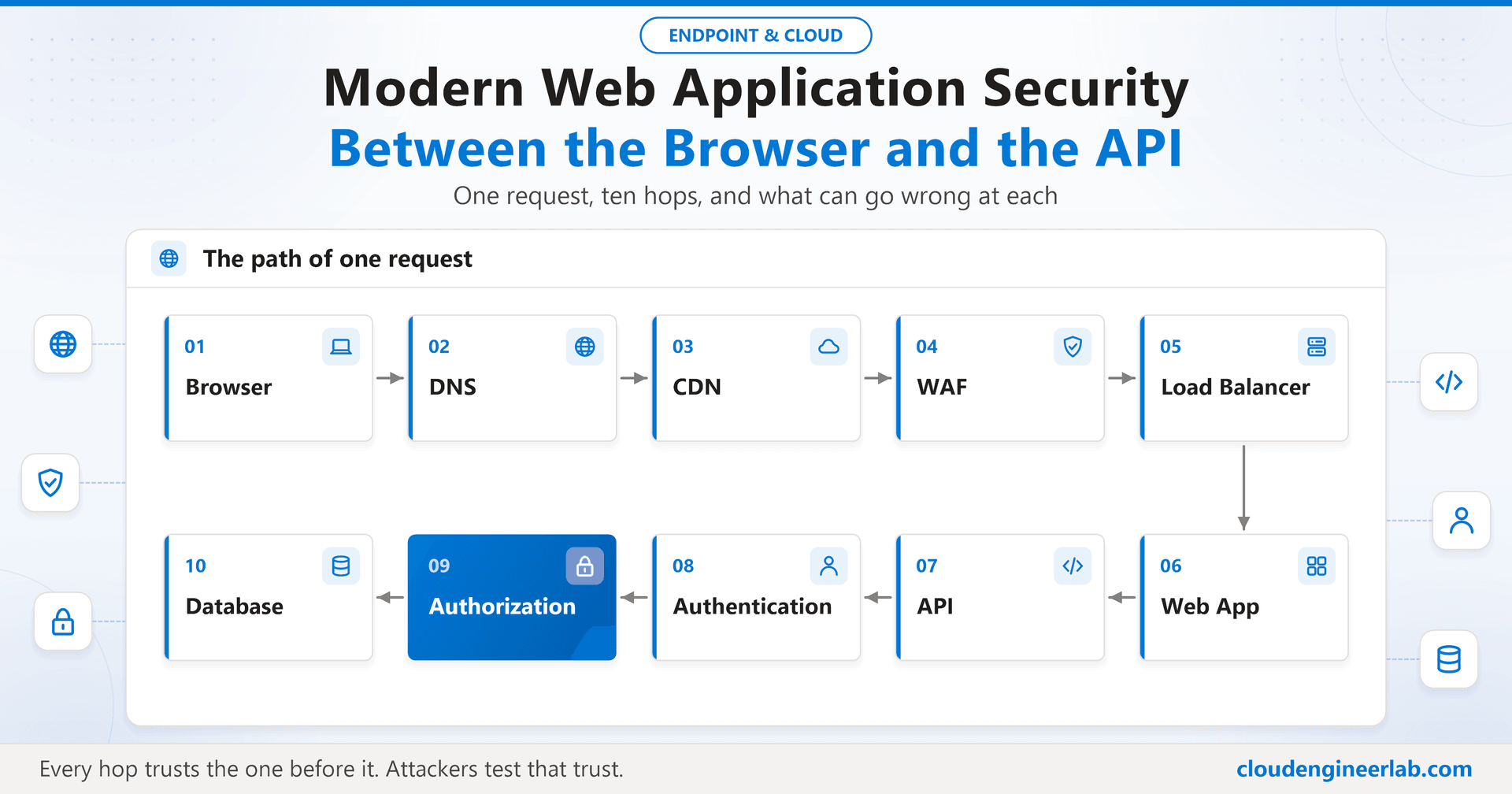
Click a button in a web app and, in a few hundred milliseconds, a request crosses ten different systems before it touches your data. Each one makes a trust decision. Each one assumes the one before it did its job. And almost every serious web breach happens because one of those assumptions was wrong.
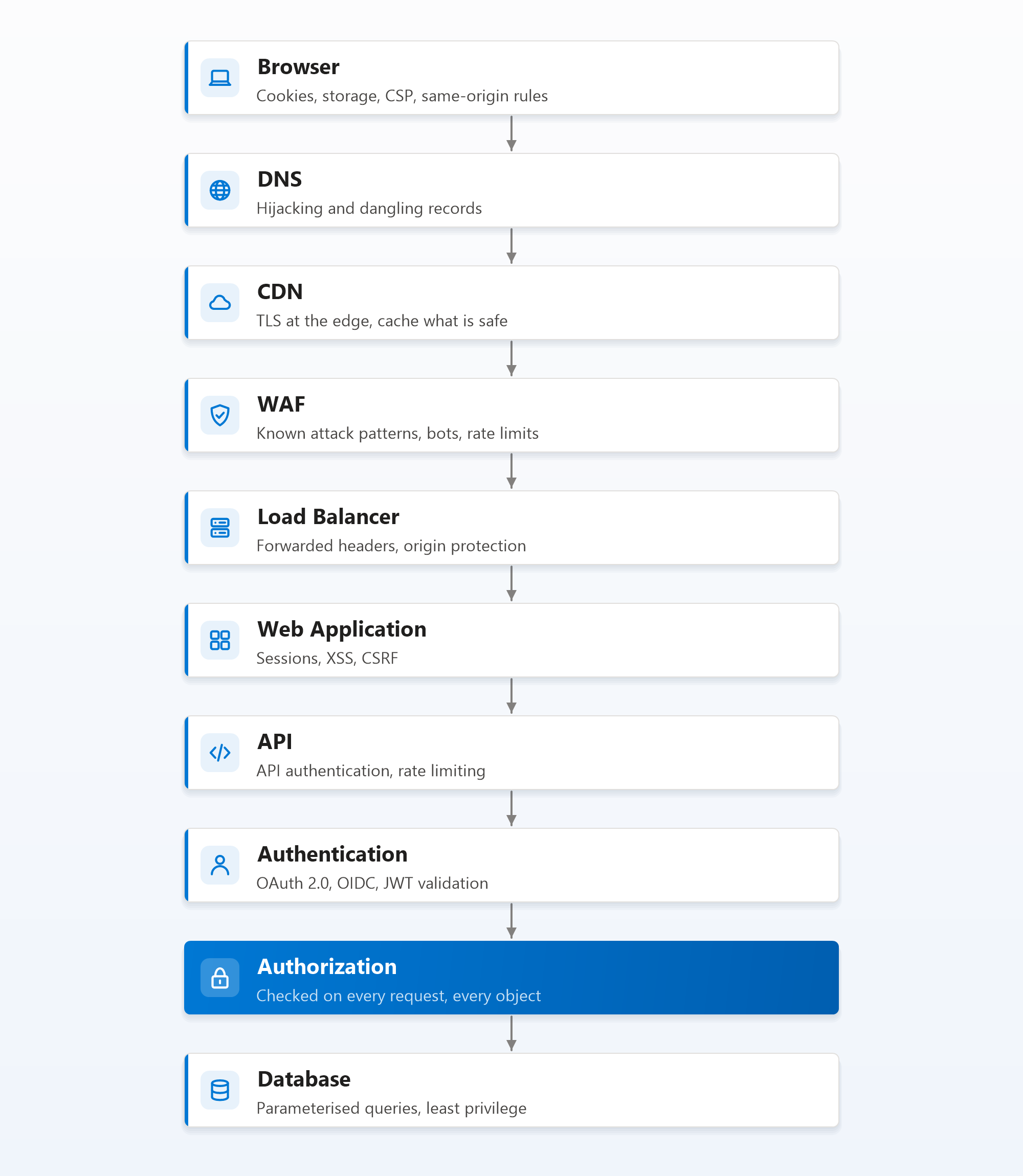
This post follows a single request, from the browser to the database, and stops at every hop to ask the same questions: what does this layer protect, and how does it fail?
Hop 1: The Browser
The browser is the one part of the path you don't control, and it holds the most sensitive thing in the whole flow: the user's session.
The browser's main defence is the same-origin policy: a page from one origin (scheme, host and port) can't read data belonging to another. Most web attacks are attempts to get around it, by running script inside your origin (XSS) or by making the browser send authenticated requests on the attacker's behalf (CSRF). Both are covered at the web application hop.
What you control in the browser is what you tell it, through response headers:
Strict-Transport-Security: max-age=31536000; includeSubDomains; preload
Content-Security-Policy: default-src 'self'; script-src 'self'; object-src 'none'; frame-ancestors 'none'; base-uri 'self'
X-Content-Type-Options: nosniff
Referrer-Policy: strict-origin-when-cross-origin
Each one closes a door: HSTS forces HTTPS, CSP limits where scripts may load from (and is the strongest backstop against XSS), frame-ancestors stops your pages being framed for clickjacking, and nosniff stops the browser guessing content types.
Hop 2: DNS
Before anything else, the browser has to find your server. If an attacker controls that answer, nothing downstream matters.
Where it breaks:
- Dangling DNS records. A CNAME still points at a cloud resource (a storage account, an app service, a CDN endpoint) that was deleted. An attacker claims the same resource name and now serves content on your subdomain. This "subdomain takeover" is common and entirely preventable.
- Registrar or DNS account compromise. Whoever controls your DNS controls where your users go, and can even get valid TLS certificates issued for your domain.
What stops it: remove DNS records as part of decommissioning every cloud resource; protect registrar and DNS provider accounts with phishing-resistant MFA; use CAA records to limit which certificate authorities may issue certificates for your domain; consider DNSSEC where your provider supports it.
Hop 3: CDN, and Where TLS Really Ends
TLS protects the request in transit: confidentiality, integrity, and proof that the server is who it claims to be. Use TLS 1.2 or 1.3 only, automate certificate renewal, and send HSTS so browsers never try plain HTTP.
The subtle point is where TLS terminates. With a CDN in front, the browser's TLS connection ends at the CDN's edge. The CDN then opens a second connection to your origin. That second leg needs its own TLS, or your traffic travels in the clear between the CDN and your servers.
Where the CDN breaks security:
- Caching what shouldn't be cached. A personalised response (an account page, an API result) cached and served to the next user. Send
Cache-Control: private, no-storeon anything user-specific. - Origin exposure. If your origin server is reachable directly, attackers can skip the CDN and the WAF entirely. Restrict the origin to accept traffic only from your CDN, through private connectivity, IP restrictions or a secret origin header.
Hop 4: WAF
A web application firewall inspects requests for known attack patterns: SQL injection strings, script injection, path traversal, malicious bots. Managed rule sets (typically based on the OWASP Core Rule Set) give you broad coverage on day one.
What a WAF is good at: blocking commodity attacks and automated scanners, rate limiting at the edge, bot management, and virtual patching, blocking exploitation of a known vulnerability while the real fix is being built.
Where it breaks:
- It is not a substitute for secure code. WAF rules match patterns; attackers vary encodings and payloads until something gets through. Every vulnerability the WAF hides is still in your application.
- Detection mode forever. Many WAFs are deployed in detection (log-only) mode during tuning and never switched to prevention.
- Business logic attacks look like normal requests. A WAF can't know that user 42 shouldn't be able to read order 17.
Treat the WAF like ASR rules on an endpoint: start in detection, tune out false positives, then enforce, and keep watching.
Hop 5: Load Balancer
The load balancer spreads traffic across application instances and often terminates TLS again. Its security role is mostly about what it tells the application.
Where it breaks:
- Trusting forwarded headers blindly. Behind a proxy, the application sees the load balancer's IP, so the real client IP arrives in
X-Forwarded-For. If the application trusts that header from anyone, an attacker sets it themselves and defeats IP-based rate limits, allowlists and audit logs. Only accept forwarded headers from your own proxies. - Health check and admin endpoints exposed through the same public listener.
What stops it: configure the application's list of trusted proxies explicitly, strip incoming forwarded headers at the edge, and keep management endpoints on a separate, private path.
Hop 6: The Web Application
This is where the browser-facing attacks land, and where most of the defences live.
Cookies and sessions
After sign-in, the session is usually a cookie. Set it like this:
Set-Cookie: __Host-session=8f3c...e91a; Path=/; Secure; HttpOnly; SameSite=Lax| Attribute | What it prevents |
|---|---|
Secure | The cookie ever travelling over plain HTTP |
HttpOnly | JavaScript, including injected script, reading the cookie |
SameSite=Lax (or Strict) | The browser attaching it to most cross-site requests, the root of CSRF |
__Host- prefix | The cookie being set by a subdomain or scoped too broadly |
Sessions themselves need: a long, random, server-generated ID; a new ID after sign-in (otherwise an attacker who planted a session ID before login keeps it, session fixation); idle and absolute timeouts; and a logout that destroys the session on the server, not just in the browser.
XSS (cross-site scripting)
XSS is attacker-controlled script running inside your origin, which means it can do anything the user can. It comes in three forms: stored (saved in your database and shown to other users), reflected (bounced back from a URL parameter), and DOM-based (created entirely in client-side JavaScript).
What stops it: encode output for the context it appears in (HTML, attribute, JavaScript, URL); use a framework that escapes by default and avoid its "raw HTML" escape hatches; and deploy a strict Content Security Policy as the backstop, so even injected markup can't load or run untrusted script. HttpOnly cookies limit the damage, but XSS can still act as the user without ever reading the cookie.
CSRF (cross-site request forgery)
CSRF tricks the user's browser into sending an authenticated request to your site from somewhere else: a hidden form on a malicious page that submits a transfer, a password change, or an email update.
What stops it: SameSite cookies stop most of it today; add anti-CSRF tokens on state-changing requests, check the Origin header on the server, and never change state on a GET request.
Hop 7: The API
Modern web apps are usually a thin frontend over an API, and the API is what attackers really target, because it exposes the data directly.
API authentication
| Method | Proves | Good for |
|---|---|---|
| API key | Which application is calling | Simple server-to-server integrations, never browser code |
| OAuth 2.0 access token | Which application, acting for which user, with which permissions | User-facing APIs |
| Client credentials (OAuth) | A service acting as itself | Service-to-service calls |
| Mutual TLS | Which machine or service holds a client certificate | High-assurance internal APIs |
An API key identifies an app, not a person. Anything shipped to a browser or a mobile app is public, so an API key in frontend code isn't a secret.
Rate limiting
Without limits, an API is an open invitation to credential stuffing, data scraping and denial of service. Rate limit:
- At the edge (CDN or WAF) by IP, to absorb floods.
- At the API gateway by user, token or API key, which is fairer and harder to evade than IP alone.
- Expensive and sensitive endpoints separately, especially sign-in, password reset and search.
Return 429 Too Many Requests with a Retry-After header, so legitimate clients back off instead of retrying harder. The same thinking applies to giving AI agents API access without too much power.
Hop 8: Authentication with OAuth 2.0, OIDC and JWT
These three are constantly confused, so here is the short version:
- OAuth 2.0 is about delegated access: letting an application call an API on a user's behalf, with limited permissions (scopes).
- OpenID Connect (OIDC) adds identity on top of OAuth: an ID token that tells the application who the user is.
- JWT is a token format, a signed JSON document. Both ID tokens and many access tokens are JWTs.
For a step-by-step walkthrough of each login flow, compared with SAML, Kerberos and certificate authentication, see OAuth 2.0 vs OpenID Connect vs SAML.
ID token for the app, access token for the API
The ID token is for the client application, to know who signed in. The access token is for the API, to decide what the caller may do. Sending an ID token to an API as if it were an access token is a common, serious mistake: it was never issued for that API.
Which OAuth flow: for browser apps and mobile apps, use the authorization code flow with PKCE. The older implicit flow, which returned tokens directly in the URL, is deprecated. For service-to-service calls, use client credentials.
Where to keep tokens in a browser app: tokens in localStorage can be read by any script that runs on the page, so a single XSS bug hands them to an attacker. The current recommendation for browser apps is the backend-for-frontend (BFF) pattern: a small server-side component holds the tokens and the browser only gets an HttpOnly session cookie.
Validating a JWT, on every request, in the API:
| Check | Why |
|---|---|
| Signature, with the issuer's published key | Proves the token wasn't forged or altered |
| Algorithm is the one you expect | Rejects none and algorithm-switching tricks |
iss (issuer) | The token came from your identity provider |
aud (audience) | The token was issued for this API, not another one |
exp and nbf | The token is within its validity window |
| Scopes or roles | The caller is allowed to do this operation |
Two facts about JWTs that cause real incidents: a JWT is signed, not encrypted, so anyone holding one can read its contents (never put secrets in it); and a JWT is valid until it expires, so keep access token lifetimes short and rely on refresh tokens, which can be revoked.
The same identity principles that protect your own sign-ins, MFA and Conditional Access, apply to the identity provider issuing these tokens.
Hop 9: Authorization, Where Most Breaches Happen
Authentication answers "who are you?". Authorization answers "are you allowed to do this, to this object?". Broken access control is consistently ranked the most serious web application risk, and it is invisible to every layer above it: the WAF, the load balancer and the authentication check all see a perfectly valid request.
The classic failure is broken object level authorization (often called IDOR): the API checks that you are signed in, but not that the order, invoice or document you asked for belongs to you. Change /api/orders/1001 to /api/orders/1002 and you see someone else's data.
What stops it:
- Check authorization on every request, for every object, in the API, on the server. Never rely on the frontend hiding a button.
- Deny by default. A new endpoint should be inaccessible until a rule explicitly allows it.
- Centralise the logic (policy middleware or an authorization service) so it isn't re-implemented, slightly differently, in every endpoint.
- Don't trust identifiers from the client for anything that matters: take the user's identity from the validated token, not from the request body.
- Test it. Automated tests that sign in as user A and request user B's objects catch this class of bug cheaply.
Hop 10: The Database
The last hop is the one attackers want. Two things decide how bad a compromise gets.
SQL injection
SQL injection happens when user input is concatenated into a query, so the input becomes part of the SQL itself:
# Vulnerable: the input becomes SQL
cursor.execute(f"SELECT * FROM orders WHERE id = {order_id}")

# Safe: the input is always treated as data
cursor.execute("SELECT * FROM orders WHERE id = %s", (order_id,))
Parameterised queries (prepared statements) fix it completely, because the database never interprets the value as code. ORMs use them by default, until someone builds a raw query string by hand, which is where SQL injection survives in modern codebases.
Least privilege
The application's database account should be able to do only what the application needs: read and write its own tables, not drop them, not read other databases, never a database administrator account. Keep the database on a private network with no public endpoint, and encrypt it at rest.
Secrets: The Thread Through Every Hop
Every hop above uses secrets: TLS private keys, API keys, OAuth client secrets, database passwords, signing keys. Most real-world breaches involving secrets come from the same few mistakes:
- Secrets in source code or repositories, including old commits nobody remembers.
- Secrets in frontend bundles. Anything shipped to a browser or mobile app is public.
- Secrets in configuration files and pipeline logs.
- Secrets that never rotate, so a leak years ago still works today.
What stops it: keep secrets in a managed vault (such as Azure Key Vault); use managed identities so services authenticate to each other with no stored secret at all; rotate on a schedule and immediately after any suspected exposure; and turn on secret scanning in your repositories and pipelines. It's the same discipline as keeping secrets out of application packages. For choosing between client secrets, certificates, managed identities, workload identity federation, API keys and mTLS, see secrets vs certificates vs tokens.
Summary: One Request, Ten Trust Decisions
| Hop | Main threat | Main control |
|---|---|---|
| Browser | XSS, clickjacking | CSP, security headers |
| DNS | Subdomain takeover, account hijack | Clean up records, MFA on DNS accounts, CAA |
| CDN | Cached private data, origin bypass | Cache-Control, lock origin to the CDN, TLS on both legs |
| WAF | Commodity attacks, bots | Managed rules in prevention mode, edge rate limits |
| Load balancer | Spoofed forwarded headers | Trusted proxy list, private admin endpoints |
| Web application | XSS, CSRF, session theft | Output encoding, SameSite and HttpOnly cookies, session rotation |
| API | Abuse, scraping, credential stuffing | Proper API authentication, rate limiting per user |
| Authentication | Token misuse, weak flows | Code flow with PKCE, BFF, full JWT validation |
| Authorization | Broken object level access | Server-side check on every object, deny by default |
| Database | SQL injection, over-privileged access | Parameterised queries, least-privilege accounts, private network |
Every hop trusts the one before it, and attackers spend their time looking for the hop where that trust is misplaced. The layers at the edge (CDN, WAF, rate limits) stop the noise. The layers in the middle (sessions, tokens, cookies) protect the user. But the layers at the end, authorization and the database, are where breaches are actually decided, and no amount of edge protection can make up for an API that forgets to check who owns the data it returns.

Written by
Chetan Yamger
Cloud Engineer · AI Automation Architect · Modern Workplace Consultant
Cloud Engineer, AI Automation Architect, and Modern Workplace Consultant based in Amsterdam, Netherlands. Specializing in scalable, secure enterprise solutions with Microsoft Azure, Intune, PowerShell, and AI-driven automation using ChatGPT, Gemini, and modern LLM technologies.
Stay in the loop.
New articles, straight to you.
Deep-dive technical articles on Intune, PowerShell, and AI — no noise, no spam.
Discussion
Share your thoughts — your email stays private
Leave a comment