
Attack Surface Reduction: What Happens When You Turn Every ASR Rule On?
Every ASR rule on at once: what lights up in audit, what breaks Office, PowerShell, developer machines and line-of-business apps, and how to reach Block safely.
The ASR rules post explains what each rule blocks and why. This one asks a more practical question: what actually happens across an estate when you switch every ASR rule on at once?
The short answer: in audit mode, a lot lights up. Most of it is noise you can explain in an afternoon. Some of it is a line-of-business app that has been quietly doing something an attacker would do for ten years. And a small number of rules can break a whole management platform if you enforce them blindly.
How to read the findings in this post
The patterns below are what typically surfaces when organisations audit every rule at once: which rules are noisy, which tools trip them, and which rules are safe to enforce early. They are representative, not measurements from one specific lab. Your own audit data is the only thing that decides your enforcement plan, which is the whole point of the process.
The Process: Eight Steps From "On" to "Enforced"
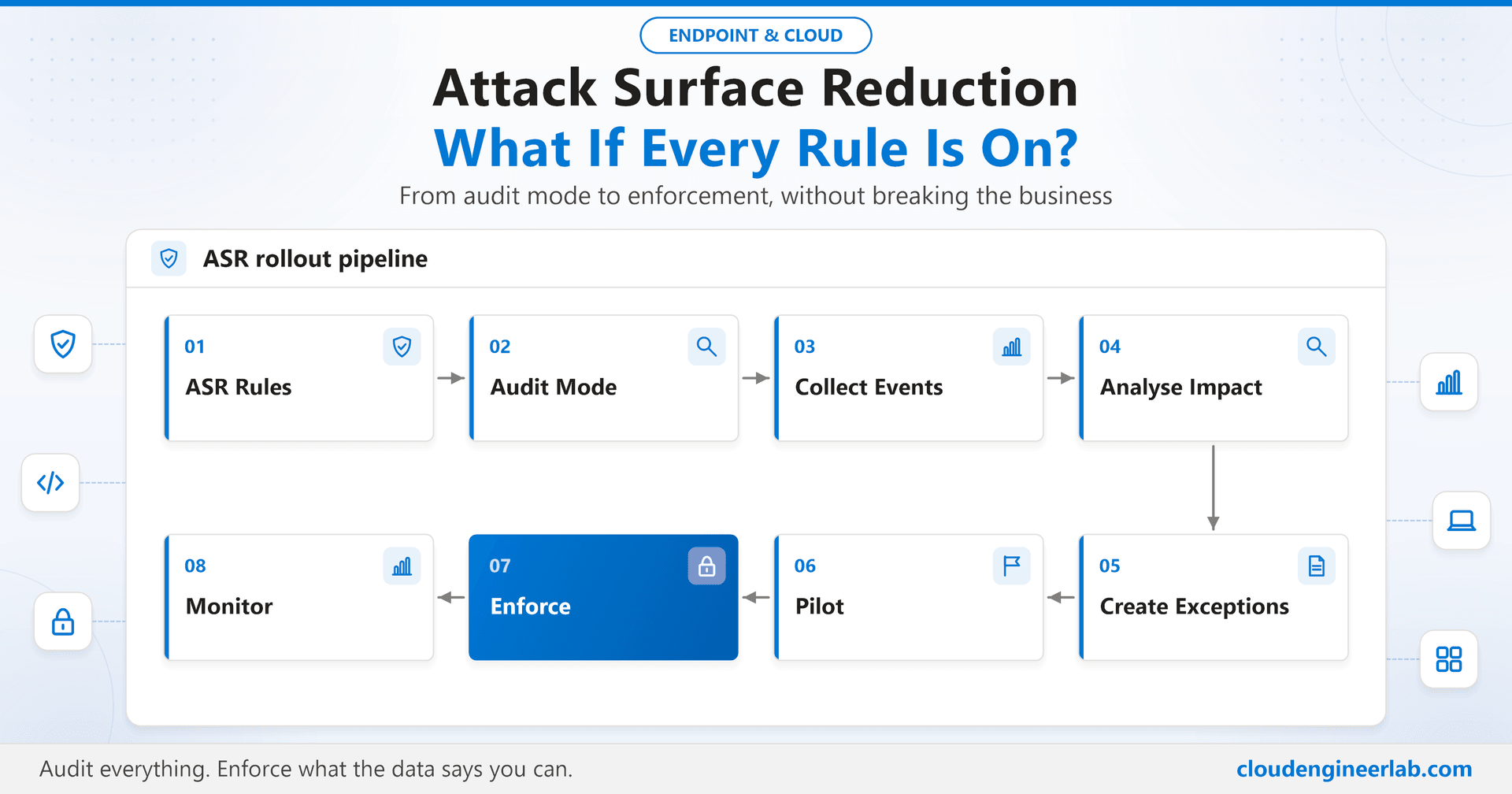
Turning every rule on is the right first move, as long as "on" means Audit. The rollout then follows eight steps:
| Step | What you do | Typical duration |
|---|---|---|
| 1. ASR rules | Create one ASR policy in Intune with every rule set to Audit | A day |
| 2. Audit mode | Assign to a pilot that represents the whole business, not just IT | Start of audit |
| 3. Collect events | Let it run through normal business cycles, including a month-end | 2 to 4 weeks |
| 4. Analyse impact | Break the hits down by rule, process and device | 1 week |
| 5. Create exceptions | Scoped, per-rule exclusions for verified legitimate tools | 1 week |
| 6. Pilot | Switch the safe rules to Block on the pilot | 1 to 2 weeks |
| 7. Enforce | Widen Block ring by ring, rule by rule | Several weeks |
| 8. Monitor | Watch blocks and changes for as long as the rules exist | Ongoing |
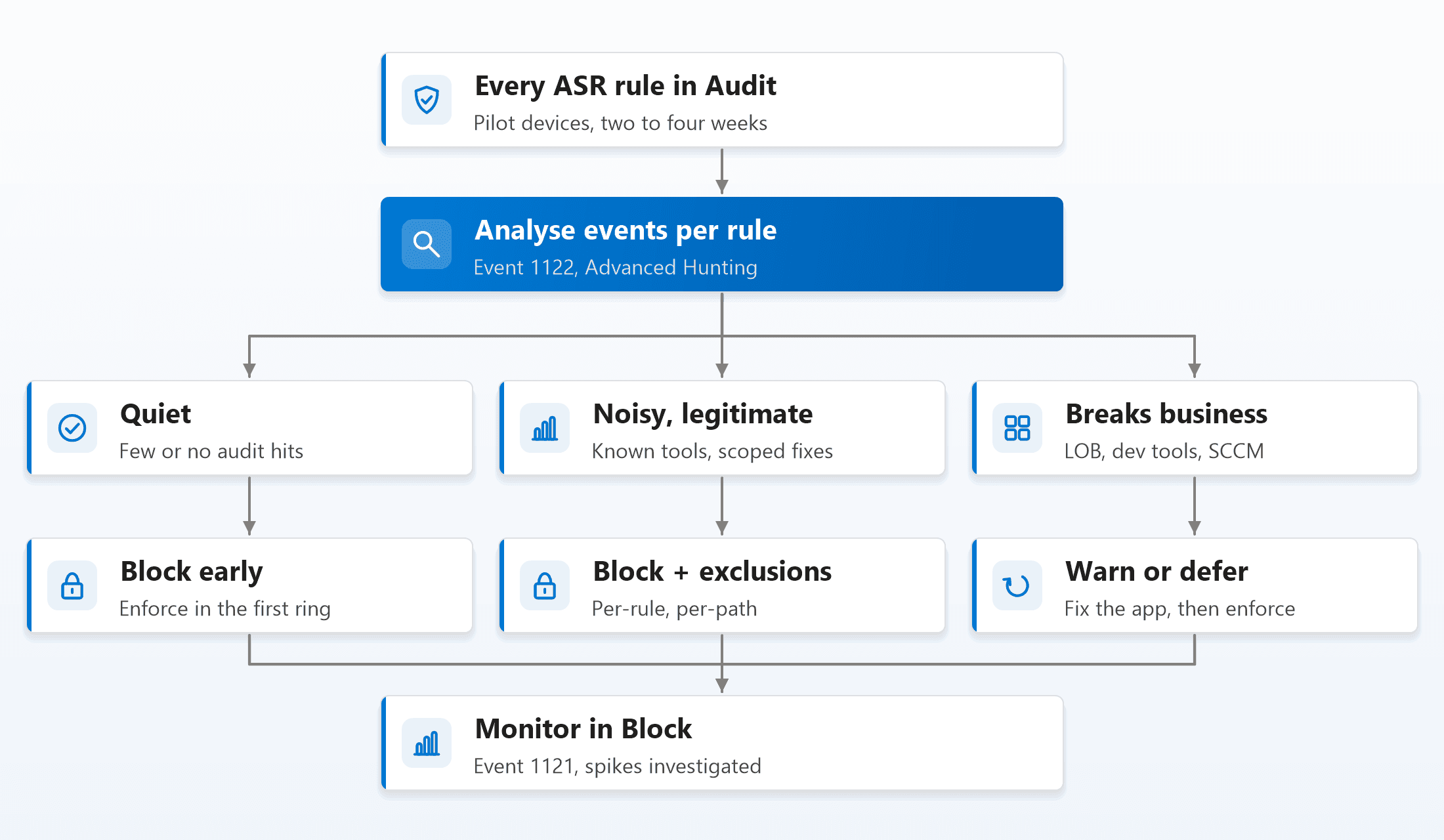
The analysis step is where every rule gets sorted into one of three buckets:
Collecting and Reading the Events
On each device, ASR events land in Event Viewer > Applications and Services Logs > Microsoft > Windows > Windows Defender > Operational:
| Event ID | Meaning |
|---|---|
| 1121 | A rule blocked something (Block mode) |
| 1122 | A rule would have blocked something (Audit mode) |
| 5007 | Defender settings changed, including ASR rule configuration |
Across an estate, use Advanced Hunting in the Defender portal instead. This query separates audit from block and shows how widely each behaviour occurs, which matters more than the raw count:
DeviceEvents
| where Timestamp > ago(30d)
| where ActionType startswith "Asr"
| extend Mode = iff(ActionType endswith "Audited", "Audit", "Block")
| summarize Hits = count(), Devices = dcount(DeviceId)
    by ActionType, Mode, InitiatingProcessFileName, FileName
| order by Devices desc, Hits desc
Sort by devices, not by hits
One legacy tool on three machines can generate thousands of events. A behaviour seen on 400 devices, even with fewer hits, is the one that will flood your help desk the day you enforce. Rank by how many devices are affected first.
What Lights Up, Area by Area
False positives in general
Most audit hits fall into a few recognisable groups:
- Security and management agents touching protected processes, especially LSASS.
- Office add-ins and macros doing things that look like an attack because, technically, they are the same behaviour.
- Admin scripts and tools that are obfuscated, minified, or launched in unusual ways.
- In-house and freshly built software that has no reputation yet.
The skill isn't avoiding false positives; it's recognising which group each hit belongs to quickly.
Office applications
The Office rules (child processes, executable content, process injection, Win32 API calls from macros) are the most valuable rules on the list, because they target the single most common initial access route: a malicious document.
In audit, they typically surface:
- Legacy macro tooling that launches executables or scripts, a finance workbook calling a reporting tool, for example.
- Add-ins that start helper processes for printing, PDF conversion or document management.
- Template and mail-merge workflows that shell out to other programs.
Each of these is a real business process doing exactly what a malicious macro does. That is why these rules work, and why each hit needs a decision: exclude that specific add-in path, or modernise the workflow. Never weaken the rule for every user.
PowerShell and scripts
The script rules ("Block execution of potentially obfuscated scripts" and "Block JavaScript or VBScript from launching downloaded executable content") catch most commodity malware delivery, but they also catch:
- Minified or packed scripts from legitimate vendors.
- Admin scripts that build commands dynamically, encode them, or download and run tools.
- Installer wrappers that use script hosts to launch downloaded content.
The fix is rarely an exclusion. Usually it's making the script stop looking like malware: sign it, stop encoding commands, and deliver tools through Intune instead of downloading them at run time. The same discipline from turning AI-generated PowerShell into safe automation applies to any script your team writes.
Credential theft
"Block credential stealing from the Windows local security authority subsystem" is usually the noisiest rule in audit and the safest rule to enforce. Many legitimate processes (security agents, management tools, some hardware utilities) open handles to LSASS, so audit generates a lot of events. But the rule blocks only the specific access needed to read credentials, and legitimate software almost never needs that.
Don't let a noisy audit scare you off this rule
High audit volume on the LSASS rule is expected and is generally not a sign of breakage. Review which processes are involved, confirm they are known, and enforce it early. It belongs with Credential Guard in the hardening baseline as one of the most important defences against lateral movement.
Ransomware behaviour
"Use advanced protection against ransomware" relies on cloud-delivered protection and machine-learning reputation, so it needs cloud protection turned on to work properly. Its false positives tend to be rare, new or unusual executables that do a lot of file operations quickly: backup tools, file-sync utilities, bulk image or document converters. Expect a short list of specific tools, each needing a verified, path-scoped exclusion.
LOLBins
Living-off-the-land binaries are legitimate Windows tools (script hosts, WMI, PsExec-style remote execution and others) that attackers use because they are already trusted. ASR covers several LOLBin abuse paths directly: Office and script hosts launching processes, process creation through PsExec and WMI, and persistence through WMI event subscriptions.
It doesn't cover every LOLBin. For the rest, pair ASR with application control, including Microsoft's recommended block rules for abusable binaries, and Defender's own behavioural detection.
The PsExec and WMI rule can break Configuration Manager
"Block process creations originating from PSExec and WMI commands" interferes with the Configuration Manager client, which relies heavily on WMI. On co-managed or SCCM-managed devices, keep this rule in Audit (or leave it off) until those devices are fully Intune-managed. Enforcing it blindly can quietly stop software deployment and inventory across the estate.
Developer machines
Developer workstations generate more ASR noise than any other group, and for good reasons:
- Build tools spawn chains of processes that look like an attack.
- Freshly compiled binaries have no reputation, so "Block executable files from running unless they meet a prevalence, age, or trusted list criterion" flags almost everything a developer builds.
- Developers run scripts, interpreters and package managers that download and execute content constantly.
Don't solve this by weakening the policy for everyone. Give developers their own device group and their own ASR policy: the high-value rules (LSASS, Office, ransomware) still in Block, the prevalence and script rules in Warn or Audit, and scoped exclusions for build output folders that standard users can't write to.
Line-of-business applications
Line-of-business apps are where enforcement decisions get hard, because nobody can change the software quickly. Expect old installers launched from Office, unsigned helpers, scripts that look obfuscated, and processes that write executables to disk.
For each one, choose deliberately:
| Option | When to use it |
|---|---|
| Path-scoped, per-rule exclusion | The app is known, its folder can't be written by users, and it trips one rule |
| Warn mode for that rule | Users need to be able to continue, but you want them to see and report the prompt |
| Keep the rule in Audit for that group only | The app breaks under Block and no safe exclusion exists yet |
| Modernise or replace the app | Always the long-term answer, with an owner and a date |
Creating Exceptions Without Creating Holes
Intune lets you add exclusions in two ways in the ASR policy: global ASR exclusions, which apply to every rule, and per-rule exclusions, which apply to one specific rule only. Use per-rule exclusions wherever you can.
Rules for safe exclusions:
- Exclude a specific file path, not a whole folder, where possible.
- Never exclude a folder standard users can write to. An attacker who can drop a file into an excluded folder inherits the exclusion. The same principle as writable install folders in where application security breaks.
- Scope the exclusion to the devices that need it, through a separate policy for that group, not the whole tenant.
- Record an owner and a review date for every exclusion. Exclusions outlive the apps they were made for unless someone removes them.
Warn mode is the useful middle ground: the user sees a prompt explaining the block and can choose to continue. It turns a hard break into a visible, reportable event. A few rules don't support Warn, so check the rule list before planning around it.
Pilot, Enforce and Monitor
Pilot. Switch the quiet rules and the safe-but-noisy rules (LSASS, Office, scripts, ransomware) to Block on the pilot first. Keep the business-breaking rules in Audit or Warn until their fixes are in place.
Enforce. Widen ring by ring. Each new ring runs every rule in Audit for at least a week first, because every department brings software the pilot never saw. Microsoft's own guidance treats three rules as a sensible baseline to enforce early almost everywhere: blocking abuse of exploited vulnerable signed drivers, blocking credential stealing from LSASS, and blocking persistence through WMI event subscriptions.
Monitor. In Block mode, event 1121 should be rare. Investigate:
- A sudden spike from one rule: either an attack or an app update that changed behaviour.
- Blocks on many devices at once: almost always a new software version, which needs a decision fast.
- Event 5007 on devices where nobody changed policy: someone or something tampered with Defender settings.
Feed these into the same incident process as other Defender alerts; what happens when Defender detects a threat covers that loop end to end.
Summary
Turning every ASR rule on is the right starting point, as long as it starts in Audit. What you find is predictable:
- The LSASS rule: noisy in audit, safe to enforce early.
- The Office rules: the most valuable, and they expose legacy macro workflows.
- The script rules: catch admin tooling that needs to stop looking like malware.
- The ransomware rule: flags a short list of specific tools.
- Developer machines: need their own policy.
- Line-of-business apps: need deliberate, owned decisions.
- The PsExec and WMI rule: can break Configuration Manager if enforced blindly.
Sort every rule into quiet, noisy-but-legitimate, or business-breaking. Enforce in that order, with per-rule, per-path exclusions that have owners and expiry dates. Then keep watching, because the day an ASR rule suddenly starts blocking things is the day it is earning its keep.

Written by
Chetan Yamger
Cloud Engineer · AI Automation Architect · Modern Workplace Consultant
Cloud Engineer, AI Automation Architect, and Modern Workplace Consultant based in Amsterdam, Netherlands. Specializing in scalable, secure enterprise solutions with Microsoft Azure, Intune, PowerShell, and AI-driven automation using ChatGPT, Gemini, and modern LLM technologies.
Stay in the loop.
New articles, straight to you.
Deep-dive technical articles on Intune, PowerShell, and AI — no noise, no spam.
Discussion
Share your thoughts — your email stays private
Leave a comment