
Prompt Engineering for PowerShell: From Natural Language to Safe Automation
AI can write you a working PowerShell script in seconds. Whether it's safe to run against your tenant is a completely separate question, with its own workflow.
Every other post in this "prompt engineering for X" series has covered a genre of AI output, tool calls, retrieved documents, general code. This one is specifically for the workflow most readers of this site actually run several times a week: ask AI for a PowerShell script, get something that looks right, and decide what happens between that answer and it touching a real tenant.
The message this entire post exists to deliver
Don't let AI-generated PowerShell go directly into production. Not because the AI is usually wrong, it usually isn't, but because "usually" is exactly the word that describes every incident this workflow is built to prevent.
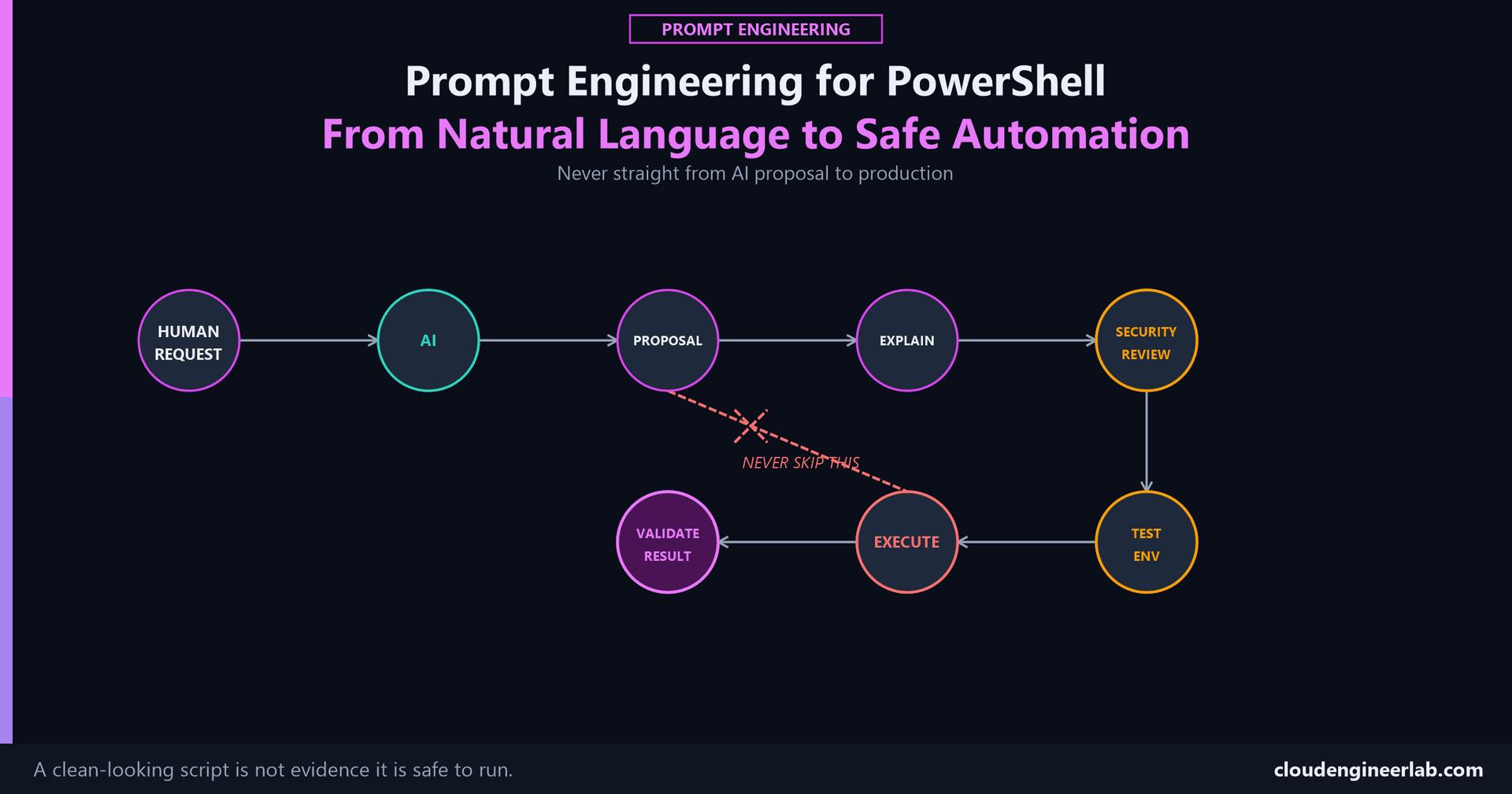
The Workflow
Every stage after 'Proposal' exists because a script can look completely correct and still be wrong
A script with clean syntax, sensible variable names, and confident comments passes a glance-read every time, whether or not it's actually safe for your tenant. None of that surface polish is evidence about what the script actually does once it runs.
Human Request
The prompt structure covered in the PowerShell template post, role, environment, task, requirements, is what makes the first draft worth reviewing at all. A vague request produces a script built on assumptions about your environment, which just means the review stages below have more to catch.
AI and PowerShell Proposal
Call it a proposal, not an answer
The same framing covered for AI-generated code generally applies with extra weight here: PowerShell can touch Active Directory, Entra ID, the registry, and every managed device in a tenant. Treating the output as a draft awaiting review is what actually gets it reviewed. Treating it as an answer is what gets it run.
Explain What It Will Do
Before reading a single line of the script yourself, ask the AI to explain it in plain language: what changes on disk, what it connects to, what gets deleted, modified, or created, and what happens if a target doesn't exist. This is a distinct, useful step even for an experienced reader, because it surfaces the AI's own understanding of its script's effects, and a mismatch between that explanation and what the code actually does is itself a warning sign worth chasing down before anything else.
Explain exactly what this script will do if I run it, step by
step, including every file, registry key, service, or account
it reads, modifies, or deletes. Call out anything irreversible.
Security Review
What to actually look for
Hardcoded credentials or secrets anywhere in the script. Destructive cmdlets, Remove-Item, Remove-MgUser, Set-ADUser, anything that deletes or overwrites state, and whether each one is actually necessary for the task asked. The blast radius: does this touch one device, a group, or the entire tenant, and does that match what was actually requested? The permissions or API scopes the script assumes, and whether they're broader than the task needs. A script that's technically correct and requests tenant-wide write access for a task that only needed to read one device has a review finding, even though it would run without error.
This is the same distinction covered for tool-calling permission boundaries: scope matters independently of correctness, and a script can be entirely correct in what it does while still being wrong in how much access it was written to use.
Test Environment
Never the first real run. A test tenant, a single non-production device, or a small pilot group, plus PowerShell's own built-in safety mechanism, -WhatIf, which reports what a cmdlet would do without actually doing it, and is worth explicitly asking the AI to add to any state-changing command before it's run anywhere at all.
Staged rollout isn't a new idea, it's the same discipline already covered for policy changes
The Conditional Access rollout pattern covered here, one test target, then a pilot group, then broader, applies just as directly to a PowerShell script as it does to an access policy. A mistake that only touches a pilot device is a five-minute fix. The same mistake run tenant-wide first is an incident.
Execute
Staged, matching whatever the Test Environment stage validated: one target first, watched, then the pilot group, then broader deployment, with each stage's actual outcome checked before the next one runs. Running an AI-generated script tenant-wide the first time it executes anywhere skips every safeguard the previous two stages exist to provide.
Validate Result
'It ran without an error' is not the same claim as 'it did the right thing'
The exact distinction covered in Prompt Evaluation: a script can complete cleanly, report success, and still have changed the wrong field, targeted the wrong device, or silently skipped records it should have flagged. Check the actual resulting state, not just the exit code, against what the original Human Request actually needed to be true.
A Worked Pass
Continuing the same example
The BitLocker compliance script used throughout this series, now through this specific workflow.
| Stage | What happens |
|---|---|
| Human Request | Flag devices with BitLocker off for more than 24 hours, Intune remediation context |
| AI / Proposal | A script matching the request, including a cleanup step removing an old log file with Remove-Item |
| Explain | The AI's own explanation surfaces that the cleanup step removes an entire log folder recursively, not just the one old file intended |
| Security Review | Flags the recursive Remove-Item as broader than needed, catches this before it ever runs anywhere |
| Test Environment | Revised script, with -WhatIf added, run against a single pilot device first |
| Execute | Rolled out to a small pilot group, then the broader device population, each stage confirmed before the next |
| Validate Result | Confirms the actual flagged-device count and log state match expectations, not just that the script exited without error |
The review stage is what caught this, not a more careful read of the code, a script that runs without error and one that does the right thing are different claims, and this workflow exists specifically to keep them from being treated as the same thing.
Where This Fits
Two related posts, two different scenarios
This post is a human running each of these stages personally, on a script they're about to execute themselves. Build an AI Agent That Can Safely Execute PowerShell Commands covers what replaces this workflow once an agent, not a person, is the one deciding to run PowerShell, JEA endpoints, constrained language mode, and approval gates doing structurally what a human's own judgment does here. Prompt Engineering for Coding is the general, language-agnostic version of the same underlying discipline.
The Bottom Line
AI writing a working PowerShell script in seconds was never the hard part. Knowing what that script actually does, confirming it's scoped to only what the task needed, proving it's safe somewhere that isn't production, and checking the real result instead of trusting a clean exit code, that's the actual work, and skipping straight from Proposal to Execute is how a script that looked completely reasonable becomes the reason a Friday afternoon gets interesting.
The question worth asking before your next AI-generated script runs
Has this touched anything other than a test target yet? If the honest answer is no, and you're about to run it broadly anyway because it looks fine, that's the exact moment this whole workflow exists for.
How many of these eight stages does your own AI-assisted PowerShell workflow actually go through before something touches production? Drop a comment with the stage you're most likely to skip when you're in a hurry, that's usually the one worth fixing first.

Written by
Chetan Yamger
Cloud Engineer · AI Automation Architect · Modern Workplace Consultant
Cloud Engineer, AI Automation Architect, and Modern Workplace Consultant based in Amsterdam, Netherlands. Specializing in scalable, secure enterprise solutions with Microsoft Azure, Intune, PowerShell, and AI-driven automation using ChatGPT, Gemini, and modern LLM technologies.
Stay in the loop.
New articles, straight to you.
Deep-dive technical articles on Intune, PowerShell, and AI — no noise, no spam.
Discussion
Share your thoughts — your email stays private
Leave a comment