
Prompt Engineering for Coding: Getting AI to Produce Reliable Code
Not another list of coding prompts. The actual engineering loop, requirement through revision, that decides whether AI-generated code survives contact with a real codebase.
The PowerShell prompt template on this site gives you one strong prompt for one request. This post is about what happens around that prompt over an entire coding session, the loop that turns a first draft into something you'd actually ship, because a single well-written prompt gets you a plausible first attempt, not reliable code.
The one sentence to remember
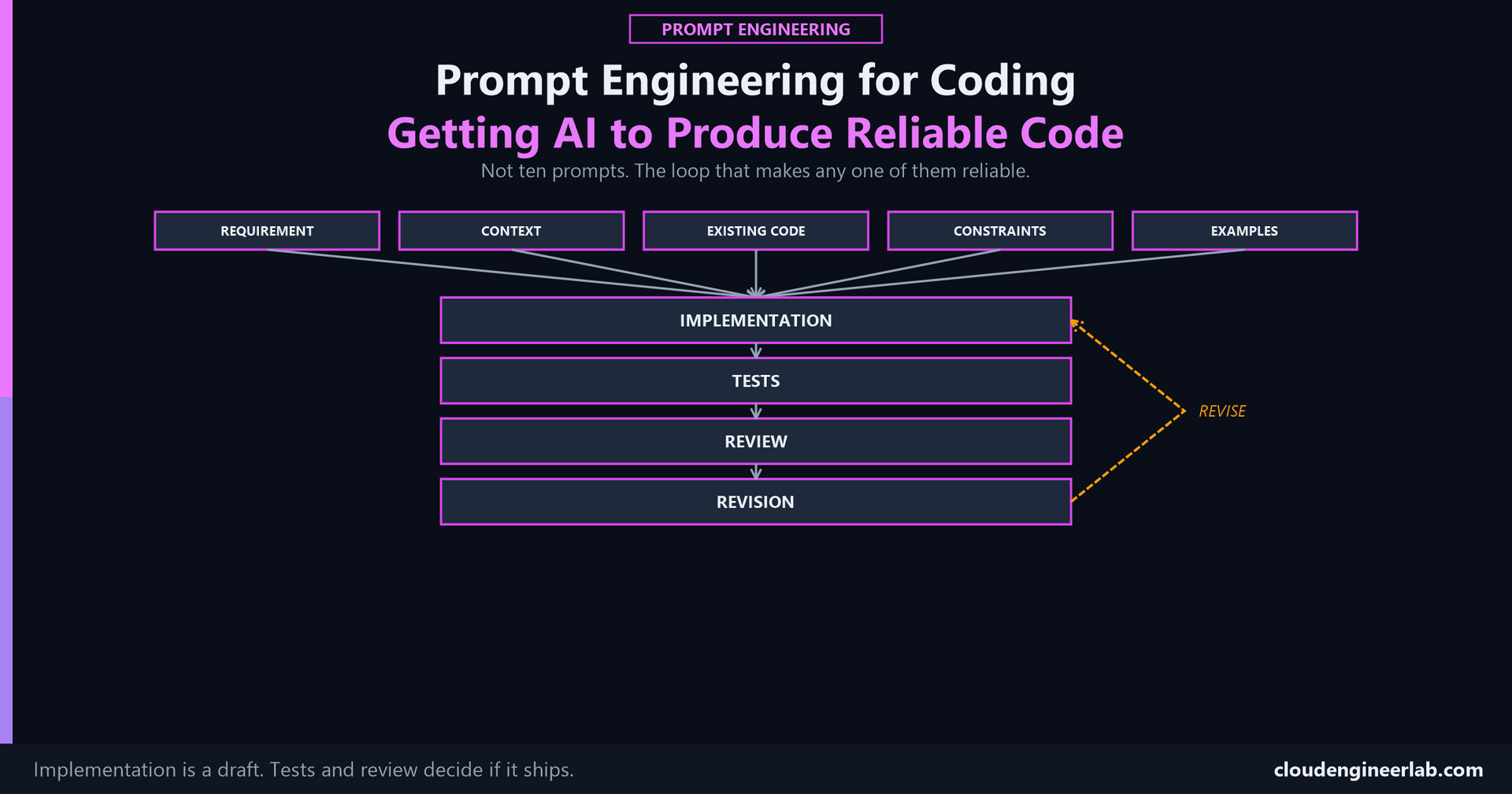
Reliable AI-generated code isn't the output of one good prompt. It's the output of a loop, generate, test, review, revise, and most of the difference between code that works and code that only looks like it works happens in the second half of that loop, not the first.
The Full Loop
Requirement
Not "write a script that checks compliance." A requirement is the actual condition that has to hold true once this is done: "every device that's been non-compliant for more than 24 hours is flagged, with no false negatives on devices that recently went non-compliant." The difference matters because a requirement is testable. A task description usually isn't, and what isn't testable can't be verified, only eyeballed.
Context
The anatomy's Context ingredient, applied specifically to code: the runtime, the target platform, whether this runs interactively or unattended, what's already installed. The PowerShell template post's own Context section is a concrete example of exactly this: PowerShell version, whether a scheduled task needs unattended auth, tenant scale. Skip this and the model fills the gap with a plausible guess that's wrong for your actual environment often enough to matter.
Existing Code
The ingredient generic prompting advice never mentions
Code doesn't exist in isolation the way a written answer does. It joins a codebase that already has naming conventions, a logging pattern, an error-handling style, and helper functions already written for exactly this kind of task. A model with no visibility into any of that will generate something internally consistent and completely inconsistent with everything around it, technically correct and a genuine maintenance cost the moment someone has to read both side by side.
Paste in a real, similar function already in your codebase before asking for a new one. This is few-shot prompting doing exactly what it's best at: showing the actual pattern, not describing it in prose and hoping the description is complete.
Constraints
The anatomy's Constraints ingredient, and in code, this is usually where the requirements that actually matter in production live: which modules are allowed, whether credentials can ever be hardcoded, whether the target machine has internet access, what has to keep working for users on an older version. A missing constraint here doesn't produce an error. It produces code that's correct in a test tenant and breaks the moment it meets a locked-down production machine.
Examples
Beyond a similar existing function, a concrete before-and-after or a short reference snippet showing exactly how errors get logged, how a function is documented, or how a parameter is validated in your style removes the ambiguity a prose description of "clean code" always leaves open. One good example beats three paragraphs of description here just as much as it does for any other kind of output.
Implementation
The generated code is a draft, and treating it as one changes what happens next
Calling this stage "Implementation" rather than "the answer" is deliberate. A draft gets tested and reviewed before it ships. An answer, psychologically, tends to get a quick read-through and a shrug of "looks fine." The same code, framed as a draft awaiting the next two stages, gets the scrutiny that actually catches what a quick read misses.
Tests
This is the actual gate, and it's the exact framework from a previous post
Prompt Evaluation's testing framework applies directly here, only the metrics change slightly: does the generated function produce the correct output for a fixed set of real inputs, including the edge cases that have broken a similar script before, a null field, an unusual name, an empty result set. "It ran without an error" is not the same claim as "it produced the correct result," the same distinction that post makes about accuracy versus a merely plausible-looking answer.
Review
Two things get checked here, deliberately, and they're different questions. Correctness: does this actually do what the requirement demanded, including the edge cases the tests covered. Convention: does this match the Existing Code patterns it's supposed to sit alongside, or does it quietly introduce a second logging style, a second naming convention, a second way of doing the same thing the rest of the codebase already does one way. A model asked to review its own output is checking the first question reasonably well and the second one barely at all, since it has no memory of what "the rest of the codebase" actually looks like unless that context was fed in again at review time too.
Revision
Feed the specific finding back, not a general 'please fix it'
"The date field is in UTC, convert it to local time before writing the CSV" produces a targeted fix. "Something's wrong with the dates" produces another draft that may fix that issue while introducing a new one, since the model is now guessing at what "wrong" meant. This is the same principle covered for tool-calling error handling: a specific, concrete finding is something to correct. A vague one is something to guess at.
A revision loops back to Implementation, not back to Requirement, unless the review actually revealed that the original requirement was wrong or incomplete, which does happen and is worth catching explicitly rather than patching around indefinitely.
A Worked Pass
Continuing the BitLocker compliance example used throughout this series:
| Stage | What happens |
|---|---|
| Requirement | Every device with BitLocker off for more than 24 hours is flagged, with a status a non-technical helpdesk can read directly |
| Context | Intune remediation script, locked-down device, no additional modules installable |
| Existing Code | A similar existing remediation script pasted in, showing the team's error-handling and output-format conventions |
| Constraints | Built-in Get-PSDrive/WMI only, must not error on a device with no BitLocker volume at all |
| Examples | One filled example output line: DEVICE-1234: 8% free - ACTION NEEDED |
| Implementation | A first-draft script matching all of the above |
| Tests | Run against 5 known device states, including a null status and an unusual device name |
| Review | Passes all 5 cases, but uses a different error-logging pattern than the pasted existing script |
| Revision | "Match the existing script's Write-Log function instead of Write-Host for errors," fed back in, produces a second draft that passes tests and matches convention |
Where This Fits
The same shape as two other posts in this series
This loop is structurally the same one covered in Prompt Chaining (breaking one hard task into staged prompts) and Prompt Evaluation (testing a candidate against a fixed dataset before it ships), applied specifically to the genre of prompting that produces code instead of prose.
The Bottom Line
A list of ten coding prompts gives you ten starting points. It doesn't give you the loop that turns any one of those starting points into code you'd actually trust in production. Requirement, Context, Existing Code, Constraints, and Examples decide what the first draft looks like. Tests, Review, and Revision decide whether that draft is actually correct, or just fluent, and that second half is where most of the real engineering in "AI-assisted coding" actually happens.
The check worth running on your own workflow
The next time AI writes a function for you, count how many of these nine stages it actually went through before you ran it against something real. If the honest count is "Implementation, then I ran it," that's not a shortcut, it's the exact gap this loop exists to close.
Where does your own AI-assisted coding workflow usually stop, Implementation, Tests, or does Review actually happen? Drop a comment with the stage you skip most often and what's slipped through because of it.

Written by
Chetan Yamger
Cloud Engineer · AI Automation Architect · Modern Workplace Consultant
Cloud Engineer, AI Automation Architect, and Modern Workplace Consultant based in Amsterdam, Netherlands. Specializing in scalable, secure enterprise solutions with Microsoft Azure, Intune, PowerShell, and AI-driven automation using ChatGPT, Gemini, and modern LLM technologies.
Stay in the loop.
New articles, straight to you.
Deep-dive technical articles on Intune, PowerShell, and AI — no noise, no spam.
Discussion
Share your thoughts — your email stays private
Leave a comment