
Prompt Engineering for Tool Calling: How to Make AI Use APIs Correctly
A tool description is a prompt the model reads to decide whether to use it at all. Get that wrong and no amount of clever wording elsewhere fixes it.
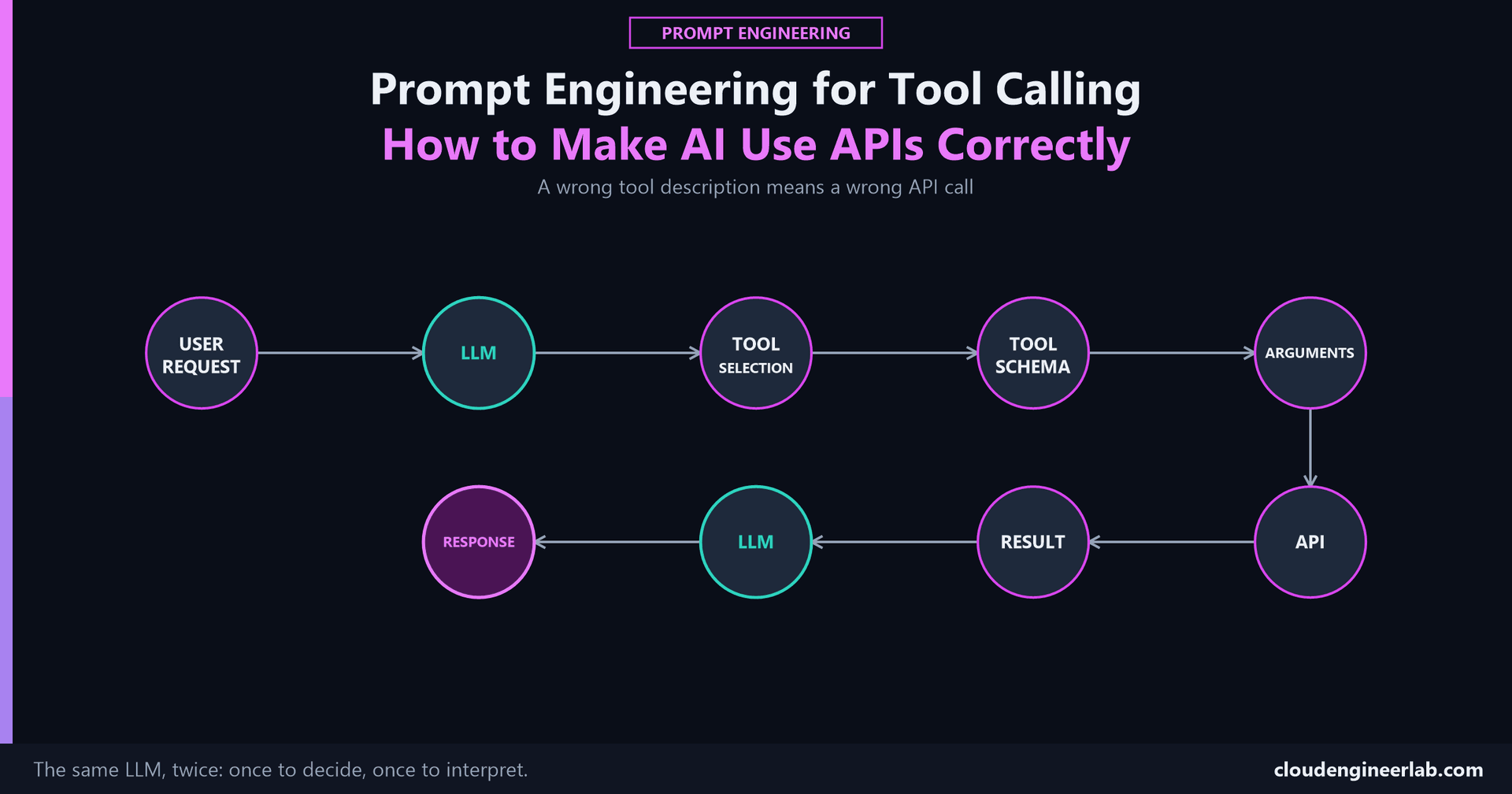
Writing a prompt that produces a good sentence and writing one that gets an API called correctly are different disciplines. A sentence can be slightly off and still be useful. A tool call with the wrong argument, or the wrong tool entirely, doesn't produce a slightly-off API request, it produces a request that queries the wrong device, checks the wrong tenant, or runs an action nobody asked for. What Happens Inside an AI Agent covers the full loop this sits inside. This post is about the specific part of that loop most real failures actually start in: Tool Selection, Tool Schema, and Arguments, the exact place a model decides what to call and how.
The one sentence to remember
A tool's description is a prompt. The model reads it to decide whether this tool applies at all, before it ever gets to filling in a single argument, and a vague description fails silently: the model either never calls the tool it should have, or calls the wrong one that sounded close enough.
The Full Path
These are two different LLM calls, not one
The first LLM stage decides what to call and how. The second, after the Result comes back, decides what that result means. This distinction matters for debugging: a wrong final answer can trace back to a bad tool choice, a bad argument, or a correct call whose result was misread, and each of those is a different bug with a different fix.
Tool Descriptions
The description is the single highest-leverage piece of text in the entire schema, because it's what the model reads to decide whether this tool is even relevant, before arguments are ever considered.
A description that only says what a tool does isn't enough
"Gets device compliance information" describes the tool. It doesn't tell the model when to reach for it instead of a similar-sounding tool, or when not to use it at all. A description that states the boundary explicitly, "Use this to check whether a specific device is currently compliant. Do not use this for a list of all non-compliant devices, use list_noncompliant_devices instead", removes the ambiguity that causes the wrong tool to get picked.
A different concern from tool poisoning
Writing your own tool descriptions well is a correctness problem. Trusting a third party's tool descriptions without verifying them is a security problem, covered in the MCP tool poisoning section of the agent hijacking post. Both matter, and they're not the same failure.
Parameters
The same lesson from making AI follow a specific output format applies directly here: naming a parameter isn't specifying it. severity: string accepts anything the model decides to generate. severity: "low" | "medium" | "high", an actual enum in the schema, is a constraint the model fills from a closed set rather than improvising a value that's close but not quite what your API expects.
{
  "name": "flag_device_issue",
  "parameters": {
    "device_id": { "type": "string", "description": "The device's unique Intune ID" },
    "severity": { "type": "string", "enum": ["low", "medium", "high"] },
    "reason": { "type": "string", "description": "A one-sentence explanation" }
  }
}
An enum here doesn't just document three valid values, it structurally prevents a fourth one from being generated in the first place, the schema-enforcement principle applied to a tool call instead of a chat response.
Required Fields
Mark what's actually required in the schema's own required array, not just in the description's prose.
{
  "required": ["device_id", "severity"]
}
A field described as required but not marked required will sometimes be skipped
"reason (required): a one-sentence explanation" in the description text is a request the model can still fail to follow, the same gap covered in How to Make AI Follow a Specific Output Format: an instruction is not the same thing as an enforced constraint. Putting the field in the schema's required array is what most tool-calling implementations actually validate against before the call is allowed to execute at all.
Validation
A syntactically valid tool call, correct types, all required fields present, isn't automatically a semantically correct one. device_id: "LAPTOP-9999" might be perfectly formed and still refer to a device that doesn't exist, or one the current user has no permission to act on.
Validate against real state, not just shape
Before executing, check that the referenced device, user, or resource actually exists and that this request is allowed to touch it. A schema check confirms the call is well-formed. It says nothing about whether it's correct.
Fail closed on ambiguity
If an argument is technically valid but the system can't confirm it's actually correct, for example, a device ID that matches two different naming conventions, reject the call and ask for clarification rather than guessing which one was meant.
Error Handling
When a call fails, whether from bad arguments or a real API error, what gets fed back into the next LLM pass determines whether the model actually corrects itself or just tries the same mistake again with different wording.
Feed the actual error, not a generic failure message
"That didn't work, try again" gives the model nothing to fix. The real validation error, "device_id not found, did you mean LAPTOP-4471?", or the real API error message, gives it something concrete to correct on the next attempt. This is the exact same principle covered in From Prompt to Production's structured output validation, applied here to a tool call instead of a JSON response.
Permission Boundaries
At the prompt-engineering layer, the most direct control is the simplest one: a model cannot call a tool it was never given. This is stated plainly in the agent architecture post: "A model can't call a tool that was never registered, no matter how the prompt is worded." Only exposing the tools a given task or user role actually needs, and never registering a destructive action as a tool at all in a context that shouldn't have it, is a real, structural boundary decided before the model ever reasons about anything.
Where the deeper version of this lives
This post covers the decision of which tools are even on the table. Scoping the actual credential each tool call executes with, so a read-only tool is physically incapable of using a destructive credential, is systems-security work, not prompt engineering, and it's covered in full here.
Tool Selection: A Worked Comparison
The task: an assistant with two Graph API tools available, one that checks a single device's compliance and one that lists all non-compliant devices tenant-wide.
Poorly differentiated:
[
  { "name": "get_device_compliance", "description": "Gets device compliance." },
  { "name": "list_devices", "description": "Gets devices." }
]
Asked "is LAPTOP-4471 compliant," a model working from these two descriptions has a real chance of calling list_devices and trying to filter the result itself, since neither description actually distinguishes a single-device lookup from a tenant-wide list.
Clearly differentiated:
[
  {
    "name": "get_device_compliance",
    "description": "Check the compliance status of one specific device by its device ID. Use this when the request names a specific device."
  },
  {
    "name": "list_noncompliant_devices",
    "description": "List every non-compliant device across the tenant. Use this for a tenant-wide report, not for checking one named device."
  }
]
Same task, same two tools, and the second version tells the model exactly which situation each one is for, in the model's own decision-making moment, not just in documentation nobody reads before shipping.
Where This Fits
One piece of a larger loop
Tool Selection, Tool Schema, and Arguments are the part of the agent loop this post covers. Memory, planning, evaluation, and infinite-loop prevention are the rest of it, credential scoping is the systems-security layer underneath it, and the instruction hierarchy is what a Tool Result actually is once it comes back, information to reason about, never an instruction to follow.
The Bottom Line
A tool schema is a contract, and the description, parameter types, required fields, and error messages are all part of writing that contract well enough that a model fills it out correctly on the first try, not just eventually after a few failed attempts. Getting this right is prompt engineering in the strictest sense: the exact words in a description change what actually gets called and with what arguments, the same way the exact words in any other prompt change the answer it produces.
The check worth running on your own tools
Pick a tool your system exposes to a model. Read only its name and description, the way the model sees it, no other context. Is it obvious when to use it, when not to, and what a required argument actually needs to look like? If you have to guess, the model is guessing too.
Have you had a model call the wrong tool, or the right tool with a wrong argument, because two tool descriptions were too similar to tell apart? Drop a comment with what the descriptions looked like and how you rewrote them.

Written by
Chetan Yamger
Cloud Engineer · AI Automation Architect · Modern Workplace Consultant
Cloud Engineer, AI Automation Architect, and Modern Workplace Consultant based in Amsterdam, Netherlands. Specializing in scalable, secure enterprise solutions with Microsoft Azure, Intune, PowerShell, and AI-driven automation using ChatGPT, Gemini, and modern LLM technologies.
Stay in the loop.
New articles, straight to you.
Deep-dive technical articles on Intune, PowerShell, and AI — no noise, no spam.
Discussion
Share your thoughts — your email stays private
Leave a comment