
AI + Power BI: Explain IT Trends in Plain English
A briefing where every AI sentence cites the metric behind it, links back to the Power BI view, and is checked before anyone reads it. Built and measured on a 12-month sample IT dataset.
A good Power BI dashboard shows what happened. The people reading it usually want three more things: is this normal, why did it happen, and should I worry? That's the gap AI promises to fill, with a paragraph of plain English under the charts.
The risk is just as clear. A paragraph that says "SLA breaches rose because of the firmware update" sounds authoritative, and nobody checks it against the report. This post builds a narrative layer where every sentence cites the metric it comes from, links back to the exact report view, and is checked by code before anyone reads it. It connects the Power BI reporting series (from your first Intune dashboard to the enterprise single source of truth) with the AI architecture posts, such as the new AI application stack: the semantic model stays the single source of truth, and the AI only puts it into words. It uses the same pattern as AI for Intune administrators (code finds the facts, the AI explains them), and adds checked claims and links back to the report.
How we tested
- The data: a sample dataset of 12 months (November 2025 to October 2026) of IT operations metrics for a fictional company:
- tickets opened;
- mean time to resolve;
- SLA breach rate;
- patch compliance;
- device compliance;
- user satisfaction (CSAT);
- outage minutes for Exchange, Teams, SharePoint and VPN.
- Five patterns planted on purpose:
- a VPN outage spike in May;
- SLA and resolution-time problems in July and August;
- a ticket spike in September;
- a patch-compliance dip in March with no recorded cause;
- a CSAT drop in August.
- A change log of four approved entries, the only context the AI may use to explain causes.
- The model: Qwen2.5-Coder-7B-Instruct, running locally at temperature 0 (Apache-2.0).
- The code: 310 lines of Python in four files. The DAX shown below is what each metric would be in a semantic model; for the test we computed the same values in Python.
The Architecture: the Model Is the Source of Truth
The key design choice: the AI never calculates anything. Every number comes from a defined metric, the same measure the report uses. Each metric in our registry has an ID, a name, its DAX, and the report page it lives on:
    "M03": {"name": "SLA breach rate", "column": "sla_breach_pct", "unit": "%", "page": "ServiceDesk",
            "dax": "SLA Breach % = DIVIDE ( CALCULATE ( COUNTROWS ( Tickets ), Tickets[SLABreached] = TRUE () ), COUNTROWS ( Tickets ) ) * 100"},
In a real deployment, the fact step runs DAX queries against the published semantic model (for example through the Power BI REST API's executeQueries endpoint), so the narrative and the report can never disagree about a number. The single source of truth post explains why that model matters.
Step 1: Code Finds the Facts and the Anomalies
For each metric, code compares the latest month with the median of the other months. To find anomalies anywhere in the year, it uses a robust test, the median and the median absolute deviation, so one extreme month doesn't distort the baseline it's compared against.
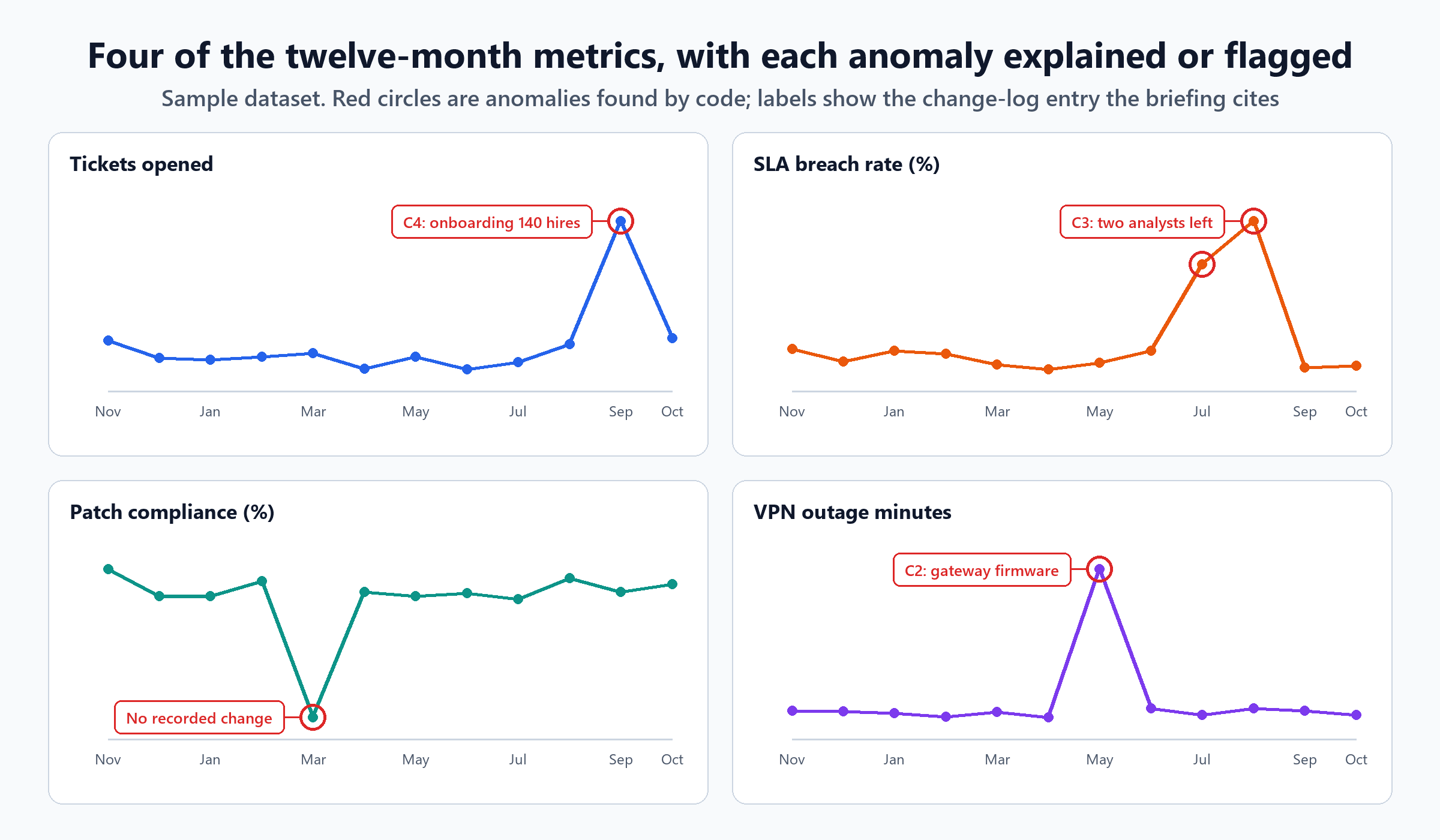
It found all five planted patterns, with no false alarms:
| Metric | Month | Value | Usual level |
|---|---|---|---|
| Tickets opened | September 2026 | 1,734 | 1,200 |
| Mean time to resolve | July / August 2026 | 15.2 / 17.9 hours | 9.9 hours |
| SLA breach rate | July / August 2026 | 9.8% / 12.6% | 3.5% |
| Patch compliance | March 2026 | 86.1% | 94.5% |
| CSAT | August 2026 | 3.71 out of 5 | 4.44 |
| VPN outage minutes | May 2026 | 612 | 24 |
Each fact also carries a link back to the report, using Power BI's URL filter syntax, filtered to that month (and that service, for outage metrics):
def link(metric, month):
    """A Power BI report URL filtered to this month (and service, for outage metrics)."""
    f = f"Calendar/Month eq '{month}'"
    if "service" in metric:
        f += f" and Outages/Service eq '{metric['service']}'"
    return f"{REPORT}/{metric['page']}?filter={quote(f)}"
URL filters need the real table and column names from your model; Calendar/Month and Outages/Service are this example's.
Step 2: Let the AI Write Freely
The first attempt gave the model all the facts and the change log, and asked for a plain-English monthly briefing that explains each anomaly, saying so when no change explains one.
It read well. It also contained these errors:
- The wrong month. "In October 2026, the IT operations team faced several anomalies that required attention. The number of tickets opened increased significantly from 1200 to 1734..." The 1,734 was September; October was 1,273.
- A wrong "no cause". "The SLA breach rate increased from 3.5% to 9.8%... also with no recorded change." The change log does explain it: two service desk analysts left in July.
- Invented arithmetic: "a 275% increase". From 3.5% to 9.8% is an increase of 180%.
- Jargon a manager can't use: "a 17.2 standard deviation increase", read straight off the anomaly score.
- Missing anomalies: it never mentioned the patch-compliance dip (the one with no recorded cause) or the CSAT drop.
Step 3: Make Every Sentence Cite Its Facts
The second attempt required JSON: each sentence lists the fact IDs whose numbers it uses, and the change IDs it gives as a cause. Code then checks that every number in a sentence belongs to the facts it cites.
Every number passed. The sentences were still wrong:
- "In October 2026, the number of tickets opened increased to 1273, up from 1734 in September, which was an anomaly." Both numbers are real; the direction is backwards.
- "User satisfaction (CSAT) in October 2026 was 4.36 out of 5, down from 3.71 in August, which was an anomaly." It went up.
- "Device compliance in October 2026 was 92.8%, up from 92.6% in the previous month." 92.6% was the 12-month median, not the previous month.
- No anomaly got a cause. It cited no change-log entries at all.
Checking the numbers isn't checking the claim
A number check would have passed this briefing. Real numbers, put in the wrong relationship to each other, produce a confident, wrong sentence. The check has to cover what the sentence says about the numbers: the direction, what they're compared with, and the cause.
Step 4: Fact Cards, With Checked Claims
So code made those decisions too. For each anomaly, and for three headline metrics for the latest month, code builds a fact card:
def make_cards(facts):
    cards = []
    for f in facts:
        if f["kind"] == "latest" and f["metric"] not in ("M01", "M03", "M06"):
            continue                                         # keep the briefing short: three headline metrics + anomalies
        v, b = f["value"], f["baseline"]
        change = round(v - b, 2)
        direction = "flat" if abs(change) <= 0.05 * abs(b) else ("up" if change > 0 else "down")
        candidates = [c for c in CHANGES if c["month"] in (f["month"], prev_month(f["month"]))] if f["kind"] == "anomaly" else []
        cards.append({"card": f"K{len(cards) + 1}", "fact": f["id"], "metric": f["name"], "unit": f["unit"], "month": f["month"],
                      "value": v, "usual_level": b, "difference": abs(change), "direction": direction,
                      "compare_to": "its usual level (the median of the other months)", "is_anomaly": f["kind"] == "anomaly",
                      "candidate_causes": candidates, "link": f["link"], "metric_id": f["metric"]})
    return cards
Each card fixes the facts a sentence may state:
- The direction: up, down, or flat within 5%.
- What the value is compared with: "its usual level", never "last month".
- The candidate causes: change-log entries from the same or the previous month.
The AI writes one sentence per card and decides whether a candidate cause plausibly explains it; if none fits, it must say "no recorded change explains this". Then code checks every sentence:
def check(sentence, card):
    t, issues = sentence.get("text", ""), []
    allowed = {card["value"], card["usual_level"], card["difference"], round(card["difference"]),
               round(card["difference"], 1), round(card["usual_level"]), round(card["usual_level"], 1)}
    allowed |= {float(n) for c in card["candidate_causes"] for n in numbers_in(c["change"])}
    stray = [n for n in numbers_in(t) if n not in allowed]
    if stray:
        issues.append(f"numbers not on the card: {stray}")
    if card["direction"] == "up" and (DOWN.search(t) or not UP.search(t)):
        issues.append("direction should be up")
    if card["direction"] == "down" and (UP.search(t) or not DOWN.search(t)):
        issues.append("direction should be down")
    if re.search(r"previous month|last month|month before", t, re.I):
        issues.append("calls the usual level the previous month")
    cause = (sentence.get("cause") or "none").strip()
    ids = {c["id"] for c in card["candidate_causes"]}
    if card["is_anomaly"]:
        if cause != "none" and cause not in ids:
            issues.append(f"cause {cause} is not a candidate")
        if cause == "none" and "no recorded change" not in t.lower():
            issues.append("unexplained anomaly not stated as such")
        expected = EXPECTED_CAUSE.get((card["metric_id"], card["month"]))
        if expected is not None and ({cause} - {"none"}) != expected:
            issues.append(f"cause {cause}, expected {sorted(expected) or 'none'}")
    return issues
A sentence that fails gets one repair attempt, with its exact problems listed. If it still fails, code writes a plain sentence from the card instead.
Result: all 11 sentences verified. 10 were correct on the AI's first attempt. The eleventh, the March patch dip, left out "no recorded change explains this"; the repair attempt failed too, so the code template supplied the sentence. Every cause matched the change log: onboarding for the ticket spike, the analysts leaving for the resolution-time, SLA and CSAT problems, and the firmware update for the VPN outage.
We fixed our own checker along the way
Our first direction check knew "rose" and "fell" but not "more than" or "less than". It flagged two correct sentences ("73 tickets more than the usual level") as wrong. And our first number check counted "out of 5" in "4.36 out of 5" as an invented number. Read your checker's failures before trusting it, in both directions.
The Briefing a Manager Sees
The final output for October 2026, each line linking to its report view:
| Sentence | Report link |
|---|---|
| In October 2026, 1273 tickets were opened, which is 73 tickets more than the usual level of 1200 tickets. | Service desk, October |
| In September 2026, 1734 tickets were opened, which is 534 tickets more than the usual level of 1200 tickets. This month's increase could be explained by the onboarding of 140 new hires for the autumn intake (C4). | Service desk, September |
| In August 2026, the SLA breach rate was 12.6%, which is 9.1 percentage points more than the usual level of 3.5%. This month's increase could be explained by the two service desk analysts leaving; positions open until October (C3). | Service desk, August |
| In August 2026, the user satisfaction (CSAT) was 3.71 out of 5, which is 0.73 points less than the usual level of 4.44. This month's decrease could be explained by the two service desk analysts leaving; positions open until October (C3). | Service desk, August |
| Patch compliance in March 2026 was 86.1%, lower than its usual level of 94.5%. No recorded change explains this. | Patching, March |
| In May 2026, the outage minutes for VPN were 612 minutes, which is 588 minutes more than the usual level of 24 minutes. This month's increase could be explained by the VPN gateway firmware update to 9.2 (rolled back after 6 days) (C2). | Availability, May, VPN |
The VPN link, for example, opens the Availability page filtered to that month and service:
https://app.powerbi.com/groups/me/reports/<report-id>/Availability?filter=Calendar/Month%20eq%20%272026-05%27%20and%20Outages/Service%20eq%20%27VPN%27Two things make this briefing trustworthy rather than just readable:
- Every claim can be checked in one click, on the same report the reader already trusts.
- "No recorded change explains this" is a finding, not a failure. The March patch dip is the line someone should investigate. An AI that invents a plausible cause for it hides the one problem nobody understands yet.
It's still not perfect prose. "could be explained by" is appropriately cautious, but phrases like "This month's increase" for August, when the analysts left in July, are slightly loose. The checks guarantee the facts, not the style.
Where Power BI's Own AI Fits
Power BI has built-in features for this, such as the smart narrative visual and Copilot. Features and licensing change quickly, so check what your tenant has. The principles in this post apply whichever tool writes the words:
- Numbers come from your measures, not from the AI's arithmetic.
- Causes come from an approved source like a change log, and "no known cause" is an allowed answer.
- Every statement is checked, and links back to the metric it describes.
Checklist
- Every number in the narrative comes from a defined measure in the semantic model.
- Code finds anomalies with a robust baseline, and labels the comparison honestly ("usual level", not "last month").
- Causes come only from approved context, such as a change log; "no recorded change" is allowed and stated.
- Code decides direction and candidate causes; the AI writes the sentence and judges plausibility.
- Each sentence is checked for numbers, direction, comparison wording and cause, with one repair attempt and then a template.
- Each sentence links back to the report page, filtered to the right month and service.
- The checker itself is tested on correct sentences, so it doesn't reject good ones.
- The checks run whenever the prompt, model or measures change (LLM evaluation covers building that habit).
The Short Version
| Approach | What went wrong | Verified sentences |
|---|---|---|
| AI writes freely | Wrong month for the ticket spike, a wrong "no cause", invented arithmetic, jargon, two anomalies missing | Not checkable sentence by sentence |
| AI cites its facts | Every number real, but two directions backwards, a median called "the previous month", no causes | Numbers passed; claims didn't |
| Fact cards with checked claims | One sentence missing the "no recorded change" statement; code template used | 11 of 11 |
AI can turn a dashboard into a briefing people actually read. Keep the semantic model as the source of truth, let code decide what's true, let the AI decide how to say it, and give every sentence a link back to the number it's describing.

Written by
Chetan Yamger
Cloud Engineer · AI Automation Architect · Modern Workplace Consultant
Cloud Engineer, AI Automation Architect, and Modern Workplace Consultant based in Amsterdam, Netherlands. Specializing in scalable, secure enterprise solutions with Microsoft Azure, Intune, PowerShell, and AI-driven automation using ChatGPT, Gemini, and modern LLM technologies.
Stay in the loop.
New articles, straight to you.
Deep-dive technical articles on Intune, PowerShell, and AI — no noise, no spam.
Discussion
Share your thoughts — your email stays private
Leave a comment