
Designing a Zero-Touch Application Packaging Pipeline
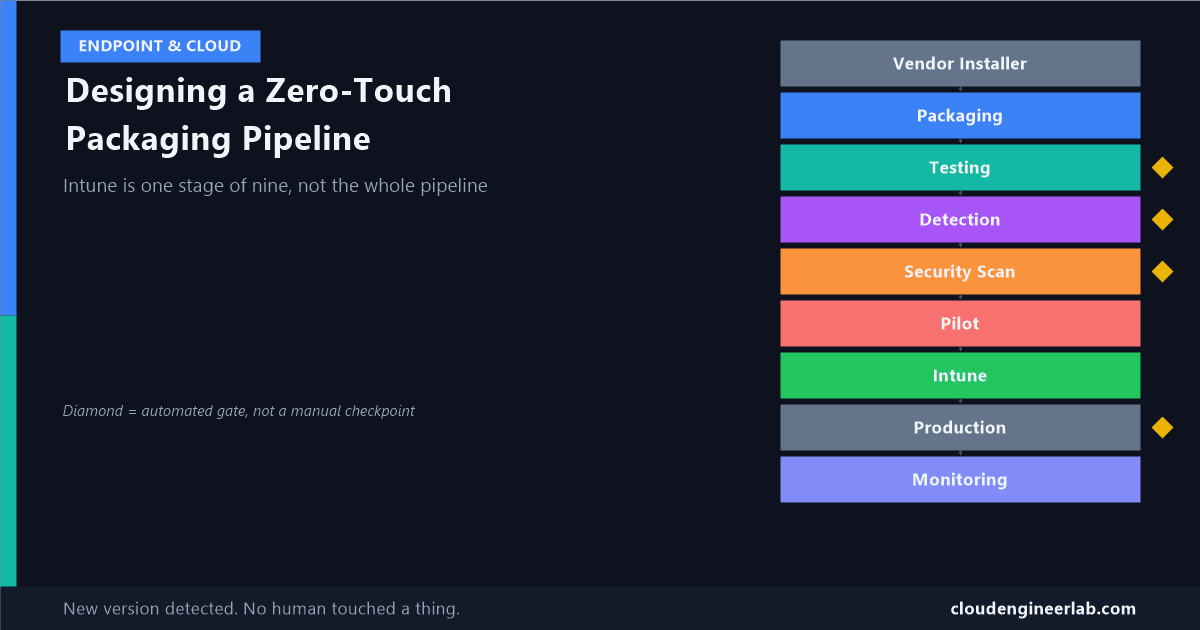
Intune is one stage in a nine-stage pipeline, not the whole story. Real tools for packaging, testing, scanning, and gating an app before it ever reaches a device.
Every post I've written so far in this series has treated Intune as the centre of the story: what happens after you upload, why detection rules lie, how dependencies and supersedence work. All of that is real and necessary, but it describes what happens to a package once a human has already built it, tested it, and decided to trust it. Most organisations still do that part entirely by hand: someone downloads a vendor installer, runs IntuneWinAppUtil themselves, eyeballs whether it looks right, and uploads it. That's not a pipeline. That's a person doing a repeatable job manually, every single time a vendor ships an update.
This post is about the nine stages before, during, and after Intune that turn packaging into an actual pipeline, one where a new vendor release can go from "detected" to "safely running in production" with no one manually touching it.
Vendor Installer
      ↓
Packaging
      ↓
Testing
      ↓
Detection
      ↓
Security Scan
      ↓
Pilot
      ↓
Intune
      ↓
Production
      ↓
Monitoring
Stage 1: Vendor Installer
The pipeline needs a trigger, and "someone noticed a new version on the vendor's website" doesn't scale. The Evergreen PowerShell module solves this specifically: for a large list of common third-party applications, it returns the current version number and a direct download URI, checkable on a schedule. When Evergreen reports a version your pipeline hasn't packaged yet, that's the trigger that starts everything below.
For apps Evergreen doesn't cover, a WinGet manifest is often available and serves the same purpose: it already documents the correct installer type, the known-good silent-install switches, and a file hash, removing the guesswork that used to require reading a vendor's deployment documentation by hand.
Stage 2: Packaging
This is the stage I covered mechanically in what actually happens inside a .intunewin file. In a pipeline, that wrapping step is driven by the IntuneWin32App PowerShell module rather than a human running the Win32 Content Prep Tool interactively, using the silent-install command a WinGet manifest already documented instead of one someone had to look up.
This stage cannot run fully serverless
The underlying Win32 Content Prep Tool cannot execute inside an Azure Automation sandbox. A genuinely zero-touch pipeline still needs a self-hosted Windows build agent, an actual Windows VM registered as an Azure DevOps or GitHub Actions runner, somewhere in the chain. "Zero-touch" describes the human involvement, not the infrastructure. You still need a real Windows machine doing the packaging work.
Stage 3: Testing
A package that was never installed anywhere before reaching production is a package running its first real test on an end user's device. This stage exists to stop that.
The pattern: every candidate package installs, silently, inside a disposable environment that has never seen the app before, either Windows Sandbox for a fast, zero-setup check, or a Hyper-V VM reverted to a clean checkpoint when the test needs more persistence than Sandbox allows (validating a multi-step deployment scenario, not just "did the installer finish"). The install runs with the exact silent switches the package will use in production, and the test confirms the installer actually completed, not just that it launched.
This mirrors how WinGet's own community pipeline works
Every package accepted into the public WinGet repository goes through the same shape of check: downloaded, hash-verified, scanned, and installed silently to completion in a clean VM before it's trusted. Building the same discipline into an internal pipeline isn't inventing something new, it's applying a standard that already exists at scale to your own tenant's apps.
Stage 4: Detection
Here's where the testing stage and the detection stage should share their result instead of operating independently. Since detection rules fail in very specific, type-dependent ways, a zero-touch pipeline should generate the detection rule based on the installer type it just packaged, MSI product code for an MSI, file version or path for an EXE, rather than someone guessing at it later, and then validate that rule against the same clean VM from Stage 3, immediately after the test install, before the package goes anywhere near a real device.
That validation step closes the exact loop I described in the detection rules post: if the generated rule doesn't detect the app in the sandbox where you know the install genuinely succeeded, you've caught a wrong product code or a WOW6432Node mismatch before it ever produces a confusing "installed but reported failed" ticket in production.
Stage 5: Security Scan
A vendor installer is third-party, untrusted code, whether or not you've used that vendor for years. This stage puts an automated gate in front of it before it's trusted with SYSTEM-level install rights on every managed device.
Multi-engine malware scanning: submitting the installer to the VirusTotal API as part of the pipeline, gating on the result rather than eyeballing it, is a well-established pattern (public projects wire this into GitHub Actions the same way). A package with meaningful detections across major engines stops here, automatically, no human judgment call required for the clear-cut cases.
Code signing verification: VirusTotal's signature information also reports the signing certificate's issuer and validity. A binary signed by a certificate with a long, clean signing history is a materially stronger trust signal than an unsigned installer or one signed by a certificate that only appeared recently.
A clean scan isn't a guarantee, it's a gate
Multi-engine scanning catches known threats, not zero-days. Treat this stage as removing the obviously bad cases automatically, not as a substitute for sourcing installers from vendors you actually trust in the first place.
Stage 6: Pilot
Only after passing Stages 2 through 5 does a package reach an actual device, and even then, not many of them at once. This is the same ring-based thinking I covered for Windows Autopatch deployment rings, applied to an application instead of an OS update: assign the app to a small pilot group first, not the whole tenant.
The pipeline shouldn't just deploy to pilot and stop watching. It should hold there for a defined window, a day, a week, whatever fits your change cadence, before Stage 8 considers promoting further.
Stage 7: Intune
By the time a package reaches this stage, it's already been packaged, tested, given a validated detection rule, scanned, and quietly running in a pilot group. Intune's role here is almost anticlimactic: the IntuneWin32App module publishes the app object, sets the validated detection rule, and configures the supersedence relationship against the previous version, choosing Update when the installer type supports clean in-place upgrades (the same MSI upgrade code, version over version) or Replace when it doesn't.
This is the stage most manual packaging processes treat as the finish line. In a real pipeline, it's stage 7 of 9, everything after this point is what actually determines whether the deployment succeeded.
Stage 8: Production
Promotion from pilot to the full production assignment should be a gated decision, not a scheduled one. Pull the pilot ring's install results through the same DeviceInstallStatusByApp export job covered earlier in this series, and only widen the assignment once the pilot's success rate clears a threshold you've defined, say, 95% clean installs with no unexpected spike in a specific HexErrorCode.
A pipeline that promotes to production on a timer regardless of pilot results isn't meaningfully different from skipping the pilot stage entirely.
Stage 9: Monitoring
The pipeline doesn't end at a successful production rollout, it loops. The same install-status reporting that gated the Stage 8 promotion keeps running afterward, watching for drift: a Windows update that breaks a previously-working install, a device population that starts failing detection after a security baseline change elsewhere in the tenant. When Evergreen or a WinGet manifest reports the next version, the same nine stages run again, automatically, from Stage 1.
This is what makes it a pipeline instead of a script
A script packages one version, once. A pipeline treats every future vendor release as the same nine-stage process running again, with the previous run's monitoring data feeding into how cautiously the next one gets promoted.
The Full Pipeline
None of these nine stages require inventing new technology. Every tool named in this post already exists, is actively maintained, and is used in production somewhere today. What most organisations are missing isn't the tooling, it's treating packaging as a pipeline with gates at all, instead of a person's Tuesday afternoon task that happens to touch the same nine concerns informally, in their head, every single time.
If you've built out any piece of this, especially the security scanning gate or the pilot-to-production promotion logic, I'd like to hear how you set your thresholds. Drop a comment below.

Written by
Chetan Yamger
Cloud Engineer · AI Automation Architect · Modern Workplace Consultant
Cloud Engineer, AI Automation Architect, and Modern Workplace Consultant based in Amsterdam, Netherlands. Specializing in scalable, secure enterprise solutions with Microsoft Azure, Intune, PowerShell, and AI-driven automation using ChatGPT, Gemini, and modern LLM technologies.
Stay in the loop.
New articles, straight to you.
Deep-dive technical articles on Intune, PowerShell, and AI — no noise, no spam.
Discussion
Share your thoughts — your email stays private
Leave a comment