
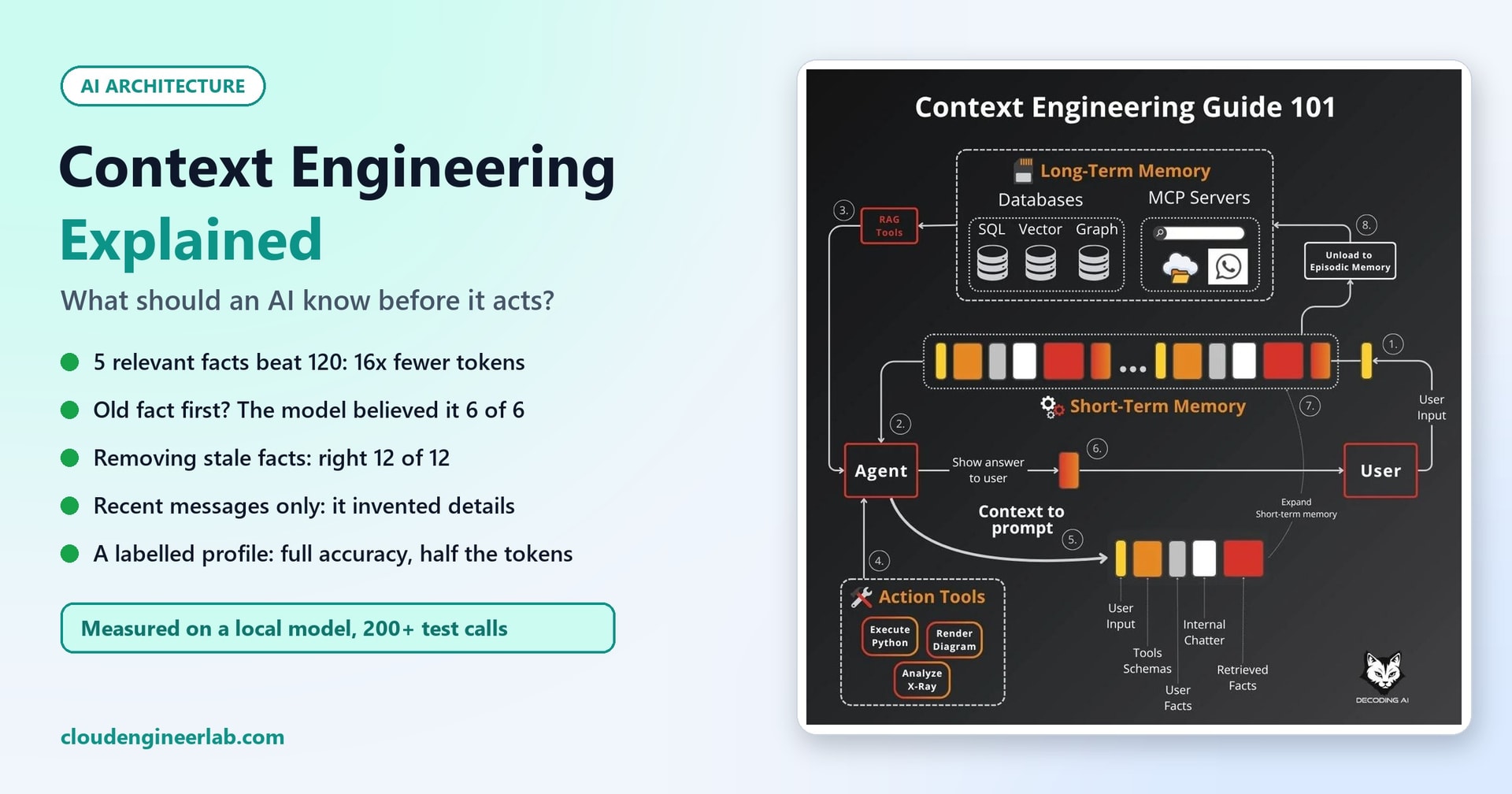
Context Engineering Explained: What Should an AI Know Before It Acts?
Selection, retrieval, memory, freshness, permissions and context limits, tested on a real model. Five facts beat 120, and stale facts fooled it every time they came first.
An AI model only knows two things when it answers you: what it learned during training, and what's in front of it right now. That second part, the context, is the instructions, the conversation so far, the documents someone retrieved, the results of tool calls and anything remembered about you. For an AI that's about to act (send a reply, change a setting, approve a request), the context is everything it has to go on.
Context engineering is the discipline of deciding what goes into that context, and what stays out. From Prompt Engineering to Context Engineering explains why the field has shifted its focus from clever wording to this question. This post goes hands-on. It covers the six decisions that make up context engineering (selection, retrieval, memory, freshness, permissions and limits) and tests each one on a real model, so the advice comes with numbers.
How we tested
All experiments used Qwen2.5-3B-Instruct, a small open model, running locally on a laptop processor (Intel Core i7-11800H, no GPU) with llama.cpp, plus nomic-embed-text for search. The test data is a pool of 120 company facts: 12 offices of the fictional Northwind Logistics, each with a VPN gateway, printer, guest Wi-Fi, backup schedule, IT contact and more. The facts are deliberately similar to each other, like a real knowledge base. Every question has one known right answer, scored automatically. We made just over 200 model calls in total. Bigger models will score higher, but the patterns are what matter.
What Goes Into a Context?
Think of the context window as a desk with limited space. Before every answer, someone has to decide what goes on the desk:
| Layer | What it is | The engineering question |
|---|---|---|
| Instructions | The system prompt: role, rules, output format | Are the rules short and unambiguous? |
| The request | What the user just asked | Is it clear what they actually need? |
| Memory | What's known about the user and the conversation so far | What is worth carrying forward, and in what form? |
| Retrieved knowledge | Documents and facts found by search (RAG) | Which few pieces actually answer this? |
| Tool results | Outputs of APIs and lookups | Is the result still current? |
| Permissions | Who is asking and what they may see | Has everything they may not see been removed? |
Each layer competes for the same limited space, and each one can make the answer worse as easily as better. Let's take the decisions one at a time.
1. Selection: Less, but Relevant
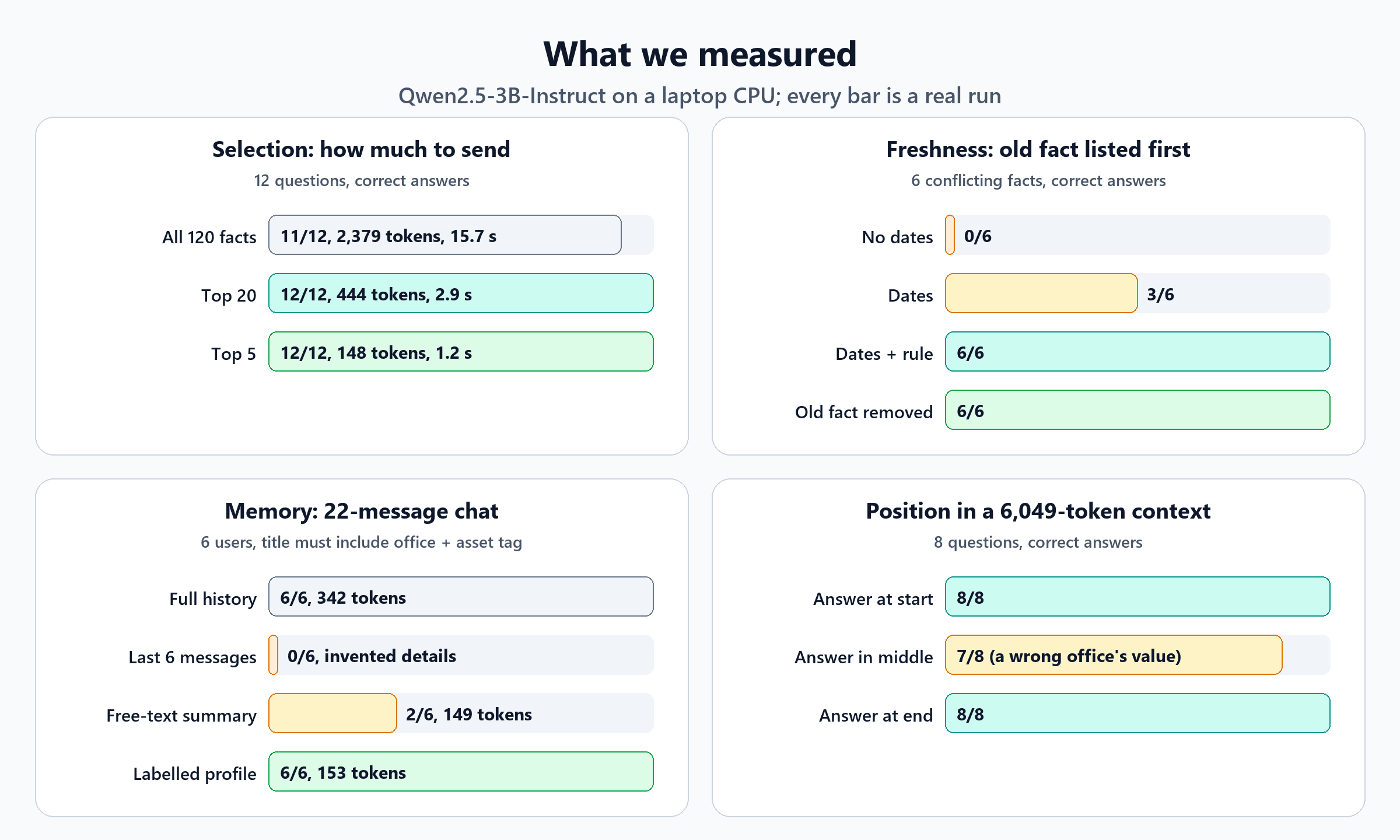
The most common mistake is to put everything into the context, on the theory that more information can only help. We tested that directly. For 12 questions, the model got one of three contexts: all 120 facts, the 20 facts that search found most relevant, or just the top 5.
| Context | Correct | Prompt size | Time per answer |
|---|---|---|---|
| All 120 facts | 11 / 12 | 2,379 tokens | 15.7 s |
| Top 20 found by search | 12 / 12 | 444 tokens | 2.9 s |
| Top 5 found by search | 12 / 12 | 148 tokens | 1.2 s |
Five well-chosen facts were slightly more accurate than all 120, with 16 times fewer tokens and 13 times faster answers. In every case, the right fact was among the 5 that search returned.
Tokens are also money. With a cloud model you pay for every token in the context, on every call. Sending 2,379 tokens instead of 148 for the same answer means paying 16 times as much for a slightly worse result.
The rule
The question isn't "what might be useful?" but "what does the model need for this request?" Start small, and add context only when you can show it improves answers.
2. Retrieval: Selection Is Only as Good as Search
Small, focused contexts only work if search actually finds the right pieces. Here it did, 12 out of 12. But two of our earlier builds show how retrieval goes wrong in practice:
- In our local coding assistant, search found where a value was used in 8 files, but missed the one line where it was defined.
- In our IT helpdesk assistant, a ticket written in Dutch matched the right English article, but only weakly.
Good context engineering measures retrieval separately from answers: for a set of test questions, is the right document in what you retrieved? If it isn't, no amount of prompt tuning will save the answer.
3. Context Limits: Longer Isn't Free
Every model has a maximum context size, but long before you hit it, long contexts cost you in two ways.
Speed. On our laptop, the model's reading time grew faster than the context did:
| Context size | Time to read it |
|---|---|
| 1,021 tokens | 6.1 s |
| 4,238 tokens | 29.9 s |
| 8,660 tokens | 75.2 s |
About 8.5 times more text took about 12 times longer, because the model has to relate every token to every other token. Data-centre hardware is far faster, but the pattern is the same. What happens when you send a prompt explains why.
Attention. Researchers have reported that models can miss information placed in the middle of a long context (sometimes called "lost in the middle"). We tested it with about 6,000 tokens of facts, placing the answer at the start, the middle or the end:
| Where the answer was | Correct |
|---|---|
| At the start | 8 / 8 |
| In the middle | 7 / 8 |
| At the end | 8 / 8 |
The one miss was in the middle, and it was a telling kind of mistake. Asked when Dublin's badge access ends, the model answered 21:30, which is another office's time. With 300 similar facts in view, it picked the wrong one. One miss in 8 is too small a sample to prove the effect. But at a shorter 2,400 tokens we saw no difference by position at all, which fits the idea that the risk grows with length and similarity.
4. Freshness: The Most Surprising Result
Real knowledge bases contain old versions: last year's policy, a superseded config, a contact who has since moved on. We gave the model six questions where the context held two versions of the same fact, a current one and an outdated one, and varied two things: whether dates were shown, and which version came first.
| How the two versions were presented | New fact first | Old fact first |
|---|---|---|
| No dates | 6 / 6 | 0 / 6 |
| Each marked with its update date | 5 / 6 | 3 / 6 |
| Dates, plus the rule "if facts conflict, use the most recent date" | 5 / 6 | 6 / 6 |
| Outdated version removed before the model saw it | 6 / 6 | 6 / 6 |
Without dates, the model simply believed whichever version it read first. Perfect when the new fact happened to be listed first; wrong every single time when the old one was. Adding dates helped only partly; the model still went with the first version half the time. An explicit rule to prefer the newest date got it to 11 of 12. The only approach that was right every time was removing the outdated fact before the model ever saw it.
That matches what we found with the archived travel policy in our documents assistant: search ranked the old version first, and the model gave an outdated answer.
Freshness is a data job, not a prompt job
Don't rely on the model to work out which of two conflicting facts is current. Mark documents as superseded, expire cached tool results, re-fetch live data before acting, and keep outdated versions out of the context entirely. If you can't remove them, show dates and state the rule, and still expect the occasional mistake.
5. Memory: What to Carry Forward
A conversation grows with every message. Sending the whole history every time works, but it gets longer, slower and more expensive. The common shortcut is to keep only the most recent messages. We tested what that costs.
Each of six simulated users mentioned their office and laptop asset tag at the very start, chatted about 18 messages' worth of other things, then asked for a ticket title that must include both details.
| Memory strategy | Correct | Prompt size |
|---|---|---|
| Full history, every message | 6 / 6 | 342 tokens |
| Last 6 messages only | 0 / 6 | 123 tokens |
| A free-text summary note + last 6 messages | 2 / 6 | 149 tokens |
| A labelled profile + last 6 messages | 6 / 6 | 153 tokens |
Three lessons, each from a real failure:
Forgetting turns into inventing. With only the last six messages, the model didn't say "I don't know your office". It made things up, writing titles like "VPN Drops in Office XYZ - Asset Tag 12345" and "Sync Errors on OneDrive for [YourOfficeName]". A missing fact doesn't produce a blank; it produces a plausible fake.
A summary can be right and still fail. We asked the model to write a short note of facts worth remembering. The note captured both details every time, but labelled them loosely, for example "user: Hamburg" rather than "office: Hamburg". When writing the ticket title, the model then mostly left the office out.
Structure fixes it. A fixed, labelled profile, extracted once, matched the full history's accuracy at less than half the tokens:
Office: Hamburg
Laptop asset tag: NW-LT-0142
Role: unknown
The prompt that produced it was simple:
PROFILE = ("From this conversation, fill in this profile about the user. Reply with ONLY these lines, "
           "using 'unknown' if not stated:\nOffice: ...\nLaptop asset tag: ...\nRole: ...")
AI agent memory covers the types of memory in depth. The context-engineering point is narrower: memory is only useful if it's stored in a form the model can recognise and use, and labelled fields beat free text.
6. Permissions: What the AI Must Never See
The final question is not "what would help?" but "what is this person allowed to know?" Anything placed in the context can end up in the answer.
We tested this in our documents assistant. When all documents were searched and the model was simply told not to reveal HR and Finance information to an ordinary employee, 3 out of 3 restricted answers leaked: salary bands, the IT budget and an IT-only procedure. When documents were filtered by the user's permissions before searching, 0 leaked.
Permissions belong before the context, not inside it
Filter by the user's identity and access rights before anything is retrieved. Once confidential text is in the context, you're relying on the model to keep a secret, and in our test it didn't.
Putting It Together: A Context Pipeline
Taken together, the results suggest an order of operations for building a context before every AI action:
The order matters. Permission and freshness filters run before search, so search can never surface something it shouldn't. That's the same principle as the approved-only knowledge filter in our helpdesk assistant, where an unapproved draft article would otherwise have been the top match.
The retrieval and assembly in our tests were deliberately simple. This is the code that built the "top 5" contexts:
def retrieve(q, k):
    global FVEC
    if FVEC is None:
        FVEC = embed([f"search_document: {f[1]}" for f in FACTS])
    s = FVEC @ embed([f"search_query: {q}"])[0]
    return [FACTS[i] for i in np.argsort(-s)[:k]]


def ask(facts, q):
    ctx = "\n".join(f"- {f[1]}" for f in facts)
    return chat([{"role": "system", "content": SYSTEM}, {"role": "user", "content": f"Facts:\n{ctx}\n\nQuestion: {q}"}])
Nothing clever: embed the facts once, embed the question, take the closest k, and list them as plain bullet points. Most of context engineering's gains come from what you choose to include, not from sophisticated machinery.
A Checklist Before an AI Acts
- Permissions: is everything in the context something this user is allowed to see?
- Freshness: could any fact be outdated? Has anything superseded been removed, and anything live been re-checked?
- Relevance: is each piece there because it helps this request, or just in case?
- Retrieval: did search actually find the right material? Do you measure that separately?
- Memory: are important user facts stored as labelled fields, not buried in old messages or loose notes?
- Size: is the context as small as it can be while still complete? What does it cost per call?
- Order: is the most important material near the start, rather than in the middle of a long block?
- Tool results: are they summarised to what matters, with a timestamp?
- Instructions: are the rules short, and are conflicts between sources handled explicitly?
- Testing: do you have a set of questions with known answers to check every change against?
The Short Version
| Decision | What we measured | The rule |
|---|---|---|
| Selection | 5 relevant facts: 12/12 at 148 tokens; all 120: 11/12 at 2,379 | Send what this request needs, not everything |
| Retrieval | Right fact in the top 5 for 12/12 | Measure search separately from answers |
| Limits | 8.5× more text took about 12× longer; one wrong-office answer at 6,000 tokens | Long context costs time, money and accuracy |
| Freshness | Old fact first, no dates: 0/6 right; old fact removed: 12/12 | Remove stale facts; don't ask the model to judge |
| Memory | Recent messages only: 0/6, with invented details; labelled profile: 6/6 at half the tokens | Carry facts forward as labelled fields |
| Permissions | Prompt-only rules leaked 3/3; filtering first leaked 0 | Filter before anything enters the context |
A model can only act on what it's shown. Context engineering is the work of making sure that what it's shown is relevant, current, permitted, compact and well-labelled. As these experiments show, getting that right matters more than the wording of any prompt.

Written by
Chetan Yamger
Cloud Engineer · AI Automation Architect · Modern Workplace Consultant
Cloud Engineer, AI Automation Architect, and Modern Workplace Consultant based in Amsterdam, Netherlands. Specializing in scalable, secure enterprise solutions with Microsoft Azure, Intune, PowerShell, and AI-driven automation using ChatGPT, Gemini, and modern LLM technologies.
Stay in the loop.
New articles, straight to you.
Deep-dive technical articles on Intune, PowerShell, and AI — no noise, no spam.
Discussion
Share your thoughts — your email stays private
Leave a comment