
Designing a Secure Enterprise Endpoint Architecture in Azure
Listing Azure services answers the wrong question. The real one is how trust actually flows from a real person down to the data they're trying to reach.
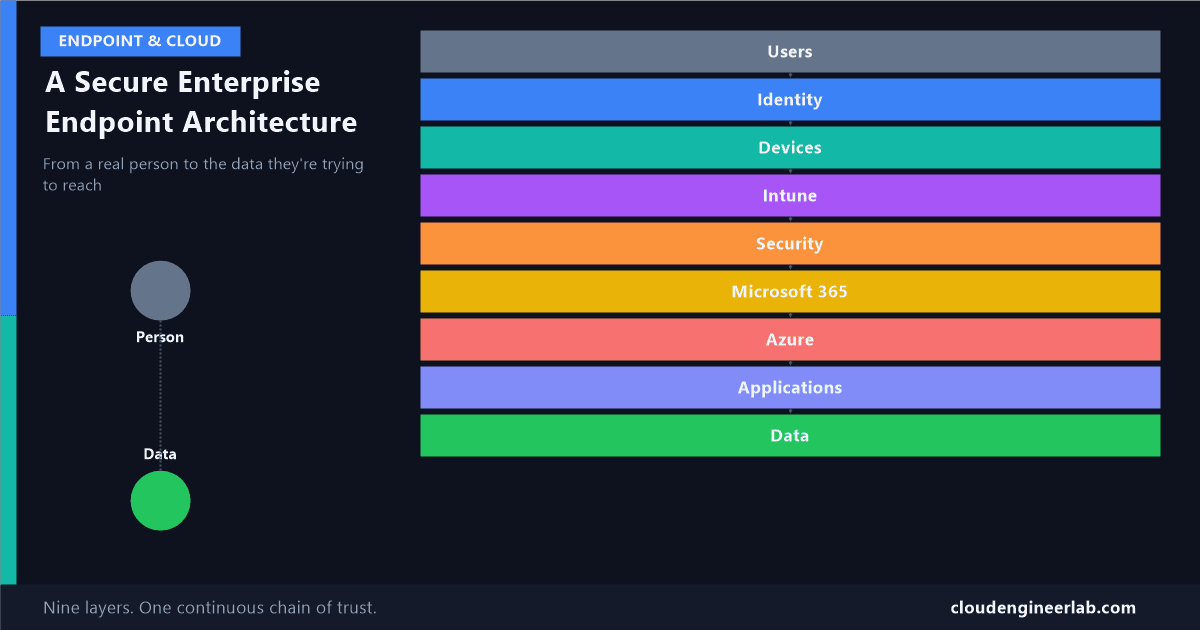
I've written before about how Intune, Entra ID, and Defender correlate as three security products. That post looked sideways, at how those three specifically talk to each other. This one looks the other direction entirely: straight down, from an actual person doing their job, through every layer that request has to pass, to the data they were trying to reach in the first place. Nine layers, and the relationship between each one matters more than any single product sitting inside it. A more recent, more granular pass over this same top-to-bottom shape, told through the specific lens of why device ownership isn't a trust signal, is here.
Users
  ↓
Identity
  ↓
Devices
  ↓
Intune
  ↓
Security
  ↓
Microsoft 365
  ↓
Azure
  ↓
Applications
  ↓
Data
Users: The Layer That Isn't a Technology at All
Every layer below exists because of this one, not the other way around. A request always starts with a real person trying to do their actual job, check email, open a file, run a report. None of the architecture below is the point. It's all in service of making that person's request safe to grant, quickly, without them ever needing to think about the eight layers underneath it.
Identity: Where Trust Actually Begins
Before anything else can happen, the person making the request has to be verified as who they claim to be. This is Entra ID's job, and it's worth being precise about what Entra ID actually is: it's the renamed Azure Active Directory, the same underlying service, now positioned as its own product family (Entra ID, Permissions Management, Verified ID, ID Governance, Internet and Private Access) rather than a feature buried inside Azure.
Why Identity gets its own layer instead of living inside Azure
Entra ID's technical lineage runs through Azure, but architecturally it sits above it, not inside it, because nothing else in this diagram can trust anything until identity has already vouched for it. Azure resources, Intune policies, Microsoft 365 access, all of it assumes a verified identity already exists. Treating identity as just another Azure service undersells the fact that it's the layer every other layer depends on existing first.
MFA, Conditional Access, and Identity Protection's risk signals all live here. This is the layer that answers "is this really the person they claim to be," nothing more, nothing about the device they're using yet.
Devices: A Second, Separate Trust Object
A verified person on an untrusted device is still a real risk. This is why devices get their own identity, separate from the user's, established the way I've covered in detail before: a TPM-backed key pair registered in Entra ID, a hardware root of trust that can't be copied onto another machine. The relationship here matters: the user and the device are independently verified. A compromised device doesn't inherit trust from a legitimate user, and a legitimate user on a compromised device doesn't get a pass because their identity checks out.
Intune: Turning "Exists" Into "Trusted"
A registered device identity just means Entra ID knows the device exists. Intune is what turns that into an actual trust judgement: is this device encrypted, patched, configured the way policy requires. This layer consumes the device identity from the layer above it and produces the one signal everything downstream actually cares about, compliance, which I've written about as necessary but insufficient on its own. Intune doesn't decide whether to grant access. It decides whether the device is telling the truth about its own configuration, and hands that answer to the layers below.
Security: Correlating What the Layers Above Already Know
This is Microsoft Defender, and specifically Defender XDR's correlation across Defender for Endpoint, Defender for Identity, and Entra ID Protection, the mechanics I went into in detail in the architecture post. The relationship worth restating here: security doesn't replace the identity or device trust established above it, it watches both of them continuously and can revoke what it previously granted the moment something changes. A device that was compliant an hour ago and just got flagged by Defender doesn't keep whatever access it already had.
Microsoft 365: Where the Trust Actually Gets Spent
This is the first layer in the stack that's actually a workload, not a control. Everything above this point exists purely to answer one question correctly: should this specific person, on this specific device, right now, be allowed to open this email, this file, this Teams chat. Microsoft 365 is where that answer finally gets used rather than just calculated.
Azure: The Substrate Underneath Everything, Including M365 Itself
This is the layer people usually start architecture diagrams with, and it belongs much further down than that instinct suggests. By the time a request reaches Azure, four layers of trust decisions have already happened. Azure here means two genuinely different things worth separating:
Azure as the substrate you've already been using
Entra ID, Defender, and the identity plumbing above are all, technically, Azure-family services. You've been relying on Azure since Layer 2.
Azure as the platform your organisation builds on top of
Custom line-of-business applications, storage accounts, virtual networks, PaaS databases, the things that are genuinely yours, distinct from Microsoft's own SaaS offerings in the M365 layer above.
The second meaning is what most "Azure architecture" content actually means when it says Azure, and it's genuinely only one part of this stack, not the whole thing.
Applications: Where Conditional Access Actually Enforces Anything
Both Microsoft 365's workloads and anything custom-built on Azure converge here: this is the layer where a Conditional Access policy actually attaches to a specific app and makes its grant-or-block decision, the mechanics I covered in compliance versus security. Every layer above this one fed a signal into that decision. This is where the signal becomes an action.
Data: The Actual Asset Everything Above Exists to Protect
This is the bottom of the stack, and the honest ending point: all eight layers above exist to control who reaches this one, under what conditions. Microsoft Purview is the real product here, sensitivity labels, data loss prevention, retention, and increasingly, in 2026, enforcement that reaches beyond Microsoft 365 into other apps, endpoints, browsers, and network traffic through Entra's Global Secure Access, plus governance extending into Copilot and AI agents that touch this same data.
A perfect stack above this layer with no data governance is an incomplete architecture
It's genuinely possible to get identity, device trust, Intune compliance, security correlation, and Conditional Access all correctly configured, and still have no actual control over what happens to sensitive data once a legitimately authorised person opens it. Access control and data protection are related but separate disciplines. This diagram's bottom layer is where the second one lives, and it's easy to treat the first eight layers as the whole job.
The Relationship That Matters More Than Any Single Layer
Trust flows down this stack, a person, verified, on a device, verified, judged compliant, continuously watched, granted access to a workload, built on infrastructure, reaching a specific app, touching specific data. But the signal doesn't only flow one direction. A finding at the Data layer, Purview flagging sensitive data leaving through an unexpected path, or a Security layer detection, can flow straight back up and revoke access that was already granted higher in the stack. This isn't a one-way pipeline that ends once access is granted. It's a loop, continuously re-evaluated, where every layer can both consume trust from above and revoke it from below.
Nine layers, five real questions, and the whole point of designing this deliberately, instead of accumulating it product by product over several years, is that each layer's answer becomes the next layer's input. Skip the relationships and you still own every product in this diagram, you just don't own the architecture they were supposed to form together.
Which layer in your own environment still operates in isolation, feeding nothing to the layers around it? For most environments I've reviewed, it's Data, fully governed Identity and Intune sitting next to a Purview deployment that never got past the default labels. Drop a comment below with yours.

Written by
Chetan Yamger
Cloud Engineer · AI Automation Architect · Modern Workplace Consultant
Cloud Engineer, AI Automation Architect, and Modern Workplace Consultant based in Amsterdam, Netherlands. Specializing in scalable, secure enterprise solutions with Microsoft Azure, Intune, PowerShell, and AI-driven automation using ChatGPT, Gemini, and modern LLM technologies.
Stay in the loop.
New articles, straight to you.
Deep-dive technical articles on Intune, PowerShell, and AI — no noise, no spam.
Discussion
Share your thoughts — your email stays private
Leave a comment