
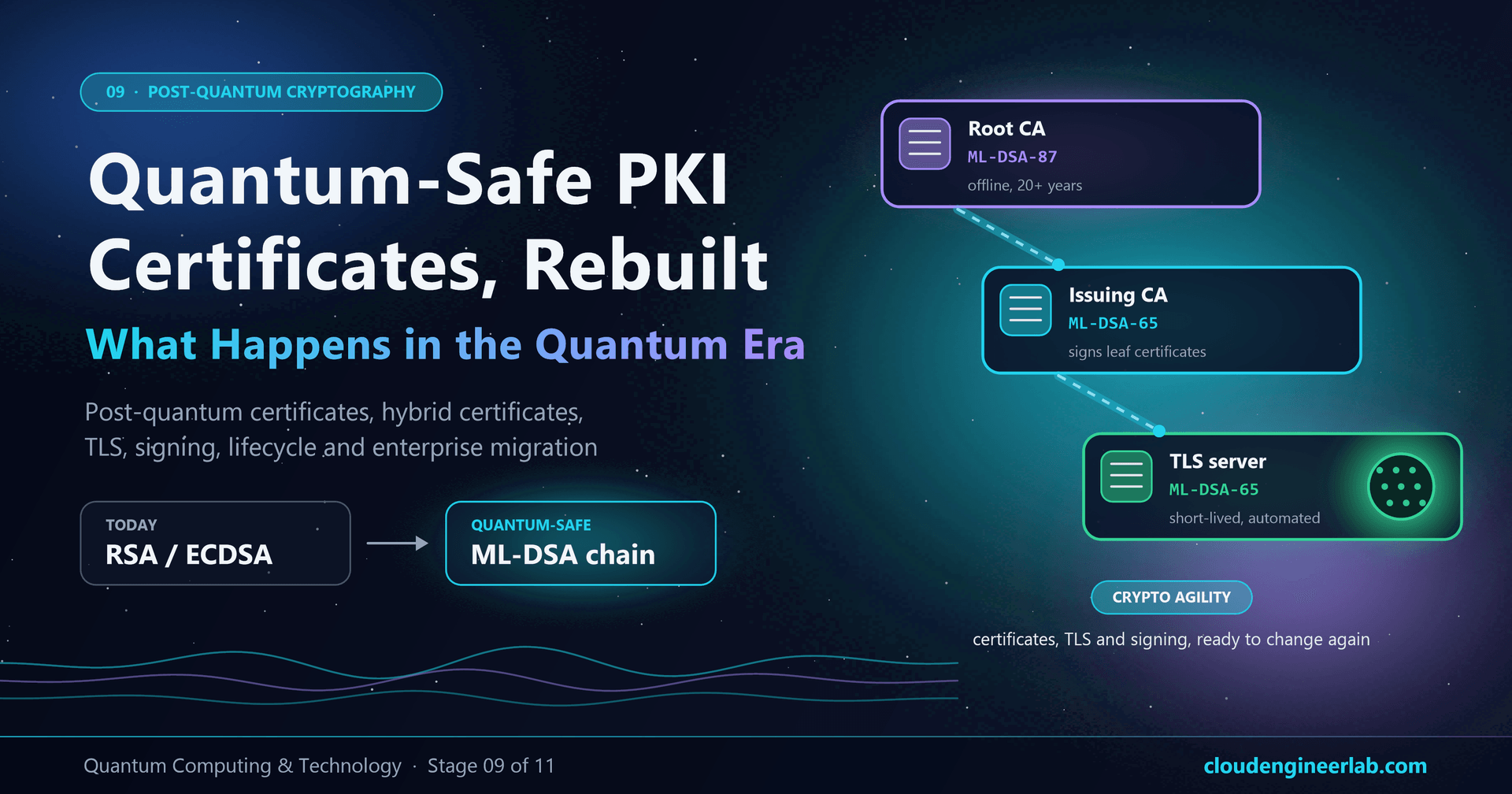
Quantum-Safe PKI: What Happens to Certificates in the Quantum Era?
Post-quantum certificates, ML-DSA signatures, hybrid certificates, TLS, crypto agility and lifecycle, with a working quantum-safe CA lab and a migration plan.
This site has two audiences that rarely meet. One reads the PKI posts: how certificates reach an Intune device, how to build the CA hierarchy, how certificates are renewed and revoked. The other reads the quantum section. This post is where the two meet, because PKI is the part of the quantum migration that takes longest, costs most and breaks most easily.
The previous post introduced the new algorithms and showed that post-quantum key exchange is already live in browsers. Key exchange is the easy half: it's a software upgrade that barely touches your PKI. This post is about the hard half. Every certificate is a public key plus a CA signature, and both are RSA or ECC today. Replacing them means new keys, new CAs, new trust anchors, and every device and server that checks a certificate learning a new algorithm.
So instead of describing it in theory, this post builds a quantum-safe PKI: an ML-DSA root, issuing CA and TLS server certificate, a fully post-quantum TLS 1.3 handshake, a revocation test, and a Windows relying-party test that fails in an instructive way. Every number in this post was measured.
Stage 09 of the learning path
This is the second post in stage 09, Post-Quantum Cryptography, of the Quantum Computing & Technology learning path. It assumes the algorithms from Post-Quantum Cryptography: How Do We Protect the Internet? and the threat from Why Quantum Computers Threaten Today's Encryption. On the PKI side, it builds on the PKI deep dive and the certificate lifecycle post.
The Path From Today's Certificate to Crypto Agility
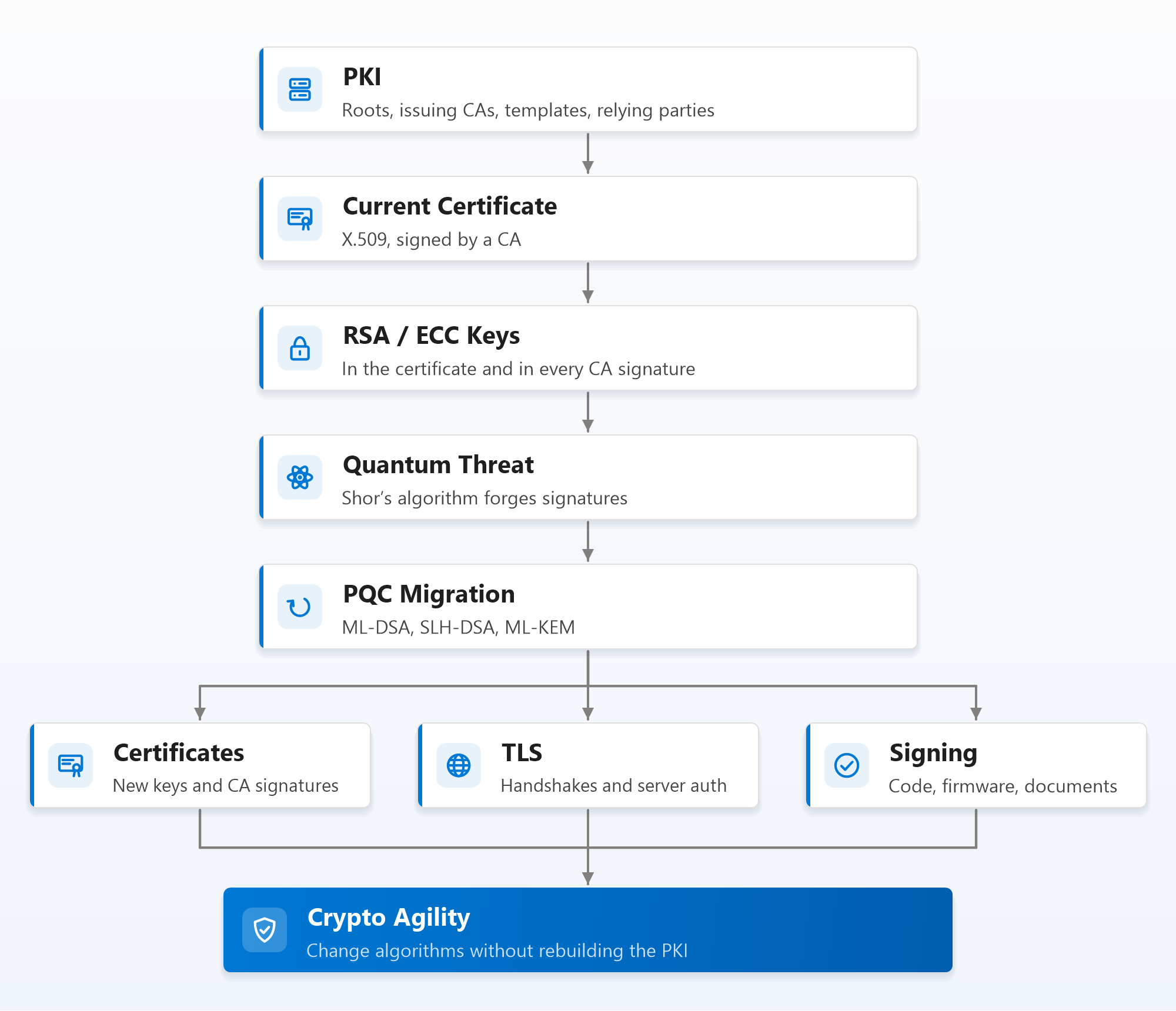
Notice where the diagram ends. The goal isn't "move from RSA to ML-DSA". It's crypto agility: a PKI that can change algorithms again without being rebuilt from scratch. Post-quantum standards are young, more algorithms are coming (FN-DSA, HQC), and some current choices may need revisiting. An organisation that treats this as a one-time swap will be doing it all again in a decade.
Start where NIST starts: discovery
NIST's migration guidance, including the work of its National Cybersecurity Center of Excellence on migrating to post-quantum cryptography, puts discovery first: find and inventory where quantum-vulnerable public-key cryptography is used across your hardware, software and services. For PKI, that means every CA, template, certificate, relying party and protocol that touches a certificate. You can't migrate what you can't see. The inventory section below gives you commands to start.
Quantum-Safe Certificates: What Actually Changes
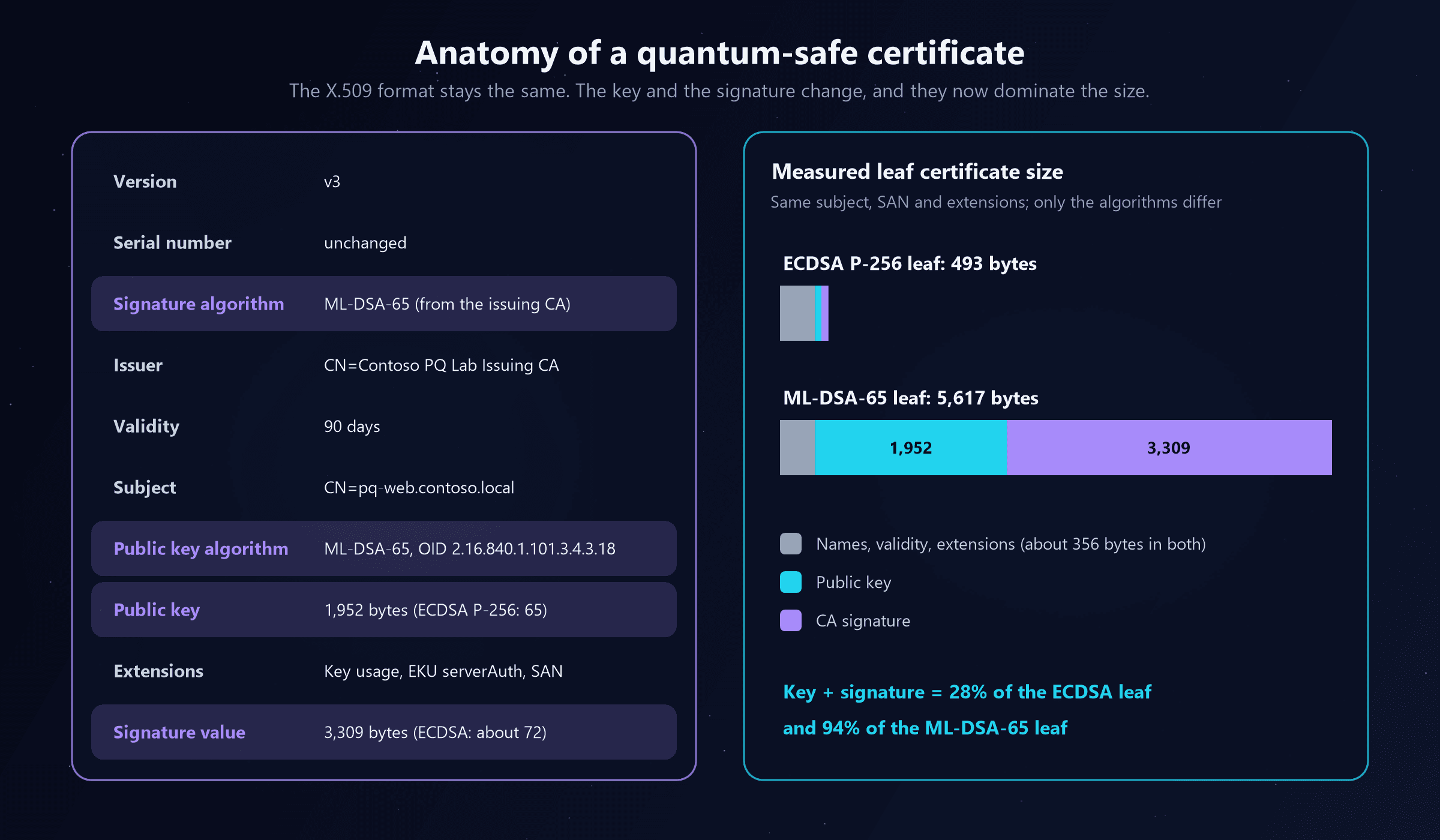
A quantum-safe certificate is still an ordinary X.509 v3 certificate. Same structure, same fields, same extensions, same chain building, same validity periods, same SANs and EKUs. What changes is three fields: the algorithm of the public key, the algorithm of the CA's signature, and the size of both.
Here's an excerpt from the lab's TLS server certificate, decoded with openssl x509 -text:
        Version: 3 (0x2)
        Signature Algorithm: ML-DSA-65
        Issuer: CN=Contoso PQ Lab Issuing CA
            Not After : Jan 10 14:15:23 2027 GMT
        Subject: CN=pq-web.contoso.local
            Public Key Algorithm: ML-DSA-65
                ML-DSA-65 Public-Key:
            X509v3 Basic Constraints: critical
                CA:FALSE
            X509v3 Key Usage: critical
                Digital Signature
            X509v3 Extended Key Usage:
                TLS Web Server Authentication
            X509v3 Subject Alternative Name:
                DNS:localhost, DNS:pq-web.contoso.local
    Signature Algorithm: ML-DSA-65
If you've read a certificate before, everything here is familiar except the algorithm names. That's deliberate: the IETF has defined how ML-DSA, SLH-DSA and ML-KEM keys are identified inside X.509, so existing PKI tooling, templates and policies carry over. What doesn't carry over is the size:
Choosing a signature algorithm for each tier
Different parts of a PKI have different lives, so they need different choices:
| Tier or use | Lifetime | Signs how often | Sensible post-quantum choice | Why |
|---|---|---|---|---|
| Root CA | 15 to 25 years | Rarely (a few CA certificates, CRLs) | ML-DSA-87, or SLH-DSA | Longest-lived trust anchor; size and speed matter least |
| Issuing CA | 5 to 10 years | Constantly (every certificate) | ML-DSA-65 or ML-DSA-87 | Needs fast signing; signature appears in every leaf |
| TLS server certificates | Days to a year | Every handshake | ML-DSA-44 or ML-DSA-65 | Handshake size matters most here |
| Device and user certificates (Wi-Fi, VPN) | About a year | Every authentication | ML-DSA-44 or ML-DSA-65 | Must fit the device's key storage and the network protocol |
| Code signing | Years | Each release | ML-DSA-87, SLH-DSA, or LMS/XMSS | Signatures must stay trusted for the software's life |
| Firmware and boot | The hardware's life | Each firmware build | LMS/XMSS or SLH-DSA | Conservative, hash-based; verified by simple boot code |
| Encryption certificates (S/MIME, EFS) | Years | n/a | ML-KEM key in the certificate | Used to agree keys, not to sign |
That last row hides a genuine novelty. Encryption certificates will carry ML-KEM keys, and a KEM key can't sign anything. Today, a certificate request proves you hold the private key by signing the request with it; a KEM key can't do that, so new "proof of possession" methods (for example, the CA encrypting something to the key that only its holder can open) are being defined. Most PKIs will meet this first in email encryption.
Lab: Build a Quantum-Safe PKI in Ten Minutes
You don't need special hardware or a vendor product to see a quantum-safe PKI work. OpenSSL 3.5 or later supports ML-DSA, SLH-DSA and ML-KEM natively (Git for Windows already ships it; run openssl version to check). The lab builds the classic three-tier shape from the PKI implementation lab, only post-quantum: an ML-DSA-87 root, an ML-DSA-65 issuing CA and an ML-DSA-65 TLS server certificate.
A lab, not a production CA
These commands keep CA private keys in plain files on disk, which is fine for learning and wrong for production, where CA keys belong in an HSM or a managed service. On Git Bash for Windows, run export MSYS_NO_PATHCONV=1 first, otherwise -subj "/CN=..." is rewritten into a Windows path.
Step 1: Create the root CA
openssl genpkey -algorithm ML-DSA-87 -out root.key
openssl req -x509 -new -key root.key -subj "/CN=Contoso PQ Lab Root CA" -days 3650 \
  -addext "basicConstraints=critical,CA:TRUE" \
  -addext "keyUsage=critical,keyCertSign,cRLSign" \
  -addext "subjectKeyIdentifier=hash" -out root.pem
Step 2: Create the issuing CA, signed by the root
cat > ca.ext <<'EOF'
basicConstraints = critical, CA:TRUE, pathlen:0
keyUsage = critical, keyCertSign, cRLSign
subjectKeyIdentifier = hash
authorityKeyIdentifier = keyid
EOF

openssl genpkey -algorithm ML-DSA-65 -out issuing.key
openssl req -new -key issuing.key -subj "/CN=Contoso PQ Lab Issuing CA" -out issuing.csr
openssl x509 -req -in issuing.csr -CA root.pem -CAkey root.key -CAcreateserial \
  -days 1825 -extfile ca.ext -out issuing.pem
Step 3: Issue a TLS server certificate
cat > leaf.ext <<'EOF'
basicConstraints = critical, CA:FALSE
keyUsage = critical, digitalSignature
extendedKeyUsage = serverAuth
subjectAltName = DNS:localhost, DNS:pq-web.contoso.local
subjectKeyIdentifier = hash
authorityKeyIdentifier = keyid
EOF

openssl genpkey -algorithm ML-DSA-65 -out leaf.key
openssl req -new -key leaf.key -subj "/CN=pq-web.contoso.local" -out leaf.csr
openssl x509 -req -in leaf.csr -CA issuing.pem -CAkey issuing.key -CAcreateserial \
  -days 90 -extfile leaf.ext -out leaf.pem

openssl verify -CAfile root.pem -untrusted issuing.pem leaf.pemleaf.pem: OKNotice that the TLS server certificate's key usage is Digital Signature only. In TLS 1.3, servers always authenticate by signing the handshake; the old RSA "key encipherment" usage doesn't exist for ML-DSA.
Step 4: Run a fully quantum-safe TLS 1.3 handshake
Start a test server with the post-quantum chain, then connect to it, trusting only the new root:
openssl s_server -accept 8443 -cert leaf.pem -key leaf.key -cert_chain issuing.pem -www &

echo Q | openssl s_client -connect localhost:8443 -CAfile root.pem \
-servername localhost -groups X25519MLKEM768Peer signature type: mldsa65
Negotiated TLS1.3 group: X25519MLKEM768
SSL handshake has read 17195 bytes and written 1581 bytes
Protocol: TLSv1.3
Verify return code: 0 (ok)That's a TLS connection where both halves are quantum-safe: hybrid ML-KEM for the key exchange, and an ML-DSA certificate chain plus ML-DSA handshake signature for authentication. The chain validated against a post-quantum root. It's also 17 KB.
Step 5: Compare it with an ECDSA hierarchy
Running the identical lab with ECDSA keys (P-384 root, P-256 issuing and leaf) gives the comparison:
| Certificate | ECDSA hierarchy | ML-DSA hierarchy |
|---|---|---|
| Root CA certificate | 489 bytes | 7,510 bytes (ML-DSA-87) |
| Issuing CA certificate | 465 bytes | 6,876 bytes (signed with ML-DSA-87) |
| TLS server certificate | 493 bytes | 5,617 bytes |
| Handshake, classical key exchange (X25519) | 1,357 bytes received | n/a |
| Handshake, hybrid key exchange (X25519MLKEM768) | 2,422 bytes received | 17,195 bytes received |
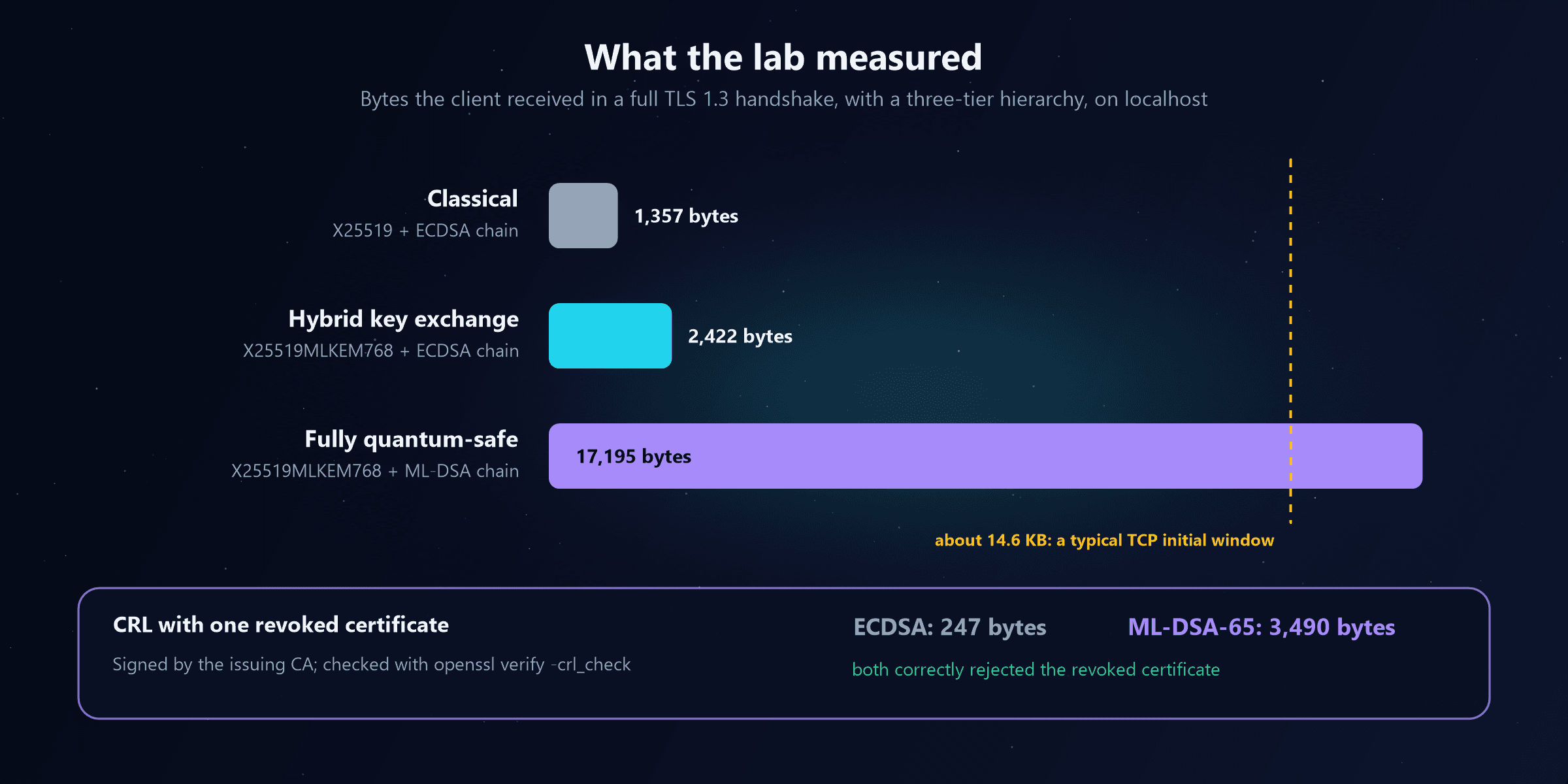
The handshake figures include everything the client received, including two session tickets, so treat them as a realistic total rather than a pure certificate measurement. The lesson is clear either way: moving key exchange is cheap; moving certificates is not.
Step 6: Revoke the certificate
Revocation works the same way it always has. Using openssl ca with a minimal configuration, the lab revoked the server certificate with reason keyCompromise and generated a CRL signed by the ML-DSA-65 issuing CA, then checked it:
mkdir -p ca && : > ca/index.txt && echo 1000 > ca/crlnumber
cat > ca.cnf <<'EOF'
[ ca ]
default_ca = lab
[ lab ]
database         = ca/index.txt
crlnumber        = ca/crlnumber
certificate      = issuing.pem
private_key      = issuing.key
default_md       = default
default_crl_days = 7
EOF

openssl ca -config ca.cnf -revoke leaf.pem -crl_reason keyCompromise
openssl ca -config ca.cnf -gencrl -out crl.pem
openssl verify -crl_check -CAfile root.pem -untrusted issuing.pem -CRLfile crl.pem leaf.pemerror 23 at 0 depth lookup: certificate revoked
error leaf.pem: verification failedExactly what you want. The CRL was 3,490 bytes, against 247 bytes for the same CRL from the ECDSA issuing CA. Almost all of the difference is the CA's signature, which is added once per CRL, so large CRLs grow by a fixed amount rather than doubling. OCSP responses, which are also signed, grow the same way.
Step 7: Ask a relying party
Finally, the step that matters most in an enterprise: can a real client trust this certificate? On the Windows 10 test machine, PowerShell could open the certificate but not understand it:
$cert  = [System.Security.Cryptography.X509Certificates.X509Certificate2]::new("leaf.der")
$cert.PublicKey.Oid.Value          # 2.16.840.1.101.3.4.3.18 (no friendly name)
$chain = [System.Security.Cryptography.X509Certificates.X509Chain]::new()
$chain.Build($cert)Exception calling "Build" with "1" argument(s): "Invalid algorithm specified."The certificate is valid, OpenSSL trusts it, and Windows 10 simply doesn't know what ML-DSA is. That's not a bug; it's the relying-party problem in one line. Microsoft has been adding ML-DSA and ML-KEM support to newer Windows releases, but every operating system, browser, RADIUS server, VPN gateway, load balancer, printer and embedded device that checks your certificates must support the new algorithm before you can issue with it. Windows 10 reached the end of support in October 2025, so machines that stay on it are unlikely ever to trust an ML-DSA certificate.
Hybrid Certificates: Bridging Old and New
The relying-party problem is why nobody switches a PKI from RSA to ML-DSA overnight. For years, some clients will understand only classical certificates, some will understand both, and a few will insist on post-quantum. Hybrid certificate designs exist to bridge that gap:
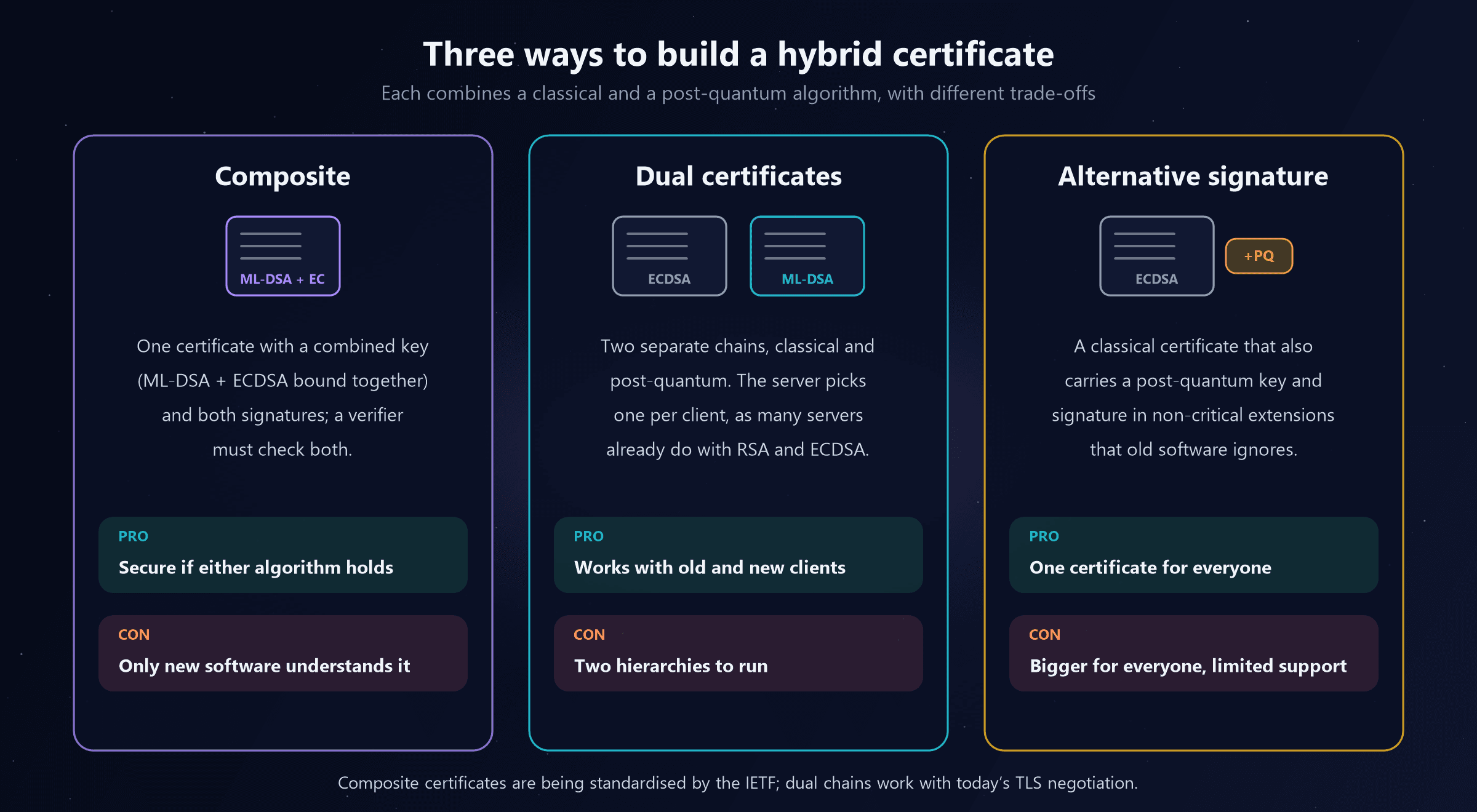
| Approach | How it works | Old clients | Security | Status |
|---|---|---|---|---|
| Composite | One certificate whose key and signature combine ML-DSA and a classical algorithm; both must verify | ❌ Can't parse it | Safe if either algorithm holds | IETF drafts for composite ML-DSA; early product support |
| Dual certificates | Two parallel chains; the server presents whichever the client supports | ✅ Get the classical chain | Each client gets one algorithm | Works today with TLS signature negotiation |
| Alternative signature | A classical certificate with a post-quantum key and signature in extra, non-critical extensions | ✅ Ignore the extensions | Depends on whether the client checks the extensions | Defined in X.509 since 2019; limited support |
The dual approach deserves emphasis because it's already familiar. Many web servers today hold both an RSA and an ECDSA certificate and pick one based on what the client offers in the TLS handshake. Adding an ML-DSA certificate as a third option uses exactly the same mechanism. Inside an enterprise, the equivalent is running a parallel post-quantum hierarchy alongside the existing one, distributing both roots, and moving relying parties over as they gain support.
Which should you plan for?
For an internal PKI, plan for parallel hierarchies first: they work with today's software and let you move relying parties one at a time. Watch composite certificates as the standards settle and products adopt them; they may become the simplest option for systems that must stay safe if either algorithm is broken.
TLS: Where Certificate Size Hurts
For TLS, the earlier stage 09 post covered key exchange. On the certificate side, three practical effects follow from the lab's numbers:
- Web handshakes get slower. A 15 to 17 KB server flight can exceed the TCP initial congestion window (about 14.6 KB on many servers), adding a network round trip before the page can load. This is why the public Web is moving to post-quantum certificates more cautiously than to post-quantum key exchange, and why the IETF is working on ideas such as certificate compression and new, smaller certificate designs.
- Mutual TLS doubles it. In mTLS (service-to-service traffic, device authentication, many APIs) the client also sends a chain. Both directions grow.
- 802.1X Wi-Fi and wired authentication feel it most. EAP-TLS carries certificates inside EAP messages, which are fragmented into small pieces, each needing a round trip between the device, the access point and the RADIUS server. A chain ten times bigger means many more round trips, and some access points, switches and RADIUS servers limit how many they'll tolerate. If you run certificate-based Wi-Fi (see Certificate-Based Authentication), test post-quantum chains against your real network equipment early.
Two design habits help: keep chains short (leaf plus one issuing CA, with the root never sent), and use the smallest parameter set your policy allows for high-volume leaf certificates.
Signing: Code, Firmware, Documents and Tokens
Certificates aren't only for TLS. Signing is where PKI decisions live longest, because a signature may need to stay trustworthy for as long as the signed thing is used:
- Code signing. Every signed executable, driver, script and update package depends on a signing certificate and the platform's trust in it. Signed software lives for years, so code-signing hierarchies are early candidates for ML-DSA-87 or SLH-DSA, and release pipelines will need to sign with new algorithms (and often with classical and post-quantum signatures side by side during the transition).
- Firmware and Secure Boot. Boot firmware verifies the next stage with keys burned into or enrolled in the hardware (see Hardware Security). These are among the hardest keys to change, which is why the NSA's CNSA 2.0 suite prioritises hash-based LMS and XMSS for firmware signing.
- Document signatures and timestamps. A signed contract may need to verify in 20 years. Long-term signature formats already handle algorithm ageing by re-timestamping archives with newer algorithms before the old ones weaken; post-quantum timestamp authorities extend that practice.
- Identity tokens. SAML assertions, OIDC ID tokens and JWT access tokens are signed by your identity provider. Those keys rotate often, so the migration is mostly the provider's job, but applications that validate tokens must accept the new algorithms (see OAuth vs OpenID Connect vs SAML).
The Certificate Lifecycle in the Quantum Era
The certificate lifecycle post described eight stages. All eight still apply; each changes a little:
| Stage | What changes with post-quantum algorithms |
|---|---|
| Enrollment | Devices must generate post-quantum keys, ideally in hardware; enrollment protocols must carry them. Classic SCEP was designed around RSA keys, so protocols such as EST, CMP and ACME are likelier paths for post-quantum enrollment |
| Issue | CAs need post-quantum signing keys, ideally in HSMs that support ML-DSA; templates gain new algorithm options |
| Install | Certificates and keys must fit device key stores (TPMs, smart cards, secure enclaves), which are still gaining post-quantum support |
| Use | Every relying party must recognise the algorithm, as Step 7 of the lab showed |
| Monitor | Inventories must report the algorithm of every certificate, so you can track migration progress |
| Renew | Renewal is the natural moment to change algorithm: issue the replacement on the new hierarchy |
| Revoke | Works as before; CRLs and OCSP responses get a few kilobytes bigger |
| Expire | Short lifetimes guarantee that old-algorithm certificates leave your estate on schedule |
Renewal is the migration's best friend. The CA/Browser Forum has approved a phased cut in maximum public TLS certificate lifetimes, down to 47 days by 2029, which forces full automation. An organisation that renews automatically every few weeks can change algorithms by changing one setting in its issuance pipeline. One that renews manually once a year can't. The same logic applies internally: automated, short-lived device certificates (such as those Intune deploys) migrate far more easily than long-lived, hand-installed ones.
Crypto Agility: The Real Goal
Crypto agility means being able to change cryptographic algorithms, parameters and keys quickly, safely and without redesigning systems. NIST has published guidance on the considerations involved, and every national post-quantum roadmap treats it as a goal in its own right. For PKI, it looks like this:
| Level | What it looks like | Typical sign |
|---|---|---|
| 0. Hard-coded | Algorithms baked into code, devices and scripts | "We'd have to rewrite it" |
| 1. Known | A complete inventory of certificates, CAs and algorithms | You can answer "where do we use RSA?" |
| 2. Configurable | Algorithms set in templates, profiles and configuration, not code | Changing algorithm is a settings change |
| 3. Automated | Issuance, renewal and deployment are automatic | Every certificate can be replaced within its lifetime |
| 4. Tested and governed | Algorithm changes are rehearsed, policies define approved algorithms, and vendors are held to roadmaps | You've already changed an algorithm once, on purpose |
Practical habits that move you up the levels:
- Centralise certificate management. A certificate lifecycle management (CLM) platform, or at least a single authoritative inventory, beats spreadsheets and surprises.
- Automate everything that issues certificates. ACME for servers, Intune or EST for devices, pipelines for code signing.
- Keep algorithms out of code. Applications should use the platform's certificate and key APIs, not assume RSA.
- Make relying parties testable. Keep a lab with a post-quantum hierarchy (like the one above) and test new products against it before buying them.
- Write it into procurement. Ask every vendor which post-quantum algorithms they support today, which they'll support next, and how updates are delivered.
Inventory: Find Your Quantum-Vulnerable PKI
Discovery is the first step in every migration plan. Three quick starting points:
1. Certificates on Windows machines. The PowerShell from the stage 08 post groups certificate stores by public-key algorithm; run it through your management tooling across a sample of devices and servers.
2. TLS endpoints. This loop records, for each endpoint, the negotiated key exchange and the certificate signature type:
for h in www.google.com www.microsoft.com www.cloudflare.com login.microsoftonline.com github.com; do
  out=$(echo | openssl s_client -connect $h:443 -servername $h -brief 2>&1)
  grp=$(echo "$out" | sed -n 's/^Negotiated TLS1.3 group: //p; s/^Peer Temp Key: //p' | head -1)
  sig=$(echo "$out" | sed -n 's/^Signature type: //p' | head -1)
  printf '%-28s %-32s %s\n' "$h" "${grp:-connection failed}" "${sig:--}"
done
When this post was written, it returned:
www.google.com               X25519MLKEM768                   ecdsa_secp256r1_sha256
www.microsoft.com            X25519MLKEM768                   rsa_pss_rsae_sha256
www.cloudflare.com           X25519MLKEM768                   ecdsa_secp256r1_sha256
login.microsoftonline.com    ECDH, secp384r1, 384 bits        rsa_pss_rsae_sha256
github.com                   X25519, 253 bits                 ecdsa_secp256r1_sha256
Three of five endpoints already used hybrid post-quantum key exchange, two still used classical key exchange, and every certificate was still RSA or ECDSA. That's the state of the whole Internet in five lines, and the same scan pointed at your own endpoints is the start of your inventory. Results change as providers upgrade, so rerun it regularly. (One practical note: forcing a specific group with -groups makes some servers drop the connection rather than negotiate, so scan with OpenSSL's defaults.)
3. Your CAs. For each CA (AD CS, Cloud PKI, third-party), record its key algorithm and size, validity, the templates it issues, how many active certificates it has, and what consumes them. Roots valid beyond 2035 deserve special attention, because they outlive the deadlines in every national roadmap.
Enterprise Migration Plan for PKI
Phase 0: Discover and assign ownership
Phase 1: Turn on hybrid key exchange
Phase 2: Build a post-quantum lab hierarchy
Phase 3: Stand up a production parallel hierarchy
Phase 4: Migrate issuance at renewal
Phase 5: Move signing
Phase 6: Retire the classical hierarchy
For a Microsoft-based estate
- AD CS and Microsoft Cloud PKI. Check current documentation for post-quantum issuance support before setting dates; support is arriving gradually. The Cloud PKI vs AD CS comparison applies to the new hierarchy as much as the old one.
- Intune. Today's SCEP and PKCS certificate profiles issue RSA keys, typically held in the TPM. Watch Intune's roadmap for post-quantum key types, and remember the enrollment-protocol point above.
- TPMs and Windows Hello. Hardware-backed keys are a security win you don't want to give up. Post-quantum key support in TPMs is still coming, so device certificates may be among the last to migrate.
- Windows versions. Relying-party support depends on the OS. Machines on unsupported versions, like the Windows 10 test machine above, are a migration blocker in their own right.
Common mistakes
| Mistake | Better approach |
|---|---|
| Trying to "upgrade" the existing root to ML-DSA | Build a parallel hierarchy and migrate relying parties to it |
| Issuing post-quantum certificates before relying parties support them | Test every relying party in a lab hierarchy first |
| Forgetting network equipment in 802.1X | Test post-quantum chains with real access points, switches and RADIUS |
| Treating the inventory as a one-off | Track algorithms continuously; migration takes years |
| Long-lived, manually installed certificates | Automate issuance and shorten lifetimes so algorithms can change at renewal |
| Ignoring signed artefacts | Code, firmware, documents and timestamps outlive certificates; plan them early |
Quick Recap
- A quantum-safe certificate is still X.509; only the key and signature algorithms change, and they now make up 94% of the certificate.
- Choose algorithms by tier: ML-DSA-87 or SLH-DSA for roots and code signing, ML-DSA-65 or ML-DSA-44 for issuing CAs and leaves, LMS/XMSS for firmware, ML-KEM for encryption certificates.
- A fully quantum-safe TLS 1.3 handshake works today with OpenSSL 3.5, but it received 17,195 bytes against 2,422 for the same hierarchy with ECDSA.
- Revocation works unchanged; an ML-DSA-signed CRL was 3,490 bytes against 247.
- Relying parties are the bottleneck: Windows 10 couldn't even build the chain ("Invalid algorithm specified").
- Hybrid certificates bridge the gap: dual chains work today, composite certificates are the standards track.
- Automation and short lifetimes make algorithm changes routine, and renewal is the moment to migrate.
- Crypto agility is the goal: inventory, configurable algorithms, automated issuance, tested change.
- Start with discovery, as NIST recommends, then hybrid key exchange, then a parallel post-quantum hierarchy.
What's Next on the Learning Path
Stage 10, Quantum Networking, looks at the other side of quantum security: using quantum physics itself to protect communication, with quantum key distribution, entanglement distribution and the idea of a quantum internet, and how it compares with the post-quantum cryptography covered in stage 09. The full 11-stage path is listed at the end of the beginner's guide.

Written by
Chetan Yamger
Cloud Engineer · AI Automation Architect · Modern Workplace Consultant
Cloud Engineer, AI Automation Architect, and Modern Workplace Consultant based in Amsterdam, Netherlands. Specializing in scalable, secure enterprise solutions with Microsoft Azure, Intune, PowerShell, and AI-driven automation using ChatGPT, Gemini, and modern LLM technologies.
Stay in the loop.
New articles, straight to you.
Deep-dive technical articles on Intune, PowerShell, and AI — no noise, no spam.
Discussion
Share your thoughts — your email stays private
Leave a comment