
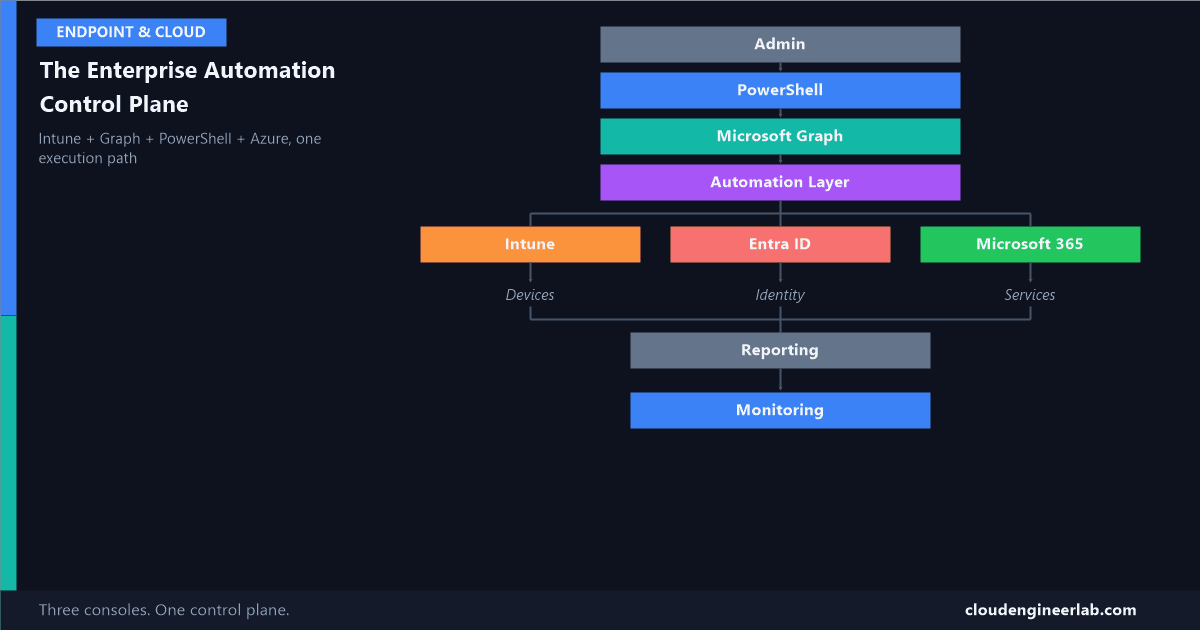
The Enterprise Automation Control Plane: Intune + Graph + PowerShell + Azure
Most tenants run three separate admin experiences, Intune, Entra ID, M365, with three mental models and three audit trails. Here's what replaces all three with one.
Most tenants run three separate admin experiences: the Intune admin centre for devices, the Entra admin centre for identity, the Microsoft 365 admin centre for everything else. Three consoles, three click-paths, three audit trails, three mental models an admin has to hold at once. Every post I've written about PowerShell and Graph automation on this site has, without naming it directly, been building toward replacing that fragmentation with one thing: a control plane. This post names it, and shows the whole architecture at once.
                    Admin
                      ↓
                 PowerShell
                      ↓
                Microsoft Graph
                      ↓
              Automation Layer
                      ↓
        ┌─────────────┼─────────────┐
        ↓             ↓             ↓
     Intune        Entra ID      Microsoft 365
        ↓             ↓             ↓
     Devices       Identity      Services
        └─────────────┼─────────────┘
                      ↓
                 Reporting
                      ↓
                  Monitoring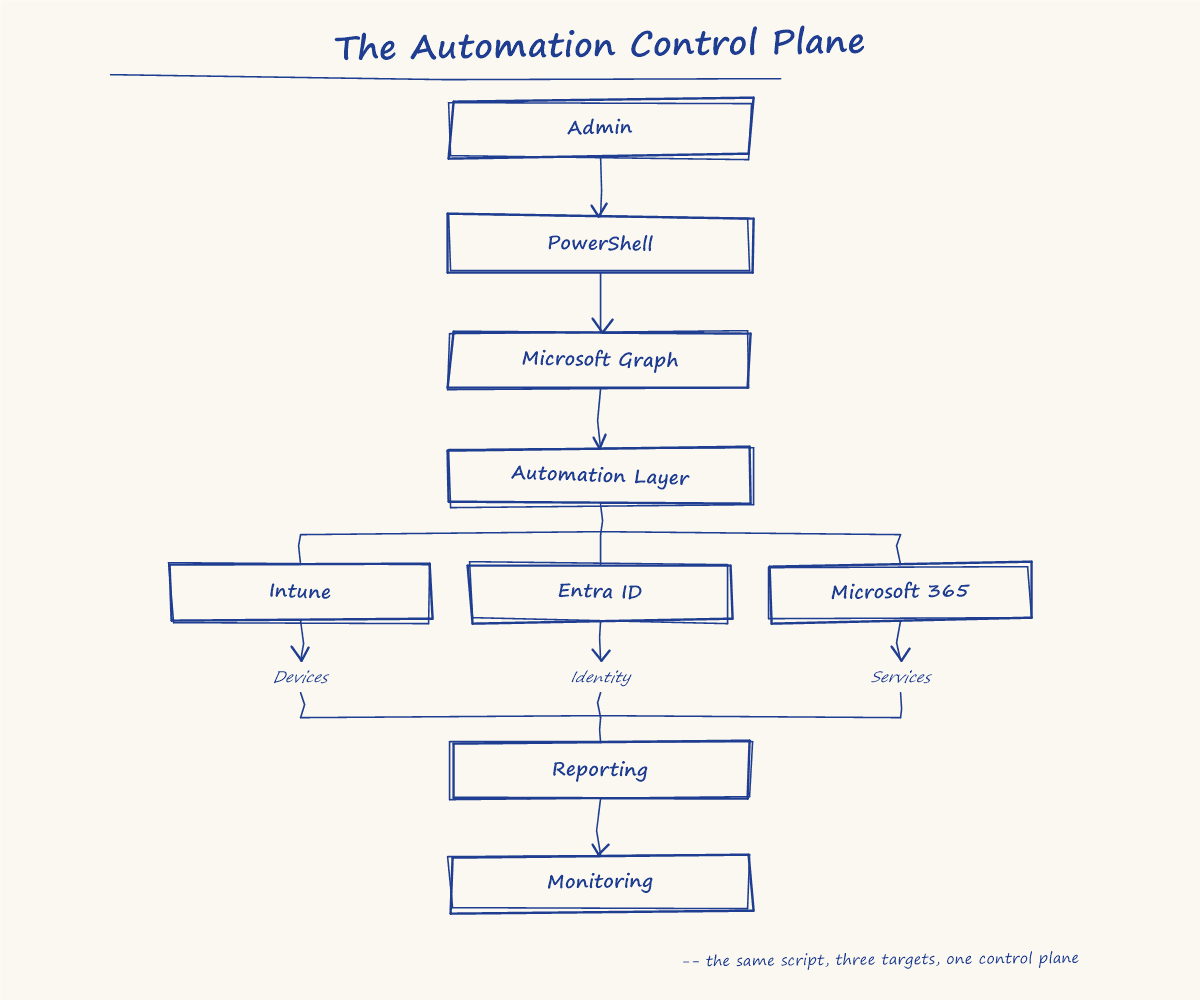
What "Control Plane" Actually Means Here
The term comes from networking and cloud infrastructure: a control plane makes decisions about what should happen; a data plane actually carries it out. Applied here, Intune, Entra ID, and Microsoft 365 are the data plane, the actual devices, identities, and services doing real work. Everything from Admin down through the Automation Layer is the control plane: the single place decisions get made, executed, and recorded, regardless of which of the three workloads they touch.
Three portals means three separate, disconnected control planes bolted onto one tenant. This architecture replaces that with one.
Admin: Where Intent Starts
Every action in this stack starts as a human decision, not code, offboard this user, roll out this app, tighten this policy. The control plane exists to take that intent and execute it reliably, consistently, and reviewably, whichever of the three workloads below it actually needs to change.
PowerShell: Turning Intent Into a Reviewable Script
This is the layer I've written the most about directly, most recently as a ten-stage maturity ladder a script climbs from a hardcoded one-off to something genuinely production-ready: parameters, validation, logging, error handling, all before the script ever touches Graph. A script that skipped that ladder can still work. It just can't be trusted to run unattended as part of a control plane other people rely on.
Microsoft Graph: The One API Underneath All Three Workloads
This is the actual architectural fact that makes a unified control plane possible at all. Whether you're touching a device, a user, or a mailbox setting, you're authenticating the same way, hitting the same throttling behaviour, and paginating the same @odata.nextLink pattern. Intune, Entra ID, and Microsoft 365 aren't three different APIs wearing different admin centres, they're three domains inside the same one.
Almost the same API, not entirely
I've written honestly about where this breaks down: several real Exchange Online settings, transport rules, retention policies, mailbox creation, still have no Graph coverage at all and need the Exchange Online Management module instead. The control plane doesn't require every call to literally be a Graph endpoint. It requires every call, Graph or not, to run through the same orchestration layer below.
The Automation Layer: The Engine Room
This is the actual machinery: authentication that works whether it's an app registration or a managed identity, retry logic that survives Graph's throttling, pagination that never silently truncates a result set past 1,000 records, and structured logging that survives the session. I've built this out in full as a reusable module, and it's worth being explicit about why this layer is the actual control plane, not just plumbing underneath it: every decision about how Intune, Entra ID, and Microsoft 365 get touched passes through this exact same code, regardless of which of the three it's headed toward. That uniformity is what turns three separate integrations into one control plane instead of three parallel ones that happen to share a name.
The Three Branches: One Tenant, Three Faces
Intune, Entra ID, and Microsoft 365 aren't three separate systems bolted onto this architecture. They're three domains of the same tenant, each reached through the identical automation layer above, each producing a different kind of managed object:
| Branch | Domain | What it actually manages |
|---|---|---|
| Intune | Devices | Compliance, configuration, app deployment, the surface covered in 15 concrete automation tasks |
| Entra ID | Identity | Users, groups, licensing, the device and user trust foundation covered in the identity layer of the endpoint architecture |
| Microsoft 365 | Services | Exchange, SharePoint, Teams, the workload layer, and the one branch most likely to need a second module alongside Graph |
The branch determines the object, not the method
An admin working through this control plane doesn't fundamentally change how they work depending on which branch they're touching. The authentication call is the same function. The retry wrapper is the same function. Only the specific Graph endpoint, or occasionally the specific PowerShell module, changes.
Reporting: Where Three Views Become One
Without a control plane, "how did last week's changes go" means three separate reports: Intune's device install status, Entra's sign-in and audit logs, and the Microsoft 365 admin centre's own activity views, none of which share a common format or a common place to look. Through this architecture, the same reporting mechanics apply regardless of source: the exportJobs pattern that generates a device inventory report is the identical mechanism behind pulling Entra's audit log through Graph. One reporting pattern, applied consistently, instead of three incompatible ones.
Monitoring: Watching the Machinery, Not Just the Tenant
This is the layer easiest to get wrong, because it's tempting to think "monitoring" means watching whether devices stay compliant or users stay in the right groups. That's the data plane's job to report on. Monitoring at the control plane level answers a different question: is the automation itself still alive. I've covered the actual mechanics, a heartbeat that pings after success rather than before, and treats a script that silently never ran as its own distinct failure mode, here. A control plane that quietly stopped running a week ago and nobody noticed has failed just as completely as one that's actively producing wrong answers, arguably worse, because nothing about the tenant looks obviously broken yet.
What This Architecture Actually Replaces
| Without a control plane | With this control plane |
|---|---|
| Three separate admin console habits | One authentication and execution pattern |
| Three separate, incompatible audit trails | One reporting mechanism applied to all three domains |
| Tribal knowledge of "how we did this last time" | A script, reviewed and version-controlled, that is the documentation |
| Nobody notices when a scheduled process quietly stops | A heartbeat that treats silence as its own failure mode |
| An admin who has to remember which portal does what | An admin who calls the same functions regardless of the target |
None of the individual pieces here are new, every one of them has its own detailed post on this site. What makes this a control plane rather than a pile of scripts is that they're built to the same standard and share the same execution path, on purpose, not by accident.
If you've consolidated your own tenant's admin work this way, which branch, Intune, Entra ID, or M365, was the hardest to bring into the same pattern as the others? For most environments I've seen, it's Microsoft 365, purely because of how much of it still sits outside Graph. Drop a comment below with what you found in yours.

Written by
Chetan Yamger
Cloud Engineer · AI Automation Architect · Modern Workplace Consultant
Cloud Engineer, AI Automation Architect, and Modern Workplace Consultant based in Amsterdam, Netherlands. Specializing in scalable, secure enterprise solutions with Microsoft Azure, Intune, PowerShell, and AI-driven automation using ChatGPT, Gemini, and modern LLM technologies.
Stay in the loop.
New articles, straight to you.
Deep-dive technical articles on Intune, PowerShell, and AI — no noise, no spam.
Discussion
Share your thoughts — your email stays private
Leave a comment