
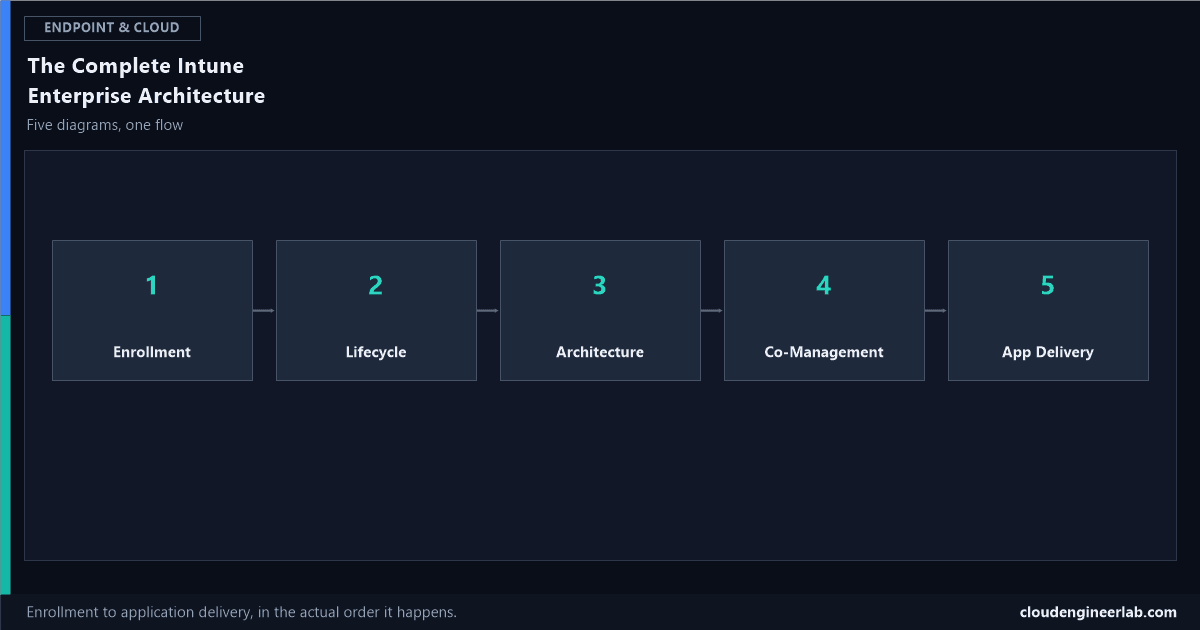
The Complete Intune Enterprise Architecture: Five Diagrams, One Flow
From a device coming out of the box to an application landing on it, in the actual sequence a real enterprise deployment runs, not five disconnected slides.
Most Intune content explains one feature at a time: here's Autopilot, here's compliance, here's app packaging. What's usually missing is the thing that actually matters in a real enterprise: how these pieces connect, in the order a device and its data actually move through them. These five architecture views, read in sequence, are that picture: a device arrives, gets provisioned, lives inside the platform's technical architecture, is managed hybrid where that's still necessary, and receives applications through a real, repeatable pipeline.
1. Enrollment: The Autopilot Device Enrollment Process
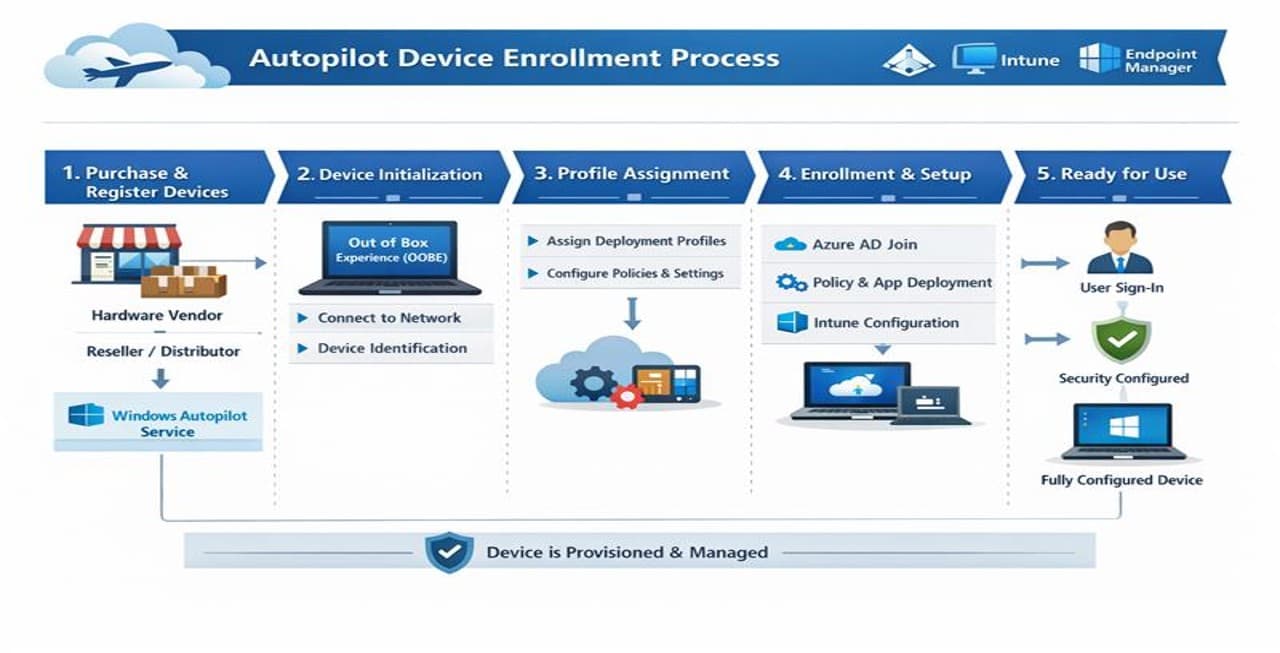
Everything downstream starts here. A device is purchased and its hardware hash registered with Windows Autopilot, it initialises through the Out of Box Experience and identifies itself on the network, a deployment profile gets assigned automatically based on that registration, Microsoft Entra join and policy deployment happen without an IT technician touching the machine, and the device comes out the other end signed in, secured, and configured. The full step-by-step mechanics behind this, including the hardware hash and the Enrollment Status Page, are covered here.
Why this has to be the first diagram in the sequence
Every other diagram in this post assumes a device already has an identity in Entra ID and is already enrolled in Intune. This is the stage that produces that starting condition, at scale, without a technician imaging each machine individually.
2. Lifecycle: The Six Stages Intune Actually Manages
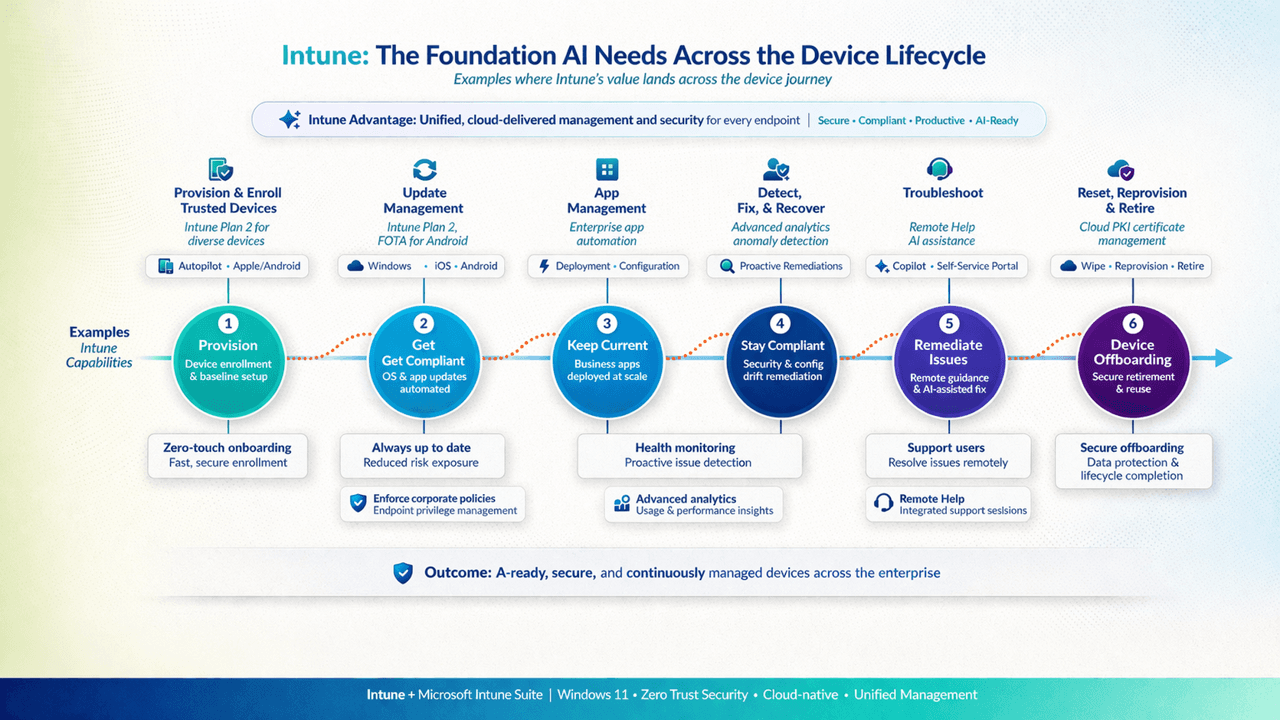
Enrollment (stage 1) feeds directly into the first box of this lifecycle: Provision, device enrollment and baseline setup. From there, a device moves through Get Compliant (OS and app updates automated), Keep Current (business apps deployed and kept current at scale), Stay Compliant (ongoing security and configuration drift remediation), Remediate Issues (remote guidance and AI-assisted fixes when something goes wrong), and finally Device Offboarding (secure retirement and reuse).
This is a loop for most of a device's life, not a line
A device doesn't move through these six stages once. It cycles through Get Compliant, Keep Current, Stay Compliant, and Remediate Issues repeatedly for its entire working life, the same continuous-verification principle that runs through Zero Trust architecture generally, and only reaches Device Offboarding once, at the actual end of that life.
3. Architecture: What's Actually Running Underneath
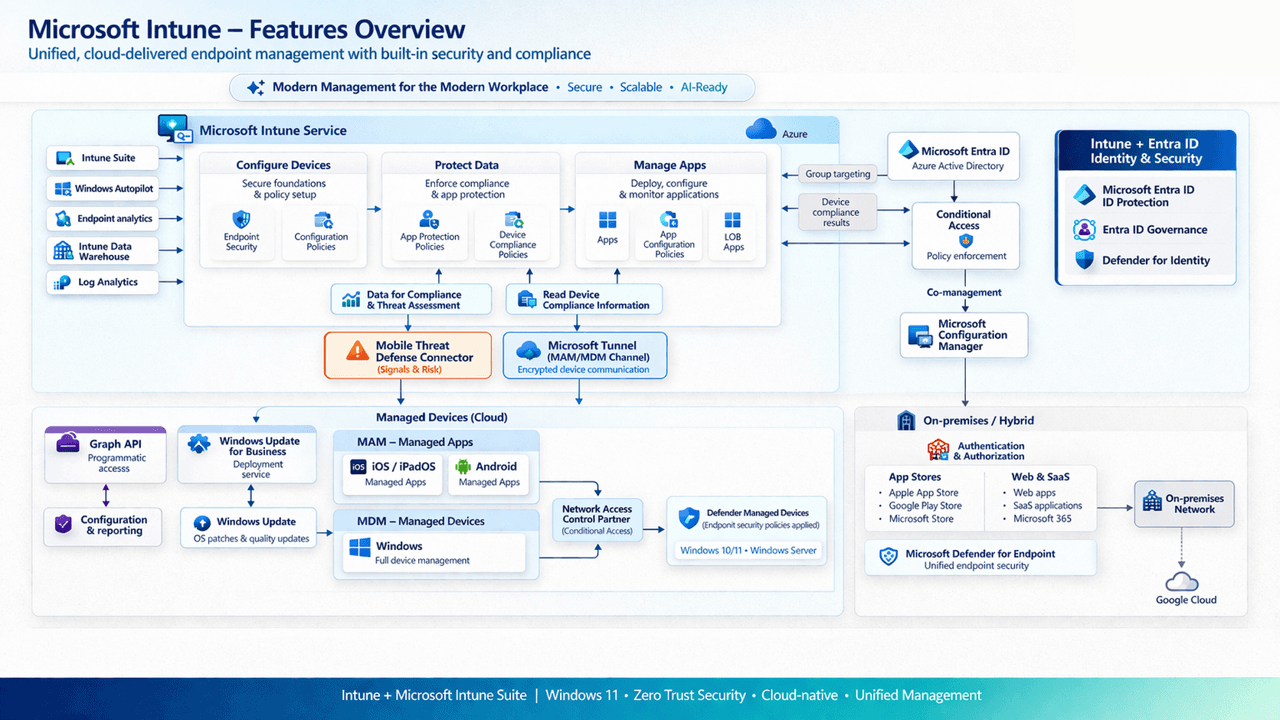
This is where the lifecycle stages above stop being labels and become actual services. Configure Devices (endpoint security and configuration policies) and Manage Apps (deployment, configuration, monitoring) are the mechanisms behind Keep Current and Stay Compliant. Protect Data (app protection and device compliance policies) feeds device compliance results to Microsoft Entra ID, which Conditional Access then reads to make an actual access decision, the same mechanism covered in full here. The Mobile Threat Defense Connector brings in the same kind of live risk signal covered in the Defender incident lifecycle post, and everything on the right side, on-premises app stores, web and SaaS apps, on-premises network authentication, exists specifically because not every resource a managed device needs has moved to the cloud yet.
4. Co-Management: Where Configuration Manager Still Belongs
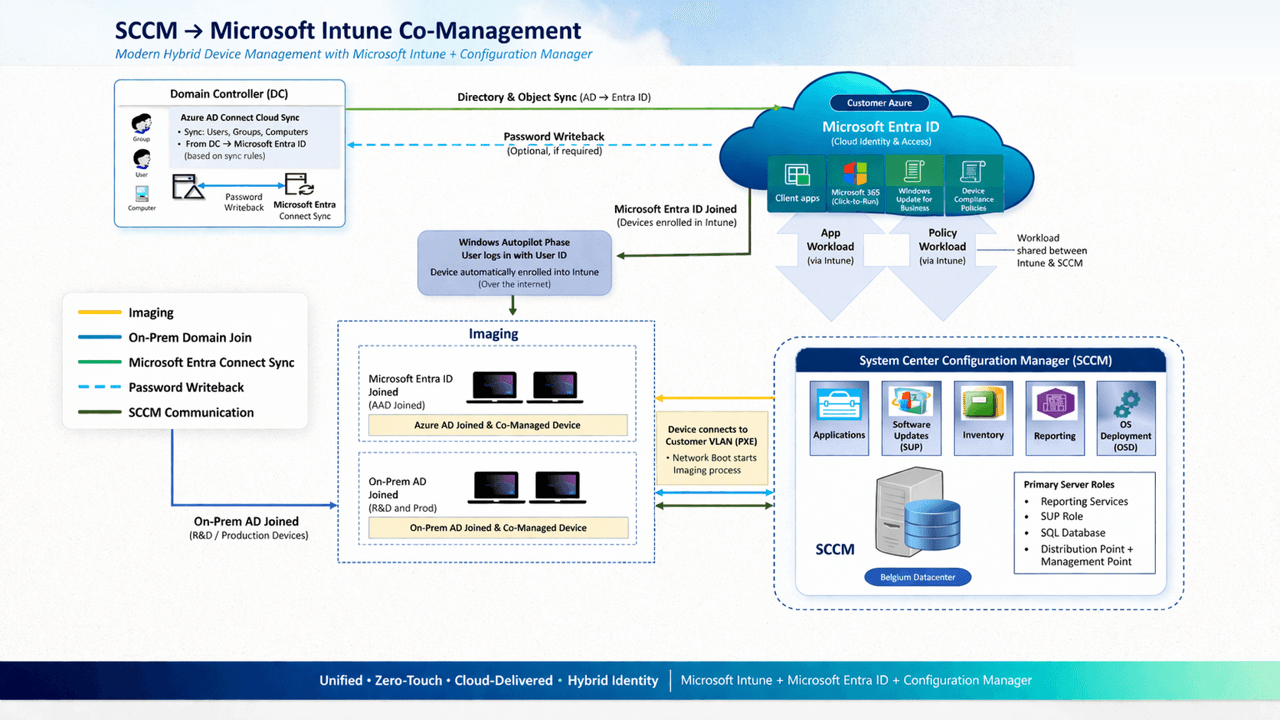
Not every organisation reading diagram 3 has fully left Configuration Manager behind, and this is the honest picture of what that hybrid state actually looks like. A domain controller syncs identity to Microsoft Entra ID through Entra Connect, devices can be either Entra ID joined (the Autopilot path from diagram 1) or on-premises AD joined, and once a device is co-managed, specific workloads (app deployment, policy) are explicitly assigned to either Intune or Configuration Manager, not both fighting over the same setting. Configuration Manager keeps its traditional role, application deployment, software update management, inventory, OS deployment, from its own on-premises infrastructure.
Co-management is a deliberate, workload-by-workload decision
The arrows in this diagram labelled "Workload shared between Intune & SCCM" are the actual decision point: for each workload (compliance policies, app deployment, and several others), an admin explicitly chooses which platform owns it. Getting this assignment wrong, or leaving it ambiguous, is how a device ends up with two systems both trying to manage the same setting.
5. Application Delivery: The Packaging Workflow Behind Every App
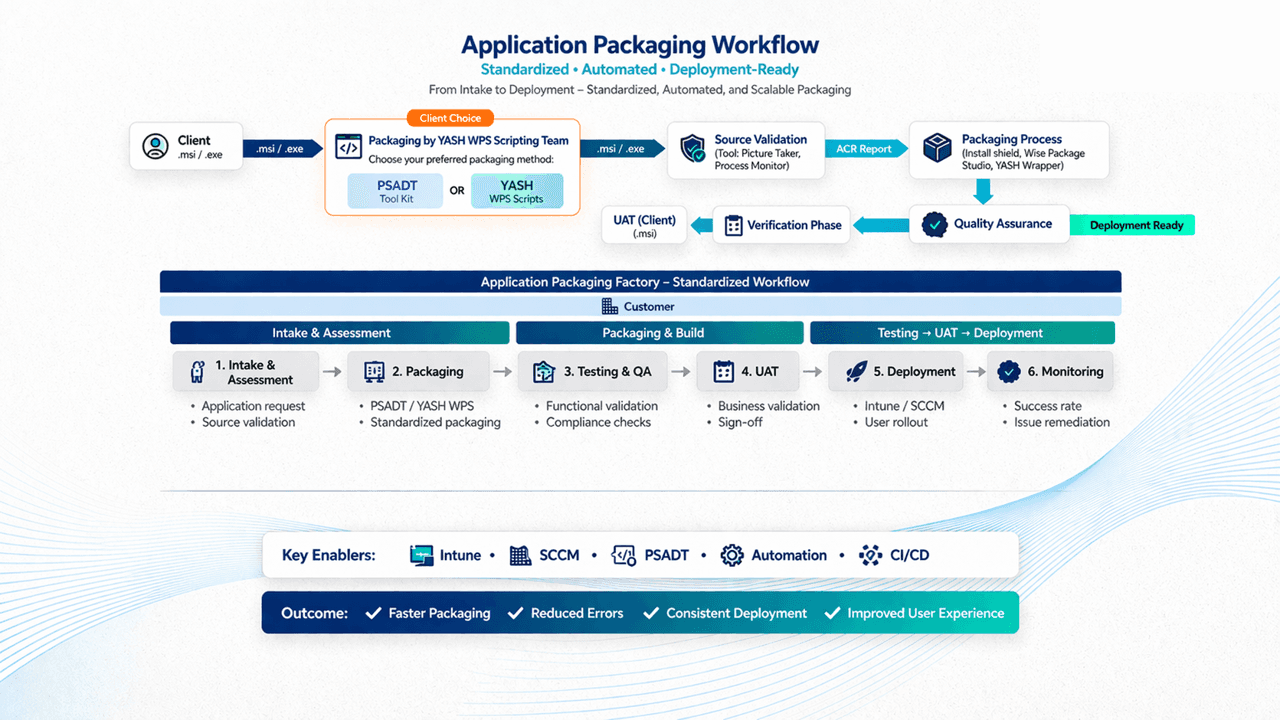
Diagram 3's "Manage Apps" box and diagram 2's "Keep Current" stage both assume an application is already packaged and ready to deploy. This is where that readiness actually comes from: a request comes in, the source installer is validated, it's packaged (via PSADT or an equivalent standardised tooling approach), it goes through QA and a verification phase, and only then reaches UAT and deployment, through Intune, Configuration Manager, or both depending on the co-management assignment from diagram 4. The technical detail of what actually happens once a Win32 app reaches Intune specifically is covered here, and why a deployed app can still fail detection even after a clean install is covered here.
Monitoring closes the loop back to diagram 2
The final stage, Monitoring, success rate and issue remediation, is exactly the data that feeds back into diagram 2's Remediate Issues stage. None of these five diagrams is really independent, each one hands off to the next, and the fifth hands back to the second.
Reading All Five as One Flow
A device enrolls unattended (Diagram 1)
Producing an Entra ID joined, Intune-managed device with zero technician touch.
It enters the six-stage lifecycle (Diagram 2)
Provision, then a continuous loop through Get Compliant, Keep Current, Stay Compliant, and Remediate Issues.
That lifecycle runs on real services (Diagram 3)
Configuration policies, app management, compliance data feeding Conditional Access, and threat signals feeding back in.
For a hybrid fleet, workloads split deliberately (Diagram 4)
Some managed by Intune, some still by Configuration Manager, by explicit assignment, not by accident.
Every app reaching a device passed through a real pipeline first (Diagram 5)
Intake, packaging, QA, UAT, deployment, and monitoring that feeds straight back into Diagram 2's Remediate Issues stage.
If you're building or reporting on any one of these five pieces in isolation, the Power BI reporting series on this site is built to give visibility across all five at once, on one governed model, rather than five separate, disconnected dashboards mirroring five separate, disconnected diagrams.
Which of these five stages is the weakest link in your own environment right now? For a lot of hybrid organisations, it's honestly Diagram 4, the workload assignment that made sense two years ago and was never revisited since. Drop a comment with where yours actually stands.

Written by
Chetan Yamger
Cloud Engineer · AI Automation Architect · Modern Workplace Consultant
Cloud Engineer, AI Automation Architect, and Modern Workplace Consultant based in Amsterdam, Netherlands. Specializing in scalable, secure enterprise solutions with Microsoft Azure, Intune, PowerShell, and AI-driven automation using ChatGPT, Gemini, and modern LLM technologies.
Stay in the loop.
New articles, straight to you.
Deep-dive technical articles on Intune, PowerShell, and AI — no noise, no spam.
Discussion
Share your thoughts — your email stays private
Leave a comment