
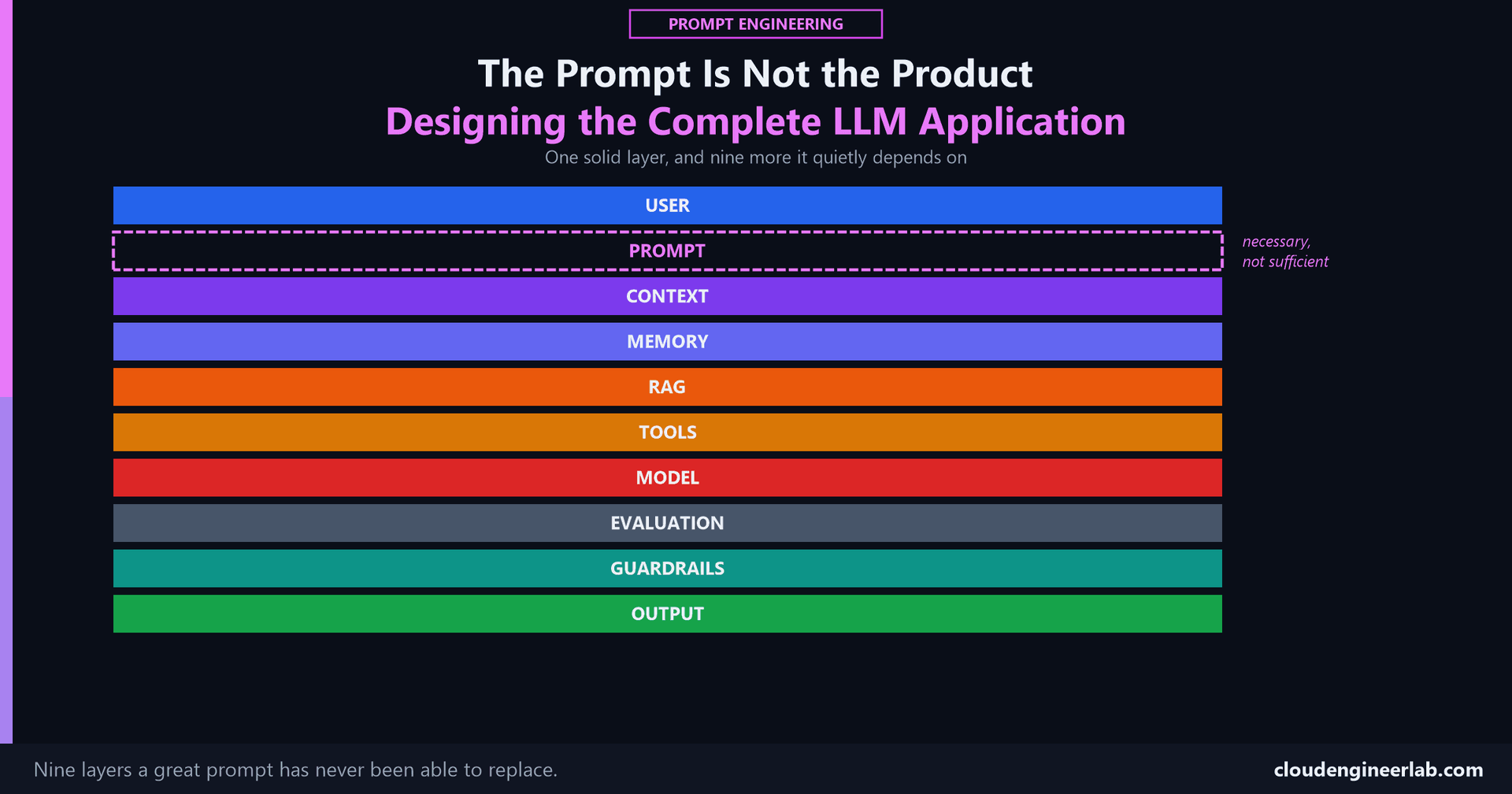
The Prompt Is Not the Product: Designing the Complete LLM Application
A perfect prompt run with no context, no memory, no evaluation, and no guardrails still fails in production, for reasons that have nothing to do with its wording.
Fifteen posts in this series have covered a single prompt in enormous depth, its anatomy, its examples, its output format, its evaluation, its version history, its security. Every one of those posts is about making a prompt good. This one is about the uncomfortable fact underneath all of them: a genuinely excellent prompt is still just one component in a system, and a system built around only that one component fails in ways no amount of better prompt wording can fix.
The one sentence to remember
The prompt decides what you're asking for. Everything else in this pipeline decides whether the system actually has the information to answer correctly, the memory of what happened before, the ability to act, the discipline to catch when it's wrong, and the restraint to refuse what it shouldn't do.
The Complete Pipeline
A demo only ever proves two of these ten stages
A working demo proves Prompt and Model function together. It says nothing about the other eight, which is exactly why a demo that impressed everyone in the room can still fail its first week in production. The same gap, described from the systems-architecture side instead of the prompt's own journey through it, is the subject of this site's AI & Innovation flagship series.
What Each Stage Actually Adds
User
The actual need behind the request, not always identical to the literal words typed. Everything downstream exists to serve this, and it's worth stating plainly because it's the stage every other post in this series assumes without naming.
Prompt
The anatomy, templates, and the whole rest of this series is about this one stage. It's necessary. It has never been sufficient on its own, which is the entire argument this post is making.
Context
What the system actually knows about this specific situation, and which layer of the instruction hierarchy that information is allowed to occupy. A prompt with no context is a prompt guessing at your environment.
Memory
What persists across sessions, distinct from context that exists only for this one request. Covered in full for agentic systems here: an application with no memory re-asks and re-explains everything, every single time, which is expensive and, worse, means it never actually learns anything about a returning user.
RAG
Grounding an answer in specific, current documents rather than whatever the model happened to memorize during training, built from scratch here. Without it, a confident answer and a correct one are indistinguishable from the outside.
Tools
The ability to actually do something, not just describe what should be done. A system with no tools can tell you a device is non-compliant. A system with tools can flag it, notify someone, or fix it.
Model
Where everything above finally gets reasoned over, and, per the instruction hierarchy post, the exact point where every distinction between trusted instruction and retrieved information collapses into one token stream unless the layers above already preserved it.
Evaluation
Proof, not a feeling, that a specific version actually works, measured against a fixed dataset, with the version history to know what changed and when. Without this, "it looks better" is the only signal anyone has.
Guardrails
What the system structurally refuses to do, regardless of how it's asked. The instruction hierarchy that makes this possible, and what it takes to actually make AI-generated action safe before it touches anything real.
Output
The actual shape the response takes, consistent, parseable, and matched to whatever's consuming it next, a person, a script, or another step in a chain.
What Breaks When a Layer Is Missing
This is the actual argument, made concrete
A perfect prompt doesn't fail because of its own wording when one of these layers is missing. It fails because the layer that was supposed to catch, ground, remember, or restrict something simply wasn't there.
| Missing layer | What actually happens |
|---|---|
| Context | The system guesses at your environment and is wrong often enough to matter |
| Memory | Every session starts from zero, re-explaining what a returning user already told it |
| RAG | A confident answer and a correct one become indistinguishable |
| Tools | The system can describe the fix but never actually apply it |
| Evaluation | A regression ships the moment someone reads a few outputs and says "looks good" |
| Guardrails | An instruction hidden in retrieved content or a tool result gets followed instead of just read |
| Output discipline | Downstream automation breaks on the first response that drifts from the expected shape |
Every row in that table is a real, documented failure mode covered somewhere else in this series. None of them are prompt problems. All of them look like one from the outside, right up until someone traces the actual cause.
Choosing Between These Layers
A companion reference for the question this raises immediately
Naming ten layers doesn't say which one fixes a specific problem in front of you right now. This decision reference matches six common problems, unclear instructions, missing information, inconsistent behaviour, domain adaptation, needing to take action, and unreliable output, to the specific layer that actually solves each one.
Where This Leaves "Prompt Engineering"
The discipline was never just about wording
Every post in this series that looked like it was about phrasing, structure, examples, format, was actually about designing one piece of a larger system: what information reaches the model, in what shape, with what guarantees, and what happens to the response afterward. "Prompt engineering" turned out to be a misleadingly small name for "deciding what an AI system is allowed to know, remember, retrieve, do, and refuse."
Reading This Series in Order
The full fundamentals arc, start to finish
Why some prompts work better than others → the anatomy of a good prompt → zero-shot vs few-shot → why context matters more than clever prompts → reusable templates → prompt chaining → output format → does length actually help → prompt evaluation → prompt versioning → prompt injection → who controls the AI → tool calling → RAG → reliable code → safe PowerShell automation → this post, which is really just the map of everywhere all sixteen of those posts actually fit.
The Bottom Line
A prompt is where a request becomes specific enough to act on. It has never been where an application becomes trustworthy, current, capable of acting, provably correct, or safe to expose to real users and real data. Those properties come from context, memory, retrieval, tools, evaluation, and guardrails, six layers that don't show up in a screenshot of a clever prompt and don't get credit when a demo goes well, and are the entire difference between a demo and a product anyway.
The audit worth running on your own AI application
List the ten stages in this pipeline. For each one, mark whether it's actually built, not planned, not assumed, actually built and tested. Wherever the honest mark is "we're relying on the prompt to handle that," that's not a strength of the prompt. It's the exact layer that's about to become an incident.
The prompt got this series its title. It was never going to be the whole story, and if you've read all sixteen posts to get here, you already knew that before this one said it out loud. The field has since put an actual name to this argument: context engineering, which is worth reading as the honest rename this post has been building toward the whole time.
Which of these ten stages does your own AI application lean on the prompt to compensate for, because the actual layer was never built? Drop a comment with which one, that's usually the most honest answer to what to build next.

Written by
Chetan Yamger
Cloud Engineer · AI Automation Architect · Modern Workplace Consultant
Cloud Engineer, AI Automation Architect, and Modern Workplace Consultant based in Amsterdam, Netherlands. Specializing in scalable, secure enterprise solutions with Microsoft Azure, Intune, PowerShell, and AI-driven automation using ChatGPT, Gemini, and modern LLM technologies.
Stay in the loop.
New articles, straight to you.
Deep-dive technical articles on Intune, PowerShell, and AI — no noise, no spam.
Discussion
Share your thoughts — your email stays private
Leave a comment